/HubSpot%20-%20eBook%20-%20Proof%20Card%20Mockup%20001.jpg?length=1000&name=HubSpot%20-%20eBook%20-%20Proof%20Card%20Mockup%20001.jpg)
/HubSpot%20-%20eBook%20-%20Proof%20Card%20Mockup%20001.jpg?length=1000&name=HubSpot%20-%20eBook%20-%20Proof%20Card%20Mockup%20001.jpg)
/HubSpot%20-%20eBook%20-%20Proof%20Card%20Mockup%20001.jpg?length=1000&name=HubSpot%20-%20eBook%20-%20Proof%20Card%20Mockup%20001.jpg)
/HubSpot%20-%20eBook%20-%20Proof%20Card%20Mockup%20001.jpg?length=1000&name=HubSpot%20-%20eBook%20-%20Proof%20Card%20Mockup%20001.jpg)
/HubSpot%20-%20eBook%20-%20Proof%20Card%20Mockup%20001.jpg?length=1000&name=HubSpot%20-%20eBook%20-%20Proof%20Card%20Mockup%20001.jpg)
/HubSpot%20-%20eBook%20-%20Proof%20Card%20Mockup%20001.jpg?length=1000&name=HubSpot%20-%20eBook%20-%20Proof%20Card%20Mockup%20001.jpg)
/HubSpot%20-%20eBook%20-%20Proof%20Card%20Mockup%20001.jpg?length=1000&name=HubSpot%20-%20eBook%20-%20Proof%20Card%20Mockup%20001.jpg)

/HubSpot%20-%20eBook%20-%20Proof%20Card%20Mockup%20001-min.jpg?length=1000&name=HubSpot%20-%20eBook%20-%20Proof%20Card%20Mockup%20001-min.jpg)


In our previous article, we talked at length about the cost of a data breach and how implementing cloud security practices like identity and access management mitigation can significantly reduce the risk and potential cost of a data breach.
Guest Reviews can be a powerful way to mitigate this risk, and while this can be done via Microsoft Identity Governance services, another alternative is to use Orchestry.
Throughout conversations with many organizations, we’ve heard a consistent refrain about Guest Management – for most, it’s simply not a “manageable” task. In our related article, we introduced you to the many reasons why Guest Access in Microsoft365 needs to be a massive priority and showed you the way Guest Access reviews can be done using Azure Identity Governance. In summary, although Azure Identity Governance is extremely beneficial in potentially preventing security issues, it is far from easy to set up, and depending on the number of Groups, Teams, users, and Guests, can lead to a completely unfeasible increase in license costs.
What You’ll Take Away
In our previous related article we discussed some of the reasons why you should consider reviewing your Guests’ Access and how to set up recurring reviews of your Guests using Azure Identity Governance within Microsoft365. In this article we’ll showcase an alternative way to perform Guest Reviews using Orchestry – a significant part of the new Guest Governance and Guest Insights functionality.
What is Required
The Features discussed below require an active subscription to Orchestry as well as a single Azure P1 license (or license that contains these same core abilities like an E3, or E5). Currently, Orchestry Review Policies can only be attached to Group-connected objects including a Modern Team Site and a Team.
How Does It Work?
In Orchestry, like Microsoft Identity Governance, we execute Guest Reviews based on the Workspaces (Modern Team Sites and Teams) that currently contain Guest accounts. Policies are created and can be attached to Workspace Templates, or applied individually to workspaces to achieve the desired results.
How to Set Up A Guest Review Process
Step 1 - Create a Review Policy
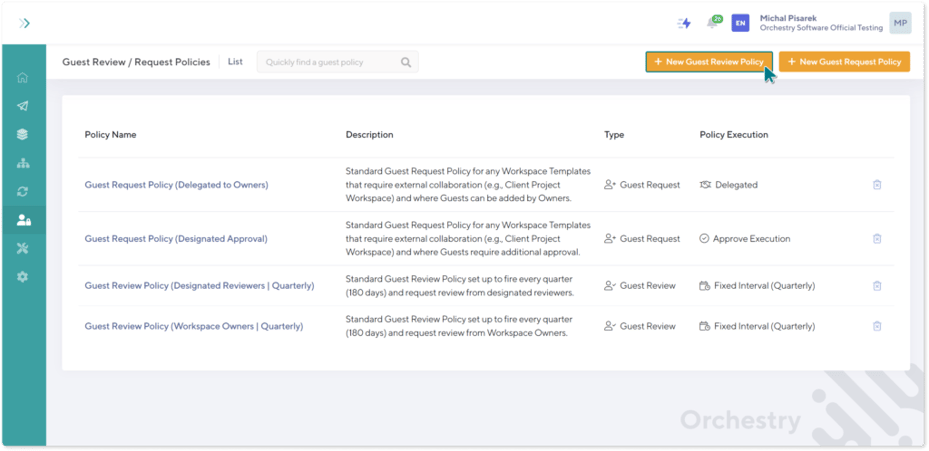
- Navigate to Orchestry Guest Management, and open Policies. Click Create + New Guest Review Policy.
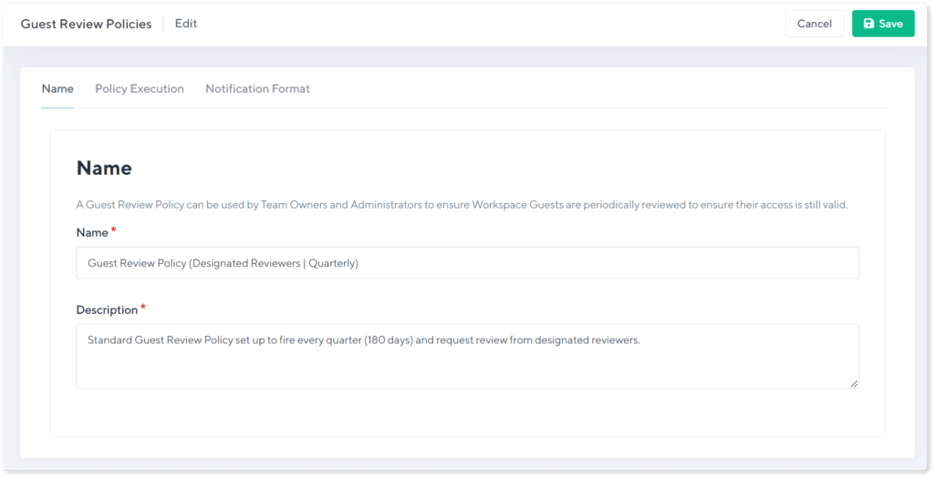
- In the Name Tab, Provide a friendly Name and Description that describes the purpose, configuration, and expected usage of the Review Policy.
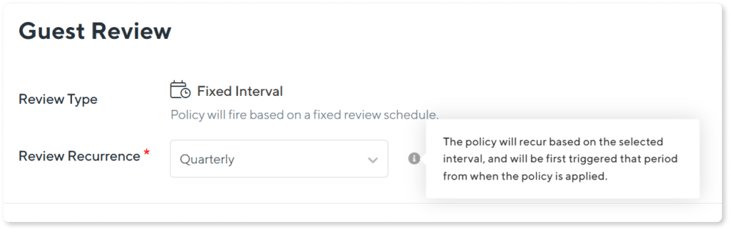
- In the Policy Execution Tab, begin by selecting a Review Recurrence which will determine how frequently you would like. The first recurrence of a Review Policy will execute based on reaching the selected interval after the policy is applied to a workspace. If you wish to force an immediate Review, this can also be done at any time (see below).
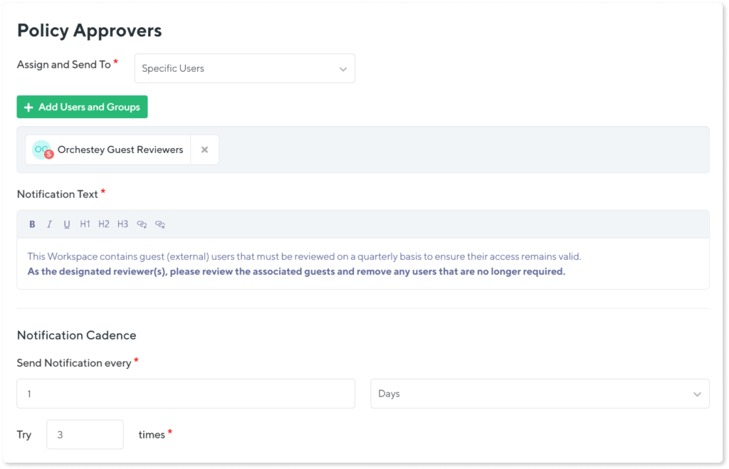
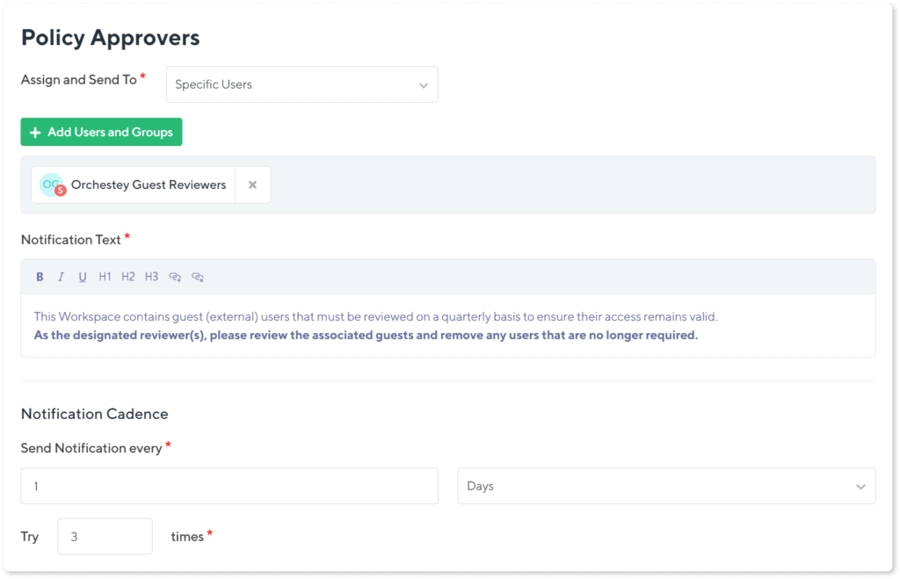
- Next, choose who will be designated as the Policy Approvers (i.e., the Guest reviewer(s)). This can either be:
- Specific Users: Users or Groups that contain individuals that will receive the notification to action Guest Reviews regardless of who owns the particular workspaces.
- Workspace Owners: The current owner(s) of the Workspace will receive the notification to action the Guest Reviews.
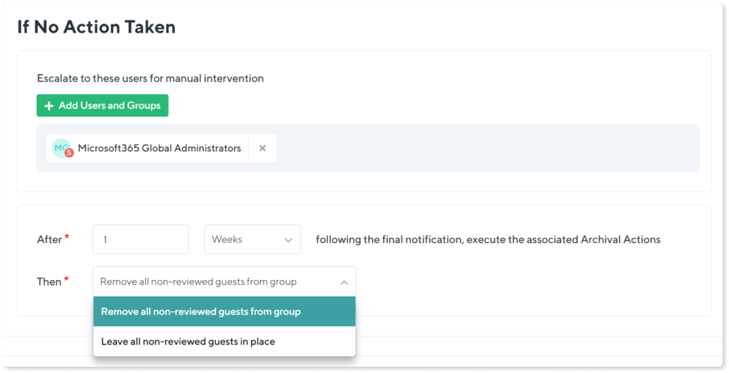
- Configure the approach for escalation if no action was taken by the designated reviewers, even after multiple attempts to contact them. Finally, configure what should take place if the escalation also goes un-answered, and when, with two options for automatic resolution:
- Remove all non-reviewed guests from the Group
- Leave all non-reviewed guests in place
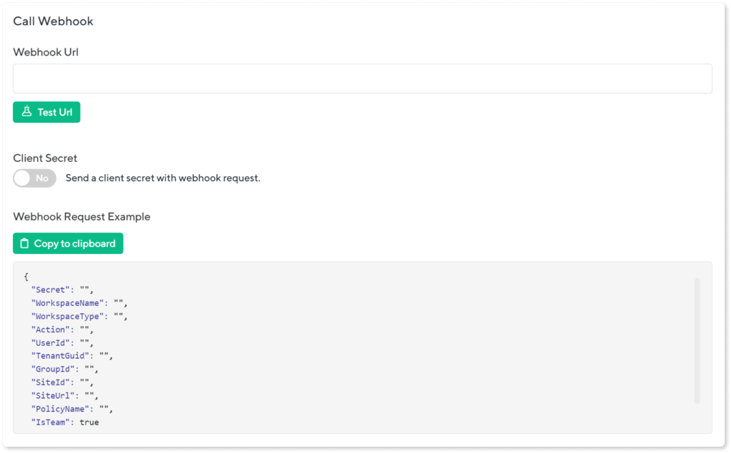
- (Optional) Call a Webhook to automatically trigger a Power Automate workflow to execute additional custom actions if the No Action Taken loop is triggered for a Guest Review.
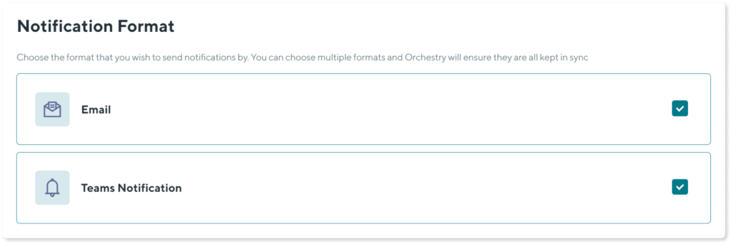
- On the Notification Format Tab, select whether the notifications should be issued via Email, Teams, or both. Then Save the policy.
Step 2 - Attach a Review Policy to Past and Future Workspaces
Much like Workspace Lifecycle Policies which are part of Orchestry’s Workspace Governance feature, Guest Review Policies can easily be attached to existing (historic) workspaces either one at a time or in bulk.
- First, select the Workspaces to which you want to apply the particular policy.
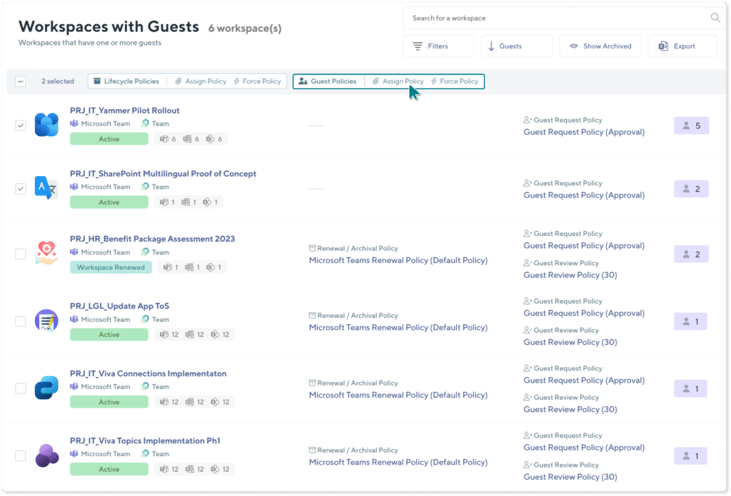
- Next, select to apply the Review Policy in bulk to the selected Workspaces.
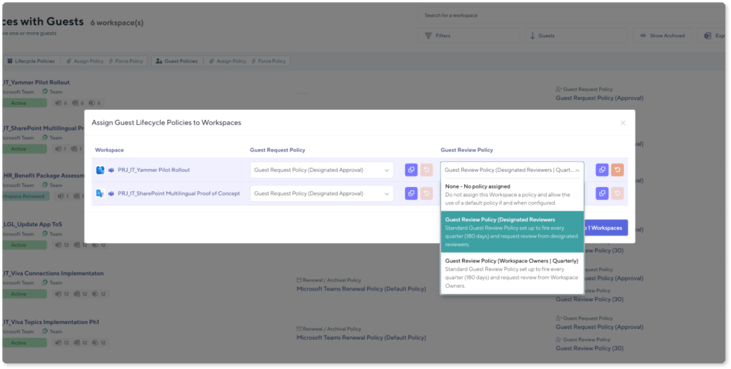
In both cases, the policy will first fire based on the policy interval beginning on the day the policy has been applied to a workspace.
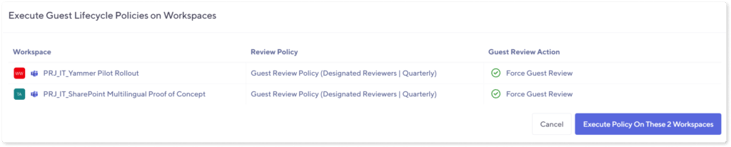
Step 3 - Force a Review Policy to Execute Immediately
To execute a Guest Review Policy to begin immediately and not wait for the standard specified interval, simply select Force Policy.

Monitoring Guest Reviews
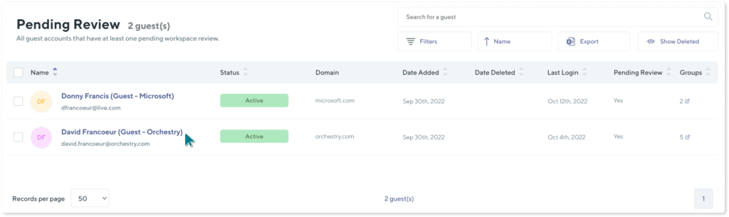
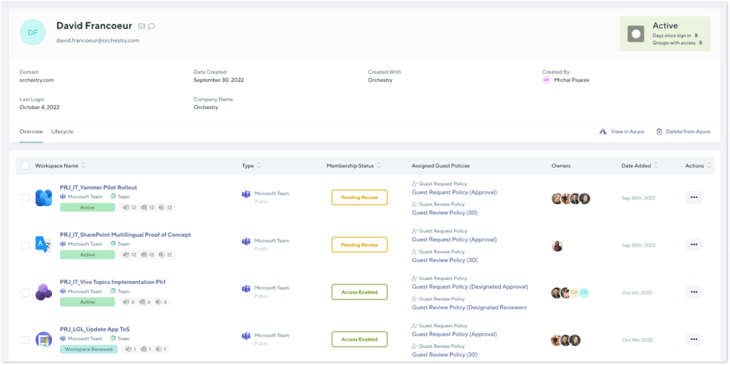
Once Guest Lifecycle is put in place via Guest Review Policies, Orchestry surfaces the overall status of Guest Reviews across the enterprise, while allowing administrators to drill down into where that user may be currently undergoing a review.

Responding to a Guest Review
As a Workspace Owner (or designated user) identified to respond to a Guest Review Policy, a notification will be received via Email and Teams.
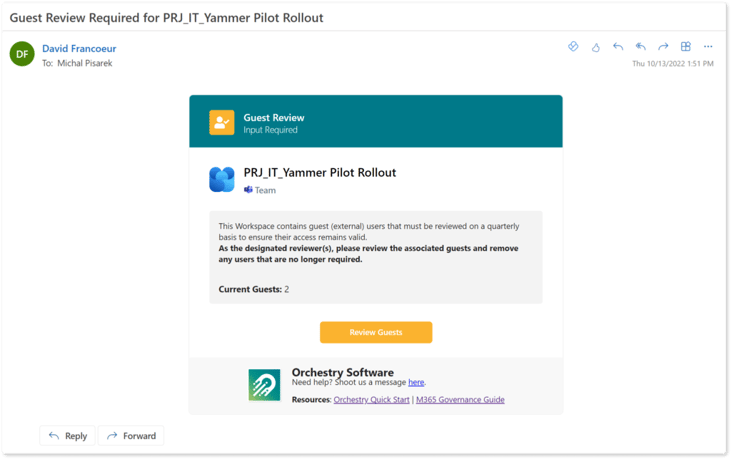
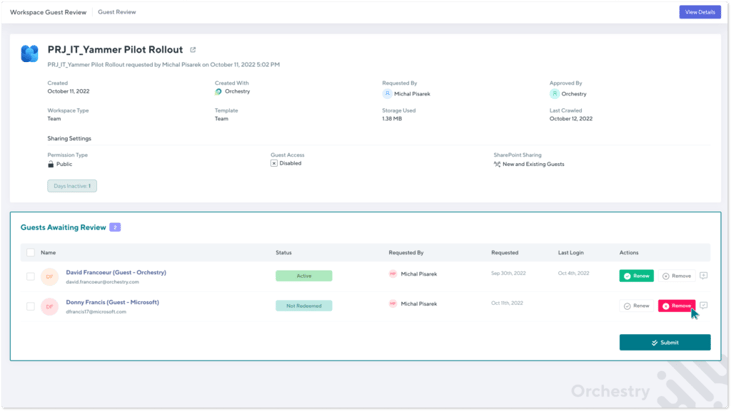
Once the reviews are actioned, Guest Users are either renewed (retained in the workspace) or removed immediately, based on the decision. This completes the Guest Review for that particular workspace until such time as it is set up to fire again.
Is There More to Guest Features in Orchestry?
The Guest Review policies are just the tip of the iceberg when it comes to Orchestry’s Guest Insights & Guest Governance features, let alone all the other unrivaled functionality.
More Details About Guests
Unlike the out-of-the-box Microsoft 365 Guest addition functionality, Orchestry requires users to capture additional information on Guests before sharing access to assets in your tenant, including their first and last name, their company name, and country, and add a justification as to why the Guest needs access.
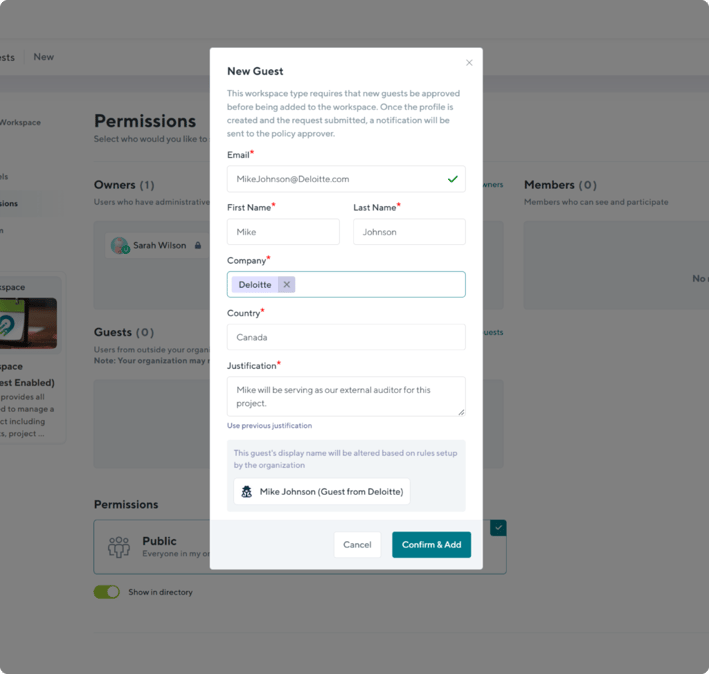
With the additional context on hand, reviewing Guests becomes a significantly simpler process.
Guest Request Policies
Guest Request policies allow you to create granular rules around Guest requests. You can create policies that restrict Guest Access to certain types of Workspaces altogether. These policies can be applied to Workspaces that hold highly confidential information. More lenient policies can also be created, requiring users to collect additional information about Guests, or approval by a group of members or individuals within your organization before Guest Access is granted.
But that’s only a small portion of what Orchestry can do. On top of Guest Governance and Guest Insights features, it is full of other functionality including Workspace Template features which lets you get the most out of your Microsoft 365 license. These allow you to leverage the existing library of business-first scenario templates created by Microsoft 365 MVPs, or create your own templates and, of course, apply Guest Review and Guest Request policies to those templates. Now every time an end-user requests a new workspace from an existing template, the policies will be automatically embedded and put into action in that workspace once provisioned.
Guest Insights

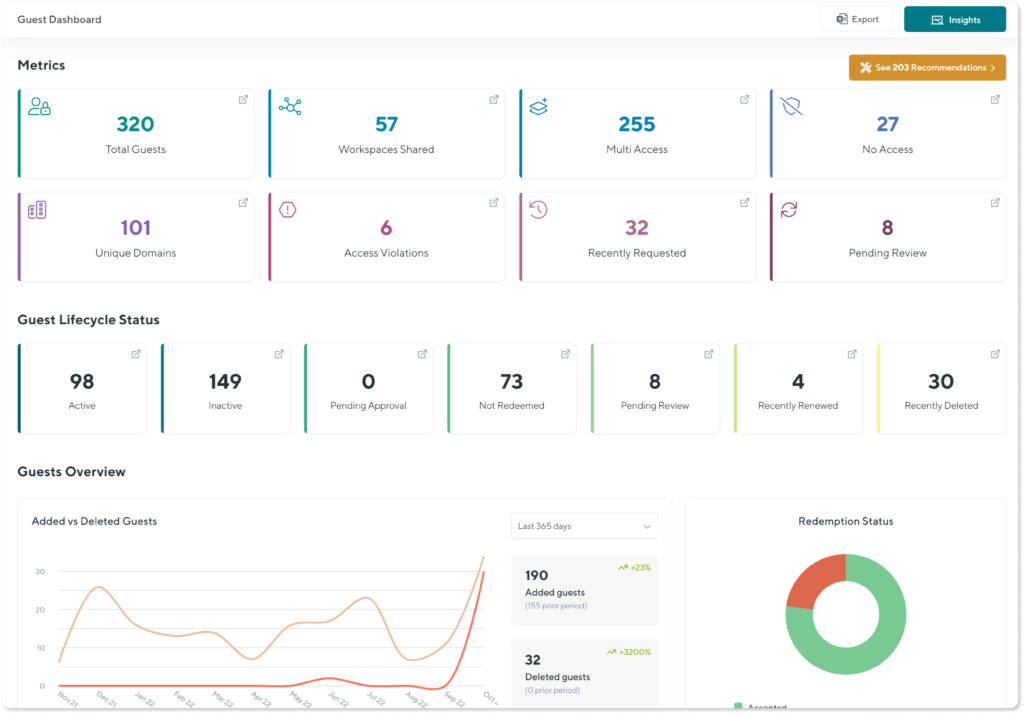
Orchestry’s Guest Insights lift the lid on all the Guests within your tenant and provides you with an unprecedented view of the total number of Guests, the number and list of Workspaces that have been shared with Guests, the number and list of unique domains the Guests in your tenant come from, access violations, growth in Guest numbers over time and so much more! These actionable insights allow your organization to make educated decisions on potential changes to the Guest Request and Review policies, revoking access and removing Guests, and the overall security of your tenant.
Want to See Orchestry’s Guest Governance and Guest Insights in Action?
Orchestry offers a free full-experience trial for 28 days.
- Trusted by thousands of IT admins, and leading Microsoft 365 partners worldwide
- Fully secure application attested by SOC2 Security certification
- Full features, zero commitment
- No credit card required
- Orchestry apps installation takes less than 15 minutes
- No obligation – if Orchestry is not your cup of tea, simply delete the apps at the end of the trial and all the content you created using Orchestry will remain
Book your demo today to chat with one of our Microsoft 365 experts about the opportunities you can unlock with Orchestry and see it in action.