/HubSpot%20-%20eBook%20-%20Proof%20Card%20Mockup%20001.jpg?length=1000&name=HubSpot%20-%20eBook%20-%20Proof%20Card%20Mockup%20001.jpg)
/HubSpot%20-%20eBook%20-%20Proof%20Card%20Mockup%20001.jpg?length=1000&name=HubSpot%20-%20eBook%20-%20Proof%20Card%20Mockup%20001.jpg)
/HubSpot%20-%20eBook%20-%20Proof%20Card%20Mockup%20001.jpg?length=1000&name=HubSpot%20-%20eBook%20-%20Proof%20Card%20Mockup%20001.jpg)
/HubSpot%20-%20eBook%20-%20Proof%20Card%20Mockup%20001.jpg?length=1000&name=HubSpot%20-%20eBook%20-%20Proof%20Card%20Mockup%20001.jpg)
/HubSpot%20-%20eBook%20-%20Proof%20Card%20Mockup%20001.jpg?length=1000&name=HubSpot%20-%20eBook%20-%20Proof%20Card%20Mockup%20001.jpg)
/HubSpot%20-%20eBook%20-%20Proof%20Card%20Mockup%20001.jpg?length=1000&name=HubSpot%20-%20eBook%20-%20Proof%20Card%20Mockup%20001.jpg)
/HubSpot%20-%20eBook%20-%20Proof%20Card%20Mockup%20001.jpg?length=1000&name=HubSpot%20-%20eBook%20-%20Proof%20Card%20Mockup%20001.jpg)

/HubSpot%20-%20eBook%20-%20Proof%20Card%20Mockup%20001-min.jpg?length=1000&name=HubSpot%20-%20eBook%20-%20Proof%20Card%20Mockup%20001-min.jpg)


Updated July 2026
Microsoft Teams templates are predefined team structures that create a new team with a ready-made set of channels, apps, and settings, so you don't build each team from scratch. Microsoft ships a few built-in templates, and admins can publish custom ones.
Below are the five templates teams ask us for most, the channels each one needs, and how to keep them governed as they multiply.
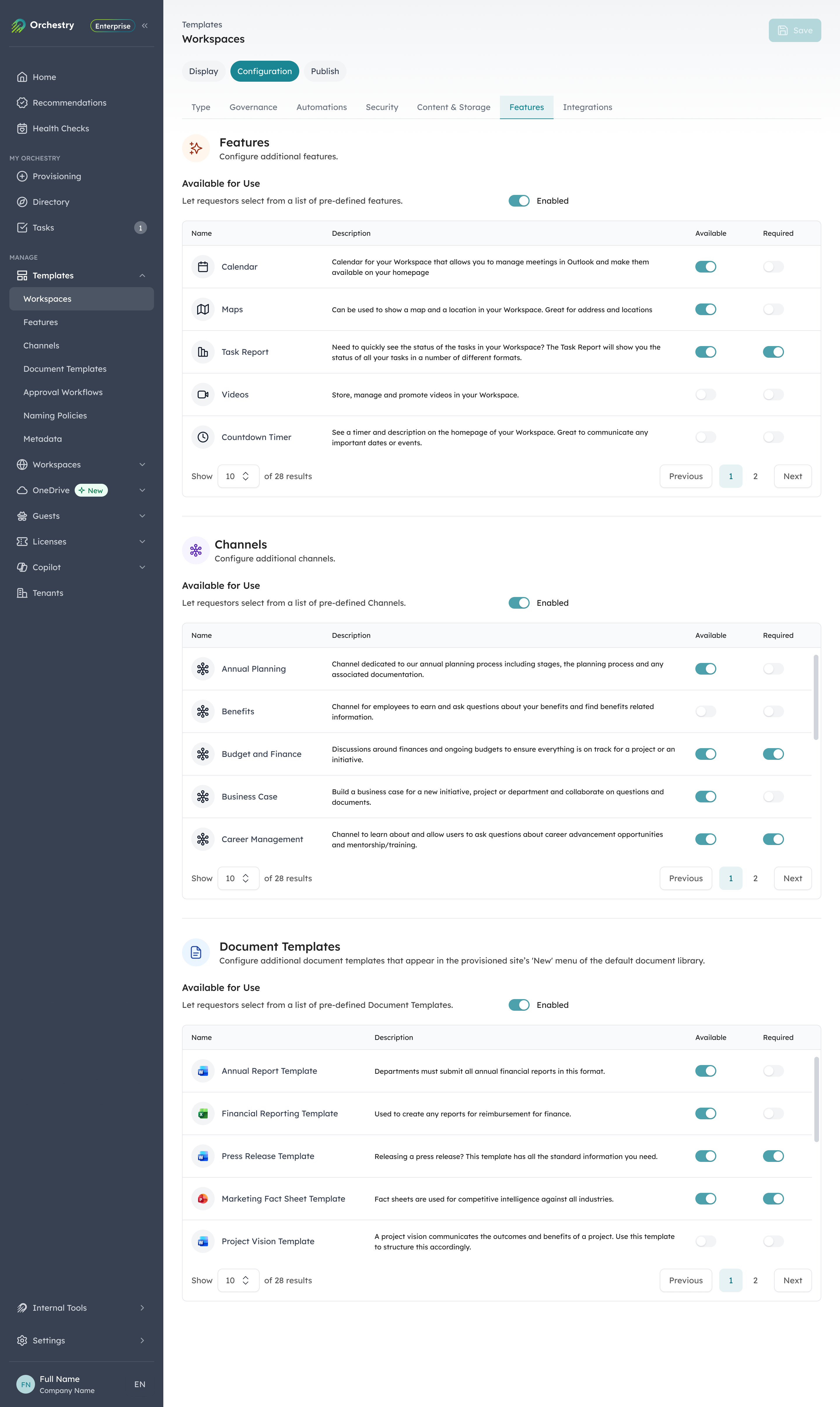
In Orchestry, each template defines the channels and document templates every new team gets.
What channels should a project management team have?
The first template is the workhorse. A project management team keeps budget, delivery, and stakeholders in one place instead of scattered across chats and inboxes. Set it up with these channels:
- Budget and Planning
- Legal and Contracts
- ROI Analytics
- Steering Committees
- Contractors and Meetings
- Team Life
Pair the team with Planner for the project plan and task board. Planner is now the single planning app in Teams, and it replaced the older Tasks by Planner and To Do. Use a Loop component in the meetings channel for live notes and decisions, and add a Copilot agent scoped to the team when you want status summaries without opening every channel. For a full build, see our guide on how to use Microsoft Teams for project management.
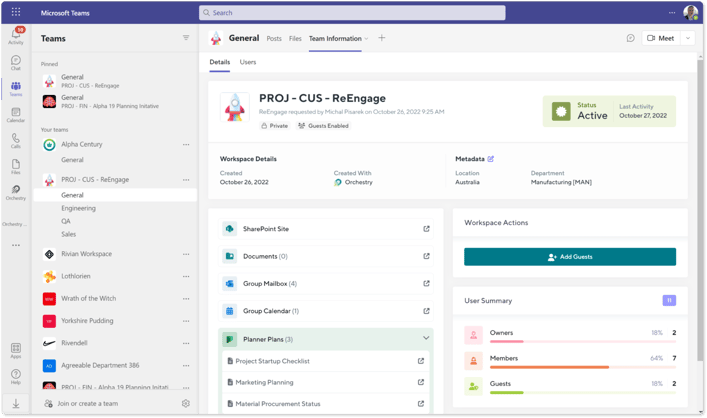
The project management template in Orchestry.
See Orchestry's Microsoft Teams and SharePoint project management template in action:
What goes in a product launch team template?
A product launch team gives everyone from research to marketing a shared home for the release. It works best with channels that follow the launch from idea to market:
- Market Research
- Product Design and Development
- Marketing and Ad Campaigns
- Legalities and Patents
- Feedback and Iterations
Add Planner to track launch milestones across teams, and a Loop component in the marketing channel so campaign copy and dates stay in sync without a dozen file versions.
How do you structure an event planning team?
Event planning has a lot of moving parts and a hard deadline, so the template leans on channels that keep logistics, promotion, and follow-up separate and clear:
- Venue and Logistics
- Invites and RSVPs
- Marketing and Promotion
- Partnerships and Sponsorships
- Agenda and Speakers
- Feedback and Post-Event Analytics
Add the Calendar and SharePoint apps for scheduling and shared files, and a Loop component to track logistics across the team as details change.
What channels belong in an employee onboarding team?
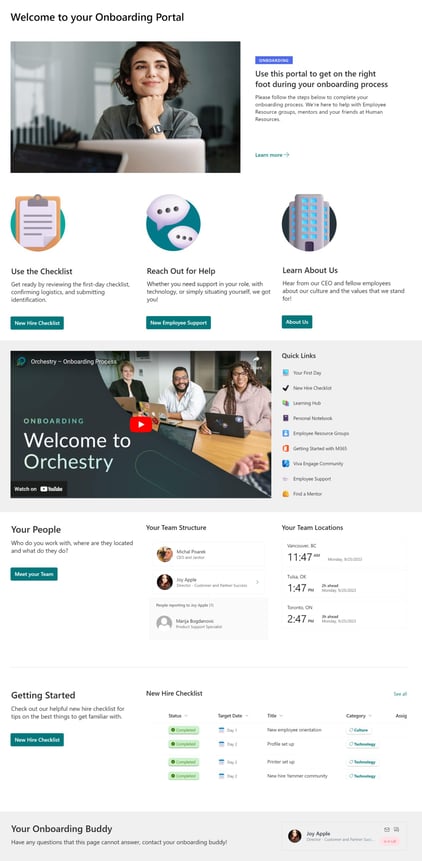 An onboarding team gets new hires productive faster by putting everything they need in one place from day one. These channels cover the first few weeks:
- Company Introduction
- Trainings and Workshops
- Key Documentation
- Security Protocols
- Team Introductions
Add Planner for the onboarding checklist and a Copilot agent grounded on the team's onboarding documents, so new hires can ask questions instead of hunting through channels.
What should an employee offboarding team cover?
Offboarding is the template people forget until something slips through. A dedicated team makes sure knowledge, access, and assets are all handled when someone leaves:
- Documentation and Knowledge Transfer
- Exit Interviews
- IT and Asset Returns
- Final Settlements and Benefits
- Farewell and Feedback
Add Planner to assign and track each offboarding task to an owner, so nothing sits half-done after the person's last day.
How do you set up channels inside a template?
The channel list is the start. What makes a template useful is what you put inside each channel. Two examples worth copying:
An onboarding and training channel
Add a Files tab for department-owned training material, a SharePoint tab that links to your policies and procedures site, and, if you use Viva Engage, a community tab where new hires can ask questions of leadership and subject-matter experts. New hires get everything in one place instead of hunting across the tenant.
A department meetings channel
Route recurring meetings through one channel so recordings and shared files land in the same place automatically, and notes save back to SharePoint. Add a tab with your meeting guidelines so the standard travels with the template.
How do you govern Microsoft Teams templates?
When you set up Teams templates, add governance policies like naming conventions, audience targeting, and approval workflows so the structure stays consistent as teams multiply. Native templates give every new team the same starting point. What they don't do is keep that structure governed once teams start multiplying, which is where sprawl, orphaned teams, and inconsistent naming come from.
Here is how native templates and Orchestry compare on governance:
| Capability | Native Teams templates | Orchestry |
|---|---|---|
| Prebuilt channels, apps, and tabs | ✓ | ✓ |
| Enforced naming conventions | No | ✓ |
| Lifecycle: inactivity, archival, expiry | No | ✓ |
| Request and approval workflow | No | ✓ |
| Guest and membership governance | Limited | ✓ |
| Self-service provisioning for end users | Admin only | ✓ |
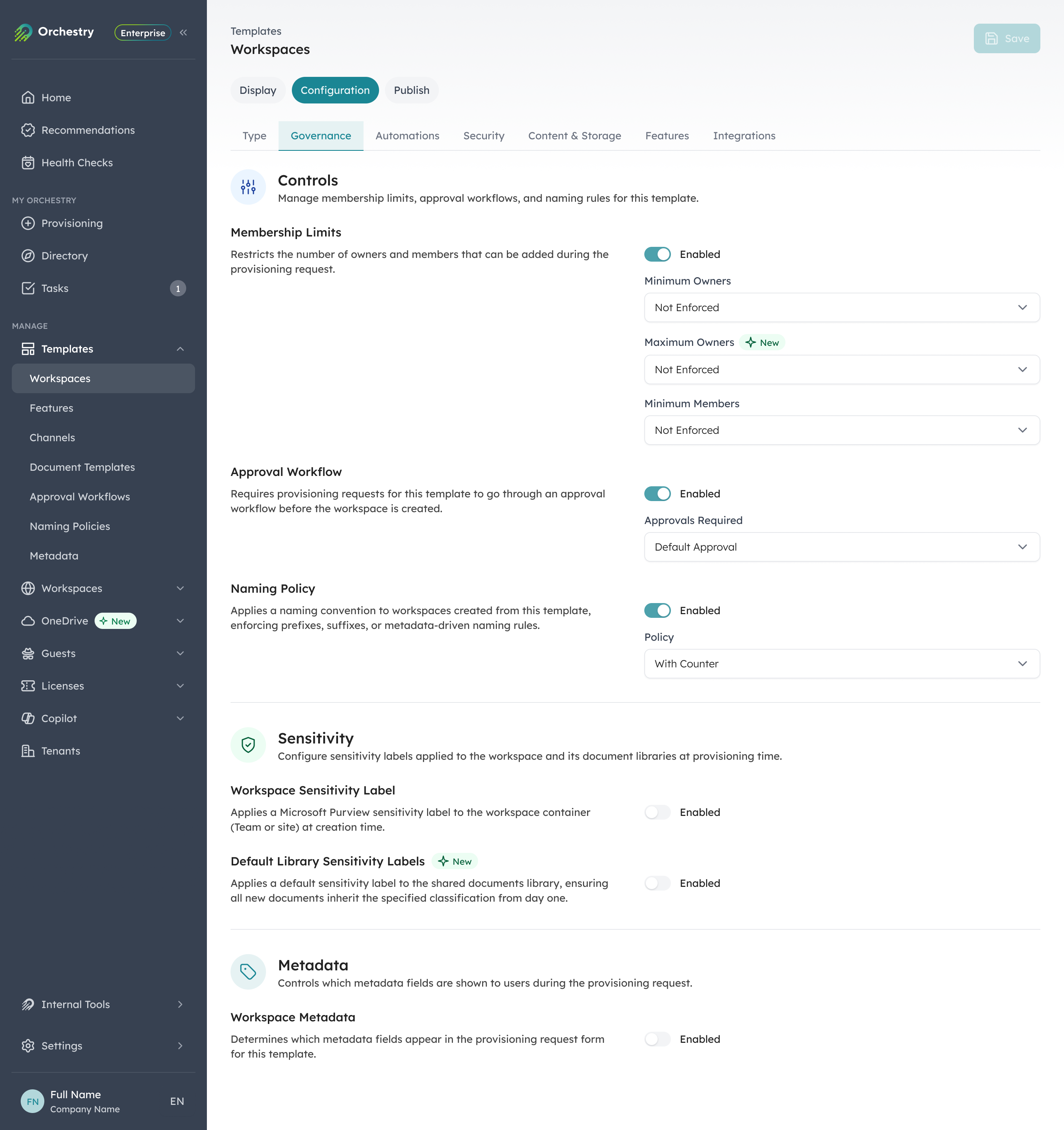
Orchestry enforces approval, naming, and membership rules on the template itself, so every team created from it stays governed.
For the broader picture on structuring a tenant, see the ultimate how-to guide for SharePoint, and read how to take control of Microsoft 365 provisioning and sprawl.
Getting more from your Microsoft Teams templates
Native templates get a team started. Orchestry keeps every templated team named, governed, and cleaned up on a schedule, and it lets your users request one through an approval workflow instead of filing a ticket.
These five are the most requested, but they are not the whole set. Orchestry also ships templates for department intranets, collaboration teams, communities of practice, and incident management, and you can turn any existing team or site into a template of your own.
Want to try it in your own tenant first? Start a free trial.
Microsoft Teams templates: frequently asked questions
What are Microsoft Teams templates?
Microsoft Teams templates are predefined team structures that create a new team with a preset group of channels, apps, and settings. Instead of configuring every team by hand, you choose a template and Teams provisions the right channels and tools for that scenario, such as project management or employee onboarding. Microsoft provides built-in templates, and admins can create custom ones.
How do I create a team from a template?
In Teams, go to Teams, then Join or create a team, then Create team, and choose From a template. Pick the template, set the name and privacy, and Teams builds the channels and apps for you. Admins can publish approved custom templates in the Teams admin center so everyone starts from the same structure.
Can you customize Microsoft Teams templates?
Yes. Admins build custom team templates in the Teams admin center and choose the channels, installed apps, and tabs each new team receives. Native customization covers the structure only; it doesn't enforce naming, membership, or a lifecycle. Orchestry adds those policies on top, so every templated team follows your rules automatically.