/HubSpot%20-%20eBook%20-%20Proof%20Card%20Mockup%20001.jpg?length=1000&name=HubSpot%20-%20eBook%20-%20Proof%20Card%20Mockup%20001.jpg)
/HubSpot%20-%20eBook%20-%20Proof%20Card%20Mockup%20001.jpg?length=1000&name=HubSpot%20-%20eBook%20-%20Proof%20Card%20Mockup%20001.jpg)
/HubSpot%20-%20eBook%20-%20Proof%20Card%20Mockup%20001.jpg?length=1000&name=HubSpot%20-%20eBook%20-%20Proof%20Card%20Mockup%20001.jpg)
/HubSpot%20-%20eBook%20-%20Proof%20Card%20Mockup%20001.jpg?length=1000&name=HubSpot%20-%20eBook%20-%20Proof%20Card%20Mockup%20001.jpg)
/HubSpot%20-%20eBook%20-%20Proof%20Card%20Mockup%20001.jpg?length=1000&name=HubSpot%20-%20eBook%20-%20Proof%20Card%20Mockup%20001.jpg)
/HubSpot%20-%20eBook%20-%20Proof%20Card%20Mockup%20001.jpg?length=1000&name=HubSpot%20-%20eBook%20-%20Proof%20Card%20Mockup%20001.jpg)
/HubSpot%20-%20eBook%20-%20Proof%20Card%20Mockup%20001.jpg?length=1000&name=HubSpot%20-%20eBook%20-%20Proof%20Card%20Mockup%20001.jpg)

/HubSpot%20-%20eBook%20-%20Proof%20Card%20Mockup%20001-min.jpg?length=1000&name=HubSpot%20-%20eBook%20-%20Proof%20Card%20Mockup%20001-min.jpg)


Updated June 2020
Microsoft Teams is a powerful tool for employee communication and collaboration, allowing team members to live chat, share and collaborate on files, meet with web conferencing/video calling and much more. But, to ensure your organization is getting the most from this robust tool, you can’t overlook the importance of Microsoft Teams governance.
In this article, we will discuss the importance of including a consistent Microsoft Teams naming convention as a key part your Microsoft Teams governance strategy, including how to approach creating a naming convention and the benefits you will yield as a result.
Why is it important to have a Microsoft Teams Naming Convention?
Once an organization has been using Microsoft Teams for a while the number of Teams will grow significantly. Defining a consistent Microsoft Teams naming convention is a great way to eliminate confusion and make it easier for users to know the purpose of each Team or Channel so they can communicate in the right place.
The search functionality in Microsoft Teams is reliant on users searching by team name therefore if you don’t have a consistent naming convention it can be difficult to find what you are looking for. Having a clear, consistent Microsoft Teams naming convention will make it a lot easier for your users to find the desired team or channel quickly.
By extension, this will also minimize the risk of ending up with too many stagnant Microsoft Teams teams or channels, as users won’t endlessly create new ones when they can’t find what they are looking for. Standardizing Microsoft Teams naming conventions, including the naming of channels, makes MS Teams much clearer to end users on where to communicate and about what, whenever needed.
Important Microsoft Teams Naming Convention Consideration
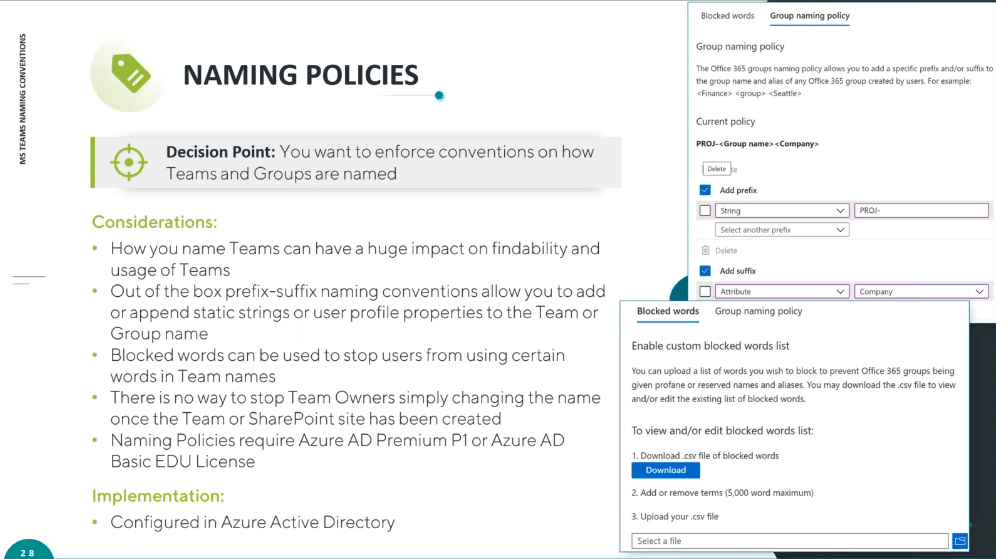
Implementing a Microsoft Teams naming convention has a considerable impact on how your users use and approach communications within your Microsoft Teams environment. With that in mind, here are some important considerations for when you are planning a new Microsoft Teams naming convention:
- Impact on Findability and Usage: The more clear and simple you make naming your teams and channels for your end-users, the higher adoption and usage will be. Keep your end-users at the top of your mind when developing your Microsoft Teams naming convention.
- Prefix-Suffix Naming Conventions: Out-of-the-box prefix-suffix allow you to add or append static strings or user profile properties to the Microsoft Teams team or Microsoft 365 Group name. This feature will help you to enforce your naming convention when users create new Teams or Groups4 .
- Blocked Words: Ensure your Microsoft Teams team and channel names, as well as Microsoft 365 Groups, meet the standards, values, and culture you have in place at your organization by setting blocked words to stop users from using certain words when creating new Workspaces.
- Team Owners Can Change the Name After Creation: There is no stopping Microsoft Teams owners from simply changing the name of a Microsoft Teams team, Microsoft Teams channel, or Microsoft 365 Group after creation. Even if you have set prefix-suffix naming conventions or set blocked words, the owner can get around this by creating a Workspace and then changing the name afterward.
- Further Licensing: To set naming policies in Microsoft Teams you will need an Azure AD Premium P1 or Azure AD Basic EDU License at a minimum.
Microsoft Teams Naming Convention Examples
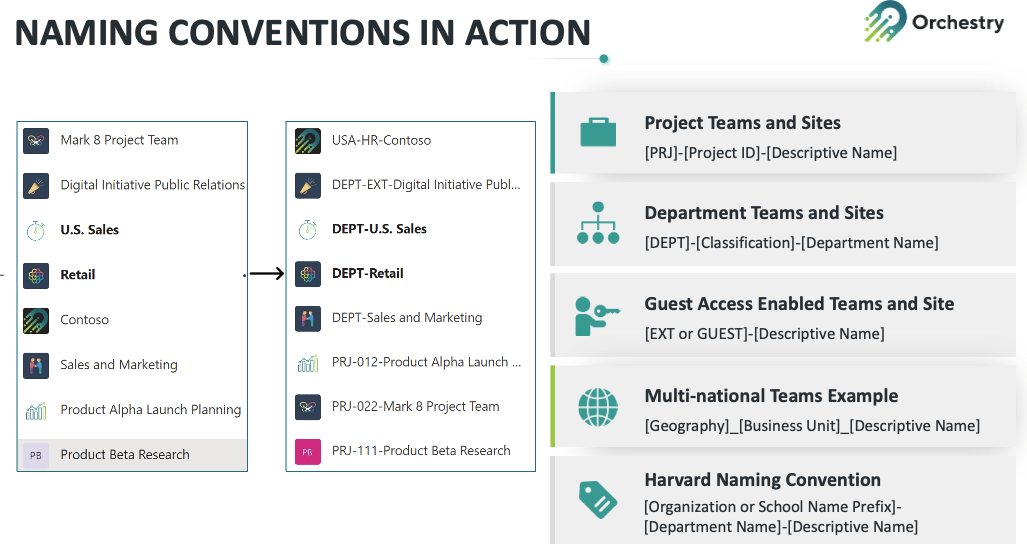
Since every organization is different, there is no one-size-fits-all solution to a Microsoft Teams naming convention. However, here are some examples that work effectively for other organizations:
Project Teams: [PRJ]-[Project ID]-[Descriptive Name]
Department Teams: [DEPT]-[Classification]-[Department Name]
Guest Access Enabled Teams: [EXT or GUEST]-[Descriptive Name]
Multi-national Teams Example: [Geography]-[Business Unit]-[Descriptive Name]
Harvard Naming Convention: [Organization or School Name]–[Department Name]
The above examples utilize a prefix in order to clearly categorize the new Microsoft Teams team or Microsoft 365 Group. These Microsoft Teams naming conventions also allow for a descriptive name to provide an element of flexibility in the naming so users can specifically tailor the name to suit their requirements. These elements combine to create a consistent naming structure that makes it easy for users to navigate and to communicate in the right Microsoft Teams Workspace at the right time.
Implementing a Microsoft Teams Naming Convention in Microsoft 365
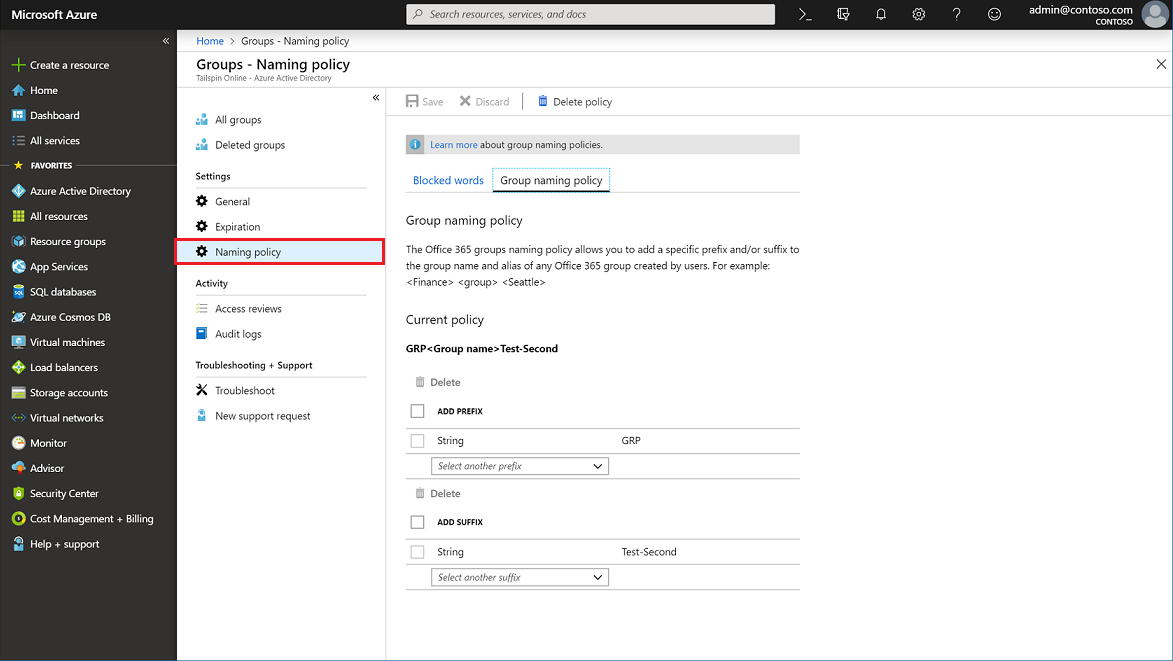
To implement your Microsoft Teams naming convention, you will need to update the Groups Naming Policy in Azure Active Directory. Every time you create a new Microsoft Teams team, a Microsoft 365 Group is created and when you adjust the naming, you are doing that at a Group level.
In the Group Naming Policy area within Azure Active Directory, you have the option to add both a prefix and suffix for Group names. Both the prefix and suffix can be either a static String, for example, PROJ for a project group, or an Attribute of the user, such as Department or Office.
This can be a useful way to enforce your chosen naming convention within the Microsoft 365 product suite, although it can be limiting in the sense that when you set these conditions they will apply to every single team or channel you create, which might not suit your requirements.
Implementing a Microsoft Teams Naming Convention Is Easier with Orchestry
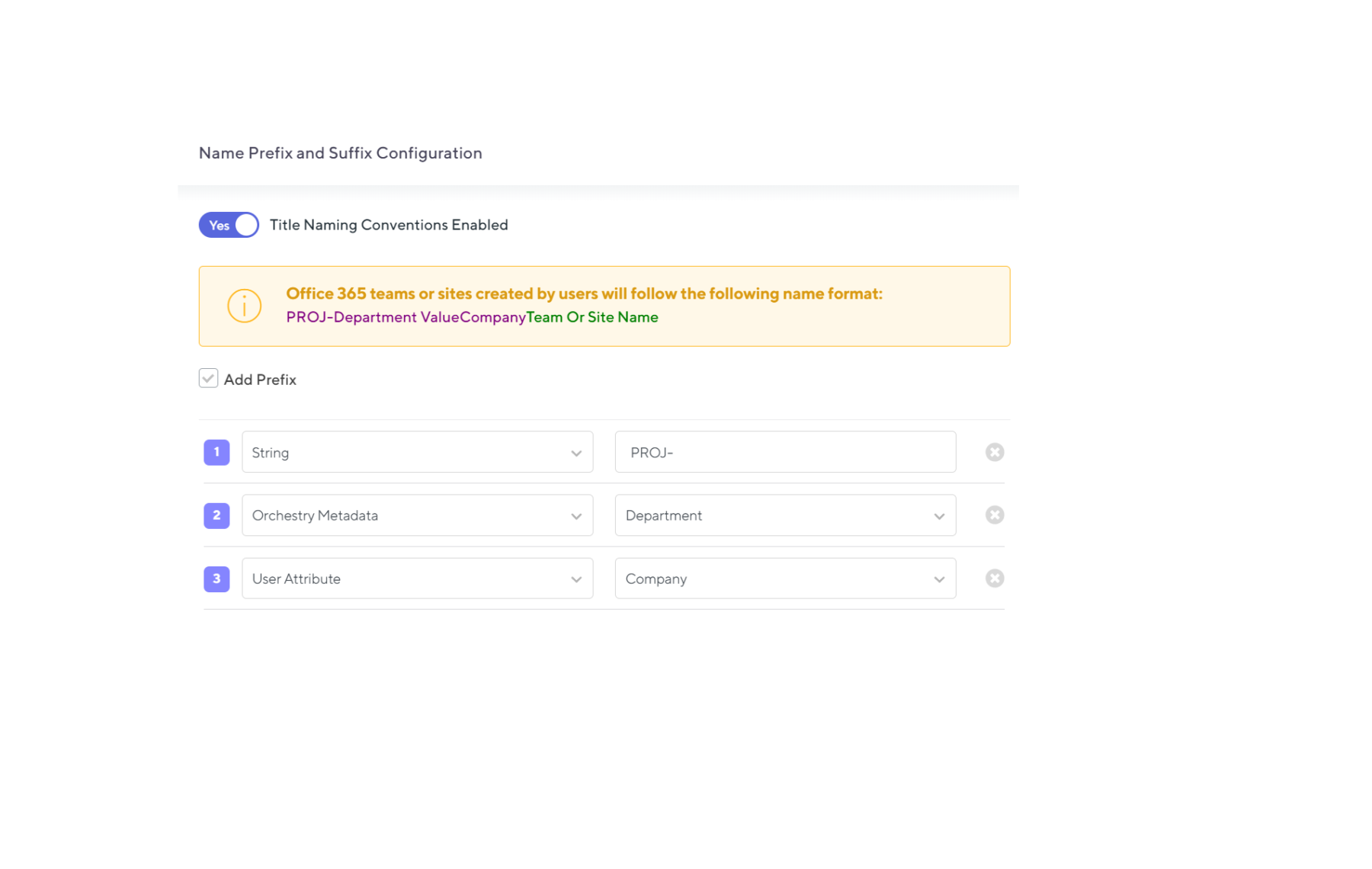
At Orchestry, we understand that the out-of-the-box implementation of naming conventions within Microsoft 365 can be limiting. That is why our product was created to provide more granularity so you have more flexibility to implement a Microsoft Teams naming convention that works for you.
With the naming policy feature within Orchestry, you can control the name of the Microsoft Teams team or Microsoft 365 Group that is going to be created. For example, you can implement the prefix ‘PROJ’ for project teams, making it immediately clear what category the new team falls into. The Orchestry platform will implement your naming convention automatically meaning the end-user doesn’t even need to be aware of the naming convention, making their life much easier.
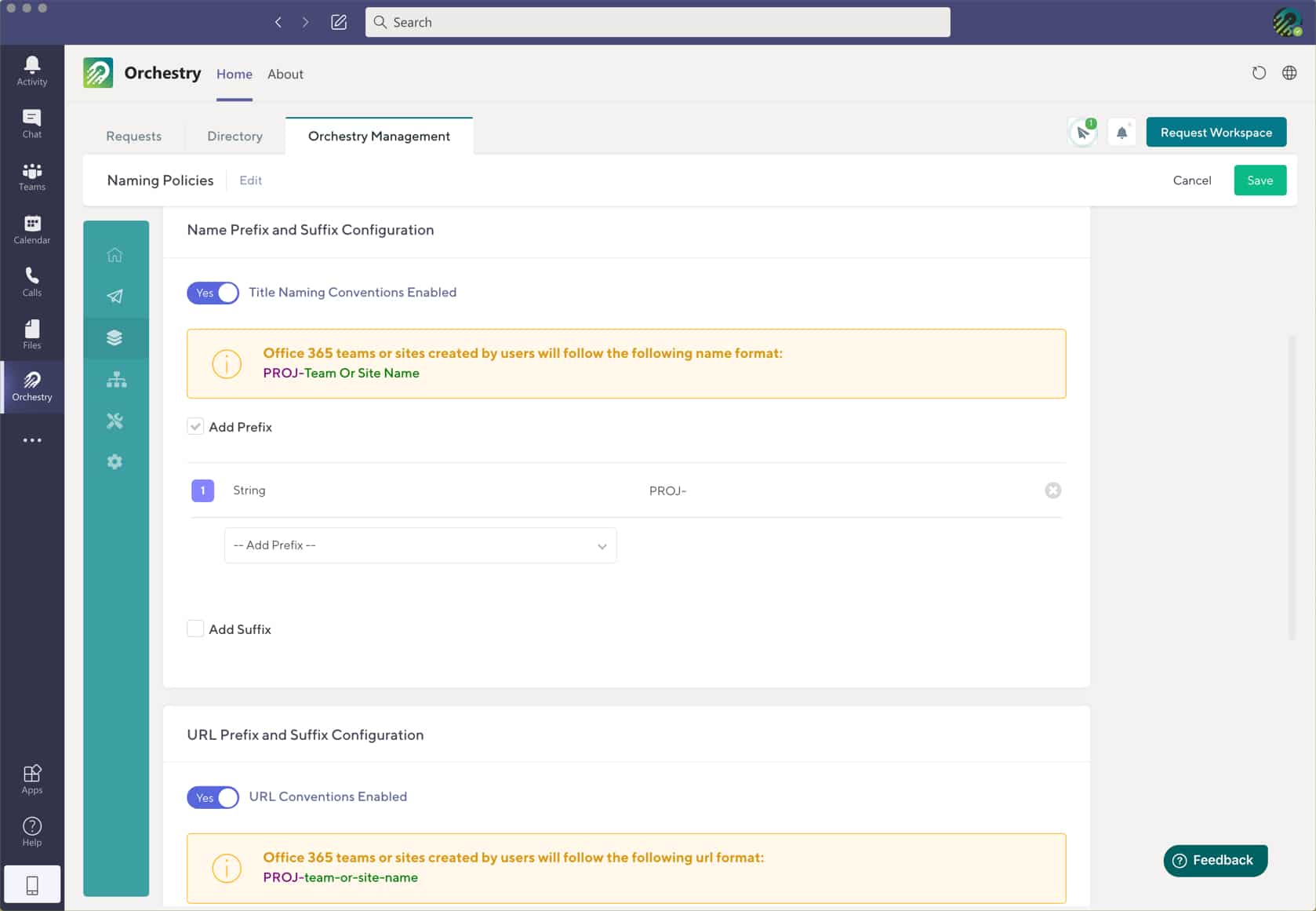
Plus, you can create your naming conventions within different Workspaces so you have more flexibility to implement different conventions for different areas of your organization – whatever works best for you!
Unleash the Full Power of Micrsoft365 with Orchestry
Most organizations are not using Microsoft 365 to its full potential.
Orchestry makes Microsoft 365 simple for all users.
Orchestry is an adoption and governance platform that allows End Users, Workspace Owners, IT admins and organizations to take full advantage of Microsoft 365.
To see Orchestry in action, request a demo!