/HubSpot%20-%20eBook%20-%20Proof%20Card%20Mockup%20001.jpg?length=1000&name=HubSpot%20-%20eBook%20-%20Proof%20Card%20Mockup%20001.jpg)
/HubSpot%20-%20eBook%20-%20Proof%20Card%20Mockup%20001.jpg?length=1000&name=HubSpot%20-%20eBook%20-%20Proof%20Card%20Mockup%20001.jpg)
/HubSpot%20-%20eBook%20-%20Proof%20Card%20Mockup%20001.jpg?length=1000&name=HubSpot%20-%20eBook%20-%20Proof%20Card%20Mockup%20001.jpg)
/HubSpot%20-%20eBook%20-%20Proof%20Card%20Mockup%20001.jpg?length=1000&name=HubSpot%20-%20eBook%20-%20Proof%20Card%20Mockup%20001.jpg)
/HubSpot%20-%20eBook%20-%20Proof%20Card%20Mockup%20001.jpg?length=1000&name=HubSpot%20-%20eBook%20-%20Proof%20Card%20Mockup%20001.jpg)
/HubSpot%20-%20eBook%20-%20Proof%20Card%20Mockup%20001.jpg?length=1000&name=HubSpot%20-%20eBook%20-%20Proof%20Card%20Mockup%20001.jpg)
/HubSpot%20-%20eBook%20-%20Proof%20Card%20Mockup%20001.jpg?length=1000&name=HubSpot%20-%20eBook%20-%20Proof%20Card%20Mockup%20001.jpg)

/HubSpot%20-%20eBook%20-%20Proof%20Card%20Mockup%20001-min.jpg?length=1000&name=HubSpot%20-%20eBook%20-%20Proof%20Card%20Mockup%20001-min.jpg)


Private Channels for Microsoft Teams are by far the most requested new feature. The good news is that this new Microsoft Teams feature is coming soon and will further bridge the gap between Teams and Slack which has had private channels for a long time. However, we shouldn’t underestimate the impact that private channels could have on your Microsoft Teams deployment.
Microsoft Teams Channels: What are people asking for?
Currently, the interaction between Teams and Microsoft Teams Channels is fairly simple – if you are part of a Team, then you get to see all of its Channels. With the introduction of Private Channels, this opens us a myriad of possibilities not just for Teams but all the underlying Office 365 workloads that support it, in particular SharePoint.
In this article, we are going to look at some possible scenarios, impacts, and considerations that you might want to think about before including Private Microsoft Teams Channels as part of your deployment.
Disclaimer: we haven’t had access to this feature, so please note that this article is built from our opinions and thoughts.
Before we begin, it’s worth noting what users are asking for with private Microsoft Teams Channels. From reading the User Voice, it’s clear to see there are a number of different scenarios. The main use case seems to be the ability to have a Channel in a Team that can be secured to select users in that Team. Mostly this seems to be for conversation but people also want this to be applied to the documents that are part of that channel.
Some users also want the ability to not have a user need to be part of the ‘parent’ Team but just give them access to the one Private channel. Basically, this means that they won’t see any other content in the Team.
What are organizations currently doing within Microsoft Teams Channels?
There are a number of ways that organizations are currently working around the limitation of not having Private Channels. For example, if you are working on a project with external users and there is a need to have private content and communications relating to budgets, here are some workarounds:
Creating a separate ‘Private’ Team
Creating a separate ‘private’ team seems to be the most common way. Users can create a completely separate Team with selected users involved in the private conversation. However, this solution isn’t perfect because it leaves you with two Teams to manage.
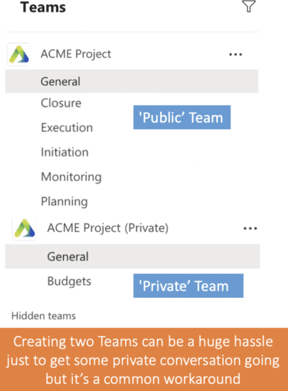
This can result in:
- No synchronization between membership across the two Teams and associated groups
If you just want a place to chat, then creating a Team can require a lot of administrative work due to all of the other components that are created
What if you want to hide some content or conversations in this private Team? Then you need to create yet another Team and eventually, you’ll have too many to keep on top of.
Having Secure Microsoft Teams Conversations Via 1:1 Chat
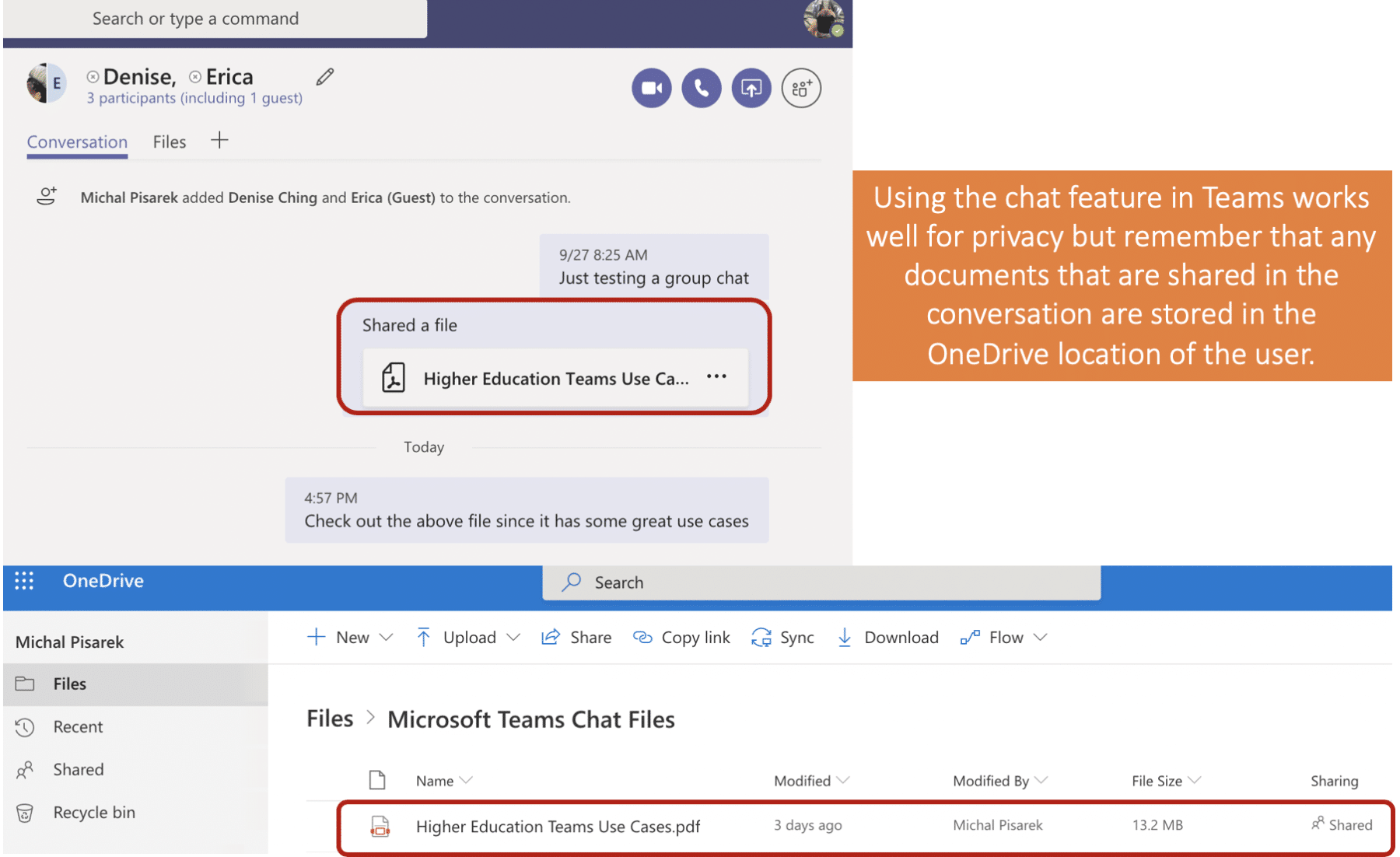
Another common approach is to move private conversations outside of the group chat on Microsoft Teams and into the one-on-one chat-functionality. This approach can work, but once again there are a few downfalls:
- You now have to go to different places in Microsoft Teams to have conversations. The public ones are in the Teams conversation channels and the private conversations would be in the 1:1 chat. This can get confusing and frustrating pretty quickly.
- Any documents that you upload and share in the 1:1 chat won’t get uploaded to the Microsoft Team but rather into the OneDrive of the person who uploaded it, so now you have multiple locations for content relating to this Team.
Use An Alternate Application to Microsoft Teams
Some people turn to email or other applications as a workaround. Adding another tool makes it easier to lose track of information and requires more time switching between applications.
Possible Impacts of Private Microsoft Teams Channels
Of course, this all depends on the implementation but here are some important things that you might want to consider when Private Channels are released:
Microsoft Teams Channels Governance
There are a lot of governance challenges and options in Microsoft Teams, but Private Channels will introduce a whole new layer to how organizations need to think, plan, and act. Already we are seeing the option to have Private Channels disabled as an option in the Microsoft Teams Admin Center so the first questions to ask is will you allow your users to create Private Channels at all in your Teams environment?
The second question will be which users will be allowed to create Private Channels? You will be able to control who will have this ability using the Teams Policy as seen below. This policy can be assigned to a subset of users within your organization.
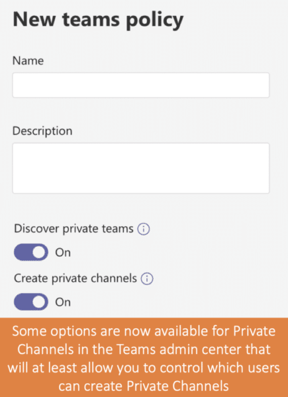
Apart from the technical details, you will also need to communicate the usage of Private Channels in Microsoft Teams. If you don’t do this you might have users creating Private Channels for the wrong purpose. As a starting point you would want to consider the following:
- Guidelines on when to create a Private Channel vs. using 1:1 chats in Microsoft Teams
- Communication on what actually happens both with conversations and documents when a Private Channel is created
- Helping users understand the security around Private Channels and any policies that your organization might have
- Revising your governance structure to only allow Microsoft Team Owners to be able to create both public and private channels. The subtleties of Public vs. Private Channels might be challenging to communicate to end-users initially, so it may be better to have a ‘gatekeeper’ in a Team who can create and manage the creation of Channels.
Microsoft Teams Information Architecture
Information architecture is really important in Teams and the introduction of Private Channels will have a significant impact on the structure of Teams. With this in mind, here are some things to consider:
- Will your Private Channels have a naming convention? We would assume that there will be some sort of visual indicator that a channel is private, but even so, will you put [Private] in front of your channel name?
- What would be an acceptable mix of Public vs. Private channels? This is an interesting question because the last thing that you want is a Team with 3 Public channels and 30 Private channels. This really defeats the purpose of a Team-based collaboration.
Microsoft Teams Document Management
By far the biggest change could be the way that documents are managed in Microsoft Teams. Although no implementation details have been announced publicly we would assume that if a Private Channel is created, then the corresponding folder in the shared documents folder will also be created with those same permissions.
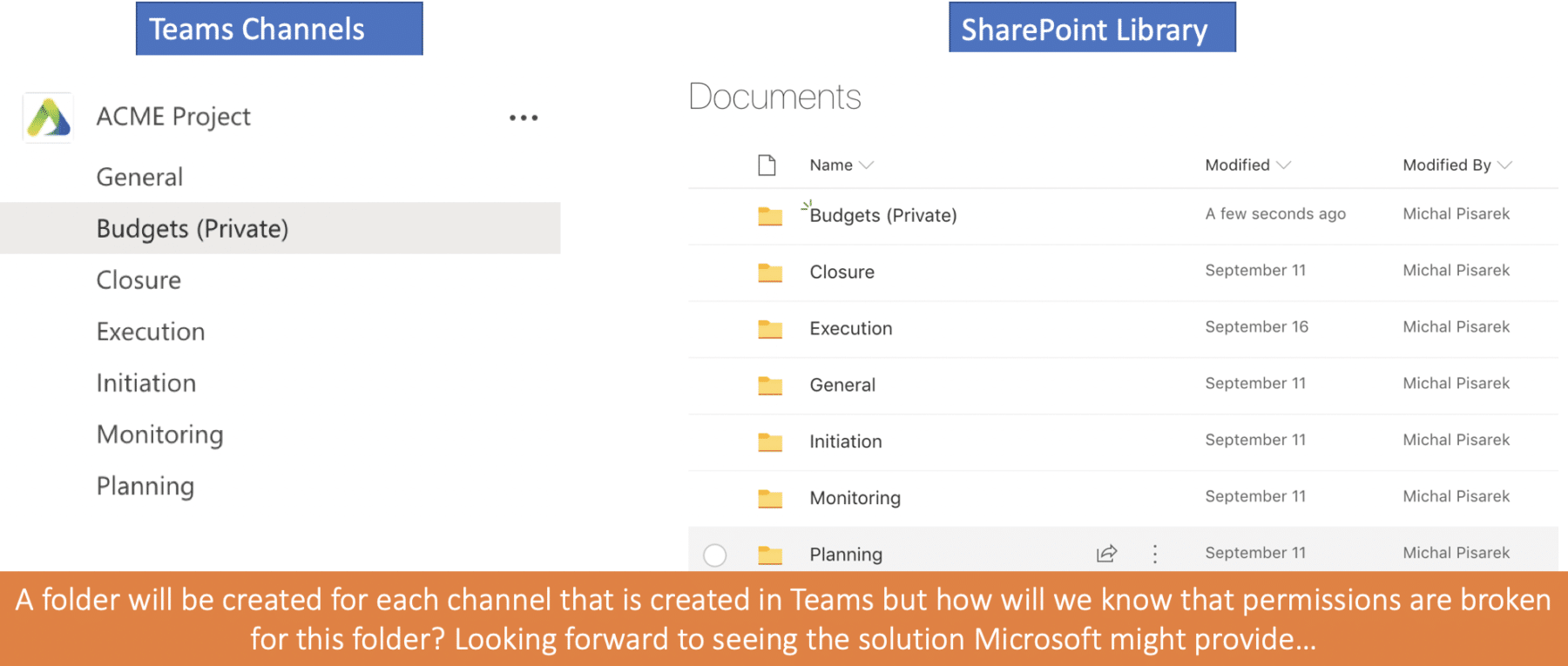
This may mean that the same document library in a Microsoft Team could have a combination of both public and private documents. If so, this could cause confusion and some issues with content discovery.
Also, the default view of document libraries in SharePoint don’t have the same permission column that allows you to see the permission on the folder. Perhaps some visual aid will be introduced to help show private content in document libraries that are associated with a Private Channel.
Some other questions that are yet to be answered are:
- If you convert an existing channel to a Private channel (if you can even do that), will documents in the corresponding folder have their permissions reset?
- How will the permissions on folders be handled? Hopefully, it’s just using the standard SharePoint document library permission change that we are all used to.
- Would users still be able to change permissions for documents in a private channel?
Questions about Private Microsoft Teams Channels
When looking at the User Voice it’s clear to see that there are a lot of questions out there on Private Microsoft Teams Channels and how they will work. In fact, there are currently over 1950 comments.
Here are some questions that we found interesting and that illustrate some other areas to think about:
- Can Team Owners add members to Private channels that are not within the parent Team?
- Do members of a Private channel need to be members of the parent Team?
- Can you create Channels without having to create a Team? (this is not really a private channels question but is really asking for more of a structure like Slack)
- Will you be able to add guest users to Private channels? (I don’t see why you wouldn’t be able to)
- Will it be possible to convert existing channels to private channels? (I am super interested in this and what the impact would be)
- As you can see there is a lot to think about and this feature is one that has really captured the interest of the user base. The feature has the potential to supercharge your Microsoft Teams experience but like anything, you need to do some planning and governance around it.
Reading the User Voice makes three things apparent:
- People really want updates on feature progress: Roughly 20% of the comments are people frustrated at the lack of communication on the update of features. Clearer communication from Microsoft would go a long way.
- People see this as a blocker to move from Slack: Many user comments discuss how they would want to onboard onto Teams but can’t because this feature isn’t available.
- People are using some interesting workarounds: Many users seem to be either creating whole new Teams or using private chat capability or some other means. If private channels work nicely it is going to make life a lot easier.p
It’s taken a long while but it’s coming!: Private channels were supposed to be released in October but this has now been moved to November which is the same time as Ignite. Coincidence? I think that you will see some information at Ignite 2019 about this feature.
Work Smarter in Microsoft Teams with Orchestry
At Orchestry, we recognize that the technology landscape for digital organizations has become overly complicated. That is why it is our mission to eliminate the disorder, confusion and indecision that comes from having too many digital tools to make work as simple as possible.
Orchestry makes work simple in Office 365, Microsoft Teams and SharePoint Sites by empowering your IT Administrators and employees to define a winning Microsoft 365 adoption and change management strategy that provides a roadmap of what to use when, for what purpose. Orchestry increases usage and adoption while empowering through governance and simplifies through intelligent provisioning in Microsoft 365, organization-wide at a fraction of the cost, on a subscription basis.
To see Orchestry in action, send us an email at hello@orchestry.com or start your free access now!