/HubSpot%20-%20eBook%20-%20Proof%20Card%20Mockup%20001.jpg?length=1000&name=HubSpot%20-%20eBook%20-%20Proof%20Card%20Mockup%20001.jpg)
/HubSpot%20-%20eBook%20-%20Proof%20Card%20Mockup%20001.jpg?length=1000&name=HubSpot%20-%20eBook%20-%20Proof%20Card%20Mockup%20001.jpg)
/HubSpot%20-%20eBook%20-%20Proof%20Card%20Mockup%20001.jpg?length=1000&name=HubSpot%20-%20eBook%20-%20Proof%20Card%20Mockup%20001.jpg)
/HubSpot%20-%20eBook%20-%20Proof%20Card%20Mockup%20001.jpg?length=1000&name=HubSpot%20-%20eBook%20-%20Proof%20Card%20Mockup%20001.jpg)
/HubSpot%20-%20eBook%20-%20Proof%20Card%20Mockup%20001.jpg?length=1000&name=HubSpot%20-%20eBook%20-%20Proof%20Card%20Mockup%20001.jpg)
/HubSpot%20-%20eBook%20-%20Proof%20Card%20Mockup%20001.jpg?length=1000&name=HubSpot%20-%20eBook%20-%20Proof%20Card%20Mockup%20001.jpg)
/HubSpot%20-%20eBook%20-%20Proof%20Card%20Mockup%20001.jpg?length=1000&name=HubSpot%20-%20eBook%20-%20Proof%20Card%20Mockup%20001.jpg)

/HubSpot%20-%20eBook%20-%20Proof%20Card%20Mockup%20001-min.jpg?length=1000&name=HubSpot%20-%20eBook%20-%20Proof%20Card%20Mockup%20001-min.jpg)


Do you want to take your governance and adoption to the next level? Then you are in the right place. Each and every organization has significant challenges with governance when it comes to managing the Microsoft 365 environment. If an organization hasn’t faced issues, it is likely because they are not far along in the process of deployment. Get ahead of the curve, review these best practices to help tackle Microsoft 365 adoption and accelerate, automate, and enhance governance in the process.
Planning for Successful Microsoft 365 Adoption
We often talk about adoption and governance as separate things. But, when we think of what we have seen in the market over years, we know they are very intertwined. Think of governance as an efficiency tool that goes beyond risk mitigation. Whereas, adoption while also focusing on efficiency, aims to ensure that the right tool is being used for the right purpose.
The Governance Approach for Successful Adoption
For successful adoption, you need to focus on governance policies and provide guidance where needed. Since there are many moving parts to governance, here are three must-have ingredients for your governance-driven adoption strategy:
Establish Technical Enablement
Technical enablement streamlines internal operations by effectively introducing the new digital platform, Microsoft 365. It will prove to be extremely cost-effective in the future as it enables you to define outcomes and success. Through technical enablement, you can create templates for use cases and build automation for and around your Workspace to ensure successful Microsoft 365 adoption.
Assess Role Readiness
There are many roles involved in the adoption process, like an Office 365 project manager, business owner, executive sponsor, department heads, IT leaders, HR managers, etc. You need to measure effective communication, coordination, and engagement between roles to understand how ready they are to adopt a new tool.
Assign Change Champions
Policies and guidance are best passed down through champions. In order to make sure policies are followed through, pick a champion and fashion a champion program that goes beyond managers and IT team members. Breaking down the hierarchy and engaging peers will drive adoption among end-users too!
Breaking Down Governance Activities
Governance activities mean the method in which you set up key governance steps for specific workloads. There is no set way of doing this, as it depends on each organizations’ technology landscape. Each workload or space requires a set of governance practices. Here is a good way to segment governance into different stages to help you smooth out the entire adoption process.
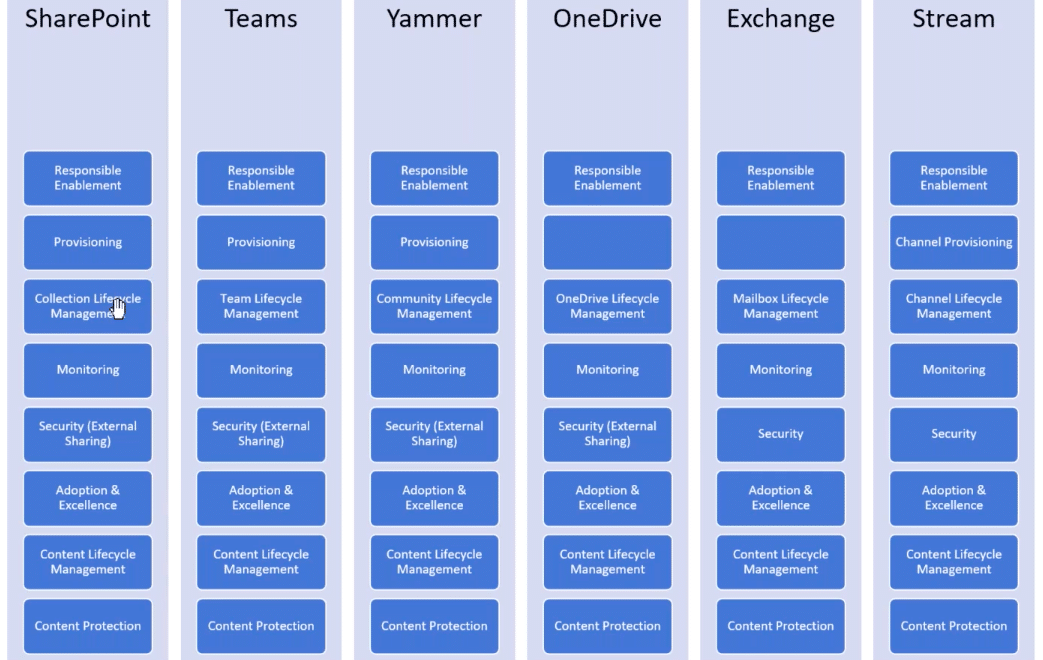
The key is to define the governance pattern for one workload and replicate the pattern across other workloads like for Microsoft Teams, OneDrive, Yammer, etc. as closely as possible.
Treating Adoption Like a Service
There is more to adoption than guidance to help you leverage the Microsoft 365 platform. For an effective digital behavior change, you need to tell people why they need to adopt a new tool.
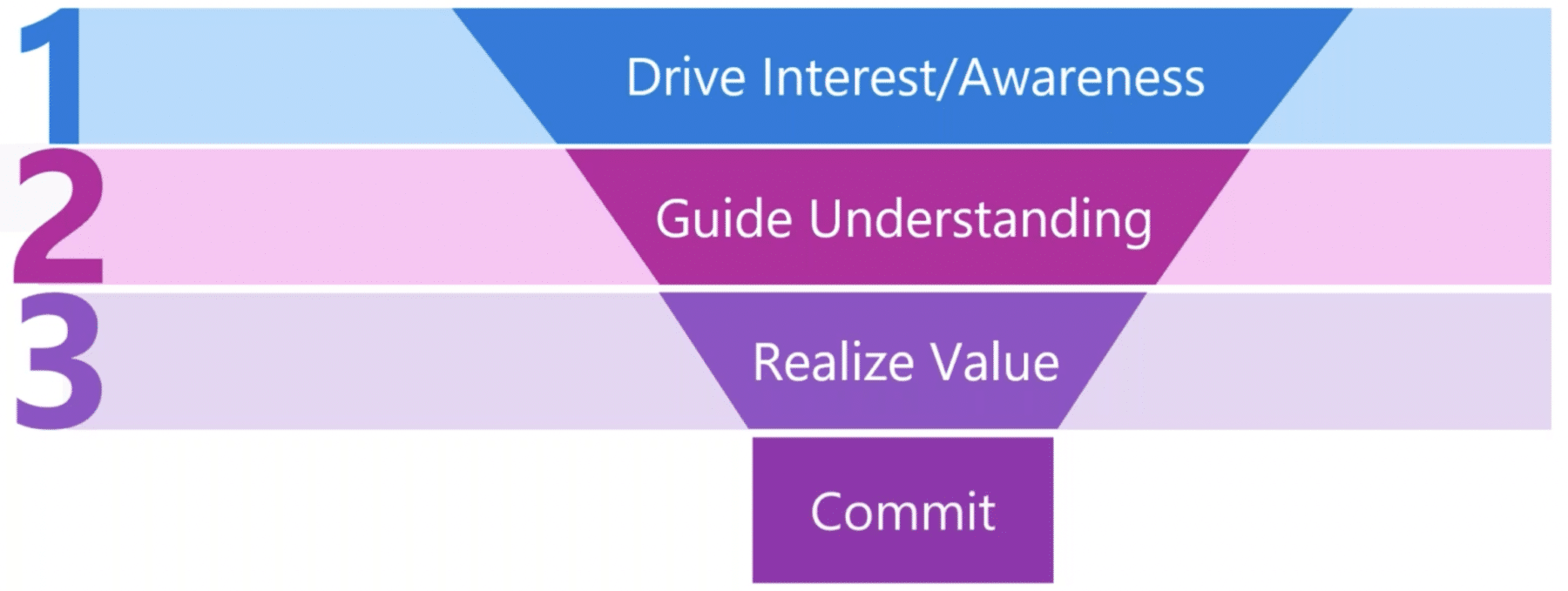
Organizations need to follow the funnel method to ensure a sustainable commitment is made. Take a look at the funnel below and you will see that it is critical to first drive interest and awareness around the tool, and supplement that with guidance and resources. Only then do users feel empowered to adapt to new technology and understand its usage as well as the value it brings to the organization. Once a user has worked their way through the tunnel they are truly engaged to use the tool to its full potential.
For a more in-depth view on the correct path for successful adoption, heck out our full-session recording on ‘Proactive Governance Adoption in Microsoft 365’: https://www.orchestry.com/event/proactive-governance-adoption-in-microsoft-365-everything-you-need-to-know/
Planning for Adoption
The best way to implement adoption is to run an adoption campaign. A roadmap of activities before, during, and after the campaign will lead to the successful adoption of the new tool. There are four critical areas for a campaign roadmap:
- Tips – Use pre-written ‘did you know’s throughout the cycle of the adoption campaign to encourage learning. If shared on behalf of different leaders and experts it shows their involvement and is an impactful way to drive engagement.
- Contests – Pick the outcome you want to drive, and build a contest around it; it motivates people to move along in the adoption process. A great way to set incentives for contests is to align them with some social pressure, this causes a sense of urgency and can increase the rate of participation among users.
- Training – Talk about all the behavioral outcomes and demonstrate how people will achieve their goals with improved efficiency. This is an effective way to drive your point home and will also help people better understand the purpose of the tool.
- Communication – Pre-plan for your adoption campaign and define a communication plan. Streamline the communication channels by deciding the message to be communicated, the medium and time of communication, and who the target recipients are.
Best Practice Tip: Involve different groups to ensure your adoption campaign is a success. By involving corporate communications, human resources, and IT in your adoption campaign, you will be able to cast a wider net for technology adoption and usage.
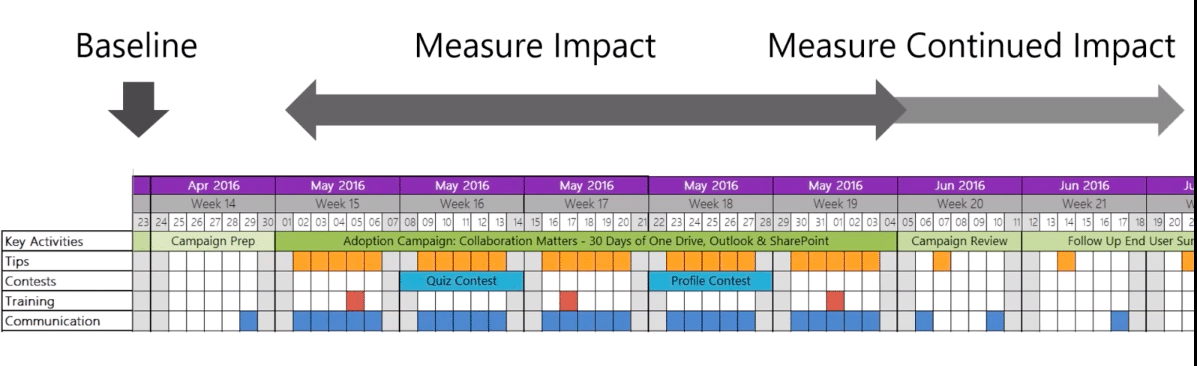
Not to mention, monitoring throughout the timeline of the campaign is important. Identify a baseline before the launch of the campaign and measure any progress made from thereon against it. This will help you see the impact of the campaign during and after the launch.
Transparent Governance in Microsoft 365 with Orchestry
A third-party tool like Orchestry should be your change management partner if you want to enforce balanced and transparent governance across your digital platforms. Be it Microsoft 365 in general or applications like Microsoft Teams and SharePoint Online, with Orchestry both end-users and IT admins are empowered to collaborate effectively.
With powerful governance capabilities like naming conventions, Group options, SharePoint sharing options, and a comprehensive set of features around Lifecycle Management, Orchestry allows you to maintain a controlled setup without any bottlenecks. Additionally, the full support of Sensitivity Labels in Orchestry is the extra layer of compliance that organizations are in need of.
Take a look at how Orchestry fulfills your governance needs and drives the adoption and enablement of Microsoft 365 applications or reach out to us at hello@orchestry.com to get your governance concerns addressed.