/HubSpot%20-%20eBook%20-%20Proof%20Card%20Mockup%20001.jpg?length=1000&name=HubSpot%20-%20eBook%20-%20Proof%20Card%20Mockup%20001.jpg)
/HubSpot%20-%20eBook%20-%20Proof%20Card%20Mockup%20001.jpg?length=1000&name=HubSpot%20-%20eBook%20-%20Proof%20Card%20Mockup%20001.jpg)
/HubSpot%20-%20eBook%20-%20Proof%20Card%20Mockup%20001.jpg?length=1000&name=HubSpot%20-%20eBook%20-%20Proof%20Card%20Mockup%20001.jpg)
/HubSpot%20-%20eBook%20-%20Proof%20Card%20Mockup%20001.jpg?length=1000&name=HubSpot%20-%20eBook%20-%20Proof%20Card%20Mockup%20001.jpg)
/HubSpot%20-%20eBook%20-%20Proof%20Card%20Mockup%20001.jpg?length=1000&name=HubSpot%20-%20eBook%20-%20Proof%20Card%20Mockup%20001.jpg)
/HubSpot%20-%20eBook%20-%20Proof%20Card%20Mockup%20001.jpg?length=1000&name=HubSpot%20-%20eBook%20-%20Proof%20Card%20Mockup%20001.jpg)
/HubSpot%20-%20eBook%20-%20Proof%20Card%20Mockup%20001.jpg?length=1000&name=HubSpot%20-%20eBook%20-%20Proof%20Card%20Mockup%20001.jpg)

/HubSpot%20-%20eBook%20-%20Proof%20Card%20Mockup%20001-min.jpg?length=1000&name=HubSpot%20-%20eBook%20-%20Proof%20Card%20Mockup%20001-min.jpg)


Most Microsoft 365 admins and finance owners already suspect they’re overpaying for licenses. The issue usually isn’t effort, it’s opacity. Licensing is scattered across multiple portals and agreements, SKUs overlap in confusing ways, and even experienced administrators end up working from rough estimates instead of clear facts.
You might know you have waste somewhere in the tenant but not be able to answer, in one place, what you’ve actually purchased, how much is assigned, where licenses are sitting unused, or how much spend is tied up in redundant combinations.
Licensing Reporting & Optimization in Orchestry is designed to make that picture visible, quantifiable and easier to act on, so you can right-size your Microsoft 365 investment with more confidence.
Why Microsoft 365 licensing is so hard to optimize
Microsoft 365 licensing isn’t just complex, it’s split across different admin centers and reports that weren’t designed for optimization. You can see usage metrics and license summaries in various places, but nothing pulls that data together into a single view that shows overlap, misassignment and underuse, or attaches a clear dollar value to what could be reduced or redirected.
The result is predictable: many organizations pay for licenses they don’t need, don’t assign, or assign redundantly, often at significant scale, without realizing it.
Introducing Licensing Reporting & Optimization
Licensing Reporting & Optimization, available in the Orchestry Enterprise plan, brings your Microsoft 365 license picture into one place and highlights where there’s a clear opportunity to improve.
The feature focuses on three things:
- Exposing the full licensing landscape across agreements.
- Identifying high-confidence optimization scenarios, such as obvious overlap or licenses on accounts that are no longer in use.
- Converting those findings into a conservative dollar estimate that reflects your actual pricing, not generic list rates.
For many organizations, it’s the first time license inventory, overlap, and savings estimates can be seen together in a single, consistent view rather than stitched together from separate reports.
In this first release, the emphasis is on clear, structural waste rather than per-user behavior or automated rightsizing, so the analysis stays understandable, defensible, and easy to explain to stakeholders.
What you can see: The license landscape
At the core is a unified view of your Microsoft 365 licensing landscape. You can see exactly which licenses you’ve acquired across Microsoft agreements and how many are currently assigned. The dashboard shows licensed and unlicensed users, plus where licenses remain attached to disabled or inactive accounts that no longer need them.

You also get a clear breakdown of which SKUs drive most of your overall spend, so the major cost centers are obvious without cross-checking multiple admin portals.
It’s a straightforward view of what you own, how it’s allocated, and where unused capacity sits today.
What you can analyze and quantify: Optimization opportunities
Once the licensing data is consolidated, Orchestry evaluates it for four specific, high-confidence optimization scenarios:
- Full overlap: cases where one license provides no additional value beyond another.
- Near-overlap: combinations where a license delivers only minimal incremental benefit.
- Licenses on disabled or inactive accounts: spend tied up in accounts that no longer require them.
- Unassigned licenses: purchased SKUs that aren’t currently used.
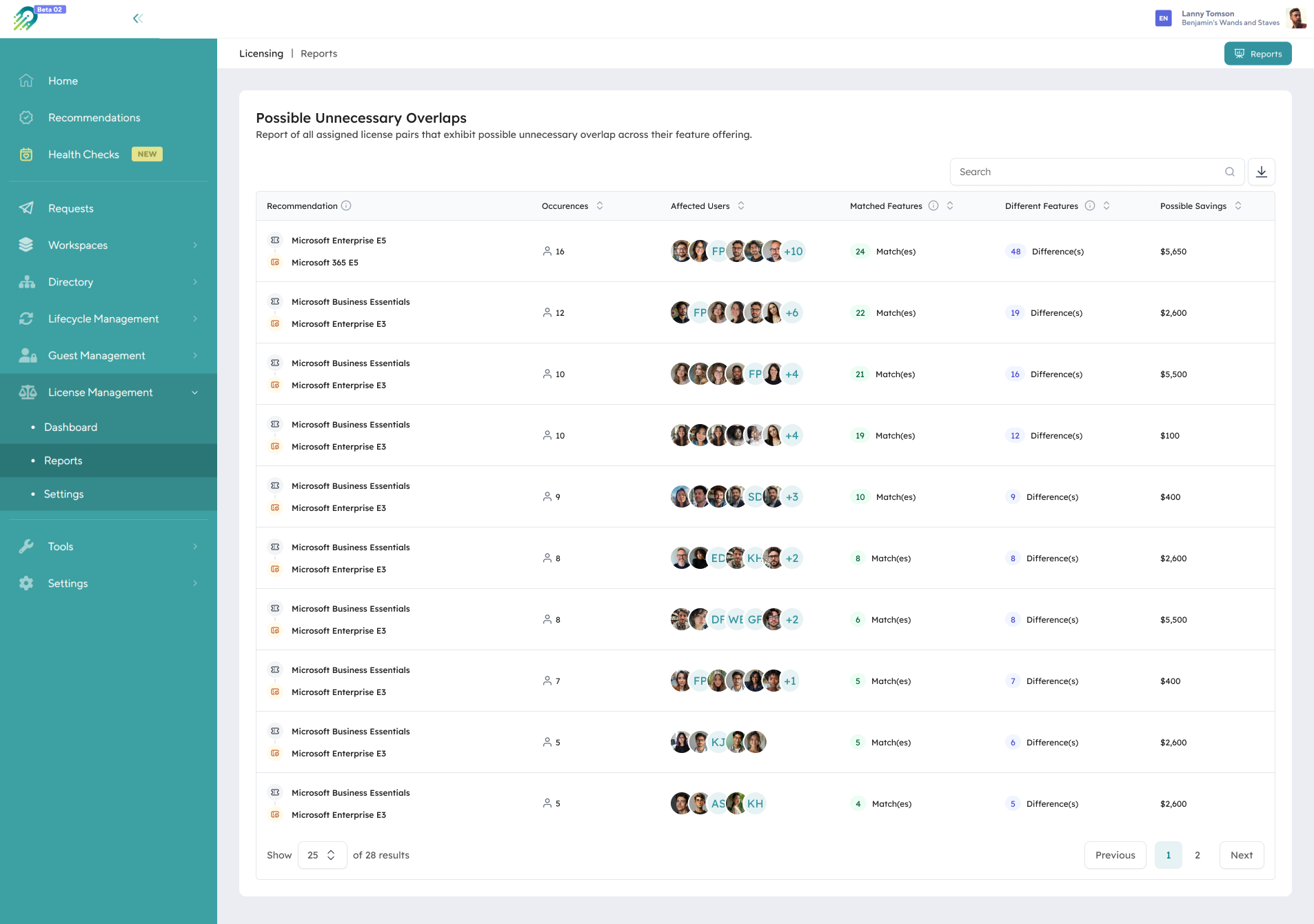
These findings are rolled into an optimization summary expressed in dollars. It’s not behavioral modelling or license rightsizing; it’s a defensible quantification of redundancy and misallocation in the current state.
Pricing estimates you can trust
Optimization numbers only matter if they reflect what you really pay. Orchestry starts with pre-populated market prices, then lets you override those with your negotiated rates and exclude free or promotional SKUs from the analysis. The savings figures you see are based on your own pricing assumptions, not generic list prices.
How this supports IT and finance decisions
Licensing Reporting & Optimization is built for shared decision-making between IT and finance.
IT gets one reliable place to see license inventory, assignment and obvious waste, instead of juggling exports. Finance and technology leaders get quantified, conservative estimates of how much spend could be reduced or redeployed, and where that spend is currently tied up.
Because Licensing Reporting & Optimization expresses waste in dollar terms, it also becomes straightforward to say, “If we address these overlapping and unused licenses, that’s roughly enough budget for this many Copilot seats,” using existing spend rather than new budget.
That makes renewal and budgeting conversations more concrete. You can go into discussions with Microsoft or partners with evidence of unassigned licenses, overlapping SKUs and licenses on inactive accounts, rather than broad assumptions. Partners and MSPs can use the same insights to scope and deliver optimization projects with clients, with numbers that can be checked and explained.
Teams don’t need to be traditional “enterprise” size to benefit from this. If licensing complexity and waste are real problems, the Enterprise plan is the right fit.
Who benefits
IT administrators and Microsoft 365 admins
Get a single, accurate picture of license inventory and concrete cleanup opportunities.
CIOs, CFOs and CTOs
See quantified savings and reallocation scenarios tied directly to licensing patterns.
Digital workplace and governance leads
Understand license mix, cost drivers, and where to simplify.
Microsoft partners and MSPs
Use Orchestry as the foundation for optimization engagements with verifiable numbers.
What organizations gain today
With Licensing Reporting & Optimization in place, organizations get:
- Clarity on what’s owned, assigned, and unused
- Conservative dollar values attached to redundant or misallocated licenses
- A stronger position going into renewals
- A practical way to discuss Copilot funding using existing spend
As part of the Orchestry Enterprise plan, it turns Microsoft 365 licensing from an opaque operational line item into something visible, understandable and fixable.