/HubSpot%20-%20eBook%20-%20Proof%20Card%20Mockup%20001.jpg?length=1000&name=HubSpot%20-%20eBook%20-%20Proof%20Card%20Mockup%20001.jpg)
/HubSpot%20-%20eBook%20-%20Proof%20Card%20Mockup%20001.jpg?length=1000&name=HubSpot%20-%20eBook%20-%20Proof%20Card%20Mockup%20001.jpg)
/HubSpot%20-%20eBook%20-%20Proof%20Card%20Mockup%20001.jpg?length=1000&name=HubSpot%20-%20eBook%20-%20Proof%20Card%20Mockup%20001.jpg)
/HubSpot%20-%20eBook%20-%20Proof%20Card%20Mockup%20001.jpg?length=1000&name=HubSpot%20-%20eBook%20-%20Proof%20Card%20Mockup%20001.jpg)
/HubSpot%20-%20eBook%20-%20Proof%20Card%20Mockup%20001.jpg?length=1000&name=HubSpot%20-%20eBook%20-%20Proof%20Card%20Mockup%20001.jpg)
/HubSpot%20-%20eBook%20-%20Proof%20Card%20Mockup%20001.jpg?length=1000&name=HubSpot%20-%20eBook%20-%20Proof%20Card%20Mockup%20001.jpg)
/HubSpot%20-%20eBook%20-%20Proof%20Card%20Mockup%20001.jpg?length=1000&name=HubSpot%20-%20eBook%20-%20Proof%20Card%20Mockup%20001.jpg)

/HubSpot%20-%20eBook%20-%20Proof%20Card%20Mockup%20001-min.jpg?length=1000&name=HubSpot%20-%20eBook%20-%20Proof%20Card%20Mockup%20001-min.jpg)


Visibility, analytics, and automated review cycles now extend governance into Microsoft 365’s personal storage layer.
Most organizations have defined processes for Teams and SharePoint. OneDrive is often different. It grows quietly, follows individual work habits, and hides activity that never reaches shared workspaces. Over time, it becomes one of the least visible parts of an M365 tenant, even though it holds sensitive files, external sharing links, and data that Copilot and Microsoft Search can surface without warning.
Native tools cover the basics, but the heavy lifting still ends up on admins. OneDrive reporting today is hard to find, limited in breadth and detail, and still requires a lot of manual effort to turn into anything truly useful. Admins run PowerShell scripts, reconcile exports, and check sharing settings one account at a time, while public or org-wide links inside personal storage can stay exposed for years because there’s no easy way to review them at scale.
This is the blind spot organizations consistently raise with us.
Why native OneDrive tools aren’t enough
Microsoft recommends regular review of sharing reports, external access, and inactive accounts. The problem is operationalizing it.
Admin centers surface isolated reports, not a full inventory. PowerShell helps, but it’s labor-intensive, brittle, and difficult to maintain. In most environments today, there isn’t a unified, tenant-wide way to see every OneDrive, its owner, its sharing posture, and its risk profile.
For many teams, personal storage ends up governed only when something goes wrong.
Why this moment requires more oversight
Unless manually curated, Copilot and Search ingest and surface whatever users can see, including files in personal storage.
Security teams now treat OneDrive as part of the governance perimeter. Organizations also want parity: if Teams and SharePoint follow a structured governance model, OneDrive should follow a similar approach.
The tools most teams rely on today weren’t built to do this at scale.
OneDrive is one surface in a larger governance picture. Our Microsoft 365 workspace governance playbook applies the same lifecycle approach across Teams, SharePoint, and OneDrive.
Introducing OneDrive Management from Orchestry
Orchestry’s new OneDrive Management module brings personal storage into the governance model customers already use for Teams and SharePoint.
It delivers tenant-wide discovery, analytics, and automated review cycles, so teams can move from one-off audits toward more continuous oversight.
This module is part of the Enterprise Plan and extends Orchestry’s governance framework into a space that has traditionally required manual cleanup and fragmented reporting.
What you can see
Admins can view every OneDrive in the tenant, linked to owner, department, and manager hierarchy through Microsoft Entra ID.
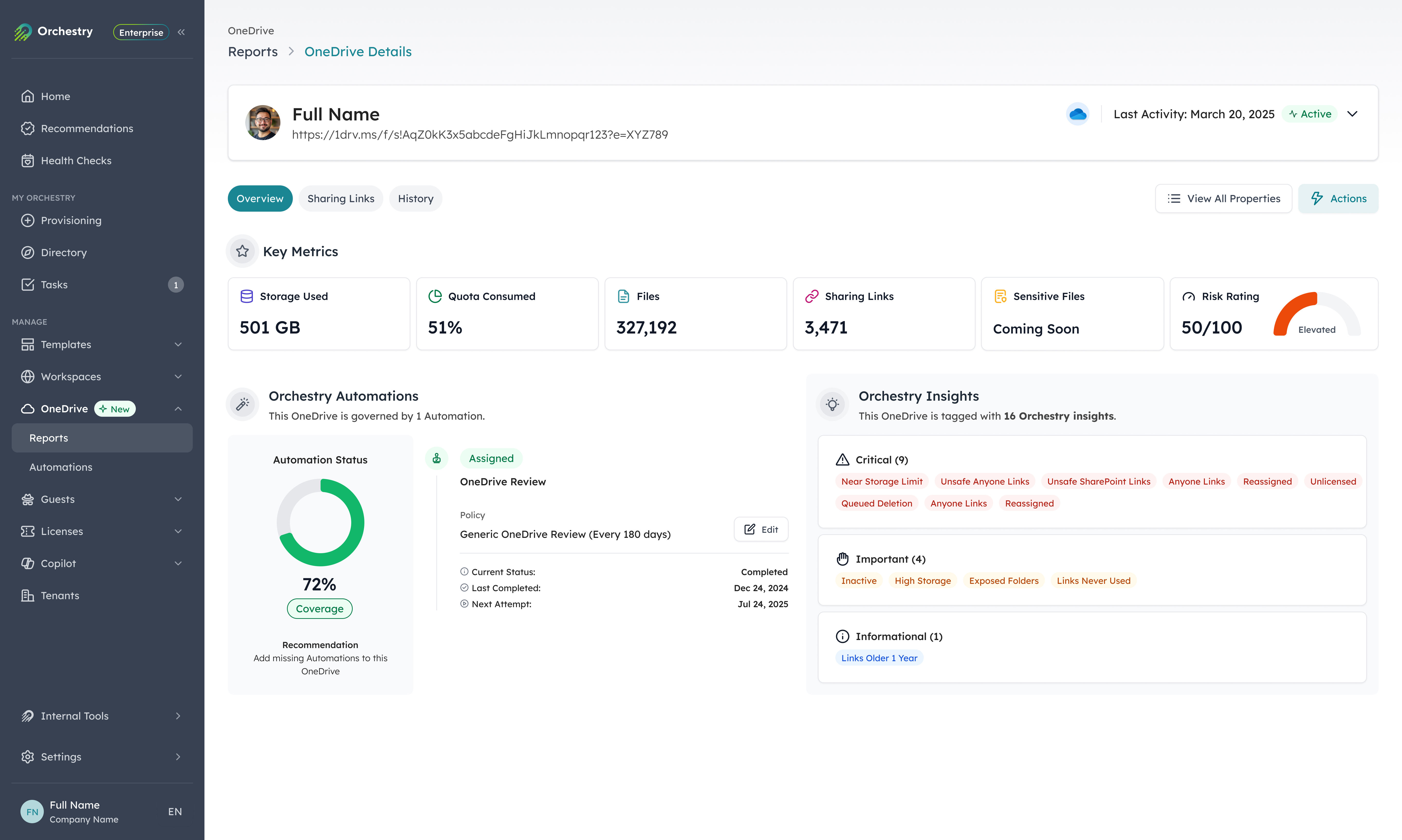
Key visibility includes:
- storage usage, file counts, and sharing link activity
- external collaborators and oversharing patterns
- potentially risky configurations surfaced through Orchestry’s Risk Ratings and governance posture scoring
- orphaned and inactive OneDrive accounts that previously went unnoticed
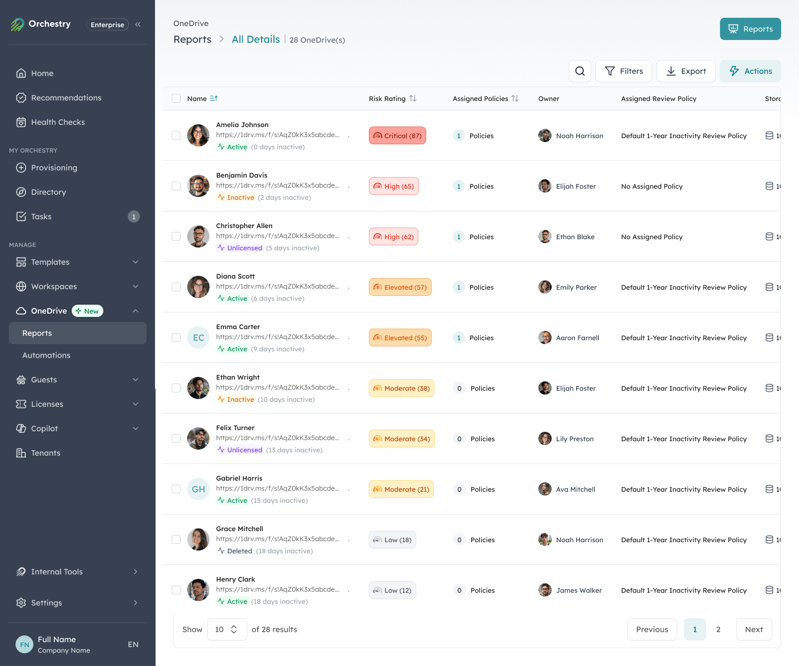
For the first time, Orchestry gives organizations a scalable way to see, compare, and manage OneDrive as part of a single governance experience, instead of reviewing it one user at a time.
What you can automate
OneDrive Review Automation introduces recurring governance cycles focused on search visibility, version history, and sharing links.
Admins define either a regular cadence or an event-based trigger. When a review runs, OneDrive owners receive prompts to:
- review and, if needed, tighten search discovery for their OneDrive
- clean up excessive version history to reclaim storage
- remove outdated or risky sharing links
This reduces a significant amount of manual audit work and helps keep personal storage closer to security and storage expectations throughout the year.
A new intelligent trigger option allows reviews to run automatically when a OneDrive’s storage usage crosses a defined threshold. This surfaces reviews when action is truly needed, without clustering them on a fixed schedule.
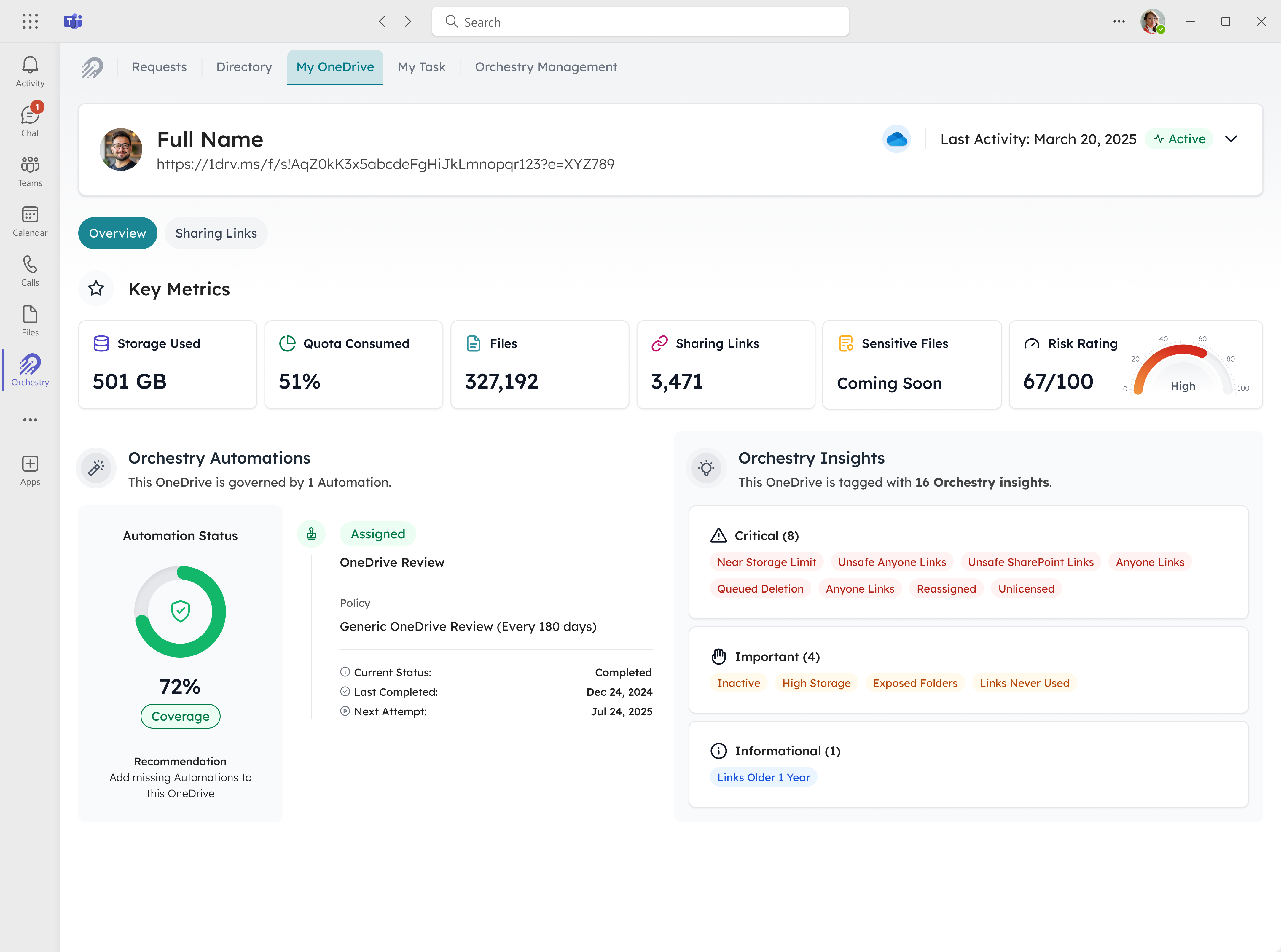
The new My OneDrive tab in the Orchestry app gives users transparency into their own storage and review prompts, reinforcing accountability without relying solely on admin intervention.
How this fits into full-stack governance
OneDrive joins Teams and SharePoint in a consistent governance model.
All three can follow a similar approach for visibility, risk scoring, cleanup routines, and reporting. This reduces blind spots and gives security and governance teams a more complete way to evaluate exposure across collaborative and personal storage.
It also simplifies communication with leadership, who can now see a more unified view of organizational risk posture.
Who benefits from OneDrive governance
IT Administrators
Gain tenant-wide reporting across every OneDrive, with no PowerShell or manual exports.
Security and Compliance Teams
Identify oversharing, external collaborators, and sharing anomalies before they create exposure.
Governance Officers
Run audit-ready, tenant-wide reviews without reconciling multiple reports.
CIOs and CISOs
Understand the risk posture of personal storage and how review cycles improve hygiene over time.
What organizations gain
OneDrive Management is designed to help teams:
- surface risky and fast-growing faster
- run consistent cleanup reviews focused on version history and sharing links
- bring personal storage into the same regular governance routines they already run for workspaces
It closes a long-standing gap that Copilot and Search have made more visible and more urgent.