/HubSpot%20-%20eBook%20-%20Proof%20Card%20Mockup%20001.jpg?length=1000&name=HubSpot%20-%20eBook%20-%20Proof%20Card%20Mockup%20001.jpg)
/HubSpot%20-%20eBook%20-%20Proof%20Card%20Mockup%20001.jpg?length=1000&name=HubSpot%20-%20eBook%20-%20Proof%20Card%20Mockup%20001.jpg)
/HubSpot%20-%20eBook%20-%20Proof%20Card%20Mockup%20001.jpg?length=1000&name=HubSpot%20-%20eBook%20-%20Proof%20Card%20Mockup%20001.jpg)
/HubSpot%20-%20eBook%20-%20Proof%20Card%20Mockup%20001.jpg?length=1000&name=HubSpot%20-%20eBook%20-%20Proof%20Card%20Mockup%20001.jpg)
/HubSpot%20-%20eBook%20-%20Proof%20Card%20Mockup%20001.jpg?length=1000&name=HubSpot%20-%20eBook%20-%20Proof%20Card%20Mockup%20001.jpg)
/HubSpot%20-%20eBook%20-%20Proof%20Card%20Mockup%20001.jpg?length=1000&name=HubSpot%20-%20eBook%20-%20Proof%20Card%20Mockup%20001.jpg)
/HubSpot%20-%20eBook%20-%20Proof%20Card%20Mockup%20001.jpg?length=1000&name=HubSpot%20-%20eBook%20-%20Proof%20Card%20Mockup%20001.jpg)

/HubSpot%20-%20eBook%20-%20Proof%20Card%20Mockup%20001-min.jpg?length=1000&name=HubSpot%20-%20eBook%20-%20Proof%20Card%20Mockup%20001-min.jpg)


March has been a truly eventful month for Orchestry. Our most highly anticipated achievement was receiving SOC2 Type II accreditation – but more on that in this blog. Apart from that, we celebrated the lovely ladies of Orchestry all month long, and, of course, that didn’t stop us from releasing a few exciting features and updates to the Orchestry platform.
SOC2 Type II accreditation is here!
The latest tangible proof of our commitment to our organizational value of Security is our achievement of SOC 2 Type II compliance – the most comprehensive certification within the Systems and Organization Controls protocol.
Apart from us living and breathing our organizational values, the trust, confidence, and peace of mind of our customers and partners is the reason why we went after the coveted SOC2 Type II certification.
Industry experts estimate that about 60% of all data breaches happen via third-party vendors, including email & cloud service providers.
According to IBM, on average, it takes companies 280 days to detect a third-party data breach. This often happens because third-party vendors tend to hide the fact that a data breach had occurred because many of them lack the security controls and protocols that are aimed at protecting their customers’ data.
With the average cost of a data breach expected to reach $5M in 2023, we weren’t prepared to take chances with our customers’ and partners’ data.
Read our blog to learn more about this incredible achievement by the Orchestry team!

Some noteworthy updates from the March release
Achieving the SOC2 Type II accreditation did not stop our development team from absolutely crushing it and delivering yet another great release full of great updates to the Orchestry platform, the UX, and the UI.
We will cover just a few to give you a taste of the attention to detail and constant focus on improving Orchestry’s functionality our development team shows each and every release.
Updates to automated archival emails
One of the incredibly valuable features of Orchestry is the Lifecycle Management of Microsoft 365 Groups, MS Teams, and SharePoint. Automated archival policy creation is part of that functionality.
With these policies, Orchestry admins can create robust workflows which configure the exact actions that happen to every piece of content that has been identified as ripe for deletion or archival. We’ve written a comprehensive blog about these policies, which you can check out here.
The policy creation process allows you to engage content (Group/Team/SharePoint) owners to make archival and renewal decisions on behalf of the IT team and action them autonomously and independently.
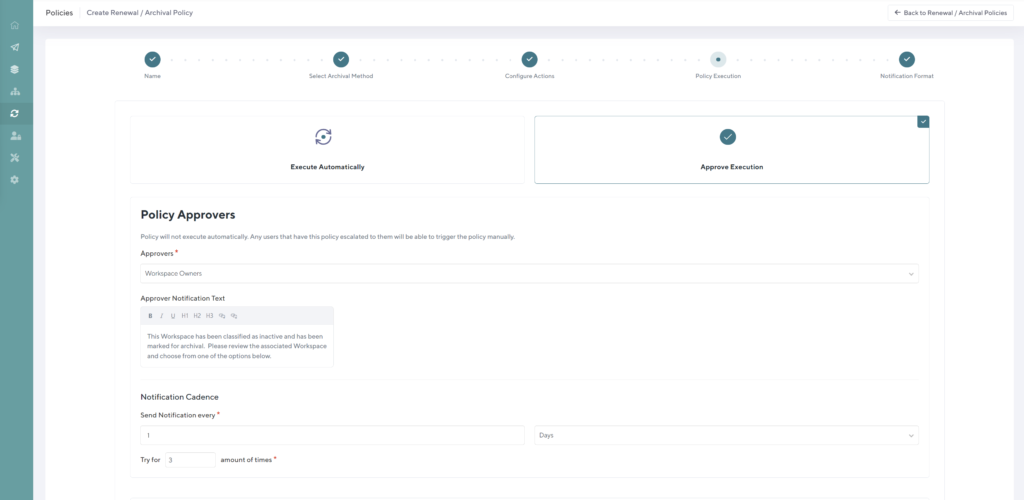
This workflow also allows the IT Admins to configure how often to engage the content owners, and by what means – emails or Teams message, or even both!
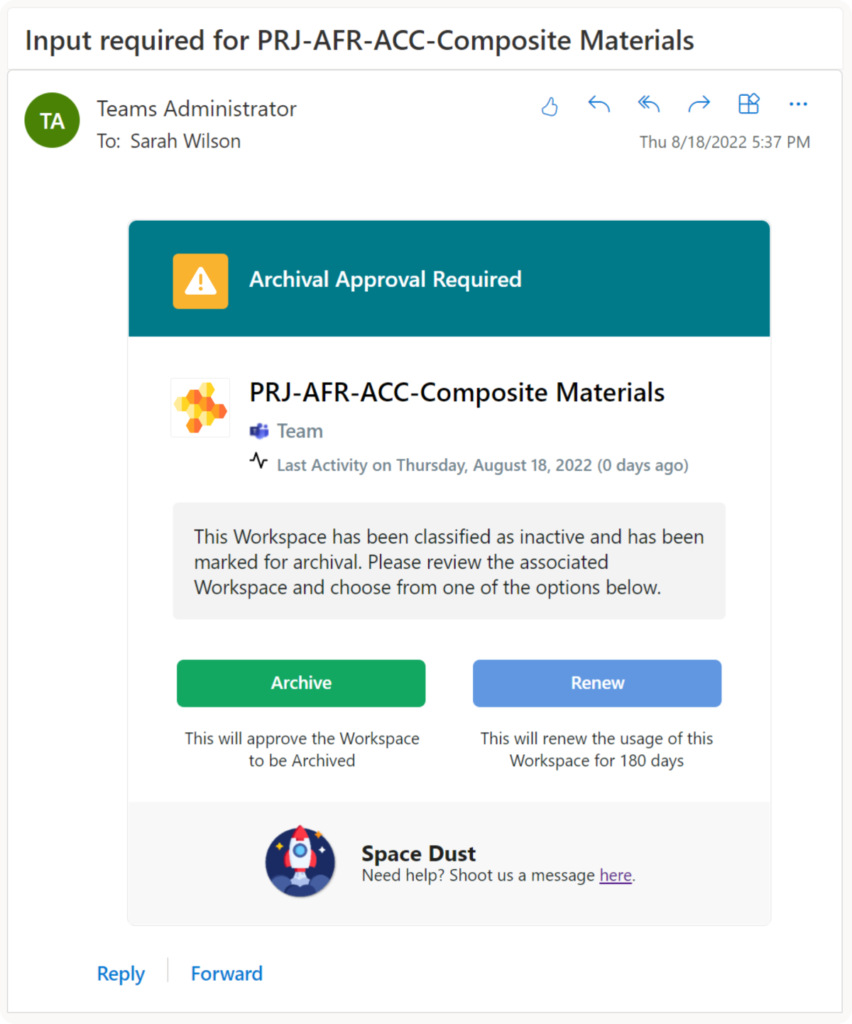
Previously, to action this policy, Orchestry would send out automated individual emails to all content owners, allowing them to make the decision whether the content could be archived, or needed to be renewed.
One of our valued customers suggested that a better idea would be to send a single email to all content owners at once, which would achieve the following:
- Limit the number of emails sent out for each archival/deletion.
- Provide transparency to owners of content as to what other owners are part of the same Team, SharePoint site, or Group, without having to lift a finger.
- Help facilitate a productive discussion among all content owners on how to proceed with the content archival or deletion.
Sure enough, we went ahead and implemented this change, which is being received very positively by all of our customers and partners.
Orchestry's Teams app UI changes
Orchestry is built to be used by both, IT Admins and end users wherever they feel most comfortable working, which includes 2 different experiences:
- Using the Orchestry app directly within Teams.
- Using Orchestry as a web app.
The two experiences vary slightly, and the web app generally provides more functionality and depth, however, the Teams app is equally as user friendly and the Orchestry admins can manage most tasks within it.
That said, we made some slight changes to the UI of the Orchestry’s Teams app as part of the latest release, and here’s what changed.
Many Orchestry users are very familiar with our incredibly powerful Reporting dashboard and even more powerful actionable Insights. If you are not familiar with them, make sure to check out the blog below.


What is truly noteworthy about these insights and reports is that they can be exported and leveraged for in-depth analysis. The exporting of these reports is only available through the Orchestry web app, so until recently, the “Export” button was not visible on the Orchestry’s MS Teams app.
Looking at our app usage stats, we noticed an uptick in the usage of the Orchestry Teams app, versus the web app, so in order to ensure each and every Orchestry admin has visibility into the export option being available to them, we added an Export button to the Orchestry Teams app with helpful instructions to access the web app to complete the export.
To paraphrase Neil Armstrong, it was a small step in the UI improvement for Orchestry, but a giant leap for all Orchestry Admins toward data analysis.
Orchestry celebrates International Women's Day

What many don’t know is that Orchestry is a primarily female-led organization. Naturally, we proudly celebrated International Women’s Day, followed by a separate celebration of Pi Day, where our ladies dressed in purple to support the #DressForStem movement.
We’ve set out to interview the lovely ladies of Orchestry and ask them a few burning questions:
- What made them get into technology
- What do they love the most about working in technology
- What are some of the challenges they experience as women in technology
- And (of course) how do they plan to celebrate International Women’s Day.
Head over to our blog to read a few fascinating and incredibly inspiring stories of women of Orchestry.


Orchestry does a deep dive into driving the adoption of M365

In March, we focused on putting together and sharing with you many useful resources that will help you increase the adoption of Microsoft 365 tools across your organization. Take a look at some of the blogs we shared this month and some of our older blogs that still hold true to this day:
- When to use what in M365 – this wonderful blog by our very own Joy Apple covers the basics of what tool to use for what job in M365. It’s a great resource you can share with staff to get to know the tools a bit better and, potentially help them ask the most common question “When to use what?”


- Microsoft Teams Adoption Strategies: Tips for IT Teams – in this article, we share some first-hand experiences of how IT teams can make their Microsoft Teams roll-out as smooth and successful as possible.


- Drive Adoption of SharePoint Online With Beautiful & Engaging Pages – this article shows how with the help of Vertical sections, you can engage end-users of SharePoint Online better, as well as present them with all the relevant content that will no doubt delight them.


- From Low to High: Strategies for Increasing Microsoft 365 Adoption in Your Organization – this mammoth of an article shows you how to access your Microsoft 365 Adoption Score, and how to decipher it. It shines a light on some of the factors that contribute to low adoption of M365 tools, or ineffective usage, and how to drive the adoption of the tools across your organization with some simple strategies.


Want more insights delivered straight to your inbox?
For more Microsoft 365, SharePoint Online, and Teams insights, tips and tricks, best practices, and exclusive events delivered straight to your inbox, join our mailing list today and level up your Microsoft 365 game!
Tag(s):
Orchestry