/HubSpot%20-%20eBook%20-%20Proof%20Card%20Mockup%20001.jpg?length=1000&name=HubSpot%20-%20eBook%20-%20Proof%20Card%20Mockup%20001.jpg)
/HubSpot%20-%20eBook%20-%20Proof%20Card%20Mockup%20001.jpg?length=1000&name=HubSpot%20-%20eBook%20-%20Proof%20Card%20Mockup%20001.jpg)
/HubSpot%20-%20eBook%20-%20Proof%20Card%20Mockup%20001.jpg?length=1000&name=HubSpot%20-%20eBook%20-%20Proof%20Card%20Mockup%20001.jpg)
/HubSpot%20-%20eBook%20-%20Proof%20Card%20Mockup%20001.jpg?length=1000&name=HubSpot%20-%20eBook%20-%20Proof%20Card%20Mockup%20001.jpg)
/HubSpot%20-%20eBook%20-%20Proof%20Card%20Mockup%20001.jpg?length=1000&name=HubSpot%20-%20eBook%20-%20Proof%20Card%20Mockup%20001.jpg)
/HubSpot%20-%20eBook%20-%20Proof%20Card%20Mockup%20001.jpg?length=1000&name=HubSpot%20-%20eBook%20-%20Proof%20Card%20Mockup%20001.jpg)
/HubSpot%20-%20eBook%20-%20Proof%20Card%20Mockup%20001.jpg?length=1000&name=HubSpot%20-%20eBook%20-%20Proof%20Card%20Mockup%20001.jpg)

/HubSpot%20-%20eBook%20-%20Proof%20Card%20Mockup%20001-min.jpg?length=1000&name=HubSpot%20-%20eBook%20-%20Proof%20Card%20Mockup%20001-min.jpg)


Microsoft's file-level archiving preview launched on March 30, 2026. If you manage SharePoint storage and you've been waiting for it, you're probably wondering the same thing most admins are: does this finally solve the mixed-activity site problem?
The answer is: partly. It solves the access and Copilot relevance problem. For tenants over quota, it reduces what you pay on the overage. But it doesn't free up capacity, and for tenants within quota the billing impact is zero.
Here's why. Most SharePoint sites can't be archived at the site level because a single active file keeps the whole site marked as in use. File-level archiving addresses that constraint by letting you archive individual files within an active site.
But per Microsoft's own documentation, archived files still count against your site storage quota identically to active files. The storage gets reclassified to a lower billing rate, not removed from your quota. If you're expecting the bill to drop because you archived a few thousand inactive files, it may not.
This post explains the underlying dynamic, how the billing model actually works, and what to do about inactive files in active SharePoint sites before policy-based automation arrives.
Why most SharePoint sites have both active and inactive content
Most M365 tenants inherit their storage problem from the way SharePoint got adopted. An early cloud migration moved years of on-premises file shares into a handful of large sites. Department and project sites grew steadily, accumulating both current work and years of legacy content that nobody reviewed.
The result is a pattern that shows up across almost every tenant: a site that looks active in the admin center, because someone edited one document last week, while the other 90% contains inactive files in “active” SharePoint sites.
A Microsoft Tech Community post on Dentsu's deployment found the same pattern: typically only 10 to 20% of stored files remain actively used while the rest accumulates over time.
That pattern isn't unique to Dentsu. Microsoft MVP Tony Redmond coined the term term “digital debris” for exactly this pattern. It's a structural outcome of how cloud migrations happened and how unmanaged sprawl behaves when cleanup stays optional.
In practice, this looks like large sites, recent last-activity dates, and no easy way to tell what's actually driving the storage.
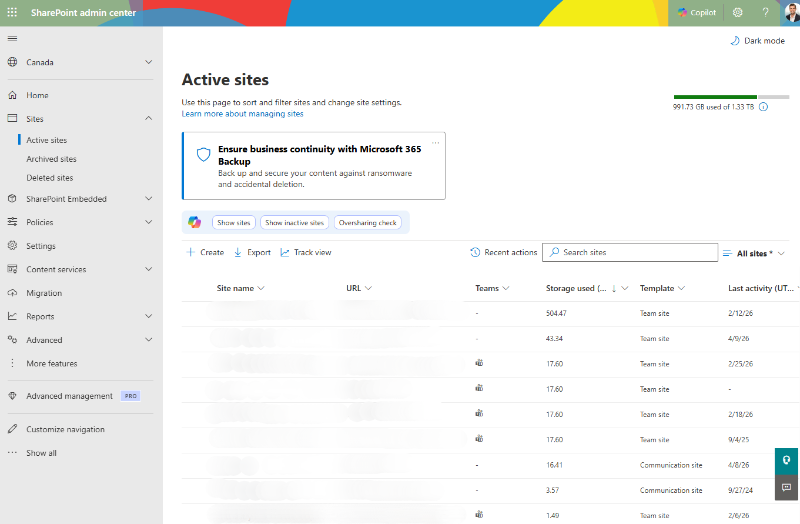
The native admin center gives you last-activity dates, SharePoint storage reports, and site usage reports. What it doesn't give you is a cross-tenant view of which workspaces are sitting heavy with inactive content and which have genuine activity.
Surfacing that across the tenant requires either drilling into each site individually or working with tooling that aggregates workspace-level storage and activity data.
Orchestry surfaces storage usage and inactivity signals at the workspace level across the tenant, so admins can see which workspaces are storage-heavy and inactive without navigating each one separately in the admin center. That's the starting point for identifying mixed-activity candidates at scale.
Why any of this matters for cost: SharePoint hot-tier storage bills at $0.20/GB/month for any storage over your tenant's included allocation. Every GB of inactive content sitting in a hot-tier site bills at that rate, regardless of whether anyone is reading it. For tenants that have accumulated years of unreviewed content, that's not a rounding error.
What site-level archiving requires that file-level archiving solves
Site-level archive through Microsoft 365 Archive moves an entire inactive site from hot storage to the archive tier at $0.05/GB/month, a 75% reduction on any overage storage.
The constraint is real: the site has to be genuinely inactive. A single file with a recent edit keeps the site's last-activity date current and makes site-level archive either impractical or a disruption risk.
This is the one-active-file problem. A shared notes file updated at last week's team meeting. A quarterly reporting template someone opened to download. A policy document with a minor revision from last month. Any of these keeps a site marked as active, even when the other 90% of its content is years old and nobody is looking at it. The whole site keeps billing at full hot-tier rates because of content that represents a fraction of its footprint.
File-level archiving, now in public preview as of March 30, 2026, addresses that constraint directly. You can archive specific files or folders within an active site without touching the content that's still in use. That's a meaningful capability for mixed-activity sites that were never candidates for site-level archive. For a broader look at how these approaches compare, see SharePoint archiving solutions vs. storage offloading.
For Copilot relevance, file-level archiving delivers a clear benefit. Archived files are excluded from Copilot's semantic index while remaining searchable. Stale content that shouldn't surface in Copilot responses can now be archived at the file level, without requiring the whole site to go dormant.
Why file-level archiving doesn't reduce your SharePoint storage quota
Understanding the SharePoint archive storage billing model is what separates an archiving decision that delivers expected results from one that doesn't.
Microsoft's Archive FAQ states it plainly: file-level archive doesn't change site storage usage or quota behavior. Archived files are accounted for in site storage the same way as active files. Archiving a file doesn't reduce reported storage usage, change storage calculations, or affect quota enforcement.
In practice, if a site is consuming 100 GB and you archive 80 GB of inactive files within it, the site still shows 100 GB used in the SharePoint Admin Center. The archived files haven't moved out of your quota. They've moved to a different billing rate within it.
You can see your current position at the top of the same view:

The M365 Archive billing model applies only to storage that exceeds your tenant's included allocation. If your tenant has 10 TB of included SharePoint storage and you're using 8 TB, archiving files has zero impact on your monthly Microsoft bill. The archive tier charge of $0.05/GB/month only kicks in on storage above your included limit. Microsoft offers a cost calculator if you want to model the actual impact for your tenant.
If you are over quota, archiving files that contribute to the overage does reduce your bill. The rate on that overage drops from $0.20/GB/month to $0.05/GB/month, a 75% per-GB reduction. But it doesn't free up capacity for new content. A site at 95% of its site-level quota gains no breathing room from file-level archiving. The files still count. For more on how M365 storage costs compound over time, see Blog 1 in this series.
One more dimension worth understanding: file-level archiving archives the current file and all its version history together. Version history can't be separated from the file at archive time, so version bloat travels with it. If a file has 200 versions, all 200 move to archive as a unit. If version history is a significant part of your storage footprint, that's a lever worth addressing separately from archiving. See how version history affects SharePoint storage for the specifics.
The distinction that matters: file-level archiving is the right tool for improving Copilot content relevance and reducing costs on overage storage. It's not a quota solution. Understanding that distinction is what separates an archiving strategy that delivers expected results from one that doesn't.
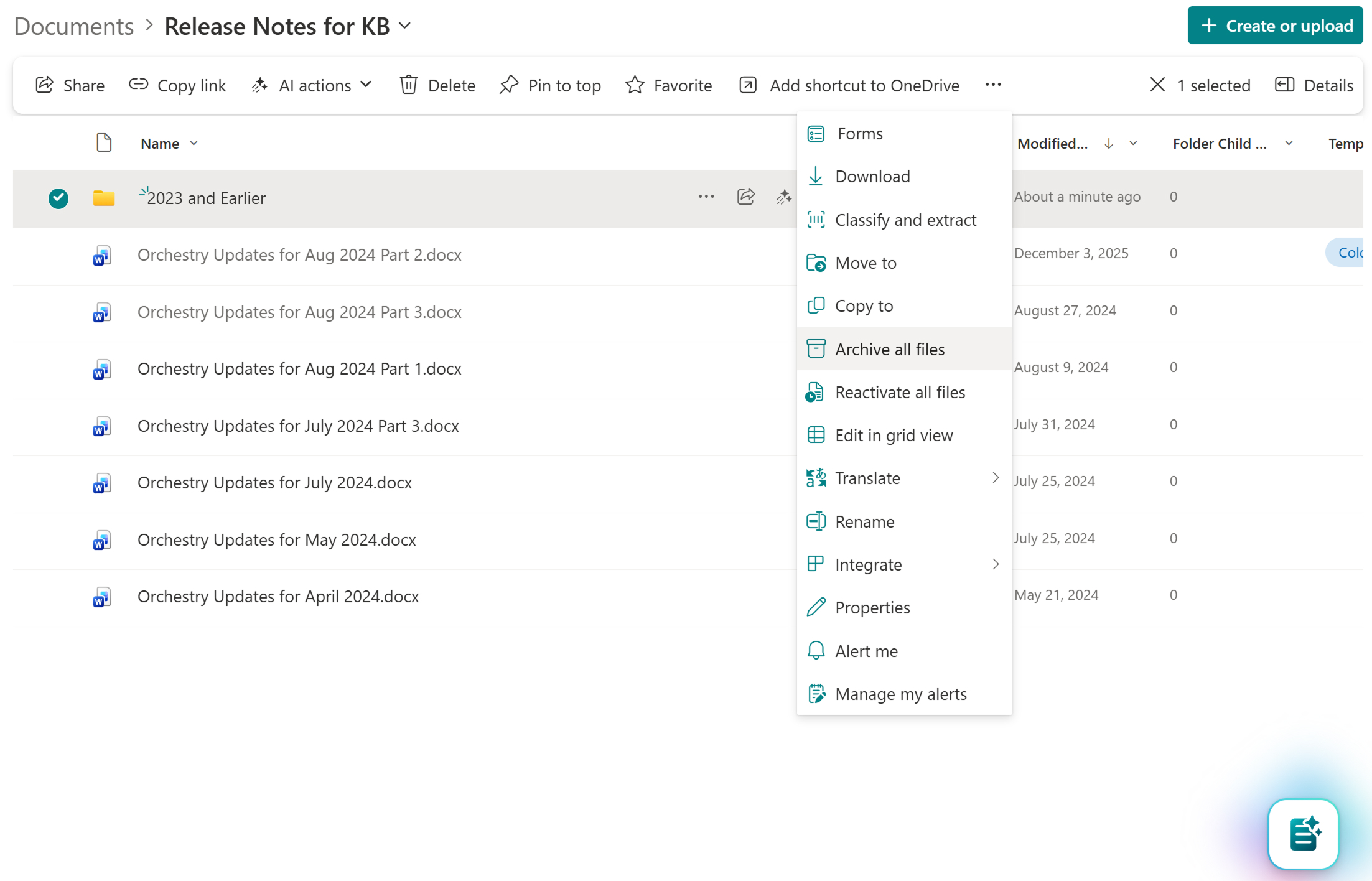
When file-level archiving is enabled, archived files stay visible in the library alongside active ones, marked with an archive indicator.
How stale content in active sites degrades Copilot relevance
Even for tenants that aren't over quota, there's a Copilot argument for addressing inactive content in active sites.
Archived files are excluded from Copilot's index. Active stale files are not. A site carrying five years of superseded policy drafts, outdated project reports, and obsolete process documents is content Copilot draws from when users in that site ask questions.
That's not a Copilot flaw. Copilot surfaces content the user has access to. If a user has access to five years of inactive content in an active site, that content is in scope. The signal-to-noise problem is a content governance problem. Copilot makes it visible.
The bottleneck in the current preview is that file-level archiving is a manual operation. Admins identify which files to archive and initiate the archive action via the SharePoint UI, PowerShell, or Microsoft Graph API. There's no automated policy in the current preview that archives files based on last-accessed date or other criteria. Policy-based automation is on Microsoft's roadmap but not yet available.
For a small site or a targeted cleanup exercise, manual archiving is workable. For a tenant with hundreds of mixed-activity sites, each containing thousands of files, manual identification at that scale is the same kind of bottleneck that makes any file-level governance task hard to sustain without tooling that surfaces candidates and routes decisions to the right people.
What policy-based file archiving will, and won't, change
Microsoft has confirmed that policy-based file archiving is on the roadmap. When it arrives, admins will be able to define rules that automatically archive files meeting criteria like last-accessed date, file type, or library, and let the system execute rather than reviewing files one at a time.
What policy-based archiving will change: the manual identification problem. The operational bottleneck of deciding which files qualify will shift from a per-file judgment to a rule the admin sets once.
What policy-based archiving won't change: the billing model. Automated archiving will reclassify storage at scale, but archived files will still count against site quota. The quota constraint isn't a current preview limitation. It's how M365 Archive works at both the site and file level, and that's unlikely to change.
The practical implication is that file-level archiving works best as part of a broader toolkit. Version limits, version history purging, site-level archiving, and file-level archiving each address a different dimension of the storage problem. Used together, they can have a significant combined impact on storage posture, even before policy automation arrives.
No single lever addresses all three dimensions of the problem. For a comparison of the archiving options and what each one actually does to your storage costs, see SharePoint archiving solutions vs. storage offloading.
What you can do now with mixed-activity sites
If your tenant has large mixed-activity sites where site-level archive was never practical, file-level archiving is worth enabling now. It's in public preview, and it's the first native tool that lets you act on the inactive content inside active sites without disrupting what's still in use.
If your SharePoint storage quota is exceeded or nearly full because of inactive content, don't wait for policy automation or GA.
There are three levers, and they work independently.
- Version trimming reduces the footprint of existing content: it targets the version history that accumulates silently on high-churn files and cuts storage before you decide what to archive.
- Site-level archiving is still the cleanest cost reduction when a site qualifies as genuinely inactive.
- File-level archiving, currently in public preview, handles the mixed-activity sites where neither of the first two levers alone is sufficient. These are separate decisions, not a fixed sequence.
Identifying candidates natively: in the SharePoint Admin Center, Active Sites sorted by storage descending with 'Last activity' visible is the starting point. Sites with large storage footprints and activity dates more than six to twelve months old are your review candidates. The site-level view won't show which libraries or files within those sites are inactive. That assessment still requires drilling into individual sites, or working with tooling that aggregates workspace-level storage and inactivity data across the tenant.
Orchestry's Storage & Archival capabilities surface workspace-level storage and inactivity data across the tenant, so the workspaces that warrant review aren't buried in the admin center.
Once candidates are identified, Orchestry's workspace review automation routes archival decisions to the workspace owners who know whether the content is safe to act on, rather than requiring IT to make every call from the top. That's the difference between a one-time cleanup and a process that repeats.
For a more sustainable storage strategy beyond one-time cleanup, see Beyond “just delete it”: A sustainable M365 storage strategy.