/HubSpot%20-%20eBook%20-%20Proof%20Card%20Mockup%20001.jpg?length=1000&name=HubSpot%20-%20eBook%20-%20Proof%20Card%20Mockup%20001.jpg)
/HubSpot%20-%20eBook%20-%20Proof%20Card%20Mockup%20001.jpg?length=1000&name=HubSpot%20-%20eBook%20-%20Proof%20Card%20Mockup%20001.jpg)
/HubSpot%20-%20eBook%20-%20Proof%20Card%20Mockup%20001.jpg?length=1000&name=HubSpot%20-%20eBook%20-%20Proof%20Card%20Mockup%20001.jpg)
/HubSpot%20-%20eBook%20-%20Proof%20Card%20Mockup%20001.jpg?length=1000&name=HubSpot%20-%20eBook%20-%20Proof%20Card%20Mockup%20001.jpg)

/HubSpot%20-%20eBook%20-%20Proof%20Card%20Mockup%20001.jpg?length=1000&name=HubSpot%20-%20eBook%20-%20Proof%20Card%20Mockup%20001.jpg)

/HubSpot%20-%20eBook%20-%20Proof%20Card%20Mockup%20001-min.jpg?length=1000&name=HubSpot%20-%20eBook%20-%20Proof%20Card%20Mockup%20001-min.jpg)
/HubSpot%20-%20eBook%20-%20Proof%20Card%20Mockup%20001-min.jpg?length=1000&name=HubSpot%20-%20eBook%20-%20Proof%20Card%20Mockup%20001-min.jpg)

File-level archive in Microsoft 365 is the feature SharePoint admins have been asking Microsoft for, and as of March 30, 2026, it’s now in public preview. It joins site-level archive as the second mode of Microsoft 365 Archive, and the two together give you something the platform didn't have before: a way to control storage costs and Copilot quality at the same time. Choosing between them, or running both, is the new question.
The two modes share a cold storage tier and a search experience, but they're built for different jobs. The decision that matters for your storage bill is which content goes into which mode, and why.
We’ll walk through the comparison the way most admins are now thinking about it: bill first, Copilot grounding second, operational fit last. If you're already seeing inactive SharePoint content costing you full price, you've felt the gap that both modes are designed to close.
How the SharePoint cold storage tier billing model works
Both archive modes route content into the same cold storage tier, which Microsoft prices at $0.05 per GB per month compared to the standard SharePoint rate of $0.20 per GB per month. The 75% gap between the two rates is the headline savings figure.
The mechanic underneath the headline is the part most admins miss. Archive storage charges only apply when your combined active and archived storage exceeds your tenant's licensed SharePoint quota. If you're under quota across both tiers, archived content costs you nothing. If you're over, you pay the cold-tier rate on the overage instead of the standard rate.
That single mechanic is the reason site-level and file-level archive produce different outcomes on your bill. The savings show up where active storage drops, because that's what changes whether you're over quota and by how much.
When site-level archive is the right move for storage costs
Site-level archive moves an entire SharePoint site, including its document libraries, lists, list data, permissions, and metadata, into the cold tier. The site stops counting against your active SharePoint quota the moment it's archived. It starts counting against Microsoft 365 Archive storage instead, billed at the cold rate.
For sites that represent concluded work, that swap is straight cost relief. A 100GB project site sitting in active storage is contributing to your tenant's overage. Archived, it's contributing to the cold tier at one quarter of the price, or to nothing at all if you're under quota across both. SharePoint or Global Admins can archive sites from the SharePoint admin center or via theSet-SPOSiteArchiveStatePowerShell cmdlet for bulk operations.
Most tenants have far more candidates than a single admin can process by hand. Orchestry's Archival Policies automatically detect inactive workspaces, route them through workspace owner review, and execute the archive action when owners confirm: into Microsoft 365 Archive cold storage, into archive in place for sites that need to stay accessible read-only, or into deletion for sites the owner confirms can be removed.
The same policy engine handles exclusion rules for sensitive sites that should never be archived. It's the difference between archiving twelve sites and archiving twelve hundred.
What site-level archive does to your Microsoft 365 archive cost
The savings math gets more interesting when you look at it across a real timeline. Microsoft's own pricing documentation makes the trade-off explicit: archived storage is 75% cheaper, but reactivating archived content has cost implications you need to plan for.
The savings hold up best when archived content stays archived. Microsoft eliminated the SharePoint reactivation fee in March 2025, which makes the math considerably friendlier than the original 2024 model, but two mechanics still shape the outcome.
First, reactivated content can't be re-archived for 30 days, so frequently revisited sites cycle in and out of cold storage less efficiently than truly inactive ones. Second, every reactivation moves storage back into your active SharePoint quota, which is what the standard $0.20/GB rate applies to. The cold-tier savings show up in proportion to how much of your archived footprint actually stays cold across a given billing period.
The practical implication: site-level archive pays back best when applied to content you don't expect to touch. Closed projects, departed teams, completed initiatives, deprecated departments. The Orchestry archive best practices guide walks through the candidate-selection process in depth, including the version history reduction step that compounds the savings before the archive action even runs.
What file-level archive in Microsoft 365 is built to do
File-level archive, announced in public preview on March 30, 2026, takes a different approach to a different problem.
Instead of archiving whole sites, it archives individual files inside active SharePoint sites. The site stays fully active, the rest of the document library stays editable, and archived files appear inline with a distinct icon overlay. Any user with edit permissions on a file can archive it; any user with read access can reactivate it.
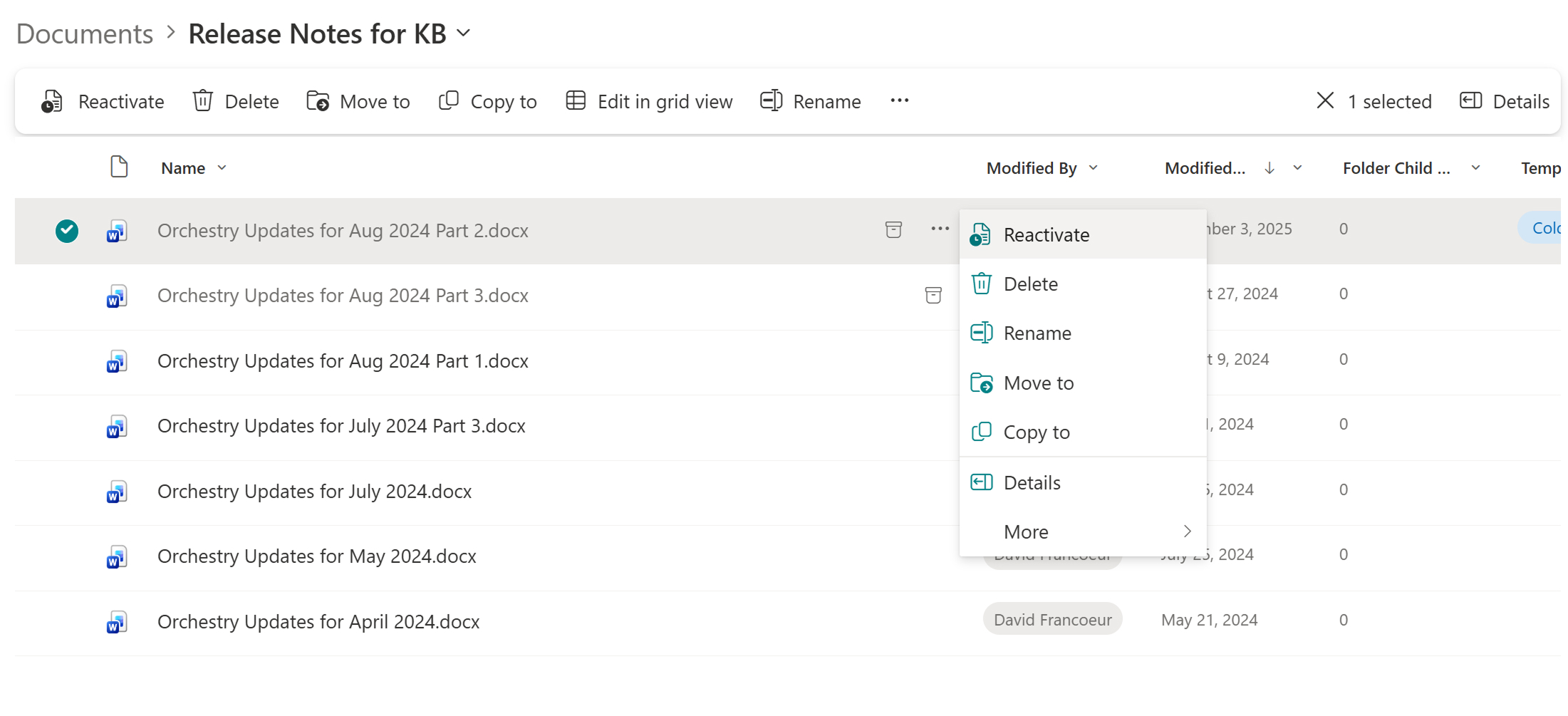
The design intent here is to clean up active sites that have accumulated years of content without disrupting how teams work. Typical file-level candidates include:
- Project files from a finished initiative
- Completed event materials
- Large inactive video files
- Reference documents that need to stay retained but no longer need to be in everyone's daily search results
File-level archive keeps that content compliant, retained, and discoverable in Microsoft Purview, while moving it out of the active surface that Copilot grounds against and that everyday users browse.
Public preview comes with the usual caveats. File-level archive is currently available for SharePoint sites only, with OneNote files, SharePoint pages, Site Assets libraries, and a list of Office and mobile clients still being brought into full support. Orchestry's file-level archiving limitations post covers the preview behavior in detail.
During public preview, file-level archive must also be enabled at both the tenant and site level via PowerShell using the Set-SPOTenant -AllowFileArchive and Set-SPOSite -AllowFileArchive flags before users can archive files.
How both archive modes interact with your Microsoft 365 storage quota
Here's where the two modes diverge in a way that determines what hits your bill.
Site-level archive removes the archived site's content from your tenant's active SharePoint storage entirely. The active total drops. If you were over your licensed quota, your overage drops by the same amount, and your bill follows.
File-level archive is built differently. Archived files stay accounted for in site storage the same way active files are. The site's quota usage doesn't change; the file's billing tier does. At the tenant level, the archived files contribute to Microsoft 365 Archive storage rather than active SharePoint storage, so cold-tier savings still appear in the cold tier accounting, but the active quota arithmetic stays steady.
Read together, the two modes give you complementary tools. Site-level is built to reduce your active footprint, which is what the bill responds to. File-level is built to clean up active sites without disrupting them, which is what your Copilot grounding and search experience respond to.
Why file-level archive is a Copilot grounding win
Microsoft's overview documentation calls out a behavior that turns out to matter more than the storage line on the invoice for many tenants: "Copilot is not trained on archived content, maximizing response relevancy." Both archive modes share that property.
For active sites carrying years of accumulated history, file-level archive is the more surgical tool. You can pull old contract drafts, deprecated vendor proposals, or last cycle's marketing assets out of Copilot's source pool without breaking the site or moving the team. The result is a meaningful improvement in signal-to-noise on the answers Copilot returns for the active sites the rest of the team is still using every day.
That's the case for using file-level even when your tenant is well under quota and the cold tier savings don't show up on the bill. Cleaner Copilot answers on the sites you care about most, without an active-storage cost trade-off.
Reactivation: what changes between site archive and file archive
Reactivation behavior is a meaningful part of the choice between modes, because it affects how you handle the inevitable "I need that one document from a closed project" request.
Site-level reactivation brings the entire site back. Permissions, metadata, retention policies, and version history return losslessly once the site is reactivated. The trade-off is that you've reactivated the whole site to retrieve one file, and the 30-day re-archive lockout applies before you can return the site to cold storage.
File-level reactivation is per-file and per-user. Anyone with read access can reactivate a single file, the rest of the library stays archived where it is, and the same 30-day lockout applies to that file individually. For occasional, file-scoped retrieval scenarios, that's a much lighter operation than spinning a whole archived site back up.
How to find inactive content worth archiving
Identifying archive candidates is the operational bottleneck on both sides of the comparison. Microsoft's native tooling gives you the SharePoint admin center activity reports and PowerShell-driven inventory queries, which are accurate but coarse. The decision that follows from those reports, "is this site inactive or just quiet right now," is still yours to make for every workspace.
The criteria that matter are familiar to anyone who's run a tenant cleanup: last meaningful activity, owner status, sensitivity label, sharing exposure, and current size. Based on Orchestry data, 67% of workspaces are inactive on average when organizations first connect to the platform. The candidate pool is larger than most admins assume.
Orchestry's Workspace Lifecycle Statuses flag sites as Inactive automatically based on configurable inactivity thresholds. Workspace Review Policies route those sites to the workspace owner for a yes-archive-or-extend decision, with email and Teams notifications, and queue confirmed sites for archive.
It's the operational layer that sits between "this site looks inactive" and "this site is in Microsoft 365 Archive," and it's the layer Microsoft's native tooling leaves to admins to build themselves.
File-level candidates: which files are worth archiving inside an active site
The candidate question shifts when the site itself stays active. Four signals matter most.
- File age and access pattern. Files that haven't been opened in 12 to 24 months are the safest candidates, since their absence from active libraries is unlikely to disrupt current work.
- File type. Large media files, completed project artifacts, and deprecated reference documents tend to cluster at the top of the candidate list.
- File size. Large inactive files produce the biggest cold-tier delta per archive action.
- Sensitivity and retention status. Files already covered by a retention label or sensitivity classification stay protected through the archive transition, which means archiving them doesn't compromise compliance posture.
Orchestry is building file-level capabilities that extend the same model to individual files, coming soon on the Enterprise plan.
Choosing between site archive and file archive
For most tenants, the right answer isn't one mode or the other; it's both, applied to different content.
| If your goal is | Reach for | Best fit content |
|---|---|---|
| Reduce the storage bill | Site-level archive | Closed projects, departed teams, completed initiatives, deprecated departments |
| Reduce Copilot noise on active sites | File-level archive | Active sites carrying years of accumulated history, old drafts, completed event materials, reference documents |
| Both | Both, on different content | Whole-site archive for concluded work; file-level archive for active sites that need clean grounding |
Site-level routing into Microsoft 365 Archive is generally available in Orchestry today through the same policy engine that handles archive in place, exclusion rules, and lifecycle reporting. Orchestry is building file-level capabilities that extend the same model to individual files, coming soon on the Enterprise plan.
The planned file-level engine targets files by inactivity threshold, file type, and size across multiple workspaces, runs queued jobs with concurrency controls within Microsoft's API rate limits, and notifies owners through email and Teams with the storage recovered and the file locations affected.
Microsoft is targeting native admin-driven policies for fall 2026, per Trent Green's public preview commentary; Orchestry's engine layers on top of that foundation.
What stays consistent across both modes
A few things hold true regardless of which mode you pick. Both archive modes preserve metadata, permissions, version history, and retention policy enforcement. Both keep content searchable in Microsoft Purview for legal hold and eDiscovery. Both use the same $0.05 per GB cold storage tier and the same tenant-level archive accounting.
If you're still untangling whether archive is the right tool versus retention or backup for a specific scenario, our Microsoft 365 Archive vs backup vs retention post explains the distinction. Archive moves content to a cheaper tier and changes its access pattern. Retention enforces preservation rules. Backup protects against deletion. The three are complementary, not interchangeable.
Make both archive modes operational in your tenant
To see which sites in your environment are genuine archive candidates, and to start applying site-level archive policies through workspace owner workflows today, start a free Orchestry trial and run a lifecycle assessment against your tenant.
File-level archive policy support is coming soon on the Enterprise plan, designed to extend the same rule-based model to the individual files that are weighing your active sites and Copilot grounding down.