/HubSpot%20-%20eBook%20-%20Proof%20Card%20Mockup%20001.jpg?length=1000&name=HubSpot%20-%20eBook%20-%20Proof%20Card%20Mockup%20001.jpg)
/HubSpot%20-%20eBook%20-%20Proof%20Card%20Mockup%20001.jpg?length=1000&name=HubSpot%20-%20eBook%20-%20Proof%20Card%20Mockup%20001.jpg)
/HubSpot%20-%20eBook%20-%20Proof%20Card%20Mockup%20001.jpg?length=1000&name=HubSpot%20-%20eBook%20-%20Proof%20Card%20Mockup%20001.jpg)
/HubSpot%20-%20eBook%20-%20Proof%20Card%20Mockup%20001.jpg?length=1000&name=HubSpot%20-%20eBook%20-%20Proof%20Card%20Mockup%20001.jpg)
/HubSpot%20-%20eBook%20-%20Proof%20Card%20Mockup%20001.jpg?length=1000&name=HubSpot%20-%20eBook%20-%20Proof%20Card%20Mockup%20001.jpg)
/HubSpot%20-%20eBook%20-%20Proof%20Card%20Mockup%20001.jpg?length=1000&name=HubSpot%20-%20eBook%20-%20Proof%20Card%20Mockup%20001.jpg)
/HubSpot%20-%20eBook%20-%20Proof%20Card%20Mockup%20001.jpg?length=1000&name=HubSpot%20-%20eBook%20-%20Proof%20Card%20Mockup%20001.jpg)

/HubSpot%20-%20eBook%20-%20Proof%20Card%20Mockup%20001-min.jpg?length=1000&name=HubSpot%20-%20eBook%20-%20Proof%20Card%20Mockup%20001-min.jpg)


Microsoft Teams and SharePoint are built to make collaboration easy. That's exactly the problem.
When creating a new workspace takes thirty seconds and needs no approval, sites multiply, channels accumulate, and groups proliferate. Because nothing reviews, archives, or removes the workspaces that outlive their purpose, they all stay, active or not.
The result is Microsoft 365 content sprawl: the tenant-wide accumulation of unstructured, unowned, and largely inactive Teams, SharePoint sites, and Microsoft 365 Groups that consumes storage, creates security exposure, confuses your users, and makes your tenant harder to govern as it grows.
What is Microsoft 365 content sprawl?
Microsoft 365 content sprawl is the uncontrolled accumulation of Teams, SharePoint sites, Microsoft 365 Groups, and associated content that happens when workspaces are created without governance guardrails and left to persist without lifecycle management.
You can recognize it by a few consistent signs:
- Teams and sites created with no naming convention, defined ownership, or metadata
- Workspaces that linger long after the project or team they served has ended
- Duplicate workspaces created when people can't find what already exists
- Orphaned workspaces with no active owner to manage membership, permissions, or content
- Storage growth from inactive content no one has reviewed or cleaned up
Microsoft Teams sprawl and SharePoint sprawl are the most visible forms, but the problem spans every workspace type in Microsoft 365.
Based on Orchestry data, roughly two in three Teams and SharePoint workspaces are inactive when Orchestry is first installed. Organizations that put governance in place at creation consistently push active workspace rates above 80%.
Why Microsoft 365 sprawl happens
Sprawl isn't bad behavior. It's the predictable result of a self-service platform without built-in governance.
- No guardrails at creation. Teams and SharePoint let any user create a workspace with no required naming, ownership, or metadata. Every unstructured workspace you allow today becomes tomorrow's cleanup project.
- Ownership is never defined. Many workspaces have no clear, active owner from the start. When the person who created a Team leaves, no one is left to decide what happens to its content, so the workspace, the access, and the data all stay.
- No cleanup process exists. Microsoft 365 has no built-in workflow that moves an inactive workspace through review and off the books. Cleanup needs someone to identify candidates, contact owners, decide, and execute, by hand and on repeat.
- Governance arrives too late. By the time you review a workspace for compliance or naming, it has often been operating outside standards for months. Retrofitting governance is harder than building it in.
- Duplication compounds. When people can't find an existing workspace, they create a new one, which makes discovery worse, which prompts more creation. Sprawl feeds itself.
The hidden costs of Teams and SharePoint sprawl
You probably underestimate the real cost of sprawl, because it's spread across several dimensions:
- Inactive workspaces keep consuming storage. Every dormant channel, archived project site, and forgotten Group adds to the bill you pay each month.
- Security exposure. A workspace with no active owner has no one reviewing membership, auditing permissions, or catching overshared content. An orphaned site with sensitive data and broad access is a gap you can't see until something goes wrong.
- IT burden. Manual governance doesn't scale. As the tenant grows, the effort to govern it by hand grows faster than your team can keep up.
- AI readiness. Microsoft Copilot surfaces content from the sites employees can access, so a tenant full of inactive, duplicate, or overshared workspaces means it draws from a noisy, stale pool. The same conditions apply regardless of which AI you use, whether that's Copilot, ChatGPT, Glean, or a custom Microsoft 365 Copilot agent.
- User experience. When people can't find the right workspace, they make another one, and when search returns dozens of similar Teams, adoption suffers.
Why manual sprawl cleanup doesn't work
The instinct is to run a cleanup campaign: find inactive workspaces, contact owners, archive what isn't needed. It works once. It doesn't work as a sustained practice, for three reasons:
- It's reactive, not preventive. Cleaning up existing sprawl doesn't stop new sprawl. Without governance at creation, the campaign becomes a recurring project instead of a solved problem.
- It concentrates effort on IT. When IT makes every decision, IT has to understand the context of every workspace it reviews, which is impractical at scale.
- It doesn't scale with the tenant. A process that works for 100 workspaces breaks at 1,000, and a tenant adding 50 workspaces a week outpaces any manual review.
The alternative is governance built into how workspaces are created and maintained, not layered on after sprawl accumulates.
How to manage Microsoft 365 content sprawl at scale
Governance at creation
The most effective anti-sprawl measure is a controlled provisioning process. Instead of letting anyone create a Team or site through the default self-service interface, you give people a guided request-and-provisioning workflow that applies naming conventions, ownership, and compliance policies at the moment of creation.
Your users get a structured request experience that surfaces existing workspaces before they create new ones, and IT gets workspaces that arrive already governed, with duplicates caught before they exist. Every workspace created through Orchestry's provisioning templates is built from an approved template, so naming, ownership, structure, and compliance apply from day one.
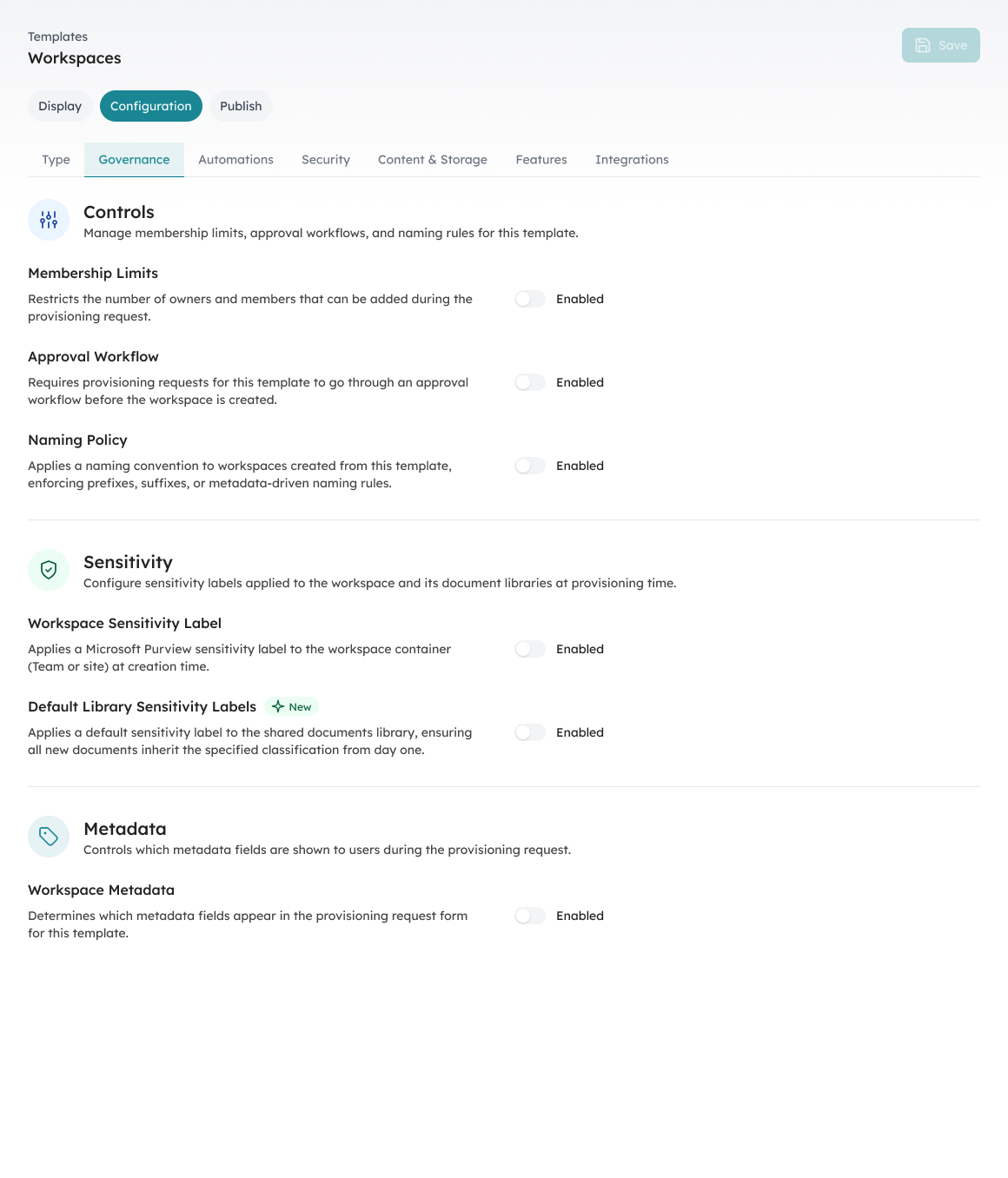
Governance controls (membership limits, approval workflow, naming policy, and sensitivity labels) configured on a provisioning template, so every workspace is governed at creation.
Automated lifecycle management
Preventing new sprawl is half the equation. Managing what already exists is the other half.
You need a process that identifies inactive workspaces, routes review decisions to the people who own them, and moves each one through a defined cycle, certify, archive, or delete, on a continuous basis. Orchestry identifies dormant workspaces across the tenant and triggers those reviews automatically, prompting owners to certify or flag a workspace for archival, and workspaces that aren't certified move toward archival on a set timeline, so IT doesn't chase every decision.
The goal isn't one cleanup. It's a living process that keeps active workspace rates high as the tenant grows.
Workspace reviews delegated to owners
Cleanup decisions belong with the people who have context, not with IT guessing from a spreadsheet. Workspace reviews put the decision with the owner who knows whether the content is still needed and who should have access.
Owners who don't respond trigger escalation, and workspaces without active owners get flagged for reassignment before they go orphaned. This spreads the governance load across the organization, the only approach that actually scales.
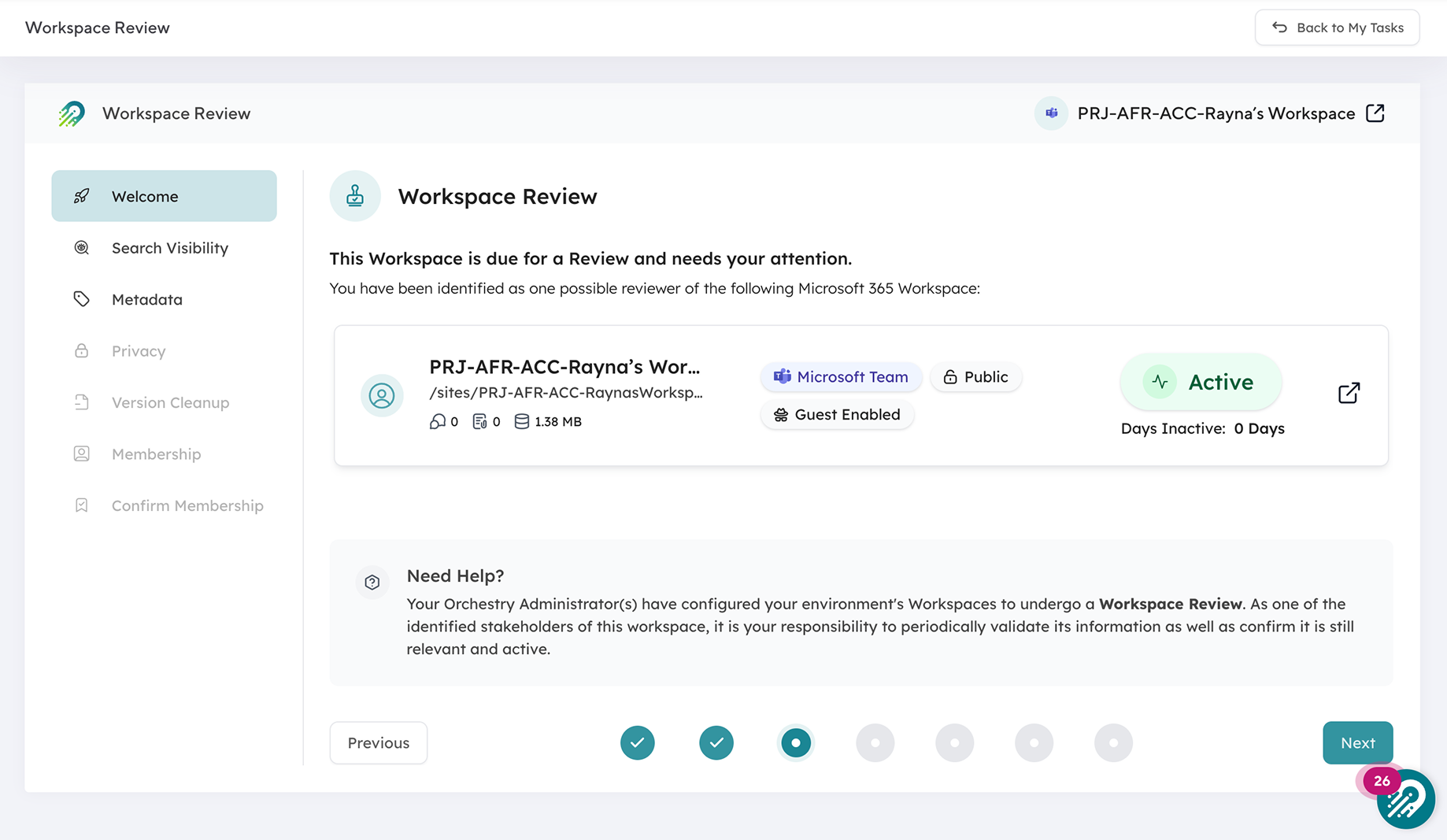
Cleanup decisions go to the owner who has the context, not to IT guessing from a spreadsheet
Complete tenant visibility
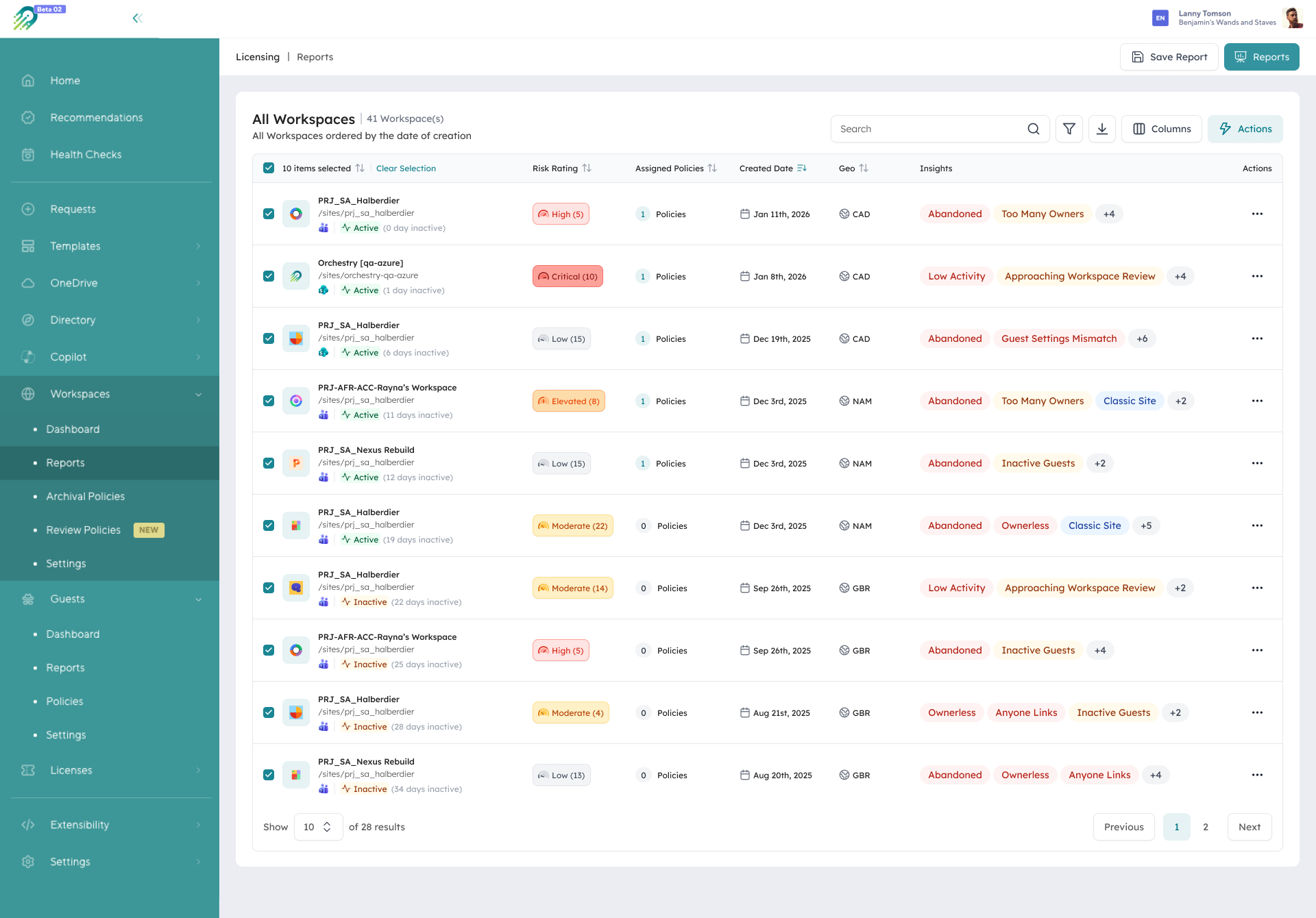
You can't manage what you can't see. Effective sprawl management needs one consolidated, always-current view of every workspace: activity, ownership, storage, sharing, and compliance.
Native admin centers hold some of this, but it's spread across tools and needs manual export and correlation, and by the time you've assembled it, something has changed. Orchestry surfaces Teams, SharePoint, OneDrive, and Viva Engage communities in a single view, filtered by activity, ownership, storage, or compliance, so the workspaces that need attention are visible and actionable.
How Orchestry compares to point tools
If you're weighing your options, it helps to see where each approach fits.
| Approach | Strength | Where it leaves a gap |
|---|---|---|
| Native Microsoft 365 admin centers | Built in, no added cost | Data is fragmented across multiple admin centers, with no provisioning templates or automated lifecycle |
| Reporting and migration point tools | Deep SharePoint reporting or migration | Built around point-in-time reporting or one-time moves, not continuous, owner-delegated lifecycle |
| Orchestry | Provisioning, reporting, owner-delegated lifecycle, and cross-workload visibility in one place | Governance runs as an ongoing practice, not a project |
What "under control" looks like
An organization with effective sprawl management has:
- A provisioning process that stops ungoverned workspaces from being created
- An automated review cycle that keeps inactive workspaces moving toward archival or deletion
- Workspace owners who participate in governance instead of waiting for IT
- A single, current view of every workspace's activity, ownership, and compliance
- Active workspace rates above 80%, sustained, not just right after a campaign
Orchestry customers commonly cut their inactive workspace count by more than half and hold active rates above 80%. The difference from a one-time campaign is that the process keeps running.
From sprawl management to AI readiness
Content sprawl and Copilot readiness are the same problem from different angles. A tenant that's two-thirds inactive isn't only a governance problem; it's a tenant where Copilot, and any AI agent you connect, draws from a content pool that's mostly stale. Structured provisioning, active lifecycle management, and clean ownership aren't really prerequisites for AI so much as how you make AI useful instead of just available.
For the wider picture, see governance at scale for Microsoft 365.
"A quick and easy way of deploying templates, allowing users an option to request the right template thus reducing overall Teams/sites sprawl." - Cloud Architect, IT services (verified Capterra review)
Ready to get your Microsoft 365 tenant under control?
Orchestry puts governance guardrails in place at workspace creation and keeps them running through automated lifecycle management, so sprawl doesn't pile up in the first place and what's already there gets managed down to a healthy baseline. To see what that looks like across your own tenant, book a 30-minute demo.