/HubSpot%20-%20eBook%20-%20Proof%20Card%20Mockup%20001.jpg?length=1000&name=HubSpot%20-%20eBook%20-%20Proof%20Card%20Mockup%20001.jpg)
/HubSpot%20-%20eBook%20-%20Proof%20Card%20Mockup%20001.jpg?length=1000&name=HubSpot%20-%20eBook%20-%20Proof%20Card%20Mockup%20001.jpg)
/HubSpot%20-%20eBook%20-%20Proof%20Card%20Mockup%20001.jpg?length=1000&name=HubSpot%20-%20eBook%20-%20Proof%20Card%20Mockup%20001.jpg)
/HubSpot%20-%20eBook%20-%20Proof%20Card%20Mockup%20001.jpg?length=1000&name=HubSpot%20-%20eBook%20-%20Proof%20Card%20Mockup%20001.jpg)
/HubSpot%20-%20eBook%20-%20Proof%20Card%20Mockup%20001.jpg?length=1000&name=HubSpot%20-%20eBook%20-%20Proof%20Card%20Mockup%20001.jpg)
/HubSpot%20-%20eBook%20-%20Proof%20Card%20Mockup%20001.jpg?length=1000&name=HubSpot%20-%20eBook%20-%20Proof%20Card%20Mockup%20001.jpg)
/HubSpot%20-%20eBook%20-%20Proof%20Card%20Mockup%20001.jpg?length=1000&name=HubSpot%20-%20eBook%20-%20Proof%20Card%20Mockup%20001.jpg)

/HubSpot%20-%20eBook%20-%20Proof%20Card%20Mockup%20001-min.jpg?length=1000&name=HubSpot%20-%20eBook%20-%20Proof%20Card%20Mockup%20001-min.jpg)


Microsoft 365 Copilot promises powerful AI-driven productivity, but there’s a catch: your results are only as good as your data governance.
Copilot acts like an amplifier on top of your existing content and permissions. If your SharePoint environment is cluttered, overshared, ownerless, or full of outdated content, Copilot will surface those issues as efficiently as it surfaces useful information.
That’s why organizations are doubling down on content readiness: cleaning up sprawl, tightening permissions, validating ownership, and ensuring only the right data is available to AI.
In our recent webinar, Getting Your SharePoint Environment Ready for Copilot, we broke down what SharePoint readiness looks like today, how SharePoint Advanced Management (SAM) fits in, and where organizations need more help preparing for Copilot.
No time to read? Check out the full webinar replay 👉
Why SharePoint readiness matters for Copilot
Here’s the reality:
✔ Copilot won’t show users content they don’t have access to.
✘ But it will surface content they shouldn’t have access to, if permissions are broken.
And that’s exactly the problem so many organizations now face. Oversharing, outdated workspace ownership, and years of accumulation in Microsoft 365 have created sprawling environments that aren’t ready for AI.
As Michal put it during the session: “Oversharing wasn’t even a word three years ago, and now it’s everywhere.”
Preparing your content on SharePoint for Copilot requires focusing on five core areas:
- Security
- User access reviews
- Information architecture alignment
- Oversharing remediation
- Content sprawl reduction
SharePoint Advanced Management gives you a foundational toolkit, but understanding its gaps (and how to pair it with deeper automation tools like Orchestry) is where the greatest value lies. When Copilot comes into the picture, each of these gaps becomes something AI can amplify.
Enable SharePoint Advanced Management (SAM) with a single Copilot license
A major misconception is that SAM requires organization-wide licensing. In reality, one Microsoft 365 Copilot license unlocks SharePoint Advanced Management tenant-wide.
Whether you have 100, 1,000, or 10,000 users, assigning one Copilot license to one user enables SAM features across your entire environment.
Once enabled, SAM provides capabilities like:
- Inactive site policies
- Site ownership policies
- Site access reviews
- Advanced permission and sharing reports
- Oversharing baseline reports
- Conditional access and restricted access control
- OneDrive and SharePoint access restrictions
- Change history logs
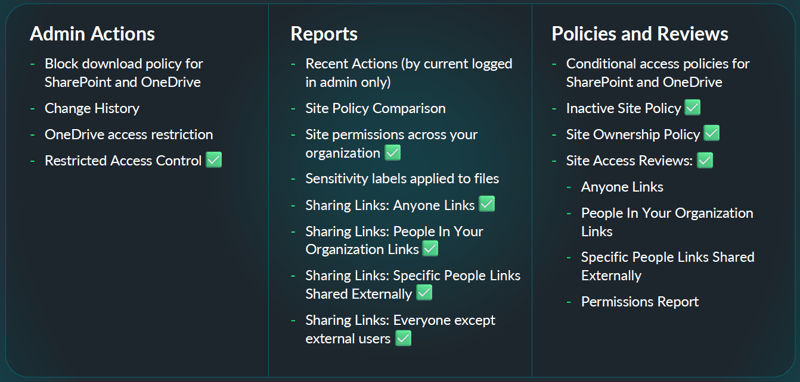
For many organizations, SAM becomes the fastest, lowest-friction way to improve governance before Copilot rolls out.
Clean up inactive SharePoint workspaces and sprawl before Copilot
One of the smartest, and simplest, places to begin your Copilot readiness journey is tackling content sprawl.
Most organizations have years of digital clutter: old SharePoint sites, abandoned Teams, project workspaces that quietly faded away, and documents no one has touched in a decade. Feeding all of that into Copilot simply creates noise your users have to sift through.
SAM’s Inactive Site Policy is a helpful first step. It identifies unused workspaces and prompts owners to confirm whether they should stick around. It’s a great starting point—but limited. You get a few automated nudges and a basic workflow, but not much guidance on what should happen next.

That’s why many organizations pair SAM with Orchestry for a more comprehensive archival process. Orchestry adds:
- Multi-stage cleanup workflows
- Version purging
- Teams-based notifications
- Owner escalation when no owners exist
- Flexible archival paths beyond “read-only or delete”
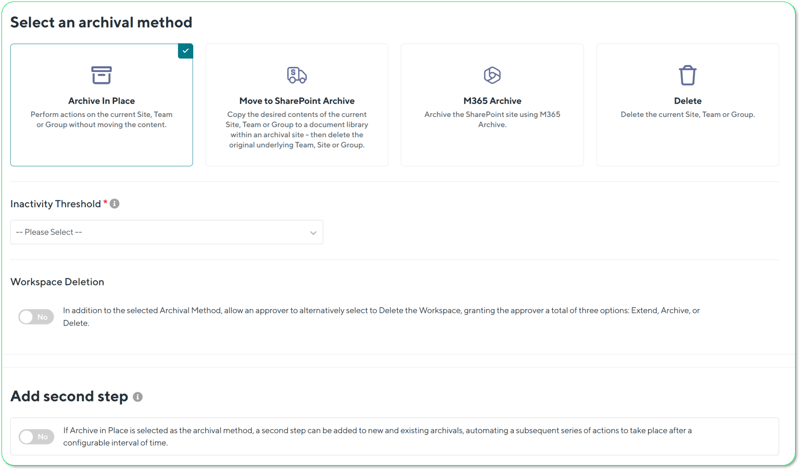
Orchestry Workspace Archival Policy
Reducing noise early doesn’t just clean up your environment, it dramatically improves the quality of Copilot’s responses.
Fix SharePoint site ownership before Copilot
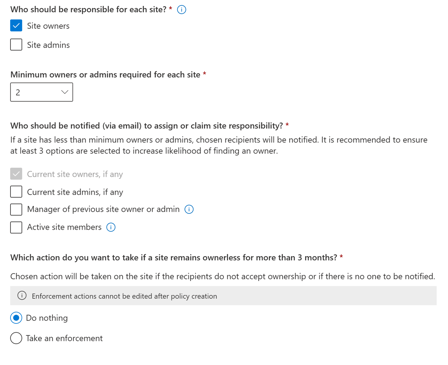 You can’t clean up permissions, review sharing links, or validate sensitive content if no one actually “owns” the workspace.
Yet almost every tenant is full of sites with:
- zero active owners,
- owners who left years ago,
- or only one owner responsible for entire departments.
SAM’s Site Ownership Policy helps by prompting current owners, or even site members, to take responsibility. But the workflow is rigid and limited to a small set of rules.
Orchestry builds on this with a more guided, intuitive ownership experience. It identifies the most active contributors, lets them assume ownership when appropriate, and walks them through a structured review that catches issues SAM can’t detect.
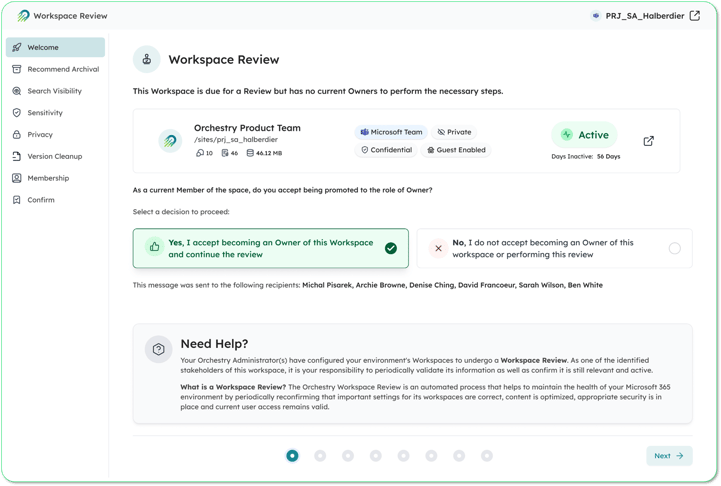
Orchestry Workspace Review Policy
As David said during the webinar: “We want owners who are real, active, and engaged, not just a name sitting on a site.”
Establishing real accountability is especially important in AI scenarios. When Copilot surfaces information, you need someone who understands why that content exists and whether it should still be there.
Oversharing: Copilot’s biggest hidden dangers
Oversharing is one of the most pressing governance challenges in Microsoft 365 today, and SAM has finally introduced long-awaited visibility with its Data Access Governance (DAG) reports.
In a Copilot-enabled tenant, this is where “garbage in” turns into “garbage, amplified.” A single overshared link isn’t just an isolated mistake—it becomes material Copilot can repeatedly draw from.
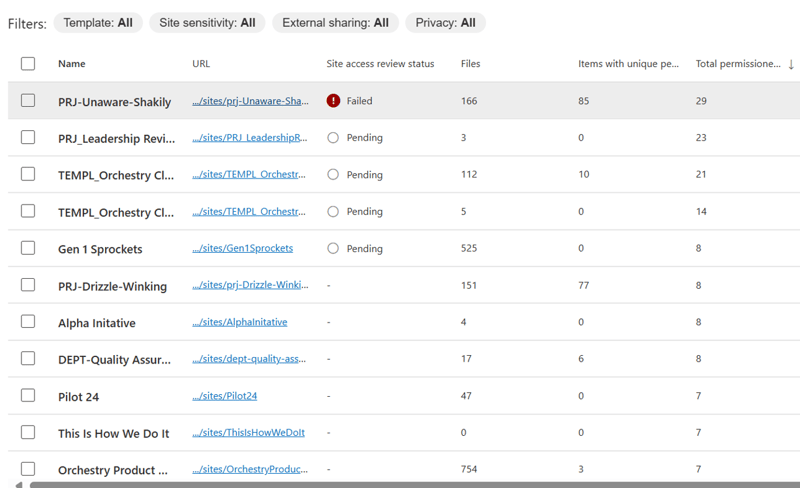
These reports highlight how many sharing links are being created, how sites are opened up internally or externally, and where sensitive information may be exposed. But they come with unavoidable limitations:
- Activity reports only show the past 28 days.
- Snapshot reports can only be generated once a month.
- Some reports take days to generate.
- Most reports show counts, not details.
SAM can tell you something might be wrong, but rarely enough to fix the problem confidently.
This is where Orchestry adds significant power. Orchestry’s Sharing Links Reports provide full historical visibility into every sharing link ever created, including who created it, what it points to, whether it expires, and who it exposes.
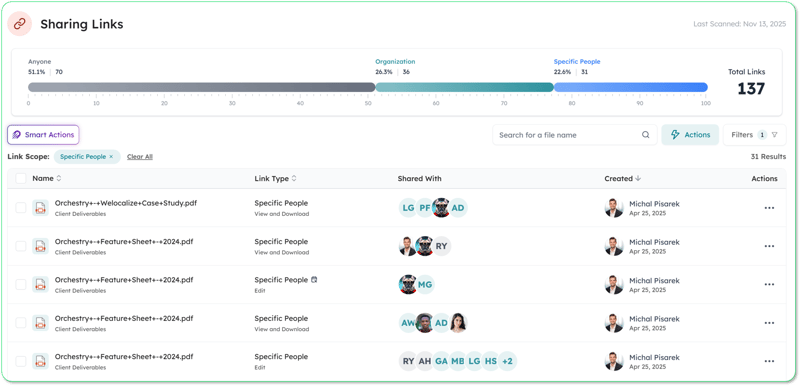
Orchestry Sharing Links Report
Even better, Orchestry lets you take action. With Smart Actions, you can clean up dozens or hundreds of risky links in a single click, something that simply isn’t possible with SAM on its own.

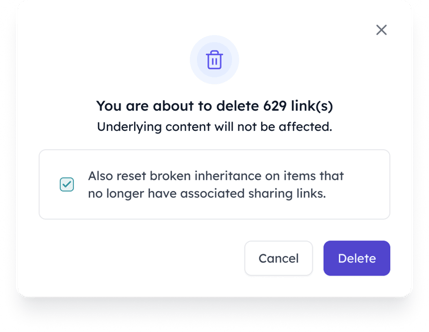
Orchestry Smart Actions for Sharing Links Reporting
Think of it this way: SAM is the flashlight. Orchestry is the cleanup crew.
Why Site Access Reviews aren’t enough for Copilot readiness
SAM’s Site Access Reviews are one of its strongest features. When oversharing is detected, owners get a notification prompting them to confirm or adjust access. For the first time, SharePoint owners, not just IT, are pulled into the governance process.
But there are real limitations:
- Reviews must be manually triggered.
- Only 1,000 reviews can be sent per month.
- Each link type generates a separate review.
- Large tenants outgrow the feature almost immediately.
Orchestry’s Workspace Review takes the same concept much further, combining membership validation, ownership checks, sensitivity label reviews, broken inheritance insights, and sharing cleanup into a single, guided workflow. Owners can complete a comprehensive review in minutes, and actually fix issues in real time.
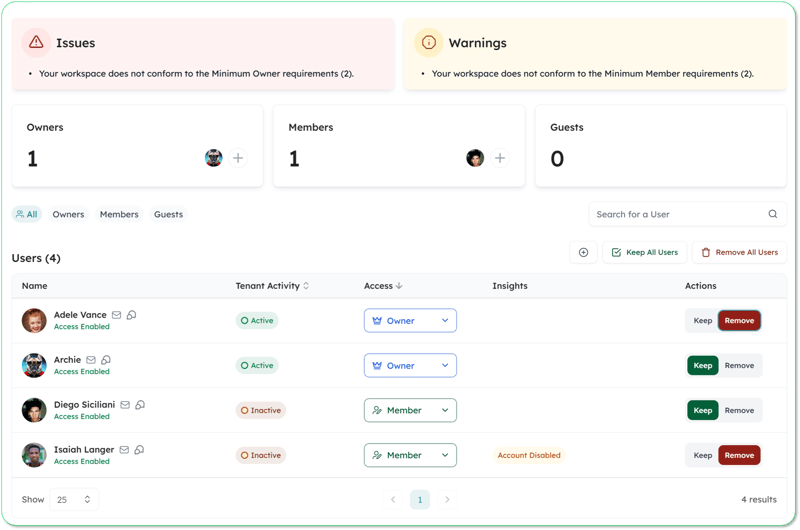
Orchestry Workspace Review
This isn’t just review, it’s remediation.
How SAM and Orchestry work together
SAM is a strong starting point and absolutely worth enabling. But SAM alone wasn’t designed to handle the scale, complexity, and automation required for Copilot readiness.
Here’s the simplest way to think about the partnership:
- SAM gives you insights. Orchestry gives you visibility and actionability.
- SAM gives you policies. Orchestry gives you workflows.
- SAM notifies owners. Orchestry helps them understand and fix what they see.
Used together, they create a governance approach that is Microsoft-aligned, scalable, and future-ready.
Clean data makes Copilot smarter
Copilot will amplify whatever already exists in your Microsoft 365 environment.
If your content is clean, secure, labeled correctly, and governed well, Copilot will accelerate productivity.
If your content is overshared, outdated, ownerless, or full of permissions issues, those problems will surface just as efficiently. In practice, it’s the same “garbage in” problem IT teams already know—only now AI makes every bad assumption easier to find and reuse.
SAM helps you take the first steps toward readiness. Orchestry helps you take the rest of the journey.
If you want to:
✔ Understand your SharePoint risks
✔ Reduce oversharing across the tenant
✔ Automate governance
✔ Clean up your environment
✔ Get Copilot-ready with confidence
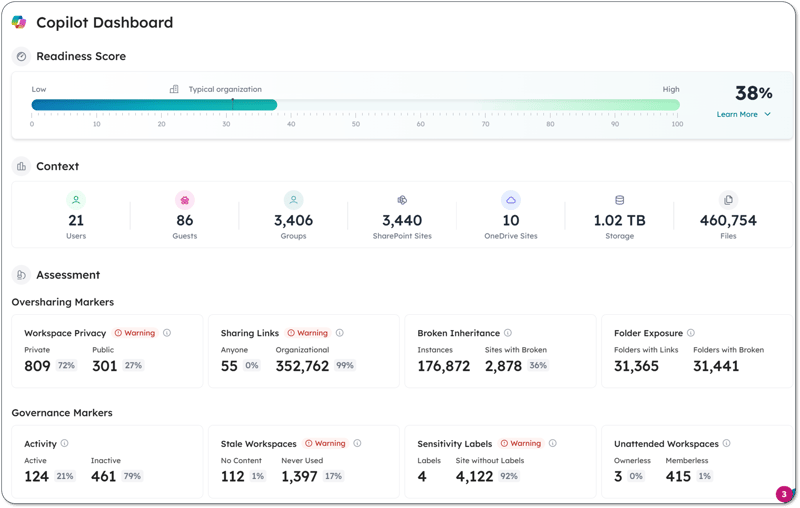
Orchestry Copilot Readiness Dashboard
Get a free demo or speak with one of our M365 experts. You’ll get real insights, real cleanup, and real Copilot readiness—fast.