/HubSpot%20-%20eBook%20-%20Proof%20Card%20Mockup%20001.jpg?length=1000&name=HubSpot%20-%20eBook%20-%20Proof%20Card%20Mockup%20001.jpg)
/HubSpot%20-%20eBook%20-%20Proof%20Card%20Mockup%20001.jpg?length=1000&name=HubSpot%20-%20eBook%20-%20Proof%20Card%20Mockup%20001.jpg)
/HubSpot%20-%20eBook%20-%20Proof%20Card%20Mockup%20001.jpg?length=1000&name=HubSpot%20-%20eBook%20-%20Proof%20Card%20Mockup%20001.jpg)
/HubSpot%20-%20eBook%20-%20Proof%20Card%20Mockup%20001.jpg?length=1000&name=HubSpot%20-%20eBook%20-%20Proof%20Card%20Mockup%20001.jpg)
/HubSpot%20-%20eBook%20-%20Proof%20Card%20Mockup%20001.jpg?length=1000&name=HubSpot%20-%20eBook%20-%20Proof%20Card%20Mockup%20001.jpg)
/HubSpot%20-%20eBook%20-%20Proof%20Card%20Mockup%20001.jpg?length=1000&name=HubSpot%20-%20eBook%20-%20Proof%20Card%20Mockup%20001.jpg)
/HubSpot%20-%20eBook%20-%20Proof%20Card%20Mockup%20001.jpg?length=1000&name=HubSpot%20-%20eBook%20-%20Proof%20Card%20Mockup%20001.jpg)
/HubSpot%20-%20eBook%20-%20Proof%20Card%20Mockup%20001-min.jpg?length=1000&name=HubSpot%20-%20eBook%20-%20Proof%20Card%20Mockup%20001-min.jpg)


Mismanaged permissions, oversharing, and broken inheritance in Microsoft 365 create hidden risks for security and AI adoption. Learn the top challenges and best practices to protect your organization before Copilot and AI tools magnify the problem.
The hidden risks lurking in Microsoft 365
In most organizations, Microsoft 365 is the backbone of collaboration. Teams share documents, spin up sites, and exchange knowledge every day. But here’s the catch: every click of “Copy Link” or “Share” could be quietly opening the door to sensitive data exposure.
What used to be a governance problem is now an AI risk. Tools like Microsoft Copilot can surface hidden content in seconds, turning small permission gaps into major security holes.
As Michal Pisarek, CEO of Orchestry, put it:
“Everyone’s permissions are in a massive mess. And in the world of AI, that mess no longer stays hidden.”
So, where are the cracks?
1. SharePoint permissions are more complex than you think
At first glance, permissions in Microsoft 365 seem straightforward. Admins manage access at the group level, expecting inheritance to take care of the rest. In reality, things rarely stay aligned.
Our Unseen, Unsecured – Part 2: Permissions, SharePoint, and the Path to Control for AI in Microsoft 365 webinar highlighted three key challenges:
- Multiple layers of access: Permissions cascade across Microsoft 365 Groups, Teams, and SharePoint sites. But “group membership” and “site permissions” don’t always match, leaving hidden gaps.
- Extra roles in SharePoint: Unlike Groups, SharePoint has a visitor role. This creates scenarios where more people have site access than owners realize.
- Poor visibility: Out-of-the-box reporting favors group-level access. It’s easy to miss the fact that far more users (internal or external) have access at the site level
The result? Owners often assume their content is locked down when, in reality, it’s far more exposed.
2. Sharing links offer convenience with consequences
Perhaps the biggest eye-opener from the webinar was just how risky sharing links have become.
A quick “Copy Link” in SharePoint or OneDrive feels harmless, but it creates a durable access object that is different than traditional security and introduces an additional level of complexity.
Depending on the link type, this can mean:
- Anyone Links: No authentication required. Anyone with the URL, inside or outside your organization, can access the file. (That means anyone, anywhere!)
- Organizational Links: Available to anyone in your company, often the default setting.
- Specific People Links: Grants explicit access to individuals, but only once they click the link.
Here’s the kicker: links also affect what AI can find. A file invisible to Copilot today can suddenly appear tomorrow if someone clicks a link. And folder links? Every file, present and future, comes along for the ride.
That's why “oversharing” has become a buzzword in the age of AI.
3. Broken inheritance is a silent culprit
Broken inheritance, where a file or folder stops inheriting permissions from its parent, is another silent risk.
That's because creating a sharing link automatically breaks inheritance, and even if the link is deleted, the object remains in a “broken” state. Detecting and fixing broken inheritance at scale is nearly impossible with native tools.Now multiply that across thousands of documents, folders, and sites. The result? Permission sprawl so tangled that even your admins don’t really know who has access anymore.
4. AI agents offer new power and new problems
AI agents make collaboration smarter, but permissions still rule.
- SharePoint Agents: Created by default, editable by members (not just owners)
- Copilot Studio Agents: Embedded files get auto-shared with all users of the agent and remain accessible, even if you revoke agent access.
As Orchestry’s David Francoeur warned:
“Even if you remove access to the agent, users still retain access to embedded content. It’s a governance nightmare.”
AI doesn’t create new risks. It magnifies existing ones.
What Microsoft offers and where it falls short
Microsoft is aware of the problem. SharePoint Advanced Management (SAM) now includes data access governance reports that flag oversharing, sensitivity labels, and broad access groups.
But reports have limitations:
- They often take days to generate.
- They only cover the last 28–30 days.
- They don't offer a complete picture, just a snapshot of a moment
For large organizations, this is not enough to manage risk at scale.
5 best practices to regain control of SharePoint permissions
To address these risks, here are five best practices:
- Disable “Anyone” Links: Set “Only People with Existing Access” as the default.
- Avoid Breaking Inheritance: Stick to group or site-level permissions whenever possible.
- Restrict Sharing Rights: Only allow site owners to share entire sites; disallow guests from resharing content
- Run Regular Workspace Reviews: Continuously re-align permissions and clean up inactive links or sites.
- Use Sensitivity Labels: Enforce governance at both container and content levels using Sensitivity Labels. (See how Orchestry makes this easier in the next section.)
These changes don’t fix everything, but they close the biggest holes before AI makes them impossible to ignore.
How Orchestry helps simplify the chaos
This is where Orchestry steps in. Instead of relying on fragmented reports and manual fixes, the platform offers:
- Comprehensive Sharing Links Reporting: Every link, across your entire tenant, not just the last 30 days.
Tracking every sharing link across your tenant is nearly impossible with Microsoft’s default reporting. Orchestry’s Sharing Links dashboard provides instant visibility into all sharing links and their associated risks.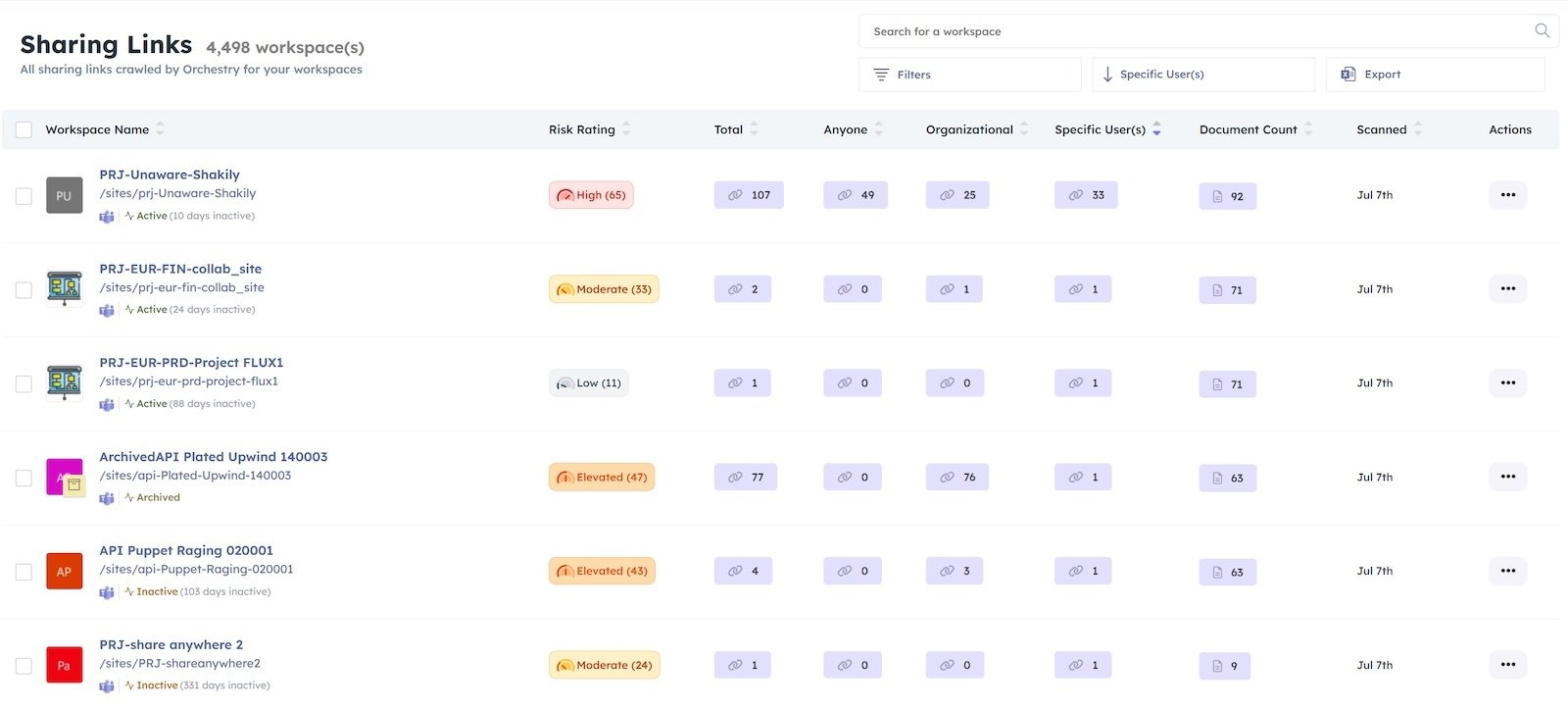
Orchestry's Sharing Links dashboard showing link types, document counts, and risk ratings across multiple workspaces. - Smart Actions: One-click cleanup for anonymous, expired, or unused links.
- Sensitivity Label Enforcement: Easily apply and enforce sensitivity labels at both the container and content levels.
While Microsoft’s native tools make sensitivity enforcement challenging, Orchestry streamlines this process. The screenshot below shows how easy it is to apply sensitivity labels within Orchestry's workspace templates.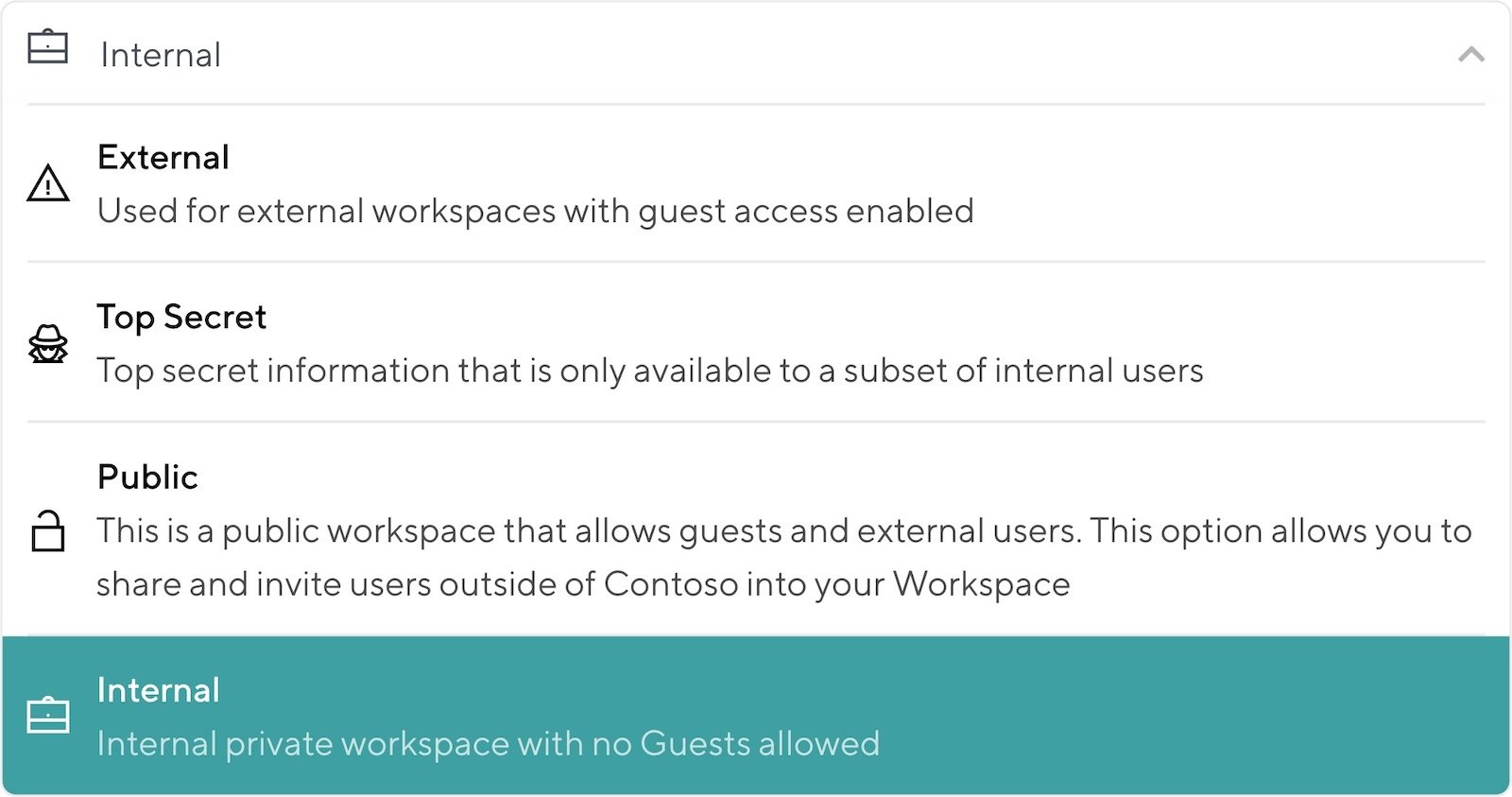
Sensitivity enforcement dropdown options in Orchestry, including Internal, External, Top Secret, and Public settings. - Broken Inheritance Reporting: See where inheritance is broken, and reset with a single action.
Broken inheritance can go undetected for months, creating hidden vulnerabilities. Orchestry’s reporting makes it simple to identify and remediate these issues at scale.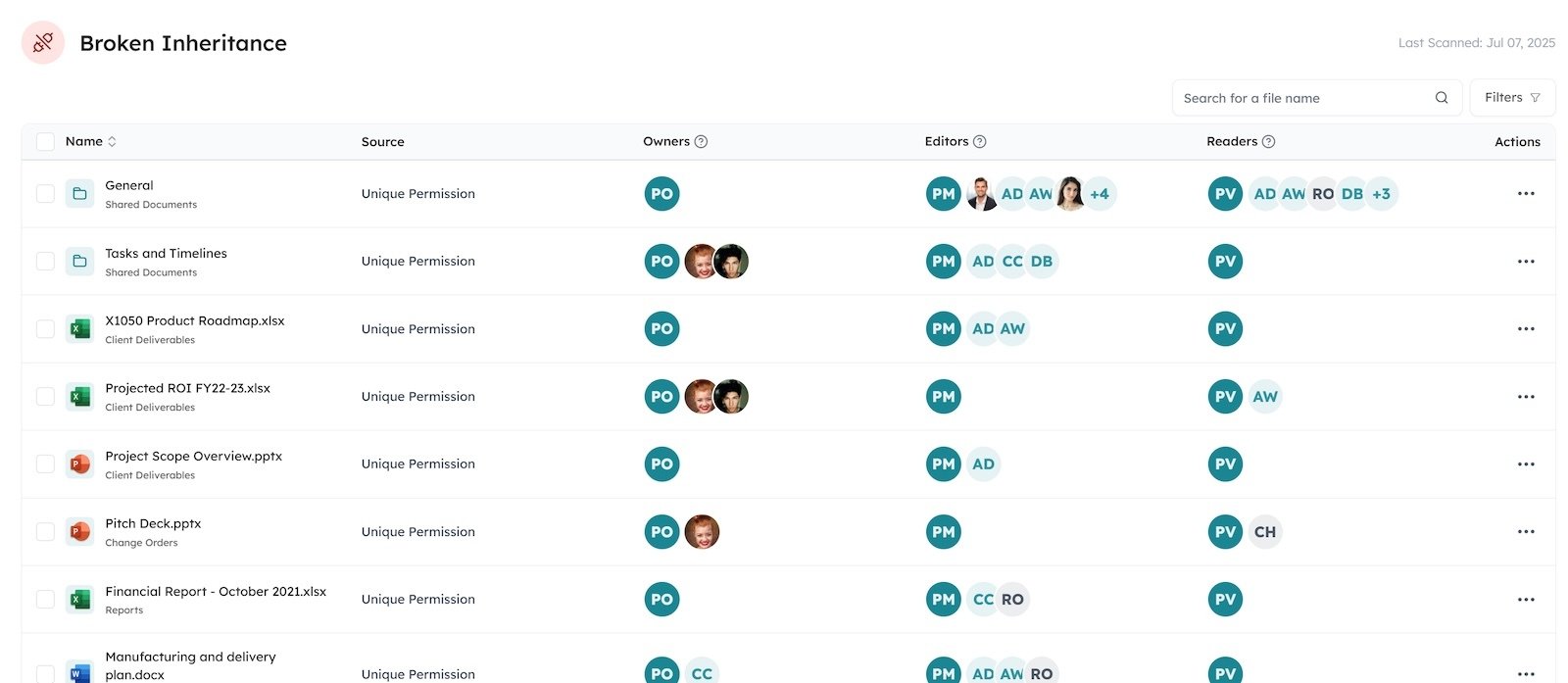
Broken Inheritance report highlighting files with unique permissions and detailed owner, editor, and reader access.
- Blast Radius Visualization: Visualize exactly how far access spreads across a site,
- Workspace Review Automation: Put site owners in the driver’s seat with guided cleanup steps.
Understanding your risk exposure is critical. Orchestry’s workspace dashboard assigns risk scores and highlights policy mismatches, helping you prioritize remediation.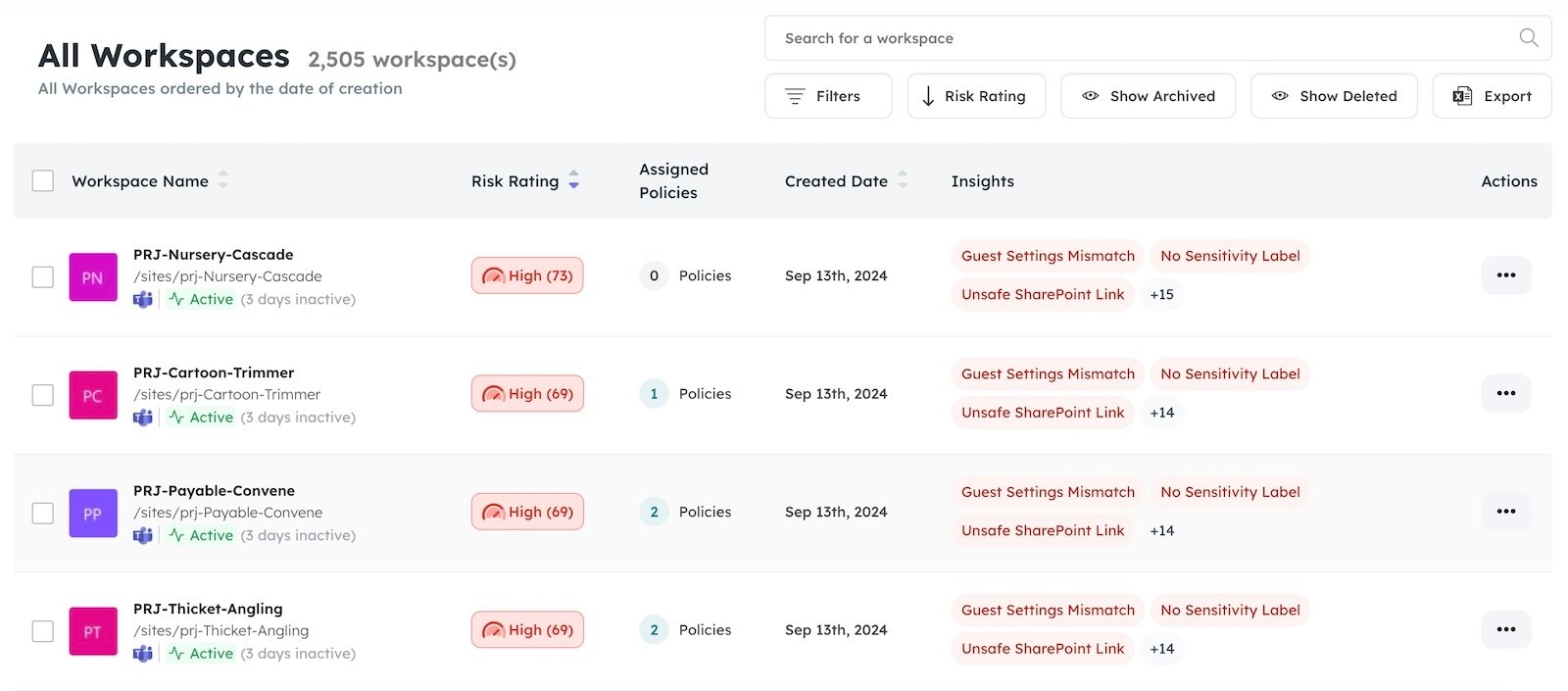
Orchestry dashboard displaying workspace risk ratings, policy compliance, and insights like guest settings mismatches and unsafe links.
The path to control before AI takes over
Permissions in Microsoft 365 have always been messy. But with Copilot and AI tools now able to surface hidden content through natural queries, oversharing is no longer just an IT issue. It’s an organizational risk.
By combining best practices with tools like Orchestry, you can clean up permissions, rein in oversharing, and get truly Copilot-ready.
Ensure that your AI future isn’t undermined by unseen, unsecured data. Explore how Orchestry can help you identify oversharing, remediate risks, and get Copilot-ready with a 28-day managed evaluation trial.
👉 Book a demo or speak to an expert on our team to see Orchestry in action.