/HubSpot%20-%20eBook%20-%20Proof%20Card%20Mockup%20001.jpg?length=1000&name=HubSpot%20-%20eBook%20-%20Proof%20Card%20Mockup%20001.jpg)
/HubSpot%20-%20eBook%20-%20Proof%20Card%20Mockup%20001.jpg?length=1000&name=HubSpot%20-%20eBook%20-%20Proof%20Card%20Mockup%20001.jpg)
/HubSpot%20-%20eBook%20-%20Proof%20Card%20Mockup%20001.jpg?length=1000&name=HubSpot%20-%20eBook%20-%20Proof%20Card%20Mockup%20001.jpg)
/HubSpot%20-%20eBook%20-%20Proof%20Card%20Mockup%20001.jpg?length=1000&name=HubSpot%20-%20eBook%20-%20Proof%20Card%20Mockup%20001.jpg)
/HubSpot%20-%20eBook%20-%20Proof%20Card%20Mockup%20001.jpg?length=1000&name=HubSpot%20-%20eBook%20-%20Proof%20Card%20Mockup%20001.jpg)
/HubSpot%20-%20eBook%20-%20Proof%20Card%20Mockup%20001.jpg?length=1000&name=HubSpot%20-%20eBook%20-%20Proof%20Card%20Mockup%20001.jpg)
/HubSpot%20-%20eBook%20-%20Proof%20Card%20Mockup%20001.jpg?length=1000&name=HubSpot%20-%20eBook%20-%20Proof%20Card%20Mockup%20001.jpg)

/HubSpot%20-%20eBook%20-%20Proof%20Card%20Mockup%20001-min.jpg?length=1000&name=HubSpot%20-%20eBook%20-%20Proof%20Card%20Mockup%20001-min.jpg)


Agent 365 can find every agent in your tenant, score it, and shut it down, but that’s only half the job. The other half is the exposure your agents inherit from the tenant underneath them, the content and permissions the control plane never touches, and whether any of it is worth what you’re paying.
Agents have been multiplying across Microsoft 365 faster than most admins can track, and the sprawl looks a lot like the Teams sprawl you already know. Microsoft now has a native answer. The catch is that some of what it governs you already pay for, and the parts that decide your real exposure sit behind a premium license or outside its reach entirely.
What is Agent 365, and what does it do?
Agent 365 is Microsoft’s control plane for the AI agents running across Microsoft 365. It gives IT a registry of every agent, an identity for each one through Microsoft Entra, access controls, an activity and risk view, and security enforcement through Microsoft Defender and Microsoft Purview. It reached general availability on May 1, 2026.
Microsoft frames the product as a control plane built on three pillars: observe, govern, and secure. Underneath those sit the pieces you actually touch: a registry that inventories agents, identity and access control through Entra Agent ID, an agent map and reporting for visibility, and security enforcement through Defender and Purview. It’s a coherent set of tools, and for organizations standing up agents at scale, it’s a real step forward.
The nuance that gets lost in the launch coverage is that some of this you already own, and some of it is what Agent 365 charges to add.
What you already own, and what Agent 365 adds on top
Before you buy anything, three native capabilities already govern parts of the agent problem. The Copilot Control System is the admin layer for managing and securing Copilot and agents. Microsoft Purview handles data classification, DLP, and insider risk. And SharePoint Advanced Management brings restricted content discovery, access reviews, and site lifecycle controls. Together, that’s a meaningful baseline that most E5 tenants already have licensed.
Agent 365 layers on top of that baseline. It adds agent identity through Entra Agent ID, threat protection through Defender for agents, and data governance through Purview for agents, and it pulls the whole picture into one registry and agent map. The honest line for you: which of these you already pay for, and which you’re being asked to pay again to add.
Which Agent 365 capabilities are generally available, and which are still in preview
The core control plane is production-ready. Much of the runtime enforcement you’d lean on for active governance wasn’t at launch:
| Generally available at GA | Still in preview |
|---|---|
| Agent registry and inventory | Defender real-time runtime protection and asset-context mapping (June 2026) |
| Entra Agent ID for agent identity | Registry sync to Amazon Bedrock, Google Vertex AI, Salesforce Agentforce, and Databricks Genie |
| Conditional access for agents | Windows 365 for Agents (US only) |
| DLP and sensitivity labels for agent access | Copilot agents usage report |
| Audit logging of agent activity | |
| DSPM observability for AI |
GA and preview status verified as of August 2026. Microsoft moves these lines frequently.
“Generally available” covers the inventory and identity core, not the whole toolkit, so check the status of any capability you’re about to build a control around.
The agents you already have won’t all move over
One practical gotcha for anyone who moved early: agents created before Entra Agent ID rolled out in July 2026 keep running on their old app registrations rather than Agent IDs. Microsoft says they’ll be migrated “in the future,” but there’s no date and no published mechanism yet. Governance still works across both during the transition, so it isn’t urgent, but if you built on Copilot Studio early, don’t assume every agent is already carrying an Agent ID.
Out of the box, you can list your agents. Governing them takes more
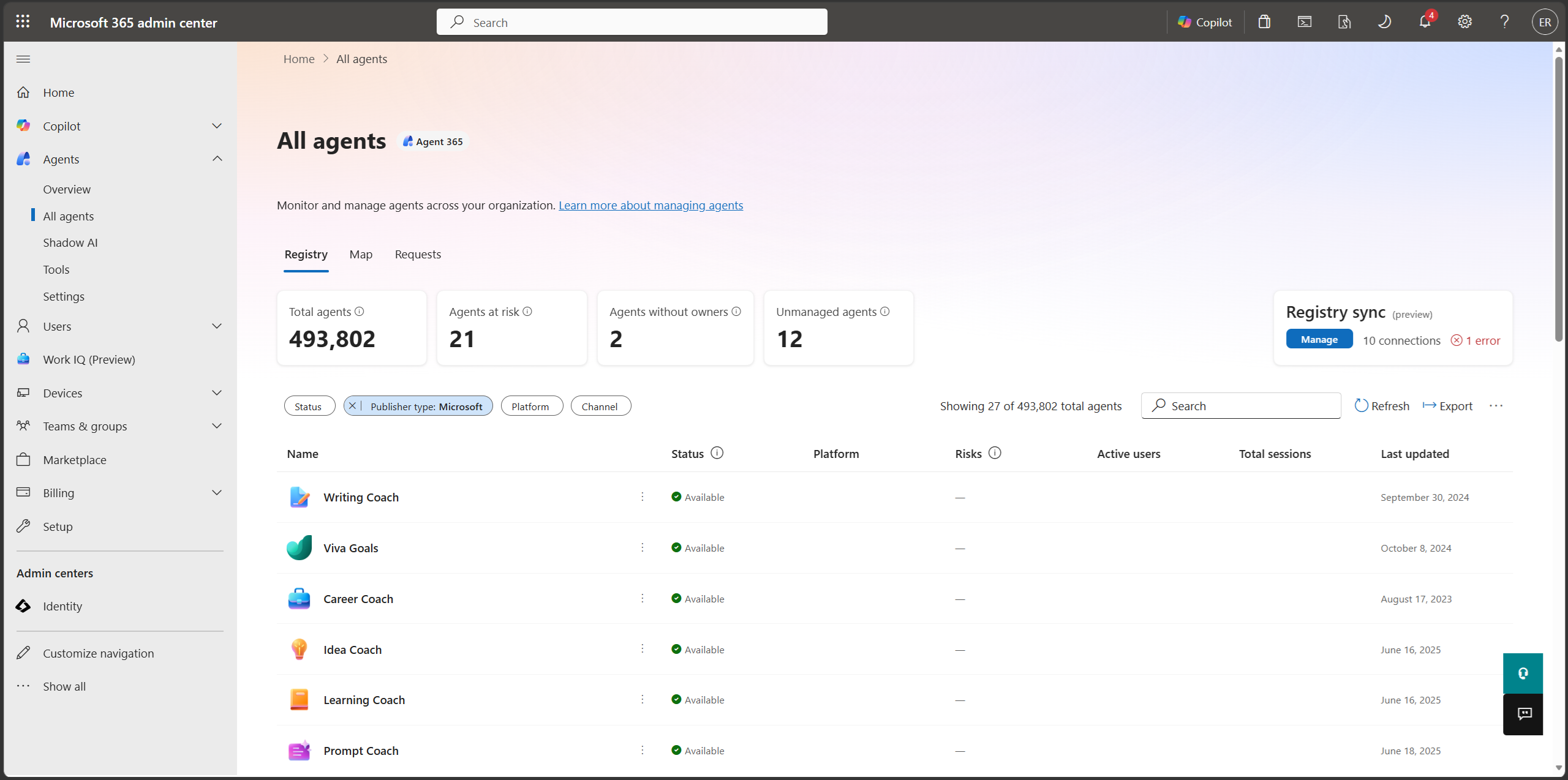
The free view in the Microsoft 365 admin center agent registry is more useful than you might expect. Without Agent 365, it shows a list of the agents in your tenant, tenant-wide counts including agents that have no owner or are unmanaged, and the ability to assign owners. That alone answers “what exists,” which is where most organizations are stuck today, still working out what these agents are and how to manage them.
What it doesn’t give you for free is the graded picture. The risk scoring that ranks agents by severity across Entra, Defender, and Purview, flagging shadow agents, excessive permissions, prompt-injection exposure, and sensitive-data access, sits behind the Agent 365 license.
A list tells you agents exist. A graded picture tells you which ones to worry about first, and that’s the part you pay for.
What Agent 365 costs: the add-on, the E7 bundle, and the license you need first
Agent 365 is about $15 per user per month as an add-on on a qualifying base, or bundled into the new Microsoft 365 E7 suite at $99 per user per month. It’s licensed per user, not per agent: one user license covers every agent that person owns, manages, or sponsors.
One caveat the price tag hides: the license isn’t the whole bill. Agents that run outside native Microsoft 365 apps, in Foundry for example, still incur separate run costs as Azure consumption. Budget for the governance license and the runtime, not just the sticker.
There’s a second line item that’s easy to miss. Since July 1, 2026, the security capabilities that used to protect agents built in Azure AI Foundry and Copilot Studio, delivered through Defender for Cloud and Defender for Cloud Apps, now require an Agent 365 license. If you build agents in either tool and want them protected, the security layer isn’t something you get on the side anymore; it rides on Agent 365 too.
Who can buy Agent 365
Since June 1, 2026, new Agent 365 purchases need a qualifying base license: Microsoft 365 E5 for enterprise, F5 Defender and Purview for frontline workers, or Business Premium for small and medium business.
Microsoft draws a hard line here. On E3, A3, or Business Standard you can’t buy Agent 365 at any price: the licensing terms make E5 (or the Defender and Purview suites underneath it) a prerequisite, not a recommendation.
The honest framing isn’t about who’s locked out; it’s about cost and complexity. An E3 organization can get to Agent 365, but only by buying up the security and compliance stack underneath it first, on top of the per-seat cost of Agent 365 itself. That’s a stack to assemble, not a box to tick, and the webinar breaks down what it means across E3, E5, the add-on, and E7.
Put a number on it: E3 lists at about $39 per user per month and E5 at about $60, so the step-up is roughly $21 per user per month before you spend a dollar on Agent 365. That’s about $252,000 a year at 1,000 users just to become eligible.
What Agent 365 governs, and where it stops
Agent 365 governs the agent as an object. It finds the agent, scores it, and lets you retire it. For the problem of “too many agents, no oversight,” that’s useful, and it’s the problem most teams feel first.
Where it stops is the tenant underneath the agent. Every agent inherits the permissions of whoever invokes it, and it can reach whatever that person can reach, so a single overshared file becomes an agent’s open doorway. The control plane governs the agent; the content and permissions it’s grounded on, and the Power Platform environment it runs in, are a separate job. To be fair to Microsoft, that job isn’t invisible to them: Purview and SharePoint Advanced Management give real content visibility, and Agent 365 keeps expanding. But it’s the governance gap that existed long before anyone deployed an agent.
The content and permissions your agents inherit are the exact exposure Orchestry was built to govern, years before Copilot could read any of it.
Only 13% of Microsoft 365 admins can accurately describe how the SharePoint “copy link” sharing default inherits, which is why oversharing is so rarely visible until an AI surfaces it. Orchestry’s oversharing detection is built to find exactly that exposure; on one tenant it tracked “anyone” links down from 69 to 13 after a cleanup.
Your agents don’t create that exposure. They inherit it.
AI agent governance beyond the control plane
Governing every agent means governing the two layers under it: the content and permissions the agent reads, and the Power Platform environment it runs in. Doing that in one place, on the licenses you already hold, is a different job from inventorying agents, and it’s the one that decides your real exposure.
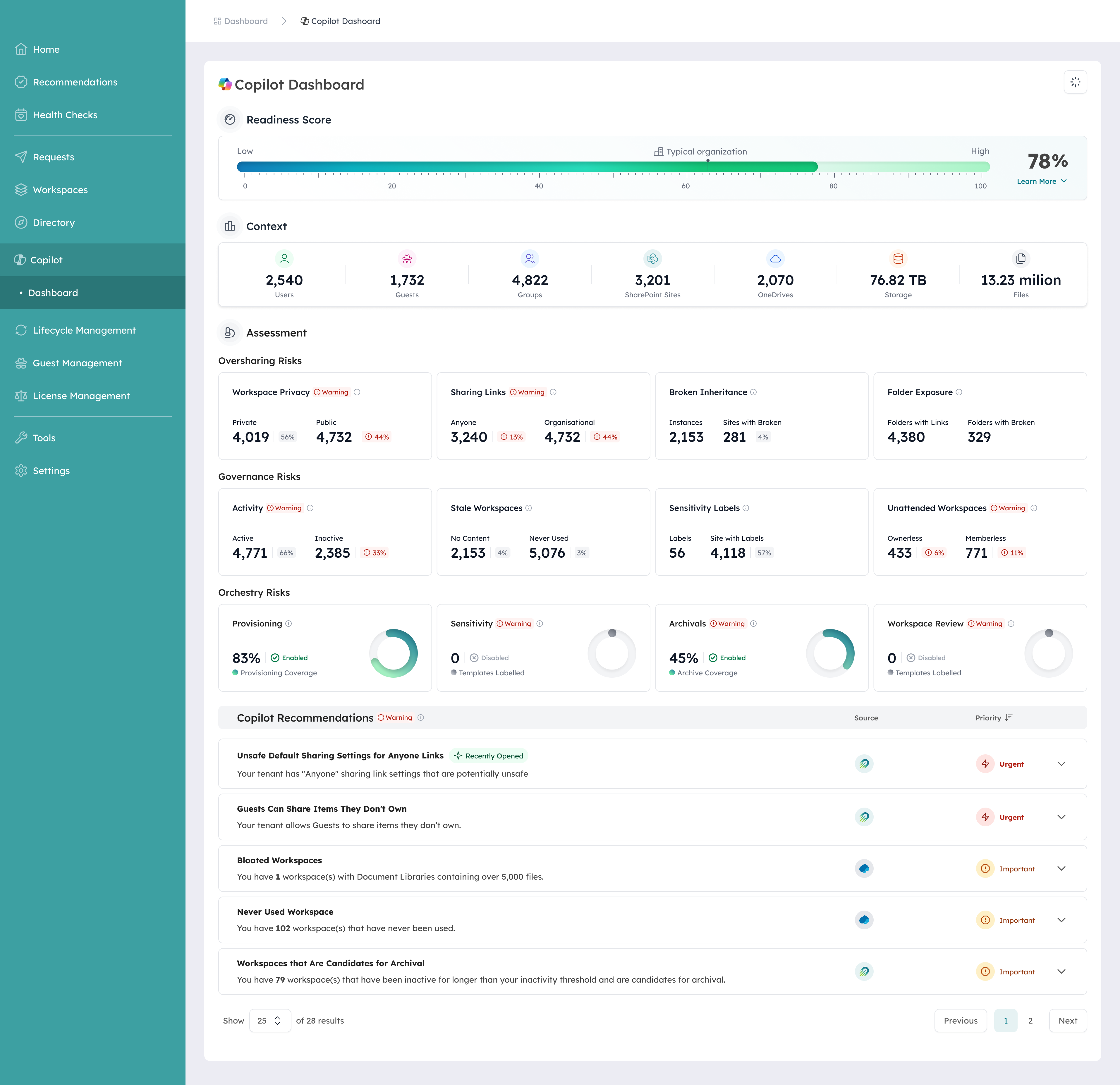
Orchestry is building towards governing both of those layers in one place: a cross-platform agent inventory across Copilot Studio, SharePoint, and Agent Builder, a composite risk score with a per-rule audit trail, and Power Platform reporting across environments, DLP policies, connectors, and solutions, all designed to run on the E3 and E5 licenses customers already hold. The foundation is already live: Orchestry’s AI readiness dashboard scores 13 governance signals into a single tenant readiness percentage, free on every tier.
When you can see what your AI can reach, you can widen access without guessing. It’s the pattern Orchestry runs everywhere: diagnose the exposure, fix the content and permissions your AI touches, then keep it clean as an ongoing practice, not a one-off cleanup.
Get real value from the native tools you already own
You don’t need to wait for a purchase order to make progress:
- Start with the free agent registry to see what exists and assign owners to the agents that don’t have one.
- Confirm what’s generally available versus preview before you build a control around it.
- Right-size the license to whether you’re deploying agents yet, because Agent 365 governance targets a scenario you may not be in.
- Fix the content and permissions your agents inherit first. That’s the exposure the control plane doesn’t reach, and the work that pays off no matter which license you land on.
Agent 365 FAQ: cost, licensing, and what it governs
What is Agent 365?
Agent 365 is Microsoft’s control plane for AI agents in Microsoft 365, providing a registry, identity through Entra, access control, activity and risk visibility, and security through Defender and Purview. It became generally available on May 1, 2026.
How much does Agent 365 cost?
Agent 365 is about $15 per user per month as an add-on on a qualifying base license, or bundled into Microsoft 365 E7 at $99 per user per month. It’s licensed per user, not per agent, so one license covers every agent that person owns, manages, or sponsors.
Do you need Microsoft 365 E5 for Agent 365?
New purchases need a qualifying base of E5, F5 Defender and Purview, or Business Premium. On E3, A3, or Business Standard you can’t purchase Agent 365 at all. An E3 organization can still get there, but only by stepping up to E5 (or licensing the Defender and Purview suites underneath) first, then adding Agent 365 on top; a matter of cost and sequencing, not a permanent lockout.
Is Agent 365 licensed per user or per agent?
Per user. A single user license covers all of the agents that person owns, manages, sponsors, or interacts with, and the agents themselves don’t need their own licenses.
What does Agent 365 not govern?
Agent 365 governs the agent itself. It does not govern the tenant underneath the agent: the content and permissions the agent inherits and the Power Platform environment it runs in. That exposure exists before any agent is deployed and is governed separately.
Know what you own before you buy more
The native toolkit is real, and for finding and containing agents it does the job. What it doesn’t do is govern the content, permissions, and platform every agent inherits, and that’s the exposure that decides what an agent can reach. Agent 365 governs the agent. Your tenant decides the blast radius.
To see that exposure in your own environment, check out Orchestry’s AI readiness dashboard and run it against your tenant.