








Switch on Microsoft's group naming policy and every new team gets your prefix. Except the ones your Global Administrators create, every group that existed before you turned it on, and any SharePoint site that isn't connected to a Microsoft 365 group. The policy does enforce; it just covers less of your tenant than its name suggests.
Microsoft's group naming policy, set in Microsoft Entra ID, adds required prefixes and suffixes and rejects blocked words when people create or rename Microsoft 365 groups in Teams, SharePoint, Outlook, Planner and other apps. Per Microsoft's documentation for the group naming policy, two admin roles are exempt, and its dynamic values come from the person creating the group.
If you haven't settled on your prefixes yet, start with our guide to designing the convention itself. Once you have one, the useful question is where Microsoft will hold the line for you and where you need a second mechanism.
What the Microsoft 365 group naming policy enforces
The policy has two parts, which Microsoft calls the prefix-suffix naming policy and custom blocked words. Both apply to the group name and to the group alias, whether the group is created or later edited.
Names follow the pattern Prefix[GroupName]Suffix, where the group name is whatever the person typed. Each prefix or suffix is either fixed text, such as GRP_, or one of six Entra ID user attributes: Department, Company, Office, StateOrProvince, CountryOrRegion or Title. Those values come from the person creating the group, and the full name, prefix and suffix included, can't exceed 63 characters.
Blocked words are checked as exact matches, with no substring search, so blocking lass won't stop anyone naming a group Class. The list isn't case sensitive, holds up to 5,000 phrases, and anyone who types a blocked word sees an error that names it.
Licensing is counted on group members. You need to own, though not necessarily assign, a Microsoft Entra ID P1 or Entra Basic EDU license for each unique person who belongs to one or more Microsoft 365 groups.
How to set up a group naming policy in Microsoft Entra ID
You need at least the Group Administrator role to configure the policy; Global Administrator and Directory Writer can too.
- Decide your prefixes, suffixes and attributes. Choose short fixed codes and only the attributes you trust. Result: a written pattern before you start.
- Check the attribute data. Microsoft recommends attributes that are filled in for everyone and aren't long. Result: no enforced name built from an empty or oversized field.
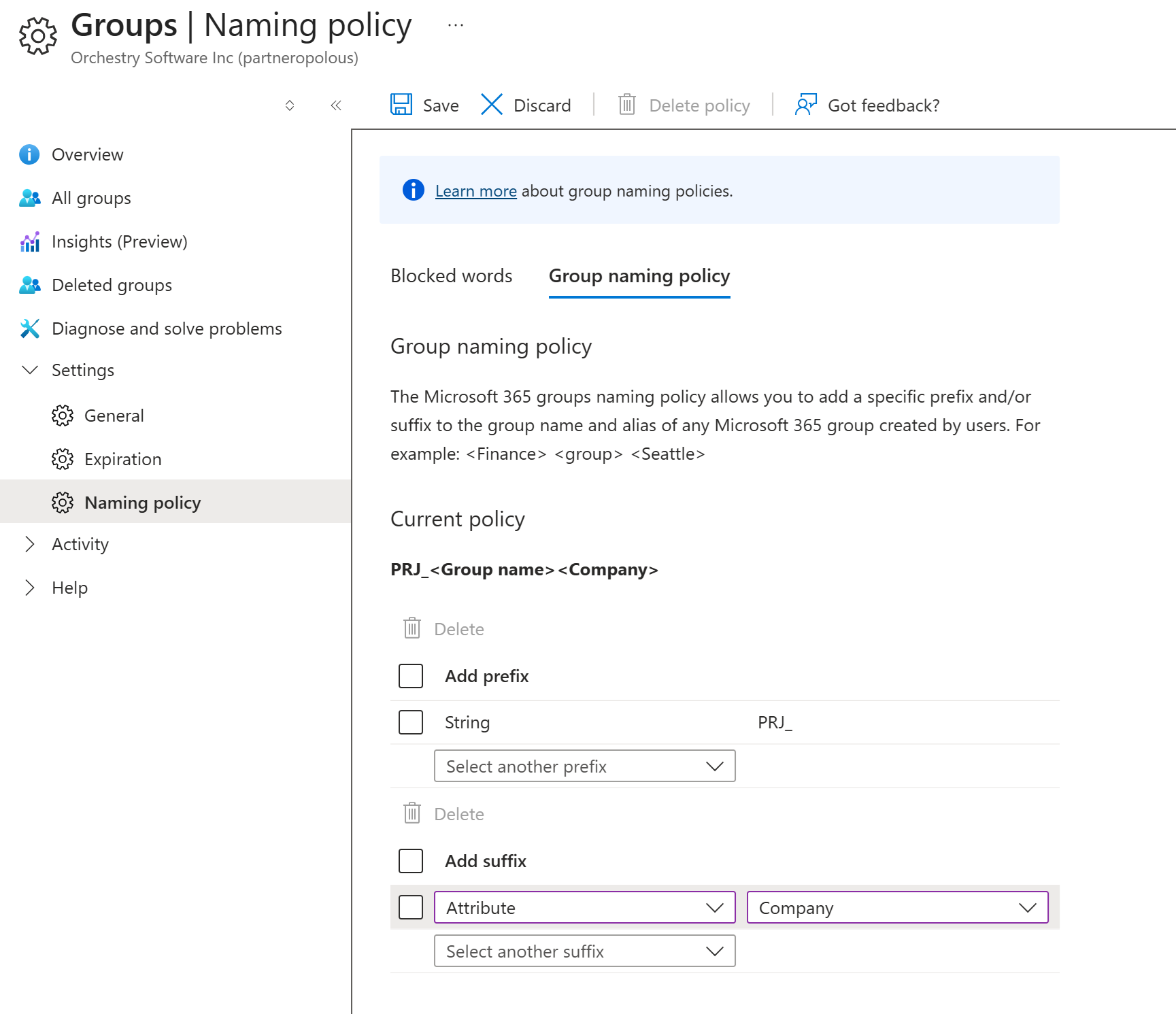
Microsoft 365 group naming policy settings in Microsoft Entra ID
- Set the group naming policy. Sign in to the Microsoft Entra admin center, select Microsoft Entra ID, then All groups > Groups > Naming policy. Select Group naming policy, add your prefixes and suffixes, and save. Result: every new Microsoft 365 group created by a non-exempt person gets the pattern.
- Add blocked words. On the same page, select Blocked words, download the current list, add your entries to it, upload the file and save. Result: names containing those words are rejected with an error.
- Test in Teams and in Outlook desktop. Teams previews the enforced name as you type. Outlook desktop, Outlook mobile and the Microsoft 365 admin center apply the policy without a preview. Result: you know what people see before you announce it.
Six gaps in a Microsoft 365 naming convention enforced by the group naming policy alone
The policy holds inside a clear boundary. These are the places it stops:
- No workspace values. Name parts come only from fixed text or six attributes of the person creating the group, and extension and custom attributes aren't supported. There's no way to require a project code or client code.
- One pattern for the whole tenant. The naming policy is part of the directory-level settings for Microsoft 365 groups, which apply to every group in the directory. Project teams and department teams get the same pattern.
- Two admin roles are exempt. Global Administrators and User Administrators can create groups with blocked words and their own names.
- Existing groups keep their names. The policy isn't applied to existing groups when you configure it. It's enforced the next time an owner edits the group name.
- Only Microsoft 365 groups. Communication sites and team sites created without a group aren't Microsoft 365 groups, so the policy has no group to act on.
- Licensing covers every member. The P1 requirement counts each unique group member, not only the people who create groups.
Teams naming convention vs SharePoint naming convention: where each one is enforced
Microsoft Teams shows the enforced name as someone types a team name, and SharePoint does the same for a group-connected site's name or group email address. Both show an error that names any blocked word.
By default, people can create communication sites as well as group-connected team sites, and Microsoft's site creation settings note that every Microsoft 365 group comes with a team site. Communication sites don't come with a group.
The Microsoft 365 community guide to team sites vs communication sites explains that communication sites use SharePoint groups for permissions, and that team sites created without a group have no Microsoft 365 group object. Since the naming policy acts only on Microsoft 365 groups, neither site type gets your prefix, so a SharePoint naming convention needs its own enforcement path.
The self-service tradeoff: restrict group creation or enforce naming at request
Microsoft's guidance on managing who can create Microsoft 365 groups calls open creation the recommended approach, because people can start collaborating without waiting on IT. That leaves two ways to make names hold.
Option A: restrict who can create groups
Restricting creation takes two separate settings. The first limits Microsoft 365 group creation to members of one group, set with Microsoft Graph PowerShell, and it needs Entra ID P1, P2 or Basic EDU assigned to the admin who configures it and to everyone allowed to create groups. Even then, Microsoft notes that certain admin roles can still create groups.
The second is Users can create SharePoint sites in the SharePoint admin center. That setting doesn't affect teams or Microsoft 365 groups, so you need both to cover communication sites as well as teams.
Names stay compliant because IT creates everything, and IT becomes the queue every new team waits in.
Option B: keep self-service and build the name at request
Option B keeps creation open and changes the path: people request a workspace, and the request builds the compliant name for them. It's the same idea behind automating provisioning for every workspace type.
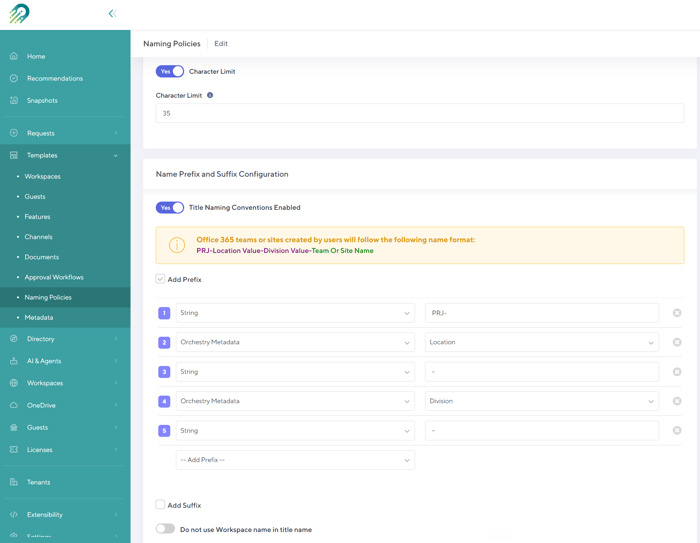
Naming conventions settings in an Orchestry workspace template
In Orchestry, naming policies are created once and assigned to workspace templates, so the template that sets a workspace's approvals and settings also applies its name and URL format, including whether spaces become dashes or underscores, before the first file is uploaded.
Different templates can use different conventions, so project teams and department teams can follow different patterns. Provisioning support tickets dropped to "virtually nothing" after adopting Orchestry's provisioning templates.
Orchestry's naming conventions apply to Microsoft Teams, SharePoint team sites with or without a Microsoft 365 group, Viva Connections sites, and communication sites created through Orchestry, including the site types the group naming policy can't reach. If you keep the Entra policy on as well, test a request with both active before rollout to see the final group name.
Enforce workspace values like project codes at the point of request
Project codes and client names describe the workspace, and the native policy has nowhere to put them, because every dynamic value it uses comes from the creator's directory profile.
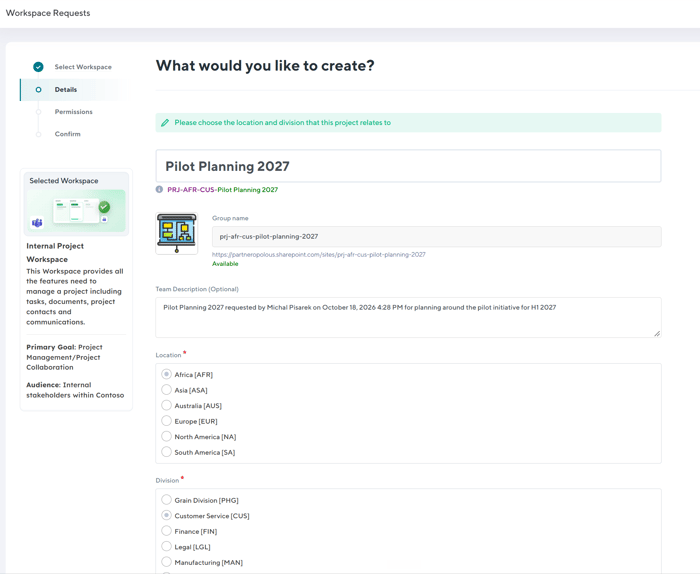
Orchestry workspace request showing the applied naming convention on the Details page
Orchestry's naming conventions can include Orchestry metadata fields, and any metadata used in a name becomes a required field on the request. An incremental counter can number workspaces automatically from a starting number you choose, and the requester sees the applied name on the Details page during the request.
You can also cap the length of workspace names, and Orchestry's blocked words reject new names that contain prohibited terms. A fully governed workspace is now provisioned in about six clicks with Orchestry.
Names that encode status or purpose go stale when a project changes. Keep the name short and stable, such as a type code plus a project code or counter, and put details that change into metadata.
Neither the native policy nor Orchestry's naming conventions rename what's already there; Orchestry applies conventions at provisioning only. Audit existing names that fall outside your convention before you rely on either.
Frequently asked questions about the Microsoft 365 group naming policy
Does the group naming policy apply to existing groups?
Not right away. Microsoft applies the group naming policy to an existing Microsoft 365 group the next time an owner edits the group name, even if they don't change it. However, since most owners never do this, it's not going to apply retroactively.
Who is exempt from the group naming policy?
Global Administrators and User Administrators are exempt. They can create Microsoft 365 groups with blocked words and their own naming conventions in every app.
What license does the group naming policy require?
You need to own, but not necessarily assign, a Microsoft Entra ID P1 or Entra Basic EDU license for each unique person who's a member of one or more Microsoft 365 groups. The count is based on group members, including guests, not only on the people who create groups, and Microsoft notes the admin who sets up the policy needs a license too.
Can I use a project code or custom attribute in the group naming policy?
No. Prefixes and suffixes can only be fixed text or one of six Entra ID attributes of the person creating the group, such as Department or Office. Extension and custom attributes aren't supported, so a project or client code needs a request process that asks for it.
Does the group naming policy cover SharePoint communication sites?
No. The group naming policy acts on Microsoft 365 groups, and communication sites don't come with one, so they don't get your prefixes or the blocked-word check. Team sites created without a group are in the same position.
Can I have different naming conventions for different kinds of teams?
Not with the native policy, which is a directory-level setting that applies to every Microsoft 365 group in the tenant. To give project teams and department teams different patterns, assign different naming conventions to different workspace templates in a provisioning tool such as Orchestry.
Keep the group naming policy on for the groups it covers, and put a request process in front of everything it doesn't. To see Orchestry's naming conventions build compliant names at request in your own tenant, book a walkthrough with our team.