/HubSpot%20-%20eBook%20-%20Proof%20Card%20Mockup%20001.jpg?length=1000&name=HubSpot%20-%20eBook%20-%20Proof%20Card%20Mockup%20001.jpg)
/HubSpot%20-%20eBook%20-%20Proof%20Card%20Mockup%20001.jpg?length=1000&name=HubSpot%20-%20eBook%20-%20Proof%20Card%20Mockup%20001.jpg)
/HubSpot%20-%20eBook%20-%20Proof%20Card%20Mockup%20001.jpg?length=1000&name=HubSpot%20-%20eBook%20-%20Proof%20Card%20Mockup%20001.jpg)
/HubSpot%20-%20eBook%20-%20Proof%20Card%20Mockup%20001.jpg?length=1000&name=HubSpot%20-%20eBook%20-%20Proof%20Card%20Mockup%20001.jpg)
/HubSpot%20-%20eBook%20-%20Proof%20Card%20Mockup%20001.jpg?length=1000&name=HubSpot%20-%20eBook%20-%20Proof%20Card%20Mockup%20001.jpg)
/HubSpot%20-%20eBook%20-%20Proof%20Card%20Mockup%20001.jpg?length=1000&name=HubSpot%20-%20eBook%20-%20Proof%20Card%20Mockup%20001.jpg)
/HubSpot%20-%20eBook%20-%20Proof%20Card%20Mockup%20001.jpg?length=1000&name=HubSpot%20-%20eBook%20-%20Proof%20Card%20Mockup%20001.jpg)

/HubSpot%20-%20eBook%20-%20Proof%20Card%20Mockup%20001-min.jpg?length=1000&name=HubSpot%20-%20eBook%20-%20Proof%20Card%20Mockup%20001-min.jpg)


You can't govern what you can't see.
That principle is easy to state. The hard part is that in most Microsoft 365 tenants, seeing everything takes enough effort to make visibility impractical without dedicated tooling. A Microsoft 365 tenant inventory is a complete, current record of what exists in your tenant: every workspace, its ownership, its activity, its sharing configuration, and its governance posture.
Workspace data lives in the Teams admin center, SharePoint site data in the SharePoint admin center, guest and external user data in Entra ID and the Microsoft 365 admin center, and OneDrive in yet another section, with permissions and sharing spanning all of them. Assembling that into a coherent picture means navigating five admin centers, exporting data, and correlating records, and the moment you finish, part of it has already changed.
The result is a common pattern: governance decisions made on incomplete information, gaps discovered only when something surfaces them, and disproportionate effort spent assembling data that should be immediately accessible.
What is a Microsoft 365 tenant inventory?
A Microsoft 365 tenant inventory is a complete, current record of what exists in your tenant: every workspace, its ownership, its activity status, its sharing configuration, and its governance compliance posture.
A complete inventory covers:
- Workspaces: every Teams channel, SharePoint site, Microsoft 365 Group, OneDrive account, and Viva Engage community, with creation date, owners, privacy setting, and sensitivity label
- Ownership: who owns each workspace, whether those owners are active, and where ownership is missing
- Activity: when each workspace was last used, and whether it's actually active or has been quiet for months
- Sharing and permissions: what's shared externally, what links exist, which workspaces are overshared, and where permissions break from inheritance
- Governance alignment: which workspaces meet your standards and which have gaps in naming, ownership, labeling, or lifecycle
Most organizations have some of this in native tools. Few have all of it in one place, always current, and actionable without manual assembly.
Why tenant visibility matters more than it used to
As your tenant grows by adding users, workspaces, external collaborators, and AI tools, the cost of poor visibility compounds.
- Governance decisions made on incomplete data are guesswork. Deciding which workspaces to archive, which guest accounts to remove, or which sites need attention on partial data means the decisions reflect the gaps.
- Security incidents originate in the blind spots. Oversharing, orphaned workspaces, and stale guest access are visibility problems first. They exist before they become incidents, and the difference between a preventable exposure and a real one is often whether you could see it coming.
- AI deployments need a clean baseline. Microsoft Copilot, and any AI agent you connect, surfaces content based on access, not intent. Deploying AI without a clear inventory means deploying into a tenant you don't fully understand.
- Audits become project-scale efforts. When answering "who has access to what" takes days of PowerShell export and correlation, compliance reporting is a reactive burden. With a complete inventory, you answer it in minutes.
Consolidated workspace activity reporting routinely surfaces hundreds of inactive Microsoft Teams, workspaces you knew existed in principle but had no systematic way to find, prioritize, and act on.
Where Microsoft 365 tenant visibility breaks down natively
Microsoft's native admin centers are capable. The challenge is consolidation.
- The Teams admin center shows Teams membership, activity, and settings, but not SharePoint, OneDrive, or sharing-link data.
- The SharePoint admin center shows site storage, activity, and sharing settings, but not Teams membership, guest history, or OneDrive.
- The Microsoft 365 admin center shows user and license data and high-level storage, but not workspace-level governance gaps.
- Entra ID shows identity, guest accounts, and group membership, but not workspace-level context about what those accounts can reach.
- Microsoft Purview shows sensitivity labels and compliance policies, but not workspace activity, ownership, or sharing status.
Getting a complete picture means logging into each tool, exporting data, and correlating it, which takes hours, produces a snapshot that's already outdated, and has to be repeated every time something changes.
What complete M365 tenant visibility enables
Informed governance decisions
When you can see every workspace's ownership, activity, sharing, and compliance status in one view, you make decisions on complete information instead of estimates. Whether a site is an archival candidate, a guest account needs review, or a workspace has gaps to fix before the next audit, it's answerable directly, without assembling data from multiple sources.
Proactive risk identification
Gaps you can see now can be addressed before they become incidents. An orphaned workspace found today is easier to resolve than the same workspace discovered during a security audit six months from now. Orchestry's reporting and insights surfaces security risks, governance gaps, and activity anomalies across the tenant, with recommendations prioritized by severity so you focus on what matters, not on what happens to be visible in the admin center this week.
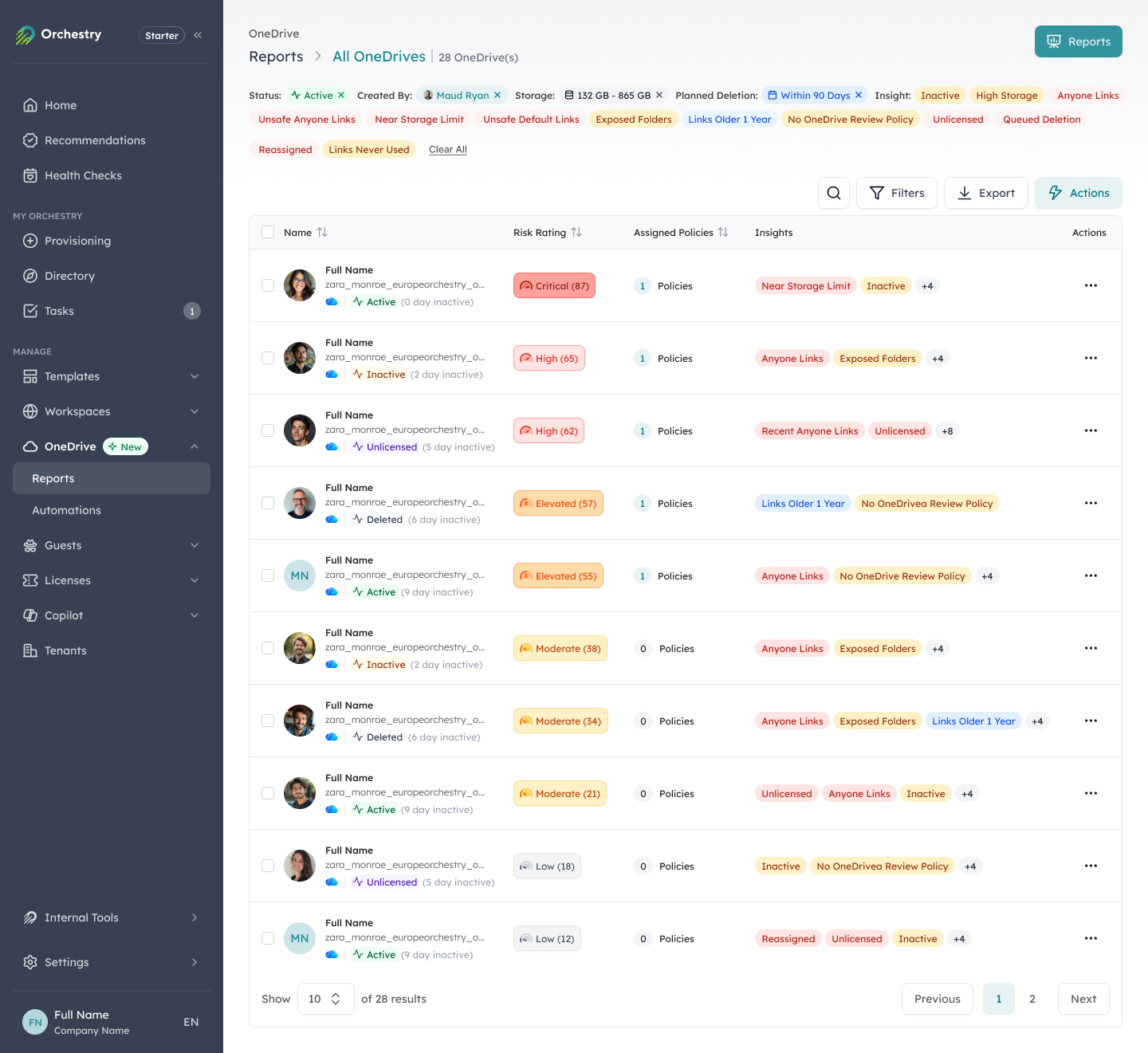
Risks and governance gaps surfaced across the tenant, prioritized by severity.
Efficient compliance reporting
Compliance reporting becomes an operational function rather than a project when the underlying data is continuously available. Orchestry's health checks generate recurring, leadership-ready reports automatically, covering storage trends, activity, sharing exposure, and governance posture without manual assembly.
Actionable, not just visible
The point of visibility is that it produces actions, not just information. A report showing 400 inactive workspaces or 200 stale guest accounts isn't useful unless it routes them to the right owners for review and removal. Orchestry pairs visibility with workflow, so the gap between seeing a problem and resolving it is measured in hours, not months.
Building a practical M365 tenant inventory program
Phase 1: Establish the baseline
Start by understanding what you have: every workspace type with ownership, activity, sharing, and governance data in one view. For most organizations this surfaces a lot of unexpected findings: workspaces no one knew were still active, guest accounts from years-old engagements, sites configured during a migration and never reviewed. That's normal, and the inventory doesn't create these problems, it makes them visible.
Based on Orchestry data, two in three workspaces are inactive at first install, so that first inventory almost always surfaces more than you expect.
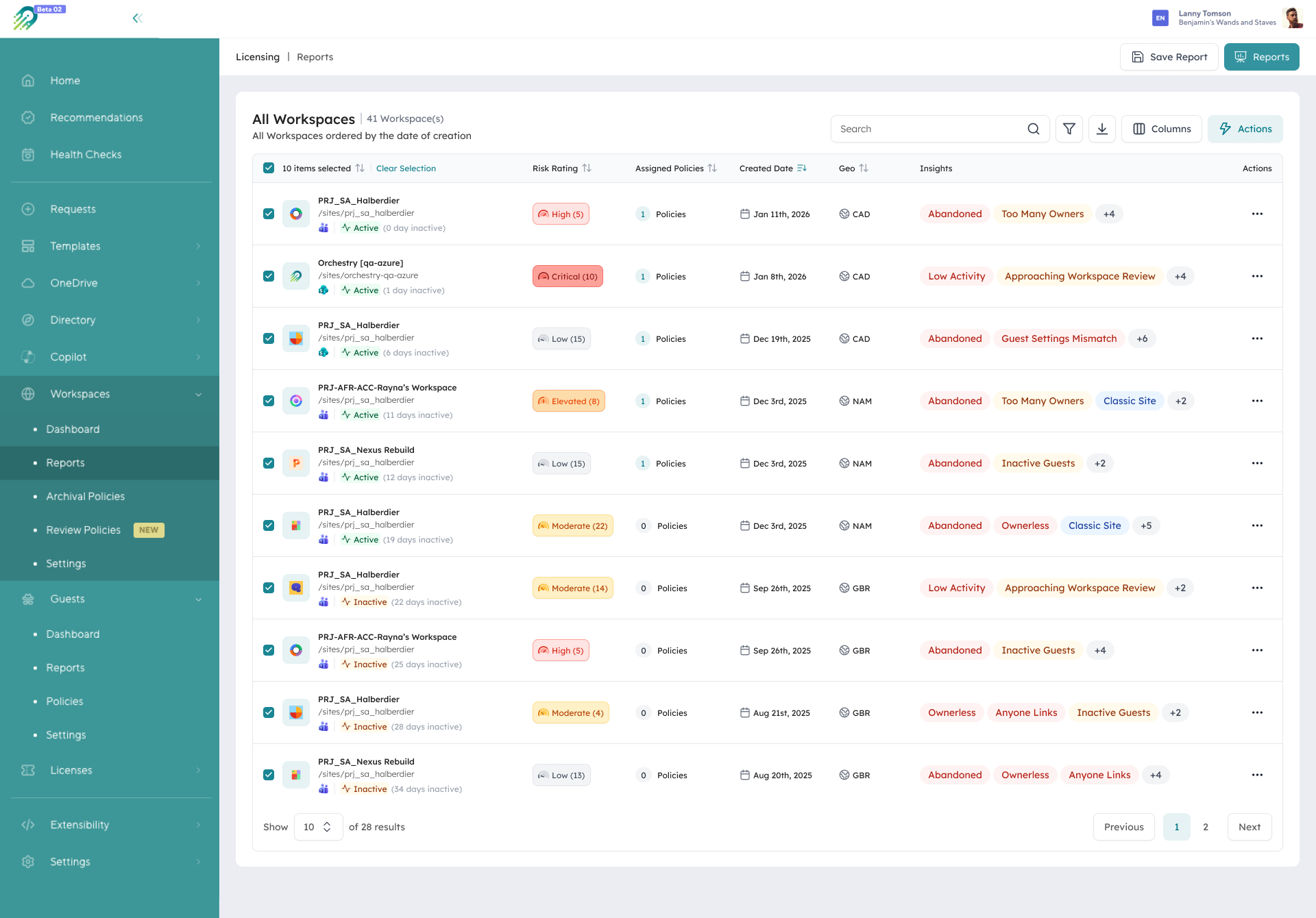
A complete inventory: every workspace with its risk rating , policies, and key insights in one view.
Phase 2: Prioritize and act on gaps
Not every gap needs immediate action. Focus on the highest-risk findings first: workspaces with sensitive data and no active owner, guest accounts with broad access from expired engagements, sites with organization-wide sharing. Orchestry's recommendations analyze tenant data and provide prioritized, guided actions for stale workspaces, unchecked guest access, missing owners, and over-permissioned sharing.
Phase 3: Keep the inventory current
An inventory is only useful if it reflects the current state, which means continuous collection, not quarterly snapshots. Orchestry gathers data continuously across Microsoft 365's management APIs, so new workspaces appear as they're created, ownership changes are reflected as they occur, and sharing updates appear as they happen.
Phase 4: Connect visibility to governance workflows
Visibility without action is just information. The final step connects the inventory to the workflows that act on it: lifecycle reviews routed to owners, guest reviews sent on a defined schedule, and ownership-gap workflows that detect and escalate orphaned workspaces automatically. When visibility and governance workflows are connected, the inventory becomes an operational tool rather than a reporting artifact.
Microsoft 365 tenant visibility and Copilot readiness
Microsoft Copilot raises the stakes of visibility, because AI operates at the scale of everything a user can access, not just what they're actively looking at.
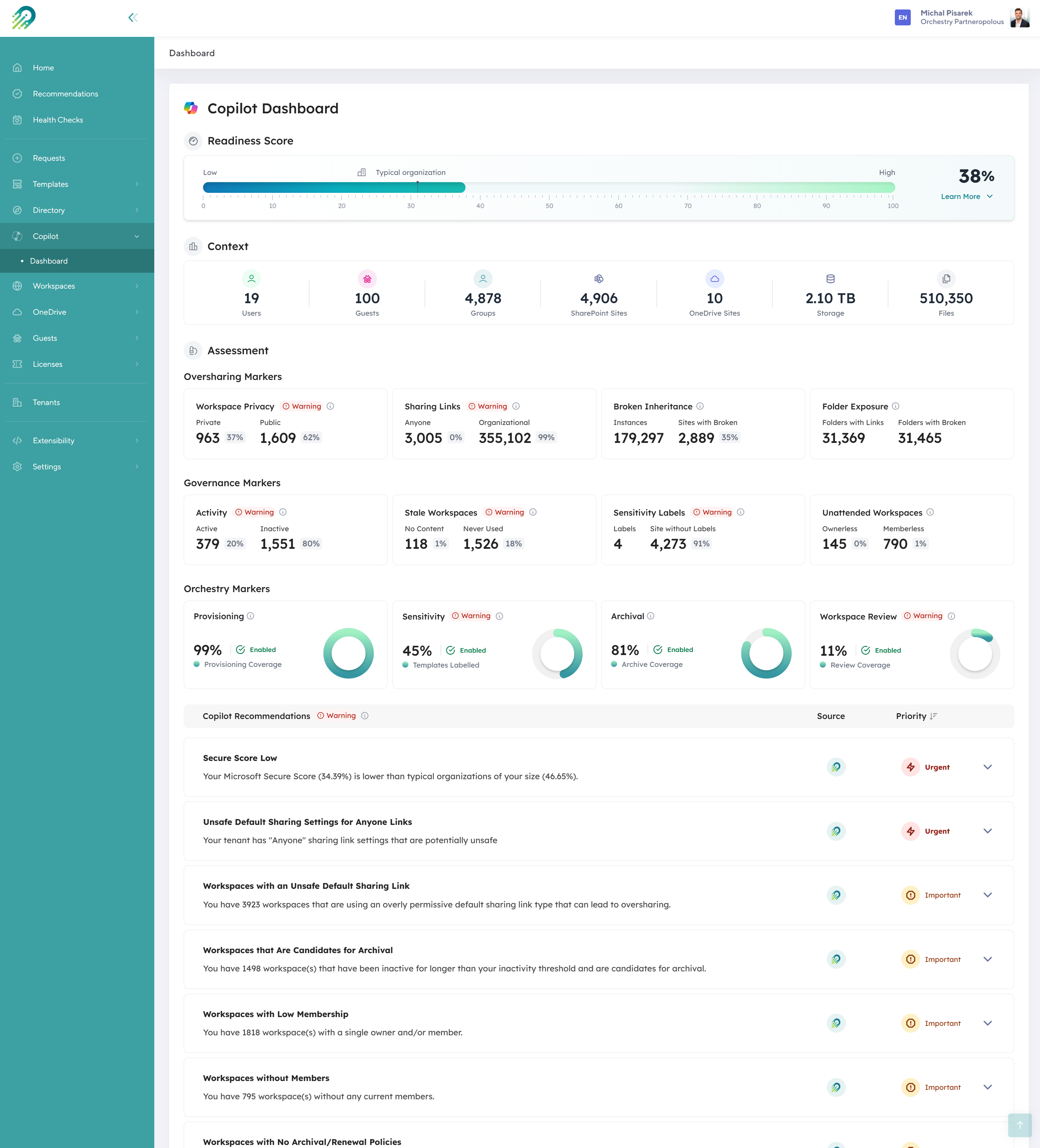
Before deploying Copilot, Orchestry's readiness view scores each tenant signal across the environment.
Before you deploy Copilot, or any AI agent, you need a clear answer to one question: what does each employee have access to, and is that access appropriate? A complete inventory makes that answerable, and it makes remediation tractable, since identified oversharing, stale content, and ownership gaps can be resolved from the same platform that surfaced them.
"Ease of use and ability to see things that cannot be seen out of the box." - Manager, IT services (verified Capterra review)
Frequently asked questions about M365 tenant inventory
What is included in a Microsoft 365 tenant inventory?
A complete inventory covers every Teams channel, SharePoint site, Microsoft 365 Group, OneDrive account, and Viva Engage community, along with ownership, activity, sharing and permissions data, storage usage, sensitivity labels, and governance compliance status.
How is a tenant inventory different from native Microsoft 365 reporting?
Native reporting distributes data across multiple admin centers. A complete inventory consolidates that data into a single, always-current view, adds governance context like ownership and risk ratings, and connects visibility to workflows that act on what it surfaces.
How often should a Microsoft 365 tenant inventory be updated?
Continuously. Point-in-time snapshots assembled from admin center exports are outdated by the time they're complete, so a living inventory should reflect changes as they happen, or at minimum on a daily refresh.
What are the most important things to include?
Ownership data, activity data, sharing and permissions data, and governance compliance status. Together those answer who owns each workspace, when it was last used, what's accessible to whom, and which workspaces meet your standards.
Ready to see your Microsoft 365 tenant clearly?
Orchestry gives you a complete, always-current inventory of your M365 tenant, consolidated into a single view, with workflows that close the gap between seeing a problem and resolving it. To see your own tenant mapped out, book a 30-minute demo.