/HubSpot%20-%20eBook%20-%20Proof%20Card%20Mockup%20001.jpg?length=1000&name=HubSpot%20-%20eBook%20-%20Proof%20Card%20Mockup%20001.jpg)
/HubSpot%20-%20eBook%20-%20Proof%20Card%20Mockup%20001.jpg?length=1000&name=HubSpot%20-%20eBook%20-%20Proof%20Card%20Mockup%20001.jpg)
/HubSpot%20-%20eBook%20-%20Proof%20Card%20Mockup%20001.jpg?length=1000&name=HubSpot%20-%20eBook%20-%20Proof%20Card%20Mockup%20001.jpg)
/HubSpot%20-%20eBook%20-%20Proof%20Card%20Mockup%20001.jpg?length=1000&name=HubSpot%20-%20eBook%20-%20Proof%20Card%20Mockup%20001.jpg)
/HubSpot%20-%20eBook%20-%20Proof%20Card%20Mockup%20001.jpg?length=1000&name=HubSpot%20-%20eBook%20-%20Proof%20Card%20Mockup%20001.jpg)
/HubSpot%20-%20eBook%20-%20Proof%20Card%20Mockup%20001.jpg?length=1000&name=HubSpot%20-%20eBook%20-%20Proof%20Card%20Mockup%20001.jpg)
/HubSpot%20-%20eBook%20-%20Proof%20Card%20Mockup%20001.jpg?length=1000&name=HubSpot%20-%20eBook%20-%20Proof%20Card%20Mockup%20001.jpg)

/HubSpot%20-%20eBook%20-%20Proof%20Card%20Mockup%20001-min.jpg?length=1000&name=HubSpot%20-%20eBook%20-%20Proof%20Card%20Mockup%20001-min.jpg)


When rolling out Microsoft Teams to their organizations, IT departments usually face some challenges. These challenges are different from those of a typical software deployment. But why is that?
Microsoft Teams provides a range of features and capabilities that users might not be familiar with. More importantly, it’s a shift from all the tools that they currently use and how they work day-to-day. In this article, we are going to share some first-hand experiences of how IT teams can make their Microsoft Teams roll-out as smooth and successful as possible.
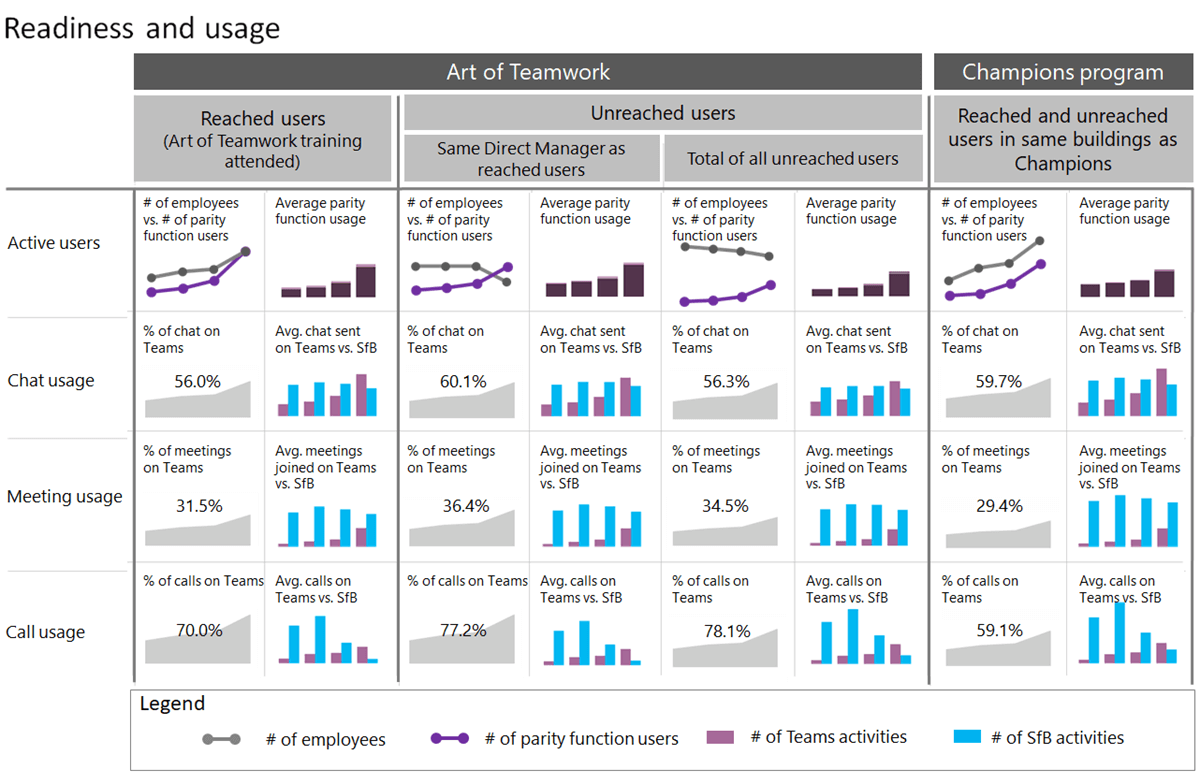
What to do for a Successful Microsoft Teams Adoption:
Run an Internal Pilot
Microsoft Teams is a multi-faceted productivity tool. The best way to understand the productivity app is to run an internal pilot with the IT team. This would help your internal support people understand the tool better and be more equipped to support the rest of the organization during roll-out.
With Microsoft Teams you can limit the creation of teams to specific users. You can also limit who can use the client application itself, effectively limiting your pilot.
Get Executive Sponsorship
Introducing a new technology product like Microsoft Teams requires a new way of working in many organizations. It makes work much more open and collaborative than before.
Because of this, having an executive sponsor that can communicate the need for change, the reason behind it, some of the challenges during the transition, and the desired outcome can be a godsend. No one likes to have specific tools forced on them, particularly when it’s IT who’s forcing, so a non-IT executive sponsor can help and should be considered essential.

Find Tangible Use Cases for Microsoft Teams Within the Business
Typically, IT teams roll out software with a features-focused mindset like “Here are some useful features that you can use”.
From our experience, a better approach is to defer talking about features and rather focus on providing a solution to a business need.
In the case of Microsoft Teams, instead of rolling out Collaborative Teams with real-time chat, use those features to create a tangible solution to offer your users. For example, “Here is how you do task management in Teams”.
By involving your business in this approach, you do the following:
- Build trust with the business and get a set of sponsors/champions from the very beginning
- Create a solution to a tangible business need, compelling your teams to adopt Microsoft Teams and making them think less of it as a “new tool with features.”
So make sure that you engage your business and come up with some use cases. Microsoft Teams has many different features, and you can come up with small solutions, for example, how to schedule meetings or video calling using Microsoft Teams, to large and complex solutions such as how to plan organization-wide initiatives.
What Not To Do With Microsoft Teams Adoption
Just like there are things you should be doing, there are things that you shouldn’t:
Make Microsoft Teams Magically Appear One Day
Making Microsoft Teams suddenly appear one day when users log into their machines is a really bad way to deploy it. This may seem obvious, but we have seen it repeatedly with countless organizations rolling it out this way. This might work for a small and targeted piece of software but for something as complex and powerful as Microsoft Teams, it doesn’t.
Not Provide Customized Training for Microsoft Teams
Like with all new tools, your Microsoft Teams users need training. It’s even more effective to have customized training for your organization.
Now, this may be a bit too cumbersome and/or expensive, so a combination of generic training for Microsoft Teams features as well as custom training for some of the specific capabilities that you have deployed can be a good way to go.
A great thing about Microsoft Teams is that you can use it to help people train, reinforcing the power of the tool. Having an organization-wide Team that is dedicated to training can be incredibly useful if you set up different channels where users can ask questions and get quick answers.
Not Providing Any Options During Your Microsoft Adoption
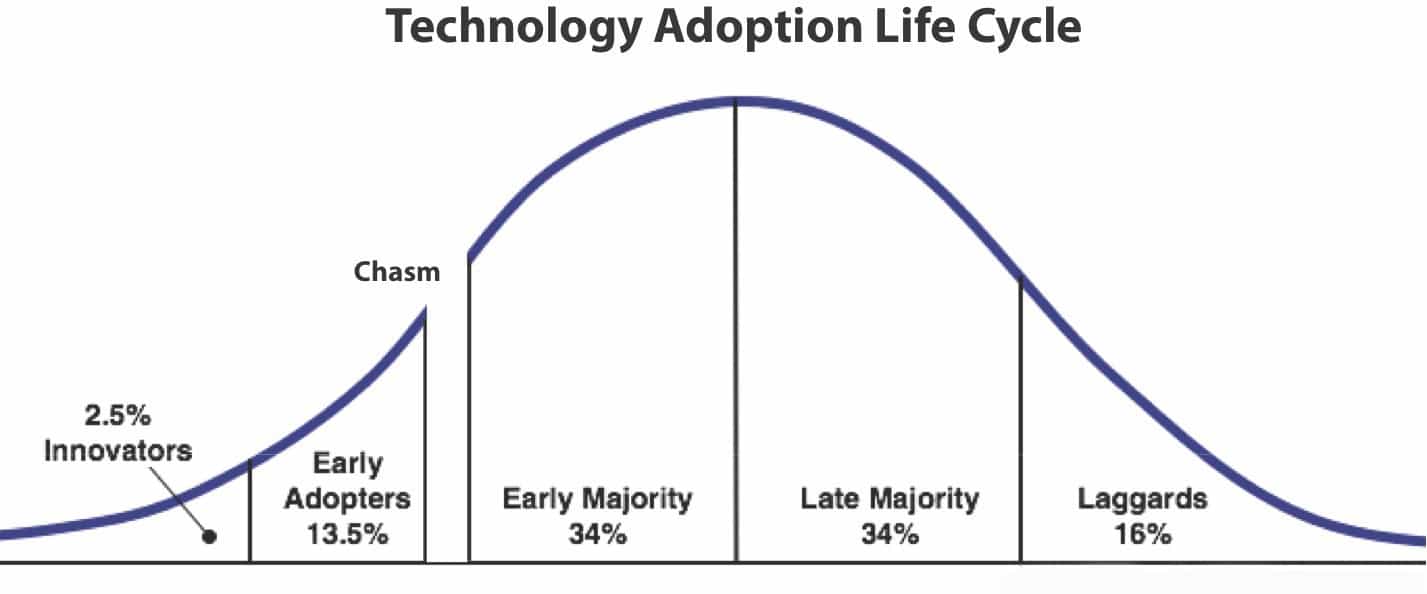
Your organization isn’t going to magically just start using Microsoft Teams one day. Regardless of industry, size, or culture, every organization will follow the technology adoption life cycle. Don’t think that you are different, because you aren’t (unless you are an organization of one).
Be sure that you can cater to the different categories:
- Innovators: Provide access to Microsoft Teams early on and let them make mistakes. They won’t mind as long as they can use the tool, and they typically try to work out any kinks themselves.
- Early Adopters: Let them use Microsoft Teams but probably need a little more support in terms of training and understanding what the tool should be used for. You want to get the early adopters on board since you can use them to help promote Microsoft Teams to the early and late majority. Everyone knows that the innovators in the company will use any tool, but if you can show value with the early adopters you have a greater chance for success.
- Early Majority: Requires most of your effort. This is where you need to have a plan and stay organized. Training, as well as support from both IT and your champions from the early adopters and innovators, will help to provide stories and show how Microsoft Teams can be used.
Getting your executives involved to explain the ‘why’ of Microsoft Teams is also incredibly useful. If you can get the early majority on board then you are looking good, but this group will need some convincing around the new ways of working that Microsoft Teams provides.
- Late Majority: Typically the largest and most challenging group of users in your organization. You can reuse a lot of content developed in the early majority group, but this group will need the most in terms of training, guidance, and executive support.
- We’ve figured that if the velocity of the early majority is high in terms of adoption, then you can get the late majority on by simply encouraging and driving usage across the organization. This group can be a challenge and bear in mind that it might take more time to get them on board.
- Laggards: You have two ways to approach this and which you choose depends on your strategy. In some organizations, you simply mandate that Microsoft Teams be used and force the laggards to switch tools. It’s not the best way, but it is effective.
A better approach, however, is to offer a path from the current work tools into Microsoft Teams and provide some time for the laggards to switch. Frequently with Microsoft Teams, laggards will eventually start using the tool if the majority of people are, but keep in mind that there will always be people in every organization that remains resistant to altering their work tools or methods, regardless of any circumstances.
Work Smarter in Microsoft Teams with Orchestry
We hope these tips are useful and help you and your IT department successfully roll out Microsoft Teams for your organization. While the roll-out process can be challenging, Microsoft Teams is one of the most powerful collaboration tools out there, and the productivity and collaboration benefits will make it all worth it.
Orchestry helps you get the most out of Microsoft Teams and other M365 tools by empowering your IT Administrators and employees to define a winning Microsoft 365 adoption and change management strategy, with a roadmap of what to use when, and for what purpose.