



Microsoft lets you set one expiration policy for every Microsoft 365 group in your tenant, and a group nobody renews is deleted. SharePoint Advanced Management adds inactive site policies you can scope to different sites, but they only notify, set read-only and archive. Most workspace lifecycle tools exist to fill the gaps: rules attached when a workspace is created, and a keep-or-archive decision that reaches someone who knows the content, even when the owner is gone.
The best workspace lifecycle management tools to compare are Orchestry, AvePoint Cloud Governance, Syskit Point, Rencore Governance, ProvisionPoint, ShareGate Protect and CoreView, measured against Microsoft’s own SharePoint and Entra controls.
Orchestry is the pick if you want lifecycle rules set on the template and owner decisions delegated, including for workspaces that have lost their owner. The table below shows where each tool fits, judged on five criteria.
What to compare before you choose a lifecycle tool
Inactivity reports are the easy part. These five criteria separate a tool that runs the lifecycle from one that shows you the backlog:
- Inactivity detection you can tune. What counts as activity, and whether you set the threshold per policy or live with a fixed default.
- Owner decisions and recurring reviews. Whether owners get a clear renew, archive or delete choice, and whether reviews repeat on a schedule rather than only when a workspace goes quiet.
- What happens when nobody answers. The default when an owner ignores the request, and who gets the task when a workspace has no owner at all.
- Lifecycle attached at creation. Whether a new workspace starts with its rules in place, or gets swept into a policy later.
- Archive options and scope. Read-only in place, Microsoft 365 Archive, a move or deletion, and which workspace types each policy can reach.
Best workspace lifecycle management tools compared
The table reflects each vendor’s product pages and documentation as last checked in October 2026, and it doubles as a shortlist of SharePoint governance tools for site lifecycle. Capabilities change release to release, so confirm anything that decides your shortlist in a demo.
| Tool | Best for | What it covers | Keep in mind |
|---|---|---|---|
| Orchestry | Teams and SharePoint tenants that want lifecycle rules set on the template and owner decisions delegated, including workspaces with no owner | Archival policies on templates and existing workspaces; owner task to renew, archive or delete; recurring workspace reviews; no-owner reviews routed to the most active members or named users; archive in place, move to SharePoint, Microsoft 365 Archive or delete | Works with or without Microsoft 365 Archive. |
| AvePoint Cloud Governance | Organizations that run every workspace request through a governed service catalog | Expiration and inactivity-based lifecycle; renewal and recertification; ownership confirmation; automated archiving or deletion; policies applied at request or after the fact | Lifecycle is one part of a broad catalog, so setup takes planning |
| Syskit Point | Inventory-led teams that want inactivity, ownership and review policies in one console | Inactive Workspaces policy with keep, archive and delete tasks; recurring Workspace Review; orphaned workspace options, including assigning the last owner’s manager; in-place or Microsoft 365 Archive | Policies attach through rules or manually |
| Rencore Governance | Teams that want lifecycle inside a wider policy engine | Provisioning templates with expiration dates; configurable inactivity thresholds; attestation with reminders and escalation; automated archival with permission cleanup | Lifecycle runs through automations you configure, with optional approval before archive or delete |
| ProvisionPoint | Provisioning-first organizations that want expiry rules from day one | Governance controls applied at creation; multi-stage expiry workflows that notify owners; archiving with Microsoft 365 Archive | Now sold by SnapOn Software; public documentation is limited |
| ShareGate Protect | ShareGate customers cleaning up an existing estate | Daily workspace policies to archive, delete or limit versions; Delegated Reviews with keep, archive or delete | Policies can’t notify owners; reviews skip workspaces with no owner; archiving needs Microsoft 365 Archive |
| CoreView | Admin teams already working from CoreView reports | Teams group activity report with last activity date; archive or remove Teams groups from the report | Owner attestation runs through scheduled Teams policies, not in the Essentials plan |
| Microsoft native | Tenants licensed for SharePoint Advanced Management | Site ownership, inactive site and attestation policies, then read-only and Microsoft 365 Archive; Entra group expiration with activity-based renewal | One group expiration policy per tenant; unrenewed groups are deleted |
Orchestry
Orchestry treats lifecycle as part of how a workspace is built. Archival policies attach to workspace templates, so every team or site provisioned from a template starts with its inactivity rules, and the same policies can be assigned to workspaces that already exist.
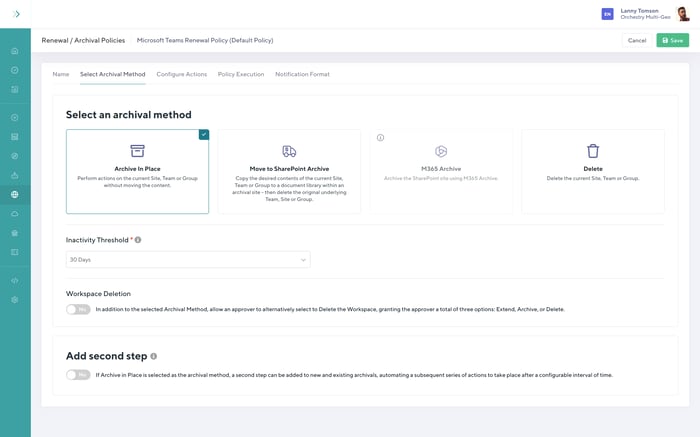
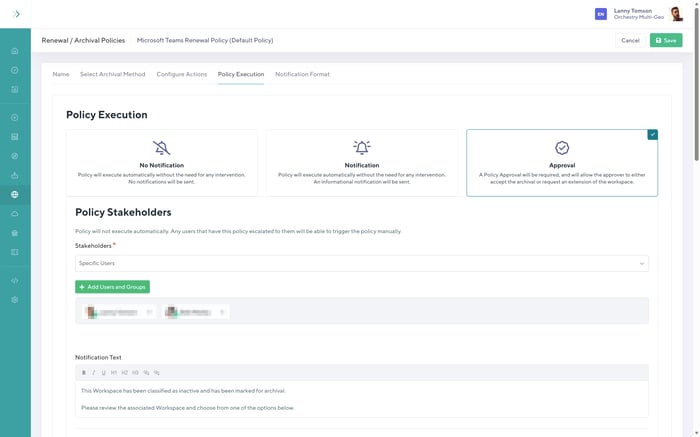
Orchestry archival policy with inactivity threshold, owner approval and archival method settings
When a workspace crosses its threshold, the owner or a designate gets an archival task to renew, archive or delete it. Archival can keep the workspace in place as read-only, move its content to another SharePoint site, send it to Microsoft 365 Archive, or delete it.
Workspace reviews add a recurring check on membership, sharing and settings, separate from inactivity. When a workspace has no owner, the review goes to its most active members or to named users, who accept ownership before they review. Guests aren’t counted as active members.
75% of unused Teams get cleaned up within 14 days when delegated lifecycle workflows are turned on. Policies cover Teams, group-connected team sites and communication sites, plus the team site behind an existing Viva Engage community; team sites without a Microsoft 365 group and classic sites are outside them.
AvePoint Cloud Governance
AvePoint builds lifecycle into a service catalog. Users request workspaces through Cloud Governance questionnaires, and lifecycle policies for sites, groups, teams and agents set expiration and inactivity rules from that point.
Renewal and recertification ask owners to confirm a workspace’s context, members and ownership, and end-of-life options run during recertification as archiving or deletion. AvePoint also applies policies to workspaces created outside the catalog, which it calls “create and chase” governance.
Syskit Point
Syskit Point starts from inventory and layers policies on top. Its Inactive Workspaces policy emails owners and admins with keep, archive and delete actions, using an inactivity period you set between 30 and 1,000 days, with reminders three days before and on the due date.
Workspace Review runs on a recurrence you choose and can include an inactivity step. For workspaces without an active owner, the Orphaned Workspaces policy offers three routes: named users assign owners, members suggest owners for approval, or Syskit assigns the last owner’s manager automatically.
Rencore Governance
Rencore puts lifecycle inside its broader policy engine. Its lifecycle governance page describes provisioning templates that set expiration dates at creation, and inactivity thresholds you can set per resource type.
Once a resource crosses a threshold, the workflow runs owner notification, an attestation request, a reminder, escalation, and then automated archival or deletion, with permission cleanup on archive. Its Archive Microsoft Team automation also sets the team’s SharePoint site to read-only, and archive and delete automations can wait for an approver before they run.
ProvisionPoint
ProvisionPoint comes at lifecycle from the provisioning side, and is now sold by SnapOn Software. Its product page describes governed request and approval for Teams, SharePoint sites and Microsoft 365 groups, with naming conventions, policies and governance controls applied from the moment a workspace is created.
For the end of the lifecycle, multi-stage expiry workflows flag workspaces inactive beyond a set threshold and notify owners, who can step in at any point, and archiving runs through Microsoft 365 Archive. We found no public help documentation, so check the no-response and no-owner behavior in a demo.
ShareGate Protect
ShareGate Protect splits lifecycle into automated policies and owner reviews. Workspace policies run once a day against conditions such as latest activity and storage, then archive matched workspaces to read-only, delete them, or limit file versions. Archiving needs Microsoft 365 Archive active in the tenant, and policies can’t send notifications to end users.
For owner input, Delegated Reviews ask owners to keep, delete or archive each workspace, and the decision runs immediately. Reminders are sent manually for now, and workspaces with no owner are skipped. ShareGate retired its provisioning features in 2025, so nothing attaches at creation.
CoreView
CoreView approaches inactive teams from the admin console. Its Teams group activity report shows each group’s last activity date, and admins can archive or remove a Teams group directly from the report.
That suits admin teams already running CoreView for wider Microsoft 365 management. Its scheduled Teams policies can also send an attestation to the group owner before archiving or removing an inactive team, though those remediation policies aren't in the Essentials plan and nothing attaches at creation.
Lifecycle at creation vs cleanup after the fact
A workspace that starts life with an expiration or inactivity rule never joins the backlog. Orchestry, AvePoint, Rencore and ProvisionPoint each attach lifecycle at provisioning, and Syskit applies policies through rules as workspaces appear. ShareGate, CoreView and Microsoft’s native controls act on workspaces after they exist.
The other split is the workspace with nobody to ask:
- Orchestry routes the review to the most active members or named users, who accept ownership first.
- Syskit Point lets named users assign owners, asks members to suggest one, or assigns the last owner’s manager.
- AvePoint confirms ownership as part of renewal and recertification.
- Rencore escalates unanswered attestations before archival or deletion.
- ShareGate Protect skips workspaces with no owner when it sends reviews.
- Microsoft’s group expiration sends renewal notices for ownerless groups to an alternate email address you set.
Microsoft Teams archive and Microsoft 365 Archive: what each tool does with an inactive workspace
Archiving means different things across these tools. A Microsoft Teams archive sets the team to read-only, while Microsoft 365 Archive moves the site to cheaper cold storage, and deletion removes it.
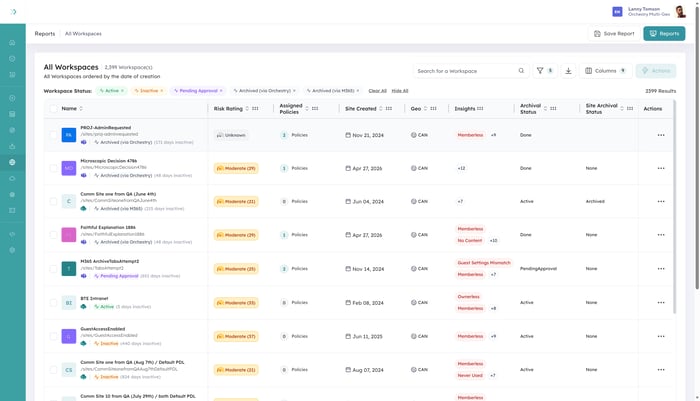
Orchestry workspace report showing lifecycle statuses for inactive, renewed and archived workspaces
- Orchestry: archive in place as read-only, move content to another SharePoint site and delete the original, Microsoft 365 Archive, or delete.
- Syskit Point: in-place archival to read-only, with optional removal of members and sharing links, or Microsoft 365 Archive; archived workspaces can be restored.
- ShareGate Protect: archive to read-only through Microsoft 365 Archive, or delete.
- Rencore: automated archival with permission cleanup, or deletion.
- ProvisionPoint: archiving through Microsoft 365 Archive.
- CoreView: archive or remove Teams groups from the report.
- Microsoft’s SharePoint site lifecycle management: read-only, then Microsoft 365 Archive after a read-only period.
One customer’s result: backlog of 150+ inactive Teams cleared through Orchestry’s automated, owner-approved archival. For the step-by-step, see how to archive inactive Teams and SharePoint sites with Orchestry.
Native Teams lifecycle controls: SharePoint site lifecycle management and group expiration
Microsoft covers Teams lifecycle with two separate tools. SharePoint site lifecycle management, part of SharePoint Advanced Management, has three policy types: site ownership, inactive site and site attestation.
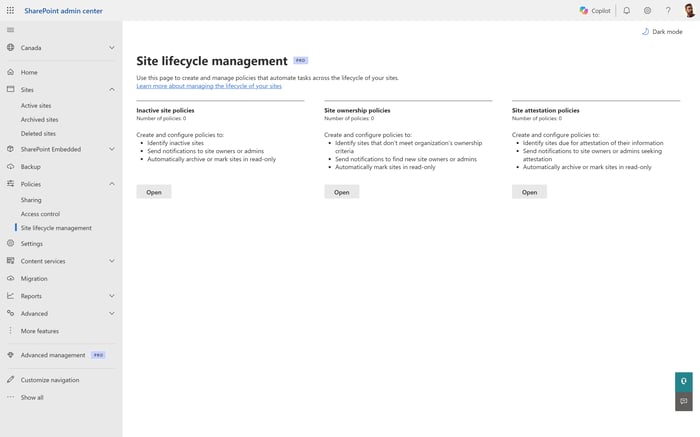
SharePoint admin center site lifecycle management policies for ownership, inactivity and attestation
The policies notify owners through Outlook actionable messages and, after several unanswered notices, can set a site to read-only and later archive it with Microsoft 365 Archive. They don’t delete sites directly.
The Microsoft 365 group expiration policy in Entra works differently. Groups with recent activity renew automatically; owners of the rest get notices 30, 15 and 1 day before expiry, and groups that aren’t renewed are deleted, with 30 days to restore them.
You can set only one expiration policy per tenant, and it needs Entra ID P1 or P2 licenses for the members of the groups it covers. SharePoint Advanced Management’s inactive site policies can be scoped to different sets of sites, but each one still stops at read-only and archive.
Workspace lifecycle management tools: frequently asked questions
What is workspace lifecycle management in Microsoft 365?
Workspace lifecycle management is the set of rules that governs a team, group or site from creation to archival or deletion. It covers inactivity detection, owner renewal or review, what happens when nobody responds, and how inactive workspaces are archived or removed.
Does Microsoft 365 have a built-in Teams expiration policy?
Yes. The Microsoft 365 group expiration policy in Entra applies to the groups behind Teams, renews active groups automatically, and deletes groups whose owners don’t renew them. You can configure one policy per tenant, and it requires Entra ID P1 or P2 licensing.
What happens to an archived team?
It depends on the method. A team archived in place becomes read-only and stays where it is, while Microsoft 365 Archive moves the site into cold storage until it’s reactivated. Tools such as Orchestry and Syskit Point let you choose the method per policy.
Do I need SharePoint Advanced Management for site lifecycle policies?
Yes, for Microsoft’s native site ownership, inactive site and attestation policies. Third-party workspace lifecycle management tools such as Orchestry run their own inactivity and review policies without SharePoint Advanced Management.
What are the best Teams governance tools for lifecycle management?
Orchestry, AvePoint Cloud Governance, Syskit Point, Rencore Governance, ProvisionPoint, ShareGate Protect and CoreView all cover Teams lifecycle. They differ most on whether rules are set at creation and on how they handle workspaces with no owner.
If you’re comparing the best workspace lifecycle management tools, see how Orchestry sets lifecycle rules on the template and hands decisions to owners. Book a 30-minute walkthrough in your own tenant.