/HubSpot%20-%20eBook%20-%20Proof%20Card%20Mockup%20001.jpg?length=1000&name=HubSpot%20-%20eBook%20-%20Proof%20Card%20Mockup%20001.jpg)
/HubSpot%20-%20eBook%20-%20Proof%20Card%20Mockup%20001.jpg?length=1000&name=HubSpot%20-%20eBook%20-%20Proof%20Card%20Mockup%20001.jpg)
/HubSpot%20-%20eBook%20-%20Proof%20Card%20Mockup%20001.jpg?length=1000&name=HubSpot%20-%20eBook%20-%20Proof%20Card%20Mockup%20001.jpg)
/HubSpot%20-%20eBook%20-%20Proof%20Card%20Mockup%20001.jpg?length=1000&name=HubSpot%20-%20eBook%20-%20Proof%20Card%20Mockup%20001.jpg)
/HubSpot%20-%20eBook%20-%20Proof%20Card%20Mockup%20001.jpg?length=1000&name=HubSpot%20-%20eBook%20-%20Proof%20Card%20Mockup%20001.jpg)
/HubSpot%20-%20eBook%20-%20Proof%20Card%20Mockup%20001.jpg?length=1000&name=HubSpot%20-%20eBook%20-%20Proof%20Card%20Mockup%20001.jpg)
/HubSpot%20-%20eBook%20-%20Proof%20Card%20Mockup%20001.jpg?length=1000&name=HubSpot%20-%20eBook%20-%20Proof%20Card%20Mockup%20001.jpg)

/HubSpot%20-%20eBook%20-%20Proof%20Card%20Mockup%20001-min.jpg?length=1000&name=HubSpot%20-%20eBook%20-%20Proof%20Card%20Mockup%20001-min.jpg)


Guests accumulate in every Microsoft 365 environment. A guest gets created, and then it just sits there, maybe forever. Most IT teams only find out when someone goes looking.
And with Microsoft moving SharePoint and OneDrive external sharing to Entra B2B, more of them are arriving as real identities in your directory, whether you planned for them or not. The result is not just clutter: it is standing access with no context, no owner, and no end date.
That is why Orchestry manages the full guest lifecycle in one place: the request that brings someone in, the review that keeps their access honest, and the cleanup that shows them out.
The full guest lifecycle, in one place
Guest management in Orchestry covers four stages, with clear delegation and built-in guardrails at each one:
- Guest Requests: structured requests and routing, capturing the required details for each guest so access is identified, justified and reviewed
- Guest Reporting: who your guests are, what access they have, and where the risk sits
- Guest Reviews: workspace owners periodically confirming that guest access is still needed
- Guest Delete: identifying unredeemed or inactive guests against your own thresholds and offboarding them from Entra
Together they streamline onboarding and offboarding across your entire environment, with a fraction of the manual effort.
New: Guest Onboarding
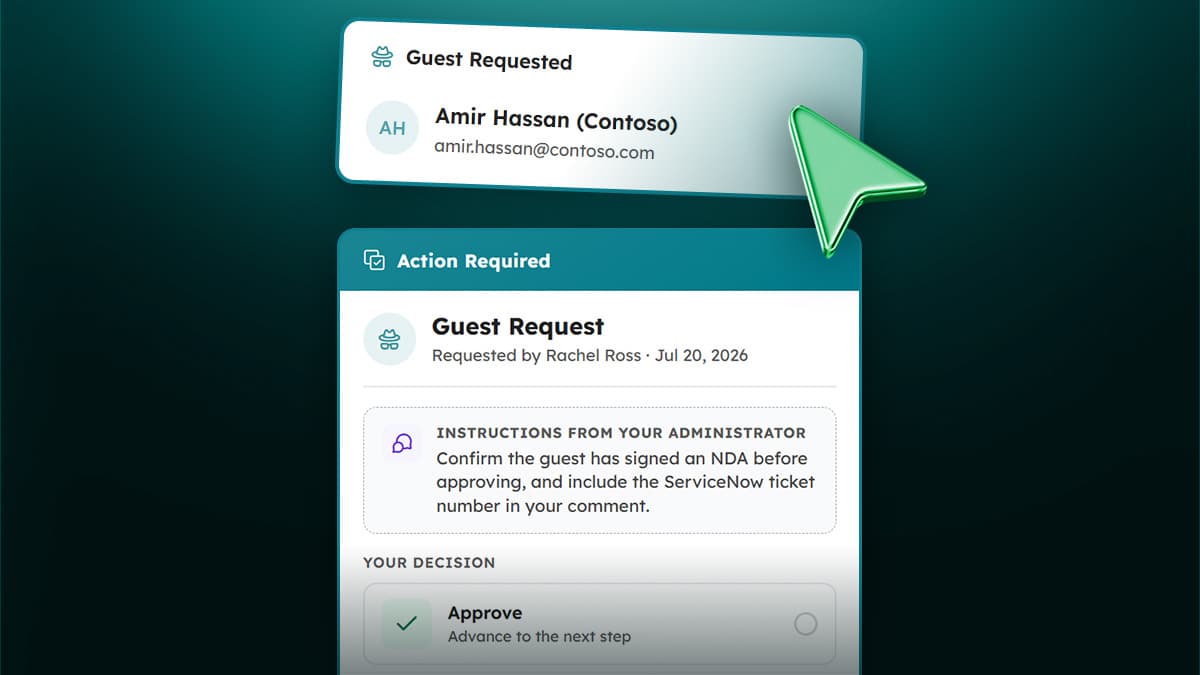
Until now, bringing a guest into Orchestry meant bringing them into a workspace. Plenty of real cases do not have one: a single file, a secure link, a contractor who needs one thing. Those became throwaway workspaces, or manual invitations nobody tracked.
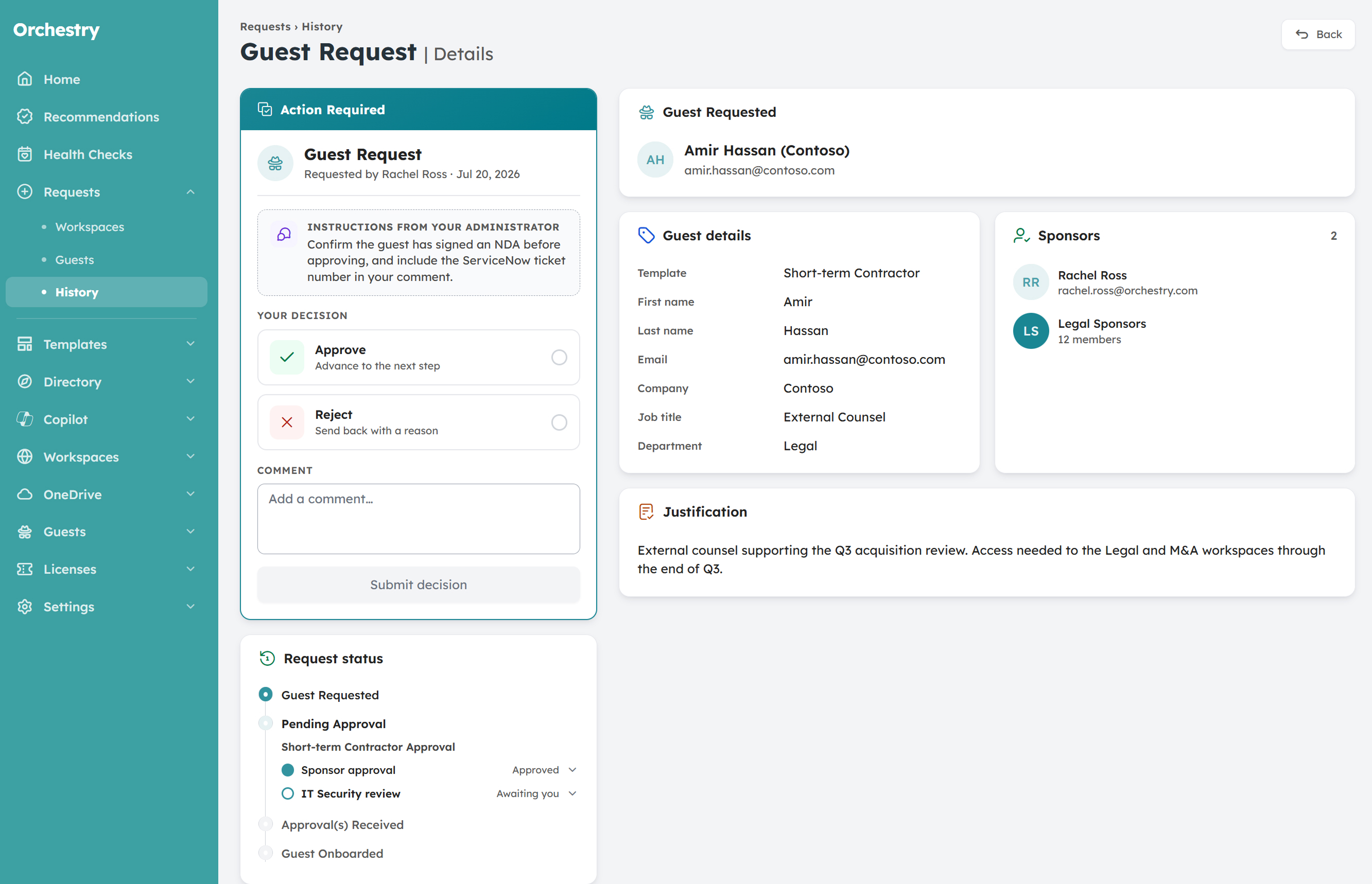
Guest Onboarding removes the workspace requirement. Guest templates define the types of guest in your environment and the metadata you capture about each one, from country and company to job title. A three-step request wizard, identical in the web app and in Teams, walks the requester through it.
The guest is created disabled, with no access to anything. Approval is what enables the account, sends the invitation, and writes the metadata and up to five sponsors to the guest’s Entra profile. Rejected or abandoned requests are cleaned up automatically.
Guest Onboarding is available on Professional and Enterprise.
New: Guest Delete Policy
Orchestry could always report on your guests and show you where they had access. What it could not do was automatically remove them, which is why guest estates grow and never shrink.
Guest Delete Policy is a tenant-wide automation. You define the criteria, invitations never redeemed and accounts gone inactive, each with its own threshold in days. It deletes the account in Entra, marks the guest as deleted in Orchestry so your reports reflect it, and can run as often as daily. Run it silently, or run and notify, with a deletion report emailed to named stakeholders after each run.
Worth knowing: this is a real deletion in your directory, not a status change inside Orchestry. Deleted accounts land in the Entra recycle bin and are recoverable there for 30 days.
See it in action
In this demo, Joy Apple, Director of Success & Enablement at Orchestry, walks through guest management end to end, including both new releases.
Where to start
If you already have guest management switched on, navigate to the Recommended for Deletion report in Guest Reporting. It is the fastest way to see exactly what has already accumulated in your tenant. It is a recommendation rather than an automation, so nothing moves until you decide.
Contact Orchestry Customer Success today and let us close the loop on guest governance together, from request to review to removal.