/HubSpot%20-%20eBook%20-%20Proof%20Card%20Mockup%20001.jpg?length=1000&name=HubSpot%20-%20eBook%20-%20Proof%20Card%20Mockup%20001.jpg)
/HubSpot%20-%20eBook%20-%20Proof%20Card%20Mockup%20001.jpg?length=1000&name=HubSpot%20-%20eBook%20-%20Proof%20Card%20Mockup%20001.jpg)
/HubSpot%20-%20eBook%20-%20Proof%20Card%20Mockup%20001.jpg?length=1000&name=HubSpot%20-%20eBook%20-%20Proof%20Card%20Mockup%20001.jpg)
/HubSpot%20-%20eBook%20-%20Proof%20Card%20Mockup%20001.jpg?length=1000&name=HubSpot%20-%20eBook%20-%20Proof%20Card%20Mockup%20001.jpg)
/HubSpot%20-%20eBook%20-%20Proof%20Card%20Mockup%20001.jpg?length=1000&name=HubSpot%20-%20eBook%20-%20Proof%20Card%20Mockup%20001.jpg)
/HubSpot%20-%20eBook%20-%20Proof%20Card%20Mockup%20001.jpg?length=1000&name=HubSpot%20-%20eBook%20-%20Proof%20Card%20Mockup%20001.jpg)
/HubSpot%20-%20eBook%20-%20Proof%20Card%20Mockup%20001.jpg?length=1000&name=HubSpot%20-%20eBook%20-%20Proof%20Card%20Mockup%20001.jpg)

/HubSpot%20-%20eBook%20-%20Proof%20Card%20Mockup%20001-min.jpg?length=1000&name=HubSpot%20-%20eBook%20-%20Proof%20Card%20Mockup%20001-min.jpg)


Microsoft Copilot doesn't create governance problems in your Microsoft 365 tenant. It reveals them.
When AI can read, summarize, and surface content at scale across every site, file, and workspace, the gaps that sat quietly for years become visible in seconds: overshared sites, stale content no one deleted, workspaces with no active owner, and sensitivity labels that were never applied. All of it becomes fair game for Copilot the moment it's deployed, and the same is true of any AI agent you connect, whether that's Copilot, ChatGPT, Glean, or a custom Microsoft 365 Copilot agent.
Microsoft 365 AI governance, the set of controls that decide what AI can reach and surface, isn't a prerequisite you check off before deployment. It's the foundation that determines whether Copilot becomes a productivity tool or an exposure problem.
What is Microsoft 365 AI governance?
Microsoft 365 AI governance is the set of controls that determine what AI tools like Microsoft Copilot can access, what they surface to employees, and how that access is maintained over time.
It covers:
- Permissions and sharing: who can access what content, and whether that access is still appropriate
- Content lifecycle: whether stale, inactive, or duplicate content is removed before AI surfaces it
- Workspace ownership: whether someone is accountable for each site's data quality, access, and compliance
- Sensitivity classification: whether confidential content is labeled and protected from being broadly surfaced
- Provisioning structure: whether new workspaces are created with governance baked in from the start
Traditional governance focuses on what people do with content. AI governance focuses on what AI can reach, and whether that reach is appropriate.
Why AI expands the blast radius of existing governance gaps
Every Microsoft 365 tenant has governance gaps. The difference between a governed tenant and an ungoverned one isn't whether gaps exist; it's whether they've been found and fixed before something surfaces them at scale.
Copilot changes that calculus because it doesn't wait for someone to go looking. It introduces risk in five recurring places:
- A site shared with "Everyone except external users" was always reachable by thousands of people, but before Copilot it took someone navigating to it; now Copilot can surface that content in a chat answer, a summary, or a drafted email. The sharing isn't new; the discoverability is.
- Broken permission inheritance. When permissions break from their parent site, content becomes reachable by people it was never meant for. These breaks accumulate silently and rarely show up in routine audits, and AI inherits every one of them.
- Inactive and duplicate content. Outdated drafts, superseded process docs, and duplicate files all look the same to Copilot. It surfaces what's accessible and recent-looking, not what's current, so employees get contradictory answers and trust erodes.
- Orphaned workspaces. A workspace with no active owner has no one reviewing membership or flagging content, so when AI can reach it, the exposure grows with no one responsible.
- Unlabeled sensitive content. Confidential documents without a sensitivity label are indistinguishable from general content in Copilot's index. If the file is accessible, it gets summarized, cited, and shared, even if no human went looking for it.
It's common to find thousands of overshared files and stale sharing links across a tenant once you look. Remediating them at the item level is what lets organizations deploy Copilot in weeks rather than months; the work isn't about blocking Copilot, it's about giving it clean data to work with.
The five pillars of Microsoft 365 AI governance
1. Identify and remediate oversharing
The first step is visibility: before you can fix oversharing, you need to know where it exists, across every site, document library, and sharing link in the tenant.
Native SharePoint reporting gives you org-level settings and per-site status. For a complete picture of "Anyone" links, "People in your organization" links, and broken permission inheritance, you need a consolidated view rather than site-by-site navigation, and remediation (bulk link removal, label application, permission resets) needs to run at scale. Orchestry's security and permissions reporting surfaces sharing exposure across the tenant and lets you act on it at the item level.
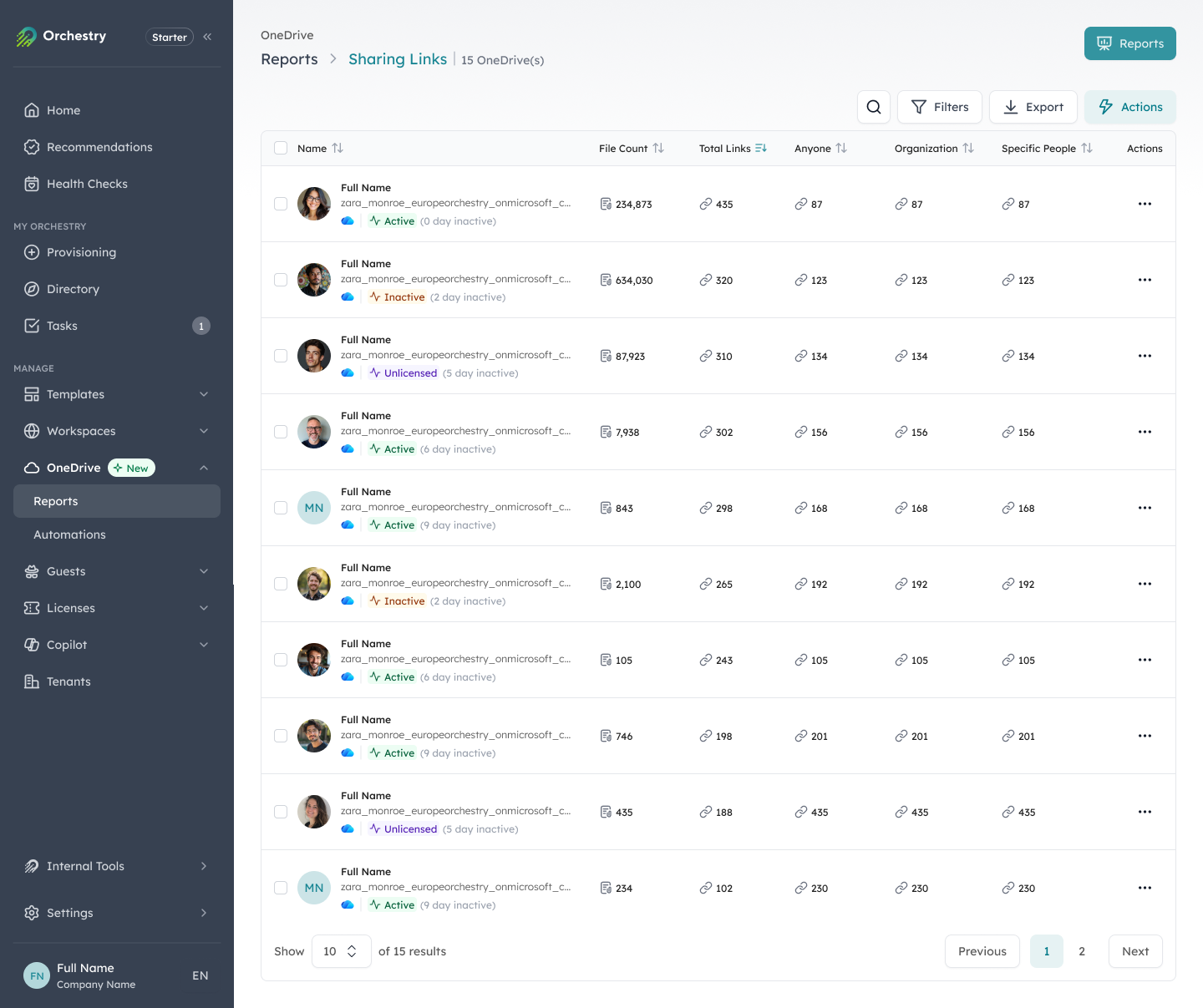
Sharing links and broken permission inheritance surfaced across the tenant, with item-level remediation.
2. Enforce ownership across every workspace
Every workspace Copilot can reach should have an accountable owner responsible for its data quality, access, and compliance.
Workspaces without active owners are the most common source of invisible AI risk: the owner left, the project ended, or the team restructured, but the workspace is still there, still accessible, and still in scope for Copilot. AI governance needs a continuous ownership process that detects orphaned workspaces, routes them to a responsible person, and escalates automatically when no one acts.
3. Manage the full content lifecycle
Stale content doesn't become harmless when it stops being used. It stays accessible, indexed, and in scope for Copilot.
Effective AI governance needs a lifecycle process that moves inactive workspaces through a defined cycle (owner certification, archival, or deletion) on an ongoing basis. Content moved to Microsoft 365 Archive is excluded from Copilot's index, so archiving keeps the index clean while preserving the data. The goal isn't to clean up everything before deployment; it's a continuous cycle that keeps the tenant clean afterward.
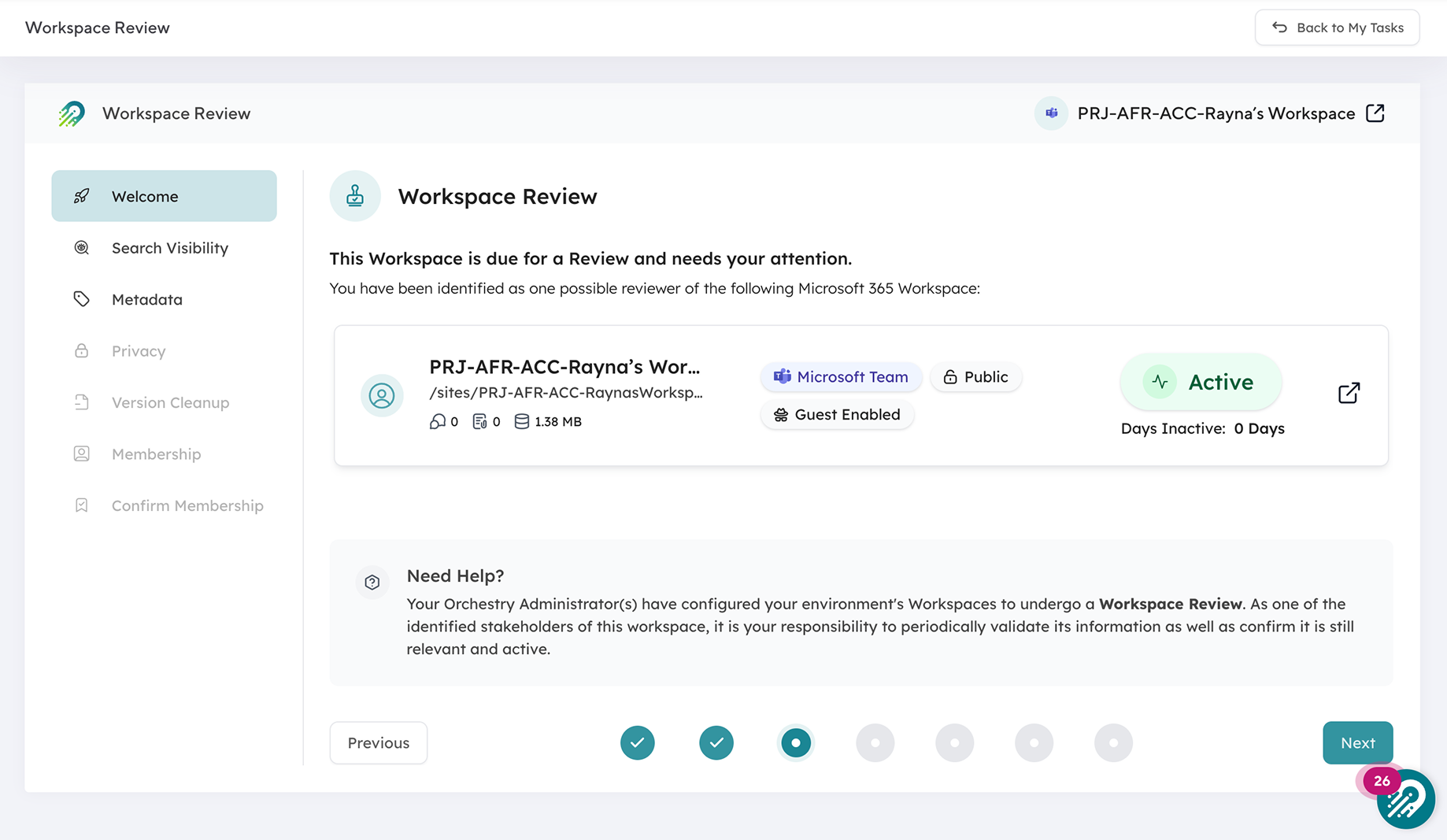
A workspace review routes an inactive workspace to its owner to certify, archive, or delete.
4. Apply governance at workspace creation
Governance applied after creation is always reactive. Workspaces that start without proper permissions, ownership, or naming require remediation later, at scale, under pressure.
Done well, every new Teams channel, SharePoint site, and Microsoft 365 Group is created through a process that applies the right structure, ownership, and compliance policies from day one. Your users get a guided provisioning experience, and IT gets workspaces that arrive already governed, so AI has clean, structured data instead of inheriting every gap the provisioning process left behind.
5. Maintain centralized visibility
You can't govern what you can't see. AI governance needs a single, always-current view of what exists across the tenant: workspaces, ownership, sharing links, sensitivity labels, and activity status, with gaps visible and actionable before they become incidents.
Native admin centers spread this data across multiple tools, licenses, and exports, so assembling it means stitching reports, running PowerShell, and deciding on data that's already out of date. Orchestry's reporting and insights keeps that view in one place and current.
Microsoft 365 AI governance vs general Microsoft 365 governance
What's the same: both need ownership, lifecycle management, provisioning standards, and visibility. The underlying principles don't change because AI is involved.
What's different: AI governance needs those controls operational before Copilot reaches the content. In a traditional model, gaps surface when someone goes looking; in an AI model, they surface when Copilot answers a question, and the audience widens from one person to everyone who touches Copilot. A misconfigured permission that was a minor compliance issue becomes a potential data exposure when AI can summarize and surface the affected content to anyone who asks.
How to assess your AI governance readiness
A practical Copilot readiness assessment covers five areas:
- Oversharing exposure: which sites have "Anyone," "People in your organization," or broad internal sharing, and have you reviewed sharing links at scale?
- Ownership coverage: what share of workspaces have at least one active owner, and where are the gaps?
- Lifecycle hygiene: which workspaces have had no activity in 12+ months, and have they been reviewed for archive or deletion?
- Content sensitivity: are sensitivity labels applied to confidential content, and is that content discoverable by Copilot without controls?
- Provisioning standards: are new workspaces created through a governed process, or does self-service keep creating ungoverned ones?
Orchestry's AI readiness dashboard scores your tenant on 13 signals across oversharing, governance, and adoption markers, with click-through reports that route remediation to the right people.
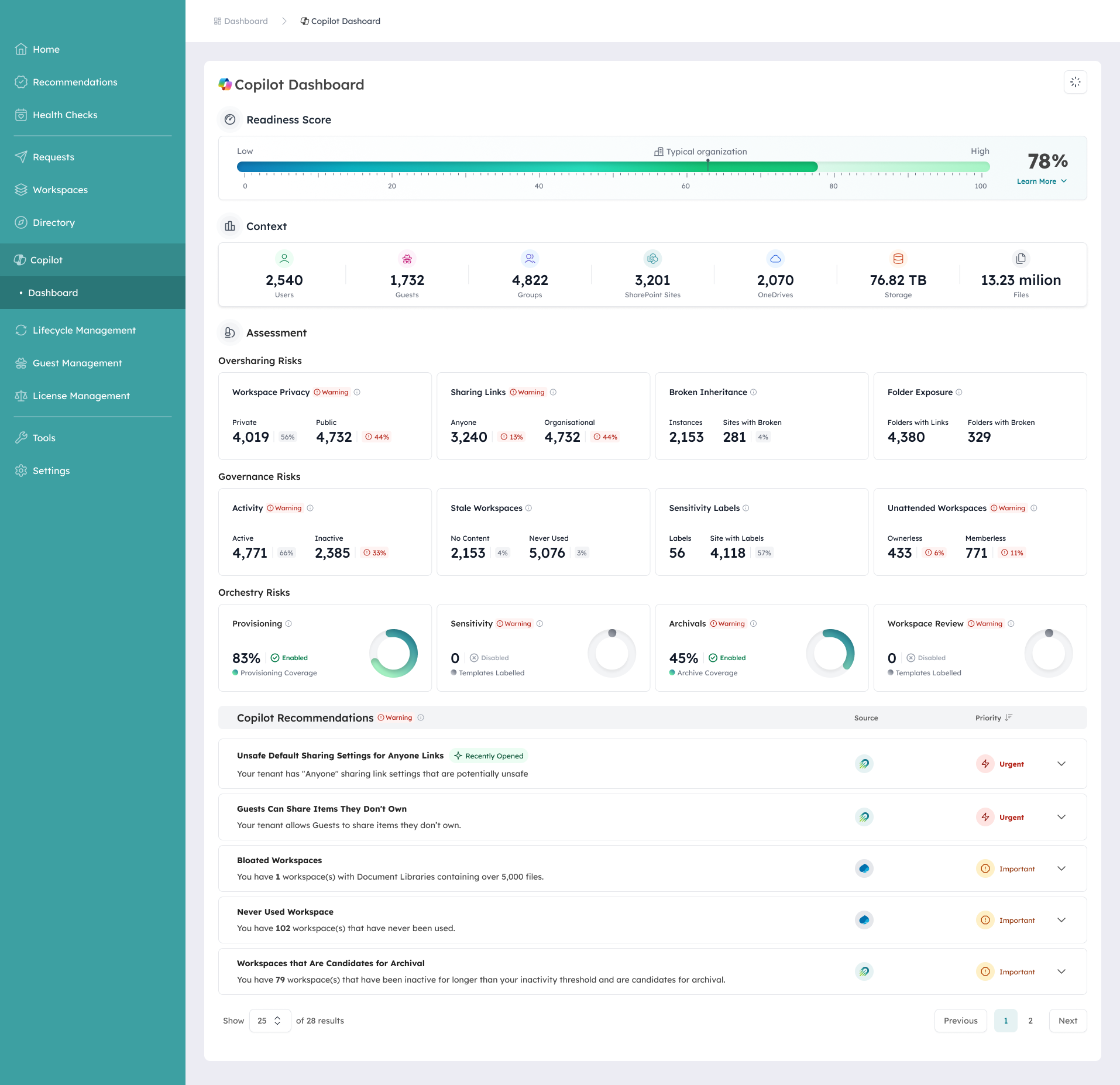
Orchestry's AI readiness dashboard scores a tenant on 13 signals across oversharing, governance, and adoption markers.
What good AI governance looks like in practice
A well-governed Microsoft 365 tenant for AI has a few traits:
- Every workspace was created through a governed process with the right structure, ownership, and permissions
- Every workspace has an accountable owner who certifies it on a defined cycle
- Inactive workspaces move to archive or deletion automatically, keeping the AI index current
- Sharing links and external access are reviewed continuously, not discovered in audits
- IT has a single view of the tenant (ownership, activity, sharing, and compliance) without PowerShell or admin-center switching
With those controls in place, Copilot works with clean, relevant, appropriately secured data and delivers the productivity it was designed for, instead of exposing the governance problems no one had gotten to.
"[Orchestry's] automated governance features are a standout, helping to maintain compliance and streamline administrative tasks."
- Technical Architect, computer software (Capterra review)
Ready to prepare your environment for AI?
Orchestry gives you the visibility and governance controls to deploy Copilot with confidence, not after a months-long remediation project, but through a structured assessment and a continuous governance process that keeps your tenant clean as it grows. To see where your tenant stands, book a 30-minute demo.