/HubSpot%20-%20eBook%20-%20Proof%20Card%20Mockup%20001.jpg?length=1000&name=HubSpot%20-%20eBook%20-%20Proof%20Card%20Mockup%20001.jpg)
/HubSpot%20-%20eBook%20-%20Proof%20Card%20Mockup%20001.jpg?length=1000&name=HubSpot%20-%20eBook%20-%20Proof%20Card%20Mockup%20001.jpg)
/HubSpot%20-%20eBook%20-%20Proof%20Card%20Mockup%20001.jpg?length=1000&name=HubSpot%20-%20eBook%20-%20Proof%20Card%20Mockup%20001.jpg)
/HubSpot%20-%20eBook%20-%20Proof%20Card%20Mockup%20001.jpg?length=1000&name=HubSpot%20-%20eBook%20-%20Proof%20Card%20Mockup%20001.jpg)
/HubSpot%20-%20eBook%20-%20Proof%20Card%20Mockup%20001.jpg?length=1000&name=HubSpot%20-%20eBook%20-%20Proof%20Card%20Mockup%20001.jpg)
/HubSpot%20-%20eBook%20-%20Proof%20Card%20Mockup%20001.jpg?length=1000&name=HubSpot%20-%20eBook%20-%20Proof%20Card%20Mockup%20001.jpg)
/HubSpot%20-%20eBook%20-%20Proof%20Card%20Mockup%20001.jpg?length=1000&name=HubSpot%20-%20eBook%20-%20Proof%20Card%20Mockup%20001.jpg)

/HubSpot%20-%20eBook%20-%20Proof%20Card%20Mockup%20001-min.jpg?length=1000&name=HubSpot%20-%20eBook%20-%20Proof%20Card%20Mockup%20001-min.jpg)


Microsoft 365 environments never start clean and they rarely stay clean. Workspaces get created with no structure, no naming standard, no metadata, and no ownership trail. IT inherits the cleanup.
AI tools inherit whatever ungoverned content is sitting inside.
That’s where Orchestry’s workspace provisioning tools come in.
Orchestry replaces native Microsoft 365 self-service with a guided, template-driven experience. Every new Team, SharePoint site, or Viva Engage community is governed before a single file is uploaded.
Your end users move fast, while you keep approvals, naming, metadata, sensitivity, storage, and lifecycle policies under control. Governance is built into the template, not bolted on later.
Provisioning-first governance, built into every template
Most Microsoft 365 provisioning approaches try to fix workspaces after they exist. Orchestry takes the opposite approach. The decisions you would normally make six months into a cleanup project become the template itself: how the workspace is named, who can request it, what content it contains, who approves it, how sensitive it is, where it lives, and what happens to it over time.
None of that is left to chance, and none of it slows the business down.
Provisioning is the first of three lifecycle phases, and the one where debt is cheapest to prevent. Our Microsoft 365 workspace governance playbook covers all three, and why getting provisioning right makes the rest quieter.
Seven new site-level controls, enforced at creation
The latest provisioning release from Orchestry introduces seven new governance settings, applied automatically the moment a workspace is created.
The most consequential is the new default library sensitivity label. Workspace-level sensitivity labels have always protected the container, but documents inside those workspaces stayed unclassified unless someone manually applied a label.
Orchestry now auto-applies a sensitivity label to the shared documents library at creation, closing the gap between container-level and content-level classification.
.png?width=2880&height=5632&name=Workspaces%20_%20Configuration%20_%20Governance%20(1).png)
Orchestry's provisioning template Governance tab: Workspace Sensitivity Label and Default Library Sensitivity Labels, both set at creation time.
Restricted Content Discovery, a SharePoint Advanced Management feature, follows the same provisioning-first logic. Where most organizations have to choose between leaving sites exposed to org-wide search or de-indexing entire sites after the fact, Orchestry lets you shield new sites from search and AI grounding at creation time. It’s a targeted control instead of a blunt one.
The remaining five settings give you granular control over storage, sharing, language, and endpoint access, all enforced before anyone touches the workspace:
-
Per-template site quotas and version limits keep storage bills predictable
-
Site sharing settings determine what members can share within the site
-
Default site language unlocks workspaces that match the region, not just the tenant default
-
Disable offline sync at the site level blocks OneDrive sync and shortcuts from pulling SharePoint content down to user desktops
A redesigned template wizard, organized the way admins think
Behind those new controls is a rebuilt template wizard. Configuration is now organized into three phases, Display, Configure, and Publish, that mirror how admins actually plan a template: what end users see, what governance applies, and how the template is published and trimmed.
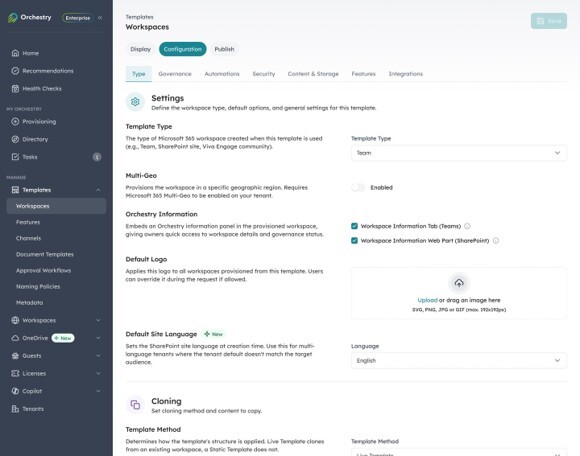
The redesigned template wizard: three phases (Display, Configuration, Publish) with settings grouped across seven tabs in Configure.
Inside Configure, settings are grouped into Governance, Security, Content and Storage, Features, Automations, and Integrations, with live templates and cloning sitting alongside the configuration choices they belong to. Security settings that used to live across three separate tabs are consolidated.
The Automations tab (formerly Policies), is where you tie a template to its lifecycle: archive policies, guest management, workspace review. Integrations handles post-provisioning customizations on a template-by-template basis.
Every new workspace inherits not just the right setup but the right cleanup, before either of them is needed.
Real results from Orchestry customers
Customers using templates this way are seeing the impact in real numbers that matter to IT.
$15,000
saved per governed template across provisioning, governance, and admin overhead
89%
less time end users spend creating and configuring a workspace
| Customer | Result |
|---|---|
| Farm Credit West | Saves over $14,000 a year on provisioning, cut workspace creation time by 92%, and reduced customization time by 75% |
| Maine Source Homes | Saves over $2,000 every time a new Team or site is provisioned |
| Fund Evaluation Group | Saved $200,000 and 200 hours by streamlining their SharePoint migration and client portal creation |
AI-ready provisioning, with governance built in
Orchestry’s provisioning tools are the highest-leverage governance lever IT teams have. Every Team, SharePoint site, or community provisioned without guardrails becomes another cleanup project later, and another AI grounding risk today.
Building the right templates gives you:
-
Fewer tickets and less sprawl, with self-service that stays governed
-
Lower storage bills, capped per template instead of cleaned up after the fact
-
Consistent compliance posture across every new workspace
-
A tenant that is AI-ready from day one, not retrofitted for it later
It also changes how governance feels. Instead of an annual cleanup or a quarterly policy review, governance becomes a living, breathing process inside the tools the business already uses.
For most end users, it’s invisible: the right path is the easy one.
See Orchestry provisioning in action
If you’re already using Orchestry and haven’t built out your templates, this is the single most impactful thing you can do this quarter. Start with your most common workspace types, define what good looks like with your business stakeholders, compliance, and legal teams, and put the guardrails directly into the template.
If you’re new to Orchestry, contact us and we’ll walk you through what provisioning-first governance looks like in your own tenant.