/HubSpot%20-%20eBook%20-%20Proof%20Card%20Mockup%20001.jpg?length=1000&name=HubSpot%20-%20eBook%20-%20Proof%20Card%20Mockup%20001.jpg)
/HubSpot%20-%20eBook%20-%20Proof%20Card%20Mockup%20001.jpg?length=1000&name=HubSpot%20-%20eBook%20-%20Proof%20Card%20Mockup%20001.jpg)
/HubSpot%20-%20eBook%20-%20Proof%20Card%20Mockup%20001.jpg?length=1000&name=HubSpot%20-%20eBook%20-%20Proof%20Card%20Mockup%20001.jpg)
/HubSpot%20-%20eBook%20-%20Proof%20Card%20Mockup%20001.jpg?length=1000&name=HubSpot%20-%20eBook%20-%20Proof%20Card%20Mockup%20001.jpg)
/HubSpot%20-%20eBook%20-%20Proof%20Card%20Mockup%20001.jpg?length=1000&name=HubSpot%20-%20eBook%20-%20Proof%20Card%20Mockup%20001.jpg)
/HubSpot%20-%20eBook%20-%20Proof%20Card%20Mockup%20001.jpg?length=1000&name=HubSpot%20-%20eBook%20-%20Proof%20Card%20Mockup%20001.jpg)
/HubSpot%20-%20eBook%20-%20Proof%20Card%20Mockup%20001.jpg?length=1000&name=HubSpot%20-%20eBook%20-%20Proof%20Card%20Mockup%20001.jpg)

/HubSpot%20-%20eBook%20-%20Proof%20Card%20Mockup%20001-min.jpg?length=1000&name=HubSpot%20-%20eBook%20-%20Proof%20Card%20Mockup%20001-min.jpg)


Microsoft 365 gives you a fast, flexible collaboration platform. That flexibility is also the source of most of your security and compliance risk, because any user can create a workspace, share content externally, and grant access to guests.
The problem isn't that Microsoft 365 lacks controls; it has plenty. The problem is that they're spread across multiple admin centers, applied inconsistently, and rarely visible as one picture. By the time you understand who has access to what, something has already changed.
Microsoft 365 security and compliance, in practice, is mostly a visibility problem: you can't fix exposure you can't see.
Why Microsoft 365 security and compliance is a visibility problem
Most M365 security risk doesn't come from sophisticated attacks. It comes from the cumulative effect of ordinary collaboration that no one reviewed:
- A SharePoint site shared with "Everyone except external users" five years ago that still holds sensitive data
- Guest accounts added for a vendor engagement that ended eighteen months ago, still holding access to confidential files
- A workspace that went ownerless when an employee left, with no one reviewing its membership or content
- Permissions broken from inheritance by a well-meaning admin, creating access no one intended
- Sensitivity labels that were supposed to be applied to confidential content but weren't, because the process was manual
None of these started as security incidents. They're the residue of normal collaboration in a tenant where visibility and enforcement couldn't keep pace with growth.
Look closely and it's common to find hundreds of stale external guest accounts, some with access going back years; a recurring guest-review policy is what stops that buildup. The exposure isn't a breach, it's a lifecycle gap no one had the visibility to see until they looked for it.
The five most common M365 security and compliance gaps
1. Oversharing across SharePoint and OneDrive
Oversharing is the most prevalent gap and among the hardest to see without dedicated tooling. It usually takes three forms, which map to the SharePoint and OneDrive sharing link types:
- "Anyone" links let people open content without signing in, regardless of whether they have a Microsoft 365 account.
- "People in your organization" links make content reachable to every authenticated user in the tenant, which on a sensitive site is effectively organization-wide access.
- "Everyone except external users" site permissions make a site browsable and discoverable to your entire internal population.
Native SharePoint admin center reporting shows org-level settings and per-site status, but a complete picture of link-level sharing across the tenant means exporting data, running PowerShell, or using tooling that aggregates it at scale.
The gap is easy to underestimate: based on Orchestry data, only 13% of M365 admins can accurately describe how the SharePoint Copy Link default inherits.
2. Unmanaged external guest access
Guest access is legitimate and often necessary. Vendors, clients, partners, and contractors all have valid reasons to reach specific content. The problem is that guest access is rarely reviewed after it's granted.
The pattern is familiar: a guest account is created for a project, access is granted, the project ends, and the account stays, active and forgotten. Multiply that across every engagement over several years and your tenant has hundreds of guest accounts whose access is no longer needed. Without a continuous review process, none of them expire on their own, and the exposure grows quietly.
3. Orphaned workspaces with no active owner
A workspace without an active owner creates risk two ways. First, no one is reviewing membership, so former employees, unnecessary guests, and over-permissioned accounts may still have access. Second, no one owns content decisions, so sensitive data can sit in a workspace everyone has forgotten.
Microsoft 365 doesn't reassign ownership when an employee leaves, so without automated detection and escalation, orphaned workspaces accumulate as you grow.
4. Broken permission inheritance
SharePoint lets site, library, and item-level permissions break from their parent's inheritance. When that happens, content becomes reachable by audiences the parent structure never intended, sometimes broader, sometimes narrower. Broken inheritance is common in tenants with years of active collaboration, and finding it means reviewing each site's permissions individually or using tooling that surfaces inheritance breaks across the tenant.
5. Unlabeled sensitive content
Microsoft Purview sensitivity labels are the primary control for classifying and protecting confidential content. Applying them consistently requires either automated classification policies, which need specific licensing, or a manual process that depends on owners labeling the right content at the right time.
In practice, most tenants hold a lot of sensitive content with no label applied. That content can be broadly shared and accessed by guests, and with Copilot, or any AI agent you connect, it can be surfaced to anyone who asks. The same risk applies regardless of which AI you use.
The challenge with native Microsoft 365 security tools
Microsoft 365 has robust security and compliance tooling. The challenge isn't capability. It's consolidation.
Sharing data lives in the SharePoint admin center, guest access in Entra ID and the Microsoft 365 admin center, permission inheritance in site-by-site SharePoint review, sensitivity-label coverage in Microsoft Purview, and storage and activity in the Microsoft 365 admin center reports.
Getting a complete picture across those dimensions means navigating five admin centers, pulling exports, and correlating data collected at different times, and the result is already out of date by the time you assemble it. That isn't a criticism of Microsoft's tools; it's the operational reality of a platform that spans many products and licensing tiers.
How to build a continuous M365 security and compliance program
Start with centralized visibility
Security decisions need current, complete data. The first step is a single view of the tenant that covers sharing links, guest access, ownership, sensitivity labels, and activity, updated continuously and available without PowerShell.
Orchestry brings security-relevant data, sharing and oversharing, guest access, ownership, and sensitivity labels, into its reporting across Teams, SharePoint, OneDrive, and Viva Engage, with risk ratings and one-click actions, so you're working in one tool instead of five admin centers.
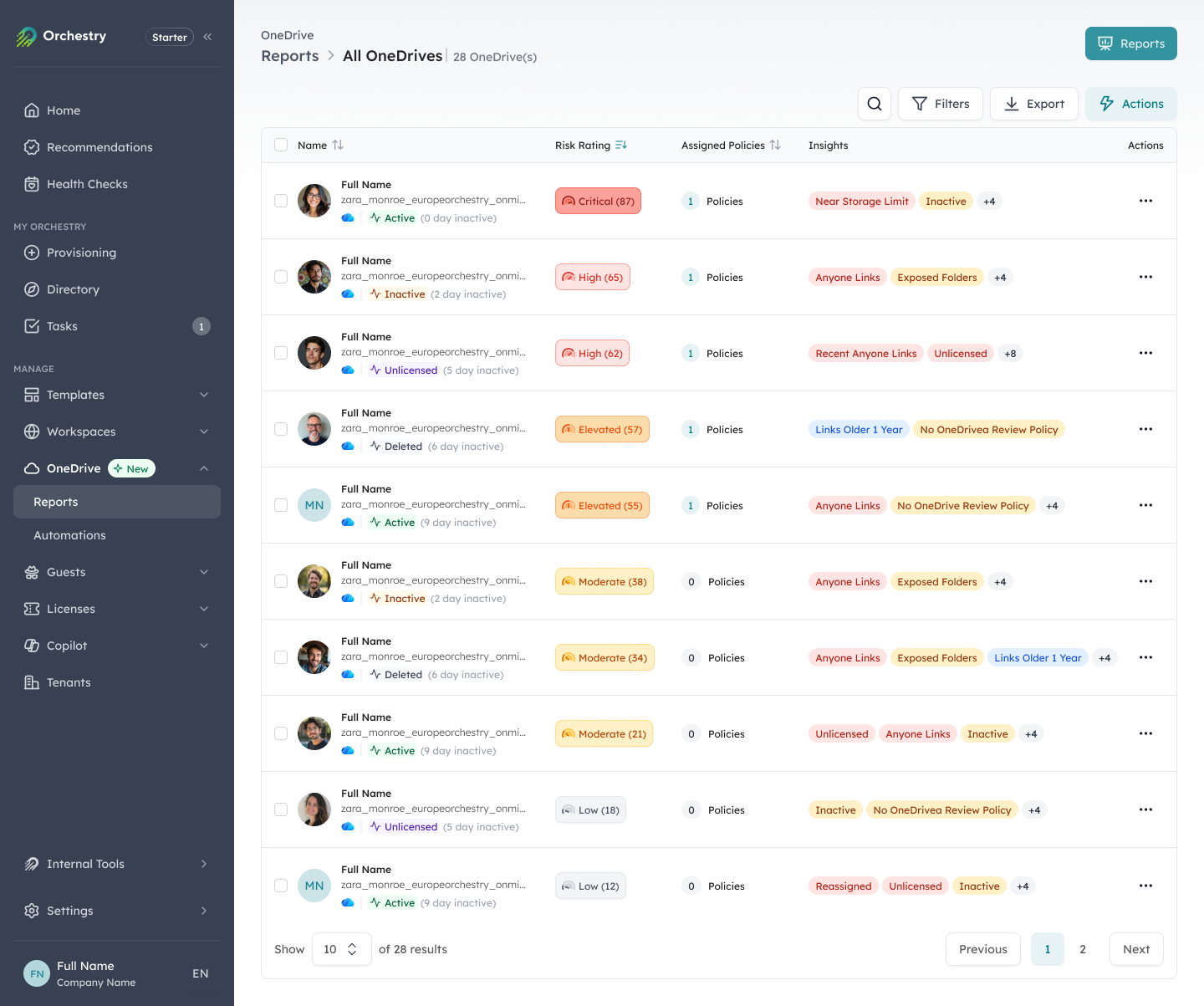
Orchestry's OneDrive report ranks accounts by risk and flags oversharing signals like Anyone links and exposed folders, with one-click actions.
Apply governance at workspace creation
Controls applied after creation are always reactive. Apply permissions, sharing settings, and sensitivity labels at the moment a workspace is created, through a provisioning process that makes the right settings the default. When every workspace starts with the right structure, ownership, and privacy settings, your baseline security posture is set from day one, and you avoid the much harder job of retrofitting controls onto years of accumulated content.
Automate external access reviews
Guest access review shouldn't depend on someone remembering to run a report. You need an automated cycle that prompts active owners to review guest access in their workspaces, confirm what's still needed, and remove what isn't. Orchestry's guest and user management sends owners periodic prompts to certify or remove external access, and accounts that aren't certified within the window are flagged for IT, so the guest population stays current without manual tracking.
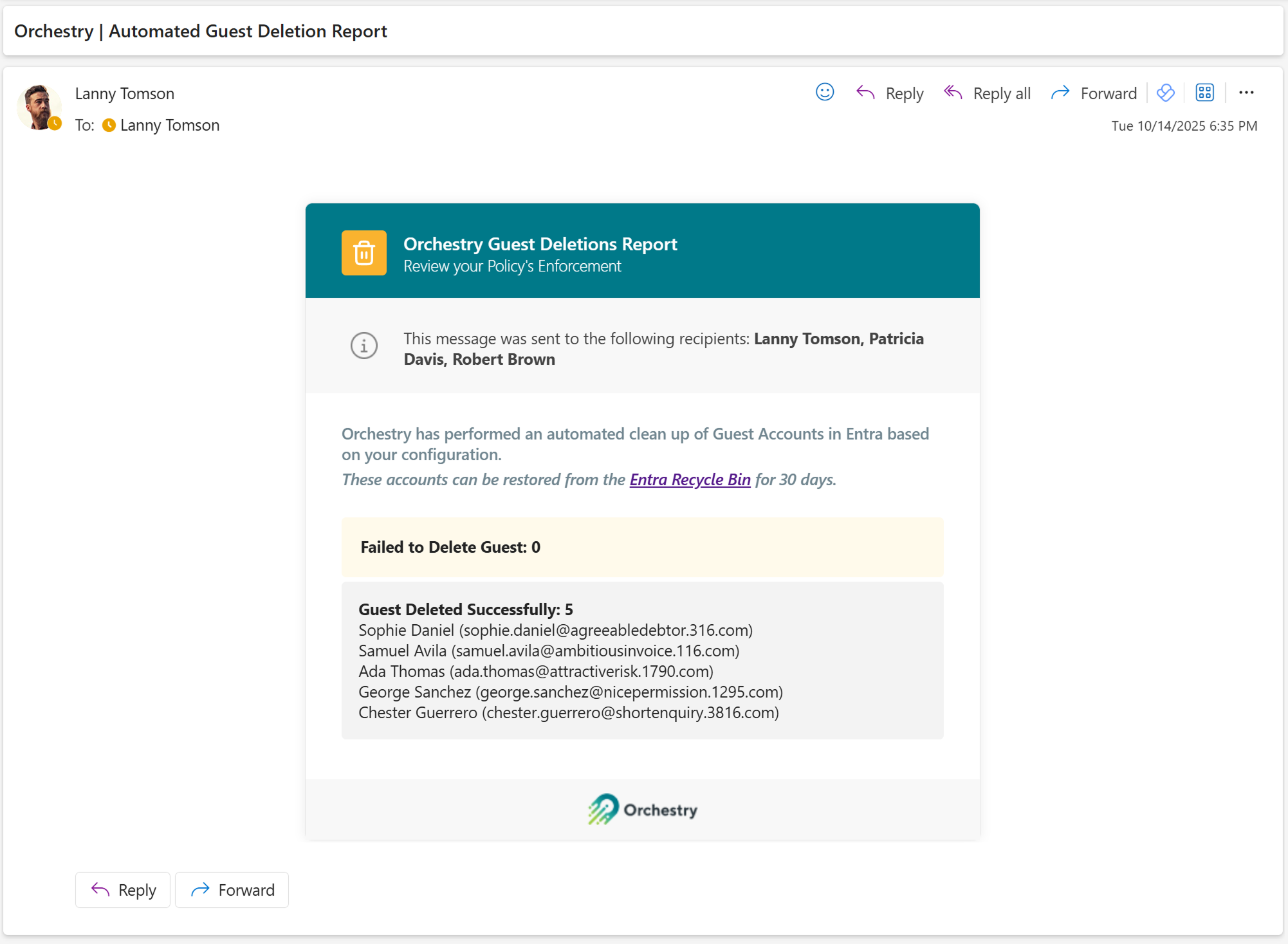
An automated guest review flags external accounts owners haven't certified within the review window.
Build lifecycle management into the compliance process
Many security gaps are lifecycle gaps in disguise. Orphaned workspaces, stale guest accounts, and inactive content with sensitive data all became risks when no one reviewed them. A continuous lifecycle process, automated reviews, owner certification, and archival, addresses the security dimension of those gaps as a byproduct of normal governance.
Use consistent policy enforcement across the tenant
Policies applied inconsistently create a two-tier tenant, and the workspaces that missed governance are the ones that surface during audits and incidents. Automated enforcement of naming, ownership, sensitivity labeling, retention, and external-access rules applied to every workspace keeps gaps from accumulating in the ones that fell through the manual process.
Orchestry is SOC 2 Type II certified and built around tenant isolation and least-privilege access, and its governance policies run continuously rather than only on the workspaces you reviewed last quarter.
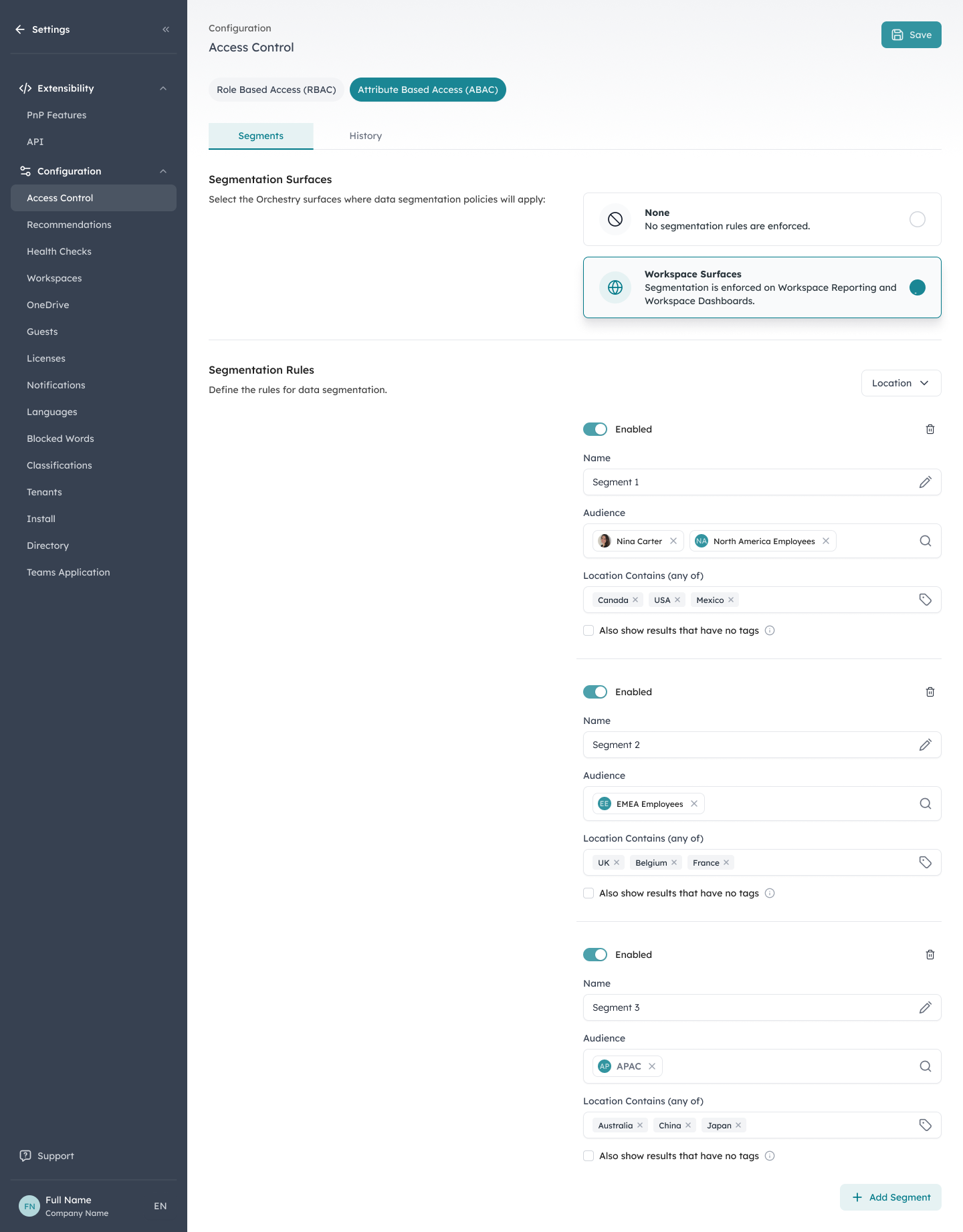
Attribute-based access control segments who sees which workspaces and reports, here scoped by region (North America, EMEA, APAC), enforcing least-privilege visibility.
What Microsoft 365 security and compliance looks like when it's working
- Oversharing exposure is visible across the tenant at all times, not discovered during an audit
- Guest access is reviewed on a defined cycle, with inactive accounts removed automatically
- Every workspace has an active, accountable owner responsible for membership and content
- Sensitive content is labeled and protected before it lands in broadly accessible workspaces
- Inactive workspaces are archived or deleted on an ongoing basis, not left to accumulate exposure
- You have a current view of security posture across all products and licensing tiers, without PowerShell
Security and compliance as a foundation for AI
Your security posture needs to be addressed before you deploy Microsoft Copilot, not after. Copilot surfaces content based on access, not intent, so sharing gaps, unlabeled sensitive content, and orphaned workspaces that are manageable risks in a traditional tenant become higher-stakes exposure when AI can summarize and surface that content at scale. The same is true of any AI agent you connect to your Microsoft 365 tenant.
"[Orchestry's health checks] provide a very clear and automated way to assess the governance, security, and overall health of your Microsoft 365 environment."
- Developer, IT services (verified Capterra review)
Frequently asked questions about M365 security and compliance
Do I need PowerShell to find oversharing in Microsoft 365?
No. Native reporting surfaces some sharing data, but a complete, tenant-wide view of link-level sharing has traditionally required PowerShell or exports. Tooling that aggregates sharing data across SharePoint and OneDrive gives you the same picture without scripting, updated continuously.
How often should external guest access be reviewed?
On a defined, recurring cycle rather than ad hoc. A common approach is a 90-day review in which workspace owners certify which guests still need access and remove the rest. Guest access does not expire on its own, so without a recurring review, accounts accumulate indefinitely.
Does Microsoft 365 remove a user's access automatically when they leave?
No. Microsoft 365 doesn't reassign workspace ownership or strip access when an employee leaves, which is how workspaces become orphaned. Closing that gap takes an automated process that detects ownership gaps and routes reassignment before access goes unreviewed.
Ready to close the Microsoft 365 security and compliance gap?
Orchestry gives you the visibility and automated controls to manage M365 security and compliance continuously, without PowerShell, without manual audits, and without the gaps that pile up when IT can't keep pace with a growing tenant. To see your own exposure mapped out, book a 30-minute demo.