






Plenty of Copilot readiness advice still prices SharePoint Advanced Management as an add-on. Since Microsoft folded it into Copilot licensing, one assigned Copilot license gives your SharePoint admins the SAM features built for a Copilot rollout, so the real question is what a third-party tool adds on top.
Microsoft’s controls leave real gaps: its site access reviews and Restricted Content Discovery don’t cover OneDrive, and its main content restriction is designed as a temporary control.
For agents, the Microsoft 365 admin center includes an agent registry that inventories agents and lets admins block or delete them, but risk signals, policy templates and activity monitoring need Agent 365 or Microsoft 365 E7.The Copilot readiness tools worth comparing against that baseline are Orchestry, Syskit Point, Rencore Governance, AvePoint, ShareGate Protect and CoreView.
Orchestry is the pick if you want content readiness and agent governance in one platform, with workspace owners doing the review work. The table below shows where each tool fits, judged on six criteria.
What Microsoft 365 Copilot governance tools should add to SharePoint Advanced Management
Copilot answers from whatever the person asking can reach, so Copilot governance starts with permissions and sharing. These six criteria show what a tool adds beyond Microsoft’s included controls:
- Oversharing detection that includes OneDrive. Organization-wide links, “Everyone except external users” access and anonymous links, across SharePoint sites and personal OneDrives.
- Remediation at scale. Removing links and broad permissions in bulk across many sites.
- Owner-driven review. Whether site owners confirm access and sharing on a schedule, since they know the content and IT doesn’t.
- Control over what Copilot can find. How a tool keeps sensitive sites out of search and Copilot, and whether that control is meant to last.
- A readiness measure you can track. A score or set of checks you can track over time.
- Agent governance. An inventory of the agents in your tenant, how risky each one is, and what you can do about it.
Microsoft’s built-in Copilot governance controls and their limits
Microsoft’s baseline is broader than many shortlists assume. With at least one Copilot license, SharePoint admins get SharePoint Advanced Management features, including data access governance reports, site access reviews, Restricted Content Discovery and site lifecycle policies.
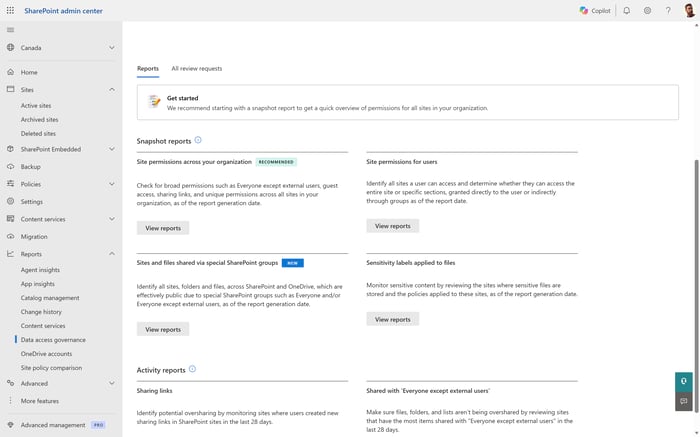
SharePoint admin center data access governance reports used to find overshared sites before a Copilot rollout
The limits are documented, and they’re where third-party tools earn their place:
- Site access reviews let you hand overshared sites to their owners, but they support SharePoint sites only, not OneDrive, and the web view starts reviews for up to 100 sites at a time. In addition these site access reviews must be manually triggered by an administrator.
- Restricted Content Discovery keeps chosen sites out of organization-wide search and Copilot. Microsoft describes it as a temporary governance control, and it doesn’t support OneDrive. Applying it in bulk through catalog management is capped at 20,000 sites.
- Restricted SharePoint Search is retiring. New enablement has been blocked since July 31, 2026.
- Purview data risk assessments, which need Microsoft 365 E5 or Microsoft Purview Suite run weekly on the top 100 SharePoint sites by usage. Item-level scanning covers a maximum of 10 SharePoint sites and doesn’t include OneDrive.
- The Copilot readiness report in the Microsoft 365 admin center shows license and app eligibility: prerequisite licenses, update channels and app usage, not the state of your content.
For a walkthrough of using the included SAM features well, see our guide to SharePoint Copilot readiness with SAM.
Copilot readiness tools compared
The table reflects each vendor’s product pages and documentation as last checked in October 2026. Capabilities change release to release, so confirm anything that decides your shortlist in a demo.
| Tool | Best for | What it covers | Keep in mind |
|---|---|---|---|
| Orchestry | Tenants that want content readiness and agent governance in one platform, with owners doing the review work | Tenant-wide AI readiness score; oversharing and “Everyone except external users” detection; workspace reviews with a Search and Copilot visibility toggle that needs no SAM license; archival; OneDrive Management; cross-platform agent inventory with a 0 to 100 risk score and delete | Agent governance and OneDrive Management are Enterprise features |
| Syskit Point | Inventory-led teams that want a Copilot readiness score and agent actions in one console | Copilot Readiness score built from sharing, public workspace and sensitive file checks; workspace reviews; AI agents inventory with block, reassign and delete | AI agents is in Early Access |
| Rencore Governance | Organizations governing several AI platforms, not only Copilot | Copilot data readiness scan; oversharing detection; sensitivity label enforcement; adoption tracking; connectors for other AI platforms | AI governance is broad, so scope the Copilot-specific policies you need |
| AvePoint | Organizations already standardizing on AvePoint’s suite | Recertification of ownership and access; automated policy enforcement; lifecycle policies that extend to agents | Capabilities span several AvePoint products |
| ShareGate Protect | Teams focused on cleaning up sharing before rollout | Policies that delete sharing links or remove “Everyone except external users” permissions; owner reviews of external links and guests | No Copilot-specific exclusion control or agent inventory found |
| CoreView | Admin teams managing Copilot licenses and usage | Copilot eligible users and Copilot usage reports; last Copilot action per user; Copilot management playbook | Readiness centers on licenses and usage |
| SharePoint Advanced Management | Every Copilot-licensed tenant, as the baseline | Data access governance reports, site access reviews, Restricted Content Discovery, site lifecycle policies | Site access reviews and Restricted Content Discovery don’t cover OneDrive. Site access reviews must be started by an admin. Restricted SharePoint Search is retiring. |
| Microsoft Agent 365 | Tenants governing agents at scale with Microsoft’s own tooling | Agent identity, lifecycle rules, risk signals, policy templates and activity monitoring | Agent 365 governs agents, not the content Copilot answers from. It doesn’t address oversharing, sharing links or stale sites, so it isn’t a Copilot readiness tool on its own. |
Orchestry
Orchestry treats Copilot readiness as two layers: the content any AI can read, and the agents built on top of it. One customer accelerated Copilot readiness from months to 4-6 weeks using Orchestry. Orchestry’s AI and agents governance starts with a free, tenant-wide AI readiness score that rates 13 governance signals as a 0 to 100 percentage, so you can track progress over time.
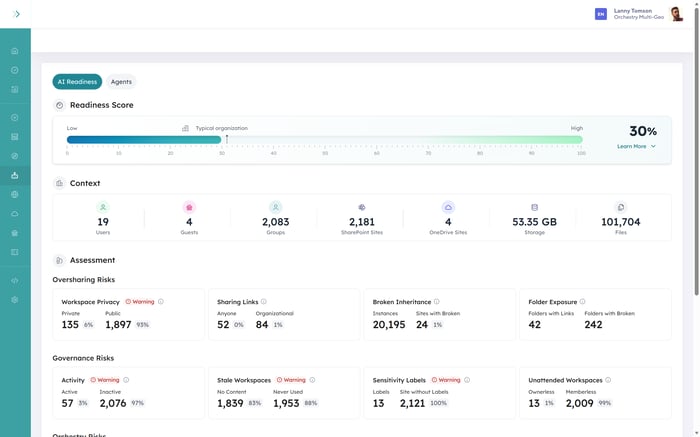
Orchestry AI Readiness Dashboard showing a tenant readiness score and the governance signals behind it
For the content layer, oversharing detection flags organization-wide links and “Everyone except external users” access. Workspace reviews then hand each site to its owner on a schedule, covering membership, sharing links, sensitivity labels and a Search and Copilot visibility toggle. That toggle uses standard SharePoint indexing, so it needs no SAM license, and archival policies handle workspaces nobody uses anymore. OneDrive Management, on Enterprise, extends review and cleanup to personal OneDrives.
For the agent layer, the Agents Dashboard gives a cross-platform inventory with a 0 to 100 risk score in five tiers and ten named insights across access, sharing, labeling and ownership, and you can delete an agent from the same view.
Coming next on Enterprise: Agent Review Policy brings Orchestry’s recurring review motion to Microsoft 365 AI agents. On a schedule, or when an agent stops being used, Orchestry raises a review to the person accountable for that agent and asks four questions: is it still needed, is it configured the way you think, is it grounded on the right content, and who owns it going forward.
Syskit Point
Syskit Point puts readiness on its main dashboard. Its Copilot Readiness score counts vulnerabilities such as workspaces shared with everyone, workspaces with shadow users, company-wide and anyone links, and public workspaces, with separate counts for those holding sensitive files once you choose which labels mark content as sensitive.
Syskit has also added actions for AI agents: block and unblock, reassign an owner, delete, and view an agent’s knowledge sources. The feature is in Early Access and free while it develops, so check which actions apply to which agents before you count on them. Syskit’s Entra Apps inventory also flags third-party AI assistants, such as ChatGPT and Claude, that connect to Microsoft 365.
Rencore Governance
Rencore frames Copilot as one AI platform among several. Its Microsoft 365 Copilot governance runs a data readiness scan before rollout, ranking anonymous links, broadly shared sites and unlabeled content by likely Copilot exposure, then tracks adoption and enforces sensitivity labels after.
The same platform is extending to other AI tools: Claude Enterprise and ChatGPT Enterprise are in preview, with Gemini and others in private preview or on the roadmap, which suits organizations that want one governance view across the AI tools their people use.
AvePoint
AvePoint approaches readiness through its governance suite. Cloud Governance runs recertification so owners confirm ownership, access and context, enforces policy by reverting out-of-policy changes, and applies lifecycle policies to sites, groups, teams and agents.
The trade-off is assembly. Oversharing insights, policy enforcement and agent governance sit across several AvePoint products, so price the combination your readiness plan needs.
ShareGate Protect
ShareGate Protect is built for cleanup. Its automated policies can remove “Everyone except external users” permissions from workspaces and delete sharing links that match your conditions, running once a day.
Owners can also review external sharing links and guest access through Delegated Reviews. We didn’t find a Copilot-specific exclusion control or an agent inventory in ShareGate’s documentation.
CoreView
CoreView looks at Copilot from the license side. Its Copilot capabilities include Copilot eligible users and Copilot usage reports, a last Copilot action column for each user, and a Copilot management playbook that collects related policies in one place.
That fits admin teams whose readiness question is who should hold a license and whether they use it. Its Copilot playbook also groups SharePoint, OneDrive and Teams cleanup policies, but its Copilot-specific reports center on licenses and usage rather than oversharing.
Copilot oversharing: who covers OneDrive
OneDrive is where most of Microsoft’s included Copilot controls stop, and it’s often where the forgotten “Anyone” links live. On one customer tenant, 92% of company “Anyone” sharing links were found in OneDrives. Here’s how each option handles it:
- Orchestry: OneDrive Management on Enterprise brings OneDrive reporting, sharing link cleanup and owner review alongside sites.
- Syskit Point: its Access Review covers OneDrive with the owner as reviewer, but new Syskit instances get Workspace Review instead, so confirm OneDrive coverage in a demo.
- Rencore: its SharePoint and OneDrive oversharing policies feed the Copilot data readiness scan.
- ShareGate Protect: OneDrive policies can delete OneDrives or manage versions, and sharing link policies delete matched links; owner reviews don’t cover OneDrive yet.
- Microsoft native: site access reviews, Restricted Content Discovery and Purview item-level scanning don’t cover OneDrive. Site access restriction can limit a OneDrive to chosen groups, and Purview data risk assessments report on OneDrive at the location level.
For the controls that decide what Copilot can surface in SharePoint itself, see “Copilot is on by default in SharePoint: how to control what it can actually see.”
Copilot agent governance: the second readiness layer
Readiness used to mean content. Now users build agents that answer from that content, so a readiness plan needs to know which agents exist, who owns them and what they can reach.
- Orchestry: a cross-platform agent inventory with a composite risk score and ten named insights, such as anonymous access, tenant-wide sharing and orphaned agents, plus delete from the same view.
- Syskit Point: an agents inventory with block, reassign and delete actions, in Early Access.
- Rencore: agent governance alongside its wider AI platform coverage.
- AvePoint: AgentPulse inventories agents across Microsoft 365 and Google Cloud, and Cloud Governance applies lifecycle and recertification policies to them.
- ShareGate Protect and CoreView: we didn’t find agent inventory or agent actions in their documentation.
- Microsoft native: the agent registry in the Microsoft 365 admin center lists agents, flags ownerless ones and lets admins block, delete or reassign them at no extra cost. Risk signals and policy templates need Agent 365 or Microsoft 365 E7.
Copilot agent governance and content readiness depend on each other. In most cases an agent surfaces what the person using it can reach, so oversharing cleanup shrinks what agents can surface at the same time.
Copilot readiness tools: frequently asked questions
Do I need SharePoint Advanced Management for Copilot?
You probably already have it. If your organization assigns at least one Microsoft Copilot license, SharePoint admins get the SharePoint Advanced Management features that support Copilot, including data access governance reports, site access reviews and Restricted Content Discovery.
Is Restricted SharePoint Search still an option?
Not for new setups. Microsoft is retiring Restricted SharePoint Search, and new enablement has been blocked since July 31, 2026. Microsoft points customers to Restricted Content Discovery, which it describes as a temporary control while permissions are reviewed.
What does the Microsoft 365 Copilot readiness report show?
It shows who is technically eligible for Copilot: prerequisite licenses, users on an eligible update channel, assigned and available Copilot licenses, and app usage. It doesn’t assess oversharing or permissions, which is where Copilot readiness tools come in.
Does Agent 365 make my tenant Copilot ready?
No. Agent 365 governs the agents in your tenant: their identity, lifecycle and activity. Copilot readiness is about the content Copilot can reach, which means fixing oversharing, sharing links and stale sites. You need both, but Agent 365 doesn’t do the content work.
What are the best Copilot governance tools?
Orchestry, Syskit Point, Rencore Governance, AvePoint, ShareGate Protect and CoreView all cover part of Copilot governance. They differ on OneDrive coverage, owner-driven review, agent governance and whether readiness is measured as content risk or license usage.
Does Copilot readiness only matter for Copilot?
No. Any AI assistant connected to Microsoft 365 answers from the content its users can reach, including agents and third-party assistants. Fixing oversharing and stale content prepares the tenant for all of them.
If you’re comparing Copilot readiness tools, see how Orchestry governs the content your AI reads and the agents built on it in one place. Book a 30-minute walkthrough in your own tenant.