/HubSpot%20-%20eBook%20-%20Proof%20Card%20Mockup%20001.jpg?length=1000&name=HubSpot%20-%20eBook%20-%20Proof%20Card%20Mockup%20001.jpg)
/HubSpot%20-%20eBook%20-%20Proof%20Card%20Mockup%20001.jpg?length=1000&name=HubSpot%20-%20eBook%20-%20Proof%20Card%20Mockup%20001.jpg)
/HubSpot%20-%20eBook%20-%20Proof%20Card%20Mockup%20001.jpg?length=1000&name=HubSpot%20-%20eBook%20-%20Proof%20Card%20Mockup%20001.jpg)
/HubSpot%20-%20eBook%20-%20Proof%20Card%20Mockup%20001.jpg?length=1000&name=HubSpot%20-%20eBook%20-%20Proof%20Card%20Mockup%20001.jpg)
/HubSpot%20-%20eBook%20-%20Proof%20Card%20Mockup%20001.jpg?length=1000&name=HubSpot%20-%20eBook%20-%20Proof%20Card%20Mockup%20001.jpg)
/HubSpot%20-%20eBook%20-%20Proof%20Card%20Mockup%20001.jpg?length=1000&name=HubSpot%20-%20eBook%20-%20Proof%20Card%20Mockup%20001.jpg)
/HubSpot%20-%20eBook%20-%20Proof%20Card%20Mockup%20001.jpg?length=1000&name=HubSpot%20-%20eBook%20-%20Proof%20Card%20Mockup%20001.jpg)

/HubSpot%20-%20eBook%20-%20Proof%20Card%20Mockup%20001-min.jpg?length=1000&name=HubSpot%20-%20eBook%20-%20Proof%20Card%20Mockup%20001-min.jpg)


Open the agent registry in your Microsoft 365 admin center and you'll get a number. Open the Power Platform admin center and you'll get a different one. The registry lists the agents available to your organization, plus drafts, but only drafts from Copilot Studio. Power Platform lists everything built in Copilot Studio and Agent Builder, drafts included. Both numbers are accurate. Neither one is the number of agents in your tenant.
Microsoft's agent registry aggregates across sources that each report on their own terms, so the count it returns is a count of what those sources publish, not a count of what's running. Every one of those gaps is documented, just never in one place.
It matters more each quarter. Microsoft's own telemetry puts active agents in Microsoft 365 up15x year over year, and 18x in large enterprises, so the distance between the number you can see and the number you have is widening faster than most tenants are checking it.
What the AI agent registry counts, and what it leaves out
Microsoft's agent registry does more than it gets credit for. It groups agents by four publisher types, flags the ones nobody owns, and exports more than thirty fields per agent to CSV.
Drafts are the sharpest gap. You can see drafts from Copilot Studio and nowhere else, because support for drafts from the other build surfaces isn't currently available.
The Data and tools tab has the same problem in miniature. It's read-only, and the admin center doesn't have data and tools information for all agents, so the one place you'd look to see what an agent can reach is itself incomplete.
What the unmanaged agents tile is actually counting
The unmanaged agents tile on the Agent Map page is the most useful number on that screen, and it's easy to read as a warning rather than a measurement. The Agent Map needs a Microsoft 365 E7 or Agent 365 license, plus the Global Administrator or AI Administrator role, so on E3 or E5 you won't see this tile at all.
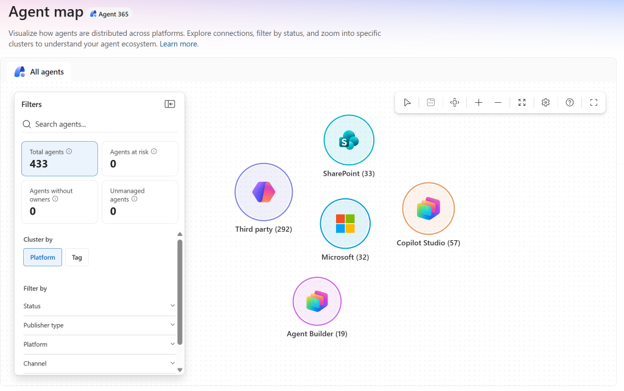
Unmanaged means created or managed outside of Agent 365, without its risk protection and observability. It's a running count of what the control plane can see but Agent 365 isn't protecting or observing.
Read as a coverage gauge, it tells you how much of your estate sits outside the tooling you've licensed. When it dwarfs the managed count, you have a scope problem, not the cleanup problem the raw total implies.
It's the sequence Teams sprawl followed, and agent sprawl is repeating it. Counting the objects comes first; governing what sits under them comes later. The unmanaged agents tile shows you the distance between the two.
Agent identity and why your count changes depending on where you look
Agents reach Microsoft 365 from several build surfaces. What shows up centrally depends on which surface built them, and Microsoft's coverage isn't the same across all of them.
Copilot Studio, SharePoint, Agent Builder, the Microsoft 365 Agents Toolkit and Microsoft Foundry all produce agents. Partner-built agents are published to your organization as their own publisher type. Agents on non-Microsoft platforms such as Amazon Bedrock or Google Vertex AI arrive through connected platforms, which an admin sets up per platform.
An agent published through a Microsoft 365 channel and registered with an Entra Agent ID arrives in the registry on its own. Anything built outside those environments takes additional steps before it appears at all.
Underneath sits Microsoft Entra Agent ID, available to every Entra customer, though extending Entra's security capabilities to agents needs an Agent 365 license.
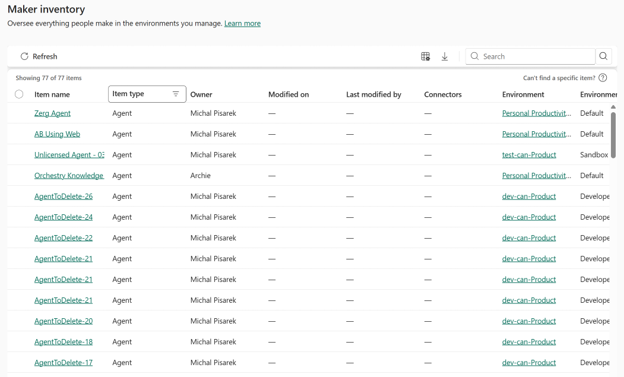
The Power Platform admin center covers every agent created in Copilot Studio and Agent Builder, refreshed within about fifteen minutes. Microsoft's agent registry covers what's available to your organization, plus Copilot Studio drafts. Both are right inside their own scope, and the scopes don't line up.
Licensing moves the number without moving the reality. Activity metrics need an E7 or Agent 365 license before they appear, so on E3 or E5 the roster looks flatter than it is; worth checking what Agent 365 licensing covers before you conclude your agents are idle.
AI agent discovery across the surfaces that hold agents
SharePoint is where the registry’s coverage stops. A SharePoint agent is a .agent file in a document library, so it's governed like a document rather than like an application.
File permissions decide who can use it, and anyone who can save a file to that library can create one. No approval, no provisioning request, no record anywhere that it happened.
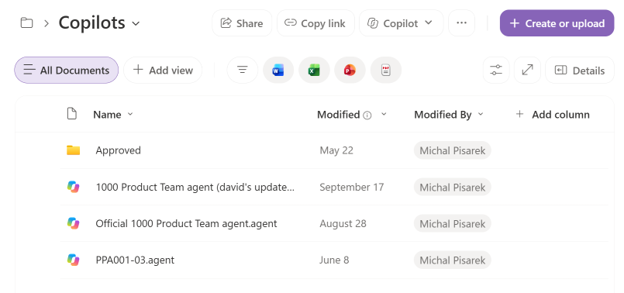
Agents you create in SharePoint don't automatically appear in any list or published location. The ones used in Copilot Chat do surface centrally, and finding the rest means searching across sites, which is a query rather than a report.
Here's the coverage map as it stands today.
| Surface | What it counts | What it misses | What it needs |
|---|---|---|---|
| M365 admin center › Agents › Registry | Agents available to your organization across four publisher types, plus Copilot Studio drafts | Drafts from anything but Copilot Studio; agents published to a custom app or website; data and tools metadata for some agents | Global Administrator or AI Administrator to act; E7 or Agent 365 for risk and activity detail |
| Power Platform admin center › Manage › Inventory | Every agent created in Copilot Studio and Agent Builder, refreshed within ~15 minutes | Classic chatbots; anything built outside Power Platform | Entra roles only; built-in Power Platform roles aren't supported for inventory access |
| SharePoint site › any document library (default: Site Assets › Copilots) | .agent files on that one site | Every other site. Actively used agents surface in the M365 admin center, and the SharePoint Agent Insights report covers the last 28 days of creation, but no complete tenant-wide inventory exists | Site access, repeated per site |
| Microsoft Foundry | Foundry-built agents, reported into the registry for analytics on V2 agents | Coverage differs from other build surfaces | Azure AI Owner role to start or stop the underlying infrastructure |
| M365 admin center › Shadow AI (preview) | Shadow AI agents, meaning named third-party AI desktop apps running on managed devices | Anything on unmanaged, non-Windows or browser-only surfaces. Blocking reaches only Intune-enrolled managed Windows devices | Microsoft 365 E5, Defender for Endpoint, Intune enrollment, Frontier opt-in |
Five surfaces, each accurate on its own terms, with no shared denominator between them. Reconciling by hand means five exports and a de-duplication pass you repeat every time somebody builds something.
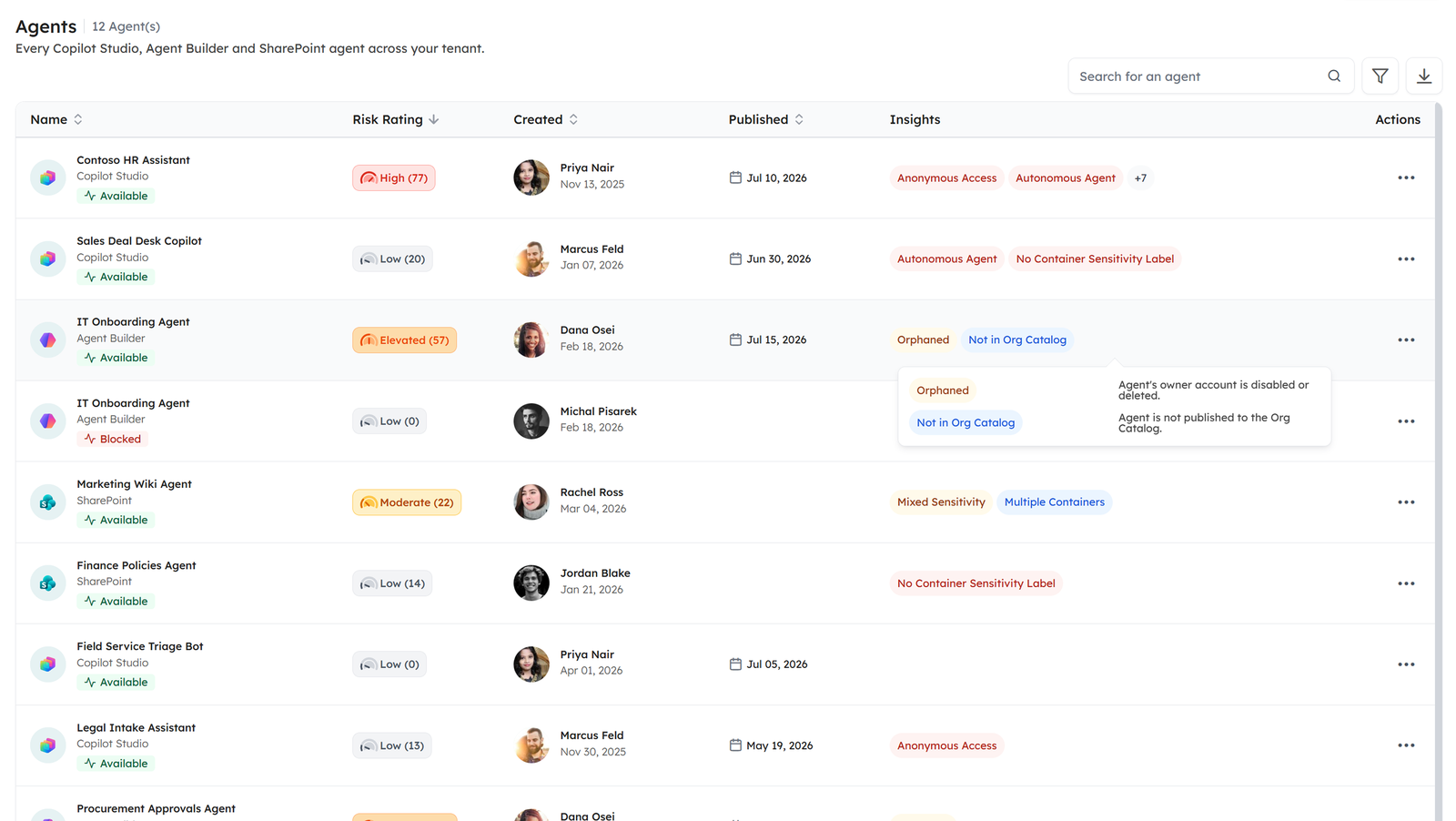
That's the job Orchestry's AI & Agents feature was built to remove. It pulls your agents into one roster across your tenant, filterable by type, status and publication status, with owner names resolved to real people rather than object IDs.
Each agent carries a composite risk score from 0 to 100 in five bands, built from named governance insights you can see on the agent itself.
The difference worth paying for is the one you can't reproduce by hand. A manual reconciliation is accurate the day you finish it, and the crawl keeps running, so the roster is current when somebody asks rather than current on the day you last had a free afternoon.
AI & Agents is on the Orchestry Enterprise plan and runs on the Microsoft 365 licensing you already hold.
Reconciling your agent count, surface by surface
Two exports and a comparison get you most of the way. SharePoint is a separate hunt, because neither export reaches most of it.
- Export the registry. Go to the Microsoft 365 admin center, open Agents, then All agents, and export to CSV. The export gives you more than thirty fields per agent, including name, status, channel, publisher, owner and platform, and it's your baseline: everything available to your organization, plus Copilot Studio drafts.
- Export the Power Platform inventory. In the Power Platform admin center, open Manage, then Inventory, and filter to agents. This export covers everything built in Copilot Studio and Agent Builder, drafts included, which is why the two numbers rarely match.
- Diff the two exports. Join on agent ID if both exports carry one; names collide and owners change. Rows that show up in Power Platform with no match in the registry are mostly Agent Builder drafts and agents nobody has shared, because the registry only shows drafts from Copilot Studio. That difference is the population the registry alone won't show you.
- Search SharePoint for .agent files. Run the Agent Insights report in the SharePoint admin center for recent creation, then search tenant-wide for .agent files to catch older ones. Don't restrict the search to Site Assets. Agents created from a site's homepage land in Site Assets › Copilots, but agents created from a library are saved in that library, and agents published from Copilot Studio sit in Documents › Copilot Studio Agents. Some of what you find will already be in the registry, because actively used SharePoint agents surface there, so de-duplicate against your registry export before you count.
Then read the unmanaged agents figure on its own terms. It answers a different question from the one you just worked through. Your reconciliation sized what the registry can't see. The unmanaged figure sizes what the registry can see but Agent 365 isn't protecting or observing. You need both numbers, and they don't add together or check each other.
Then write down the date. Agents get created continuously by people who don't file tickets, so your count is accurate the day you produce it and decays from there, and a figure with a timestamp is the only kind worth taking to a security review.
One failure mode is worth knowing before you act on any of this. Where an environment runs Power Platform Firewall in active enforcement mode, admin actions started from the Microsoft 365 admin center fail and aren't applied to the agent, because the firewall sees the upstream service IP instead of yours.
The documented fix is to run the action against the Power Platform API. You find out an environment is in that mode by checking its IP firewall settings, not from the screen where the action failed.
AI agent registry questions Microsoft 365 admins ask
Why doesn't Microsoft's agent registry show all my agents?
Because Microsoft's agent registry aggregates from sources that each publish on their own terms. Draft agents appear only from Copilot Studio, agents built outside Microsoft 365 channels don't arrive on their own, and the platform card on the dashboard shows the top five platforms rather than all of them. Each source is accurate within its own scope, and the scopes don't align.
Which Microsoft admin center shows every AI agent?
None of them individually. The Microsoft 365 admin center covers agents available to your organization plus Copilot Studio drafts; the Power Platform admin center covers everything created in Copilot Studio and Agent Builder, drafts included; and SharePoint agents are files inside document libraries, listed centrally only once they've been used in Copilot Chat. A single number means reconciling at least five surfaces or using tooling that crawls across them.
Do I need Agent 365 to see my agents?
No, but the detail you get without it is narrower. The roster, publisher types, ownerless detection and CSV export come with your existing licensing. The risks column, per-agent activity metrics and the agent map require Microsoft 365 E7 or an Agent 365 license, which means an unlicensed tenant sees the list without the signals that tell you which entries matter.
What are unmanaged agents in Microsoft 365?
Unmanaged agents are agents created or managed outside Agent 365, so they sit without its risk protection and observability. The tile counting them on the Agent Map page is a coverage measurement rather than a threat count: it tells you how much of your agent estate falls outside the tooling you've licensed to govern it.
Keeping the count accurate as Microsoft adds surfaces
The coverage map above is a snapshot of today. Shadow AI arrived in preview this year, so the list of places an agent can sit is still moving. A reconciliation you ran last quarter describes an estate that has already changed shape, and the same conditions apply regardless of which AI your organization is using.
That makes this a measurement practice rather than an audit you finish. The question worth putting on a recurring calendar isn't how many agents you have. It's how long ago you last checked, and how many surfaces you checked against.
Orchestry runs that measurement for you, which is the whole reason the roster exists rather than a report you generate. If you'd rather not run the five-export pass by hand every quarter, request a demo and we'll show you what the reconciled count looks like on your own tenant. Most teams find the gap between what Microsoft's agent registry reports and what they have is wider than they expected.