/HubSpot%20-%20eBook%20-%20Proof%20Card%20Mockup%20001.jpg?length=1000&name=HubSpot%20-%20eBook%20-%20Proof%20Card%20Mockup%20001.jpg)
/HubSpot%20-%20eBook%20-%20Proof%20Card%20Mockup%20001.jpg?length=1000&name=HubSpot%20-%20eBook%20-%20Proof%20Card%20Mockup%20001.jpg)
/HubSpot%20-%20eBook%20-%20Proof%20Card%20Mockup%20001.jpg?length=1000&name=HubSpot%20-%20eBook%20-%20Proof%20Card%20Mockup%20001.jpg)
/HubSpot%20-%20eBook%20-%20Proof%20Card%20Mockup%20001.jpg?length=1000&name=HubSpot%20-%20eBook%20-%20Proof%20Card%20Mockup%20001.jpg)
/HubSpot%20-%20eBook%20-%20Proof%20Card%20Mockup%20001.jpg?length=1000&name=HubSpot%20-%20eBook%20-%20Proof%20Card%20Mockup%20001.jpg)
/HubSpot%20-%20eBook%20-%20Proof%20Card%20Mockup%20001.jpg?length=1000&name=HubSpot%20-%20eBook%20-%20Proof%20Card%20Mockup%20001.jpg)
/HubSpot%20-%20eBook%20-%20Proof%20Card%20Mockup%20001.jpg?length=1000&name=HubSpot%20-%20eBook%20-%20Proof%20Card%20Mockup%20001.jpg)
/HubSpot%20-%20eBook%20-%20Proof%20Card%20Mockup%20001-min.jpg?length=1000&name=HubSpot%20-%20eBook%20-%20Proof%20Card%20Mockup%20001-min.jpg)


A Microsoft 365 Copilot license runs about $30 per user per month on the enterprise plan, but that sticker price is the easy part of the decision. You can’t buy Copilot on its own. It’s an add-on that sits on top of a qualifying Microsoft 365 plan, so the seat you’re really paying for is the base license plus Copilot.
The bigger cost is the one that doesn’t show up on the quote: seats you assign to people who never use any of the functionality that the license provides.
So before you approve a number, it helps to know exactly what a Microsoft 365 Copilot license is, which plans qualify, what it costs across the enterprise and business tiers, and how to decide who on your team actually needs one.
How much does a Microsoft 365 Copilot license cost?
For enterprise organizations, the Microsoft 365 Copilot add-on is $30 per user per month, on an annual commitment, added to a base plan like Microsoft 365 E3, E5, Business Standard, or Business Premium.
That add-on price held steady even as the plans around it moved. The July 1, 2026 Microsoft 365 price increases raised E3 and E5, so the all-in cost of a Copilot seat went up even though the add-on itself didn’t. For the full picture on the 2026 M365 licensing changes, including the new E7 bundle, that breakdown is worth a read.
For smaller organizations, there’s a separate, lower-priced tier.
Microsoft 365 Copilot pricing by plan
| Plan | What you pay | Best for |
|---|---|---|
| Microsoft 365 Copilot (enterprise add-on) | $30 / user / month, annual | E3, E5, Business Standard or Premium orgs |
| Microsoft 365 Copilot Business (add-on) | ~$21 / user / month, annual (promo $18 ended June 30, 2026) | Organizations under 300 seats |
| Business Standard + Copilot Business (bundle) | $22 / user / month, annual | New SMB customers wanting the cheapest path |
| Business Premium + Copilot Business (bundle) | $32 / user / month, annual | SMBs that want Premium security underneath |
All figures are per user per month on an annual term. Promotional windows shift, so confirm the current numbers on Microsoft’s Copilot pricing page before you buy.
Orchestry surfaces which paid seats, Copilot included, are sitting on inactive users, so the add-on math is based on real usage, not headcount.
Why the Microsoft 365 Copilot add-on license isn’t sold standalone
The first thing most licensing plans get wrong is simple: you can’t just buy Copilot. Microsoft sells it as an add-on, which means every Copilot seat has to sit on an eligible Microsoft 365 base subscription first.
That matters for budgeting. A Copilot line item is never the true cost of turning Copilot on for a user. The real number is the base plan plus the add-on, which is why the same $30 add-on can produce a very different all-in figure depending on whether the user sits on E3, E5, or a Business plan.
It also shapes what a seat can do. A Copilot seat gives a user no new access. It works entirely within what their base license already grants: the same apps, the same storage, the same files. Copilot just makes what they can already reach far easier to surface.
Which Microsoft 365 license includes Copilot
No Microsoft 365 plan includes the paid Copilot experience by default, not even E5. What the plans do is qualify you to add it. Microsoft’s minimum requirements documentation lists the eligible base subscriptions:
- Enterprise: Microsoft 365 E3, E5, and F3, plus the Office 365 E1, E3, and E5 equivalents
- Business: Microsoft 365 Business Basic, Business Standard, and Business Premium
- Frontline and government: F-tier and GCC plans, with some capability limits
One thing is included at no extra cost: Copilot Chat. Any user on an eligible Microsoft 365 subscription gets web-based Copilot Chat for free. The paid Microsoft 365 Copilot license is what adds work-based chat grounded in your tenant’s data, plus Copilot inside Word, Excel, PowerPoint, Outlook, and Teams.
Microsoft 365 Copilot Business license vs. enterprise Copilot
The split comes down to org size and the base plan underneath. A Microsoft 365 Copilot Business license is built for organizations under 300 seats sitting on a Business plan. The enterprise Microsoft 365 Copilot add-on is for E3 and E5 tenants and carries no seat ceiling.
| Copilot Business | Microsoft 365 Copilot (enterprise) | |
|---|---|---|
| Base plan required | Business Basic, Standard, or Premium | E3, E5, or Business Standard/Premium |
| Seat cap | Up to 300 | ✓ No cap |
| Price per user/month | ~$21 (annual) | $30 (annual) |
| Best fit | SMBs standardizing on Business plans | Enterprises and large, mixed tenants |
The Copilot experience is largely the same across both; the difference is who qualifies and how the seat is priced. A growing business already on Business Premium takes the cheaper Business add-on. An enterprise on E5 takes the $30 add-on.
Who actually needs a Copilot license
This is where the money is won or lost. A Copilot license only pays back when the person holding it spends real time in the apps Copilot accelerates: heavy Outlook and Teams users, people who live in Word and Excel, and roles built around drafting, summarizing, and analysis.
Microsoft gives you a data-driven starting point. The Microsoft 365 Copilot Readiness Report in the admin center shows each unlicensed user's activity across Teams, Outlook, and Office, so you can build a licensing plan around who's actually working in the apps Copilot accelerates. That beats assigning seats by job title or by who asked loudest.
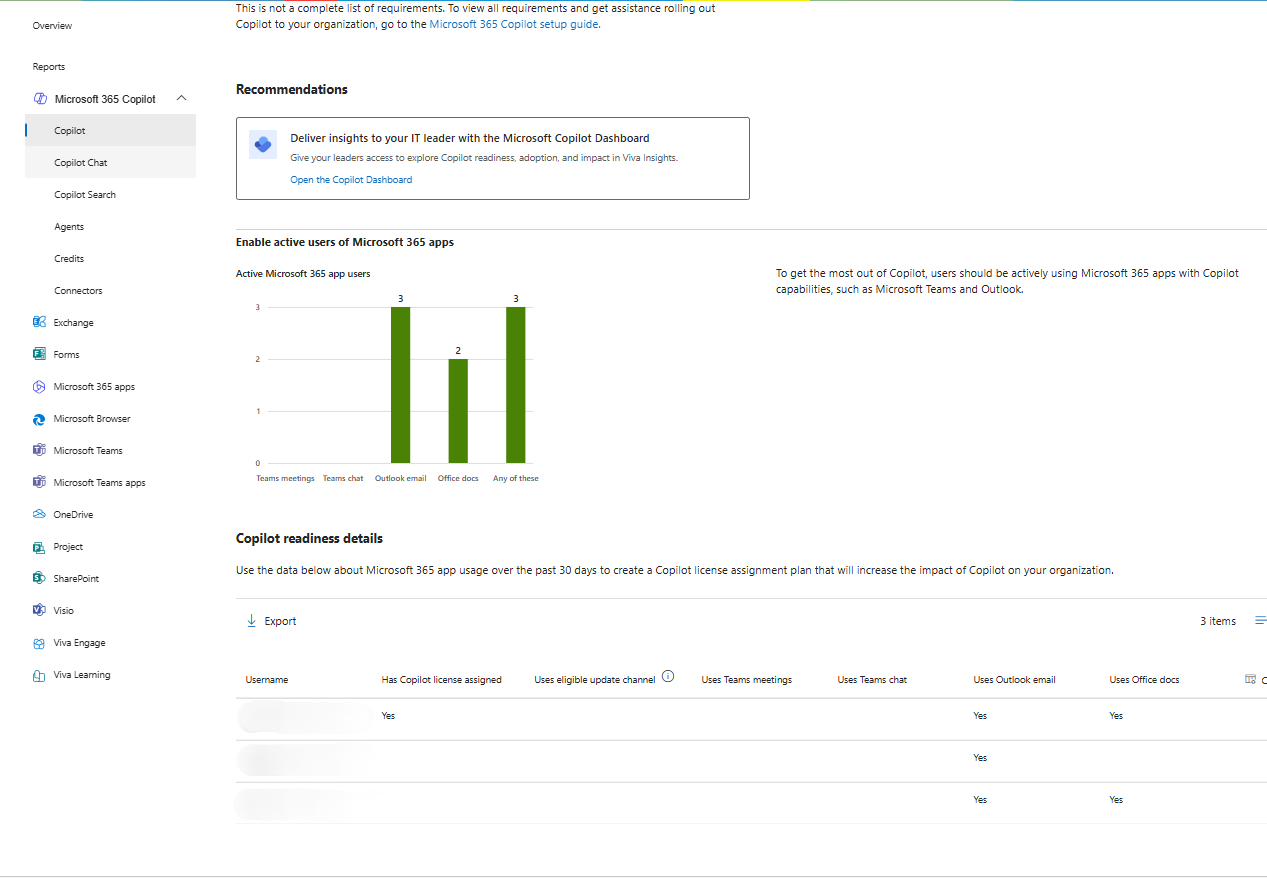
Per-user Microsoft 365 app usage (Teams, Outlook, Office docs) and Copilot license status, the data you use to build a licensing plan.
The report tells you who’s active in Microsoft 365. What it won’t tell you is which of your existing paid seats, Copilot or otherwise, sit on people who left or went quiet. Pair that with Orchestry, which flags the seats quietly renewing on departed or inactive users, so you can reclaim them and redirect the budget to users who'll actually use Copilot.
Before you assign seats: get your tenant Copilot-ready
A Copilot license goes live against whatever your tenant already looks like. If a user can reach an overshared HR folder today, Copilot can summarize it for them tomorrow. The license doesn’t create that exposure; it makes it trivially easy to surface. And the same conditions apply regardless of which AI you use, whether that’s Copilot, a custom Microsoft 365 Copilot agent, or another assistant connected to your content.
That’s why readiness belongs before procurement, not after. Orchestry’s approach to content readiness runs on the Copilot Dashboard, which scores your tenant across 13 signals spanning oversharing, governance, and adoption, while oversharing detection flags the specific workspaces where content is reachable more widely than it should be. Fixing those before seats go live costs far less than explaining an exposure after.
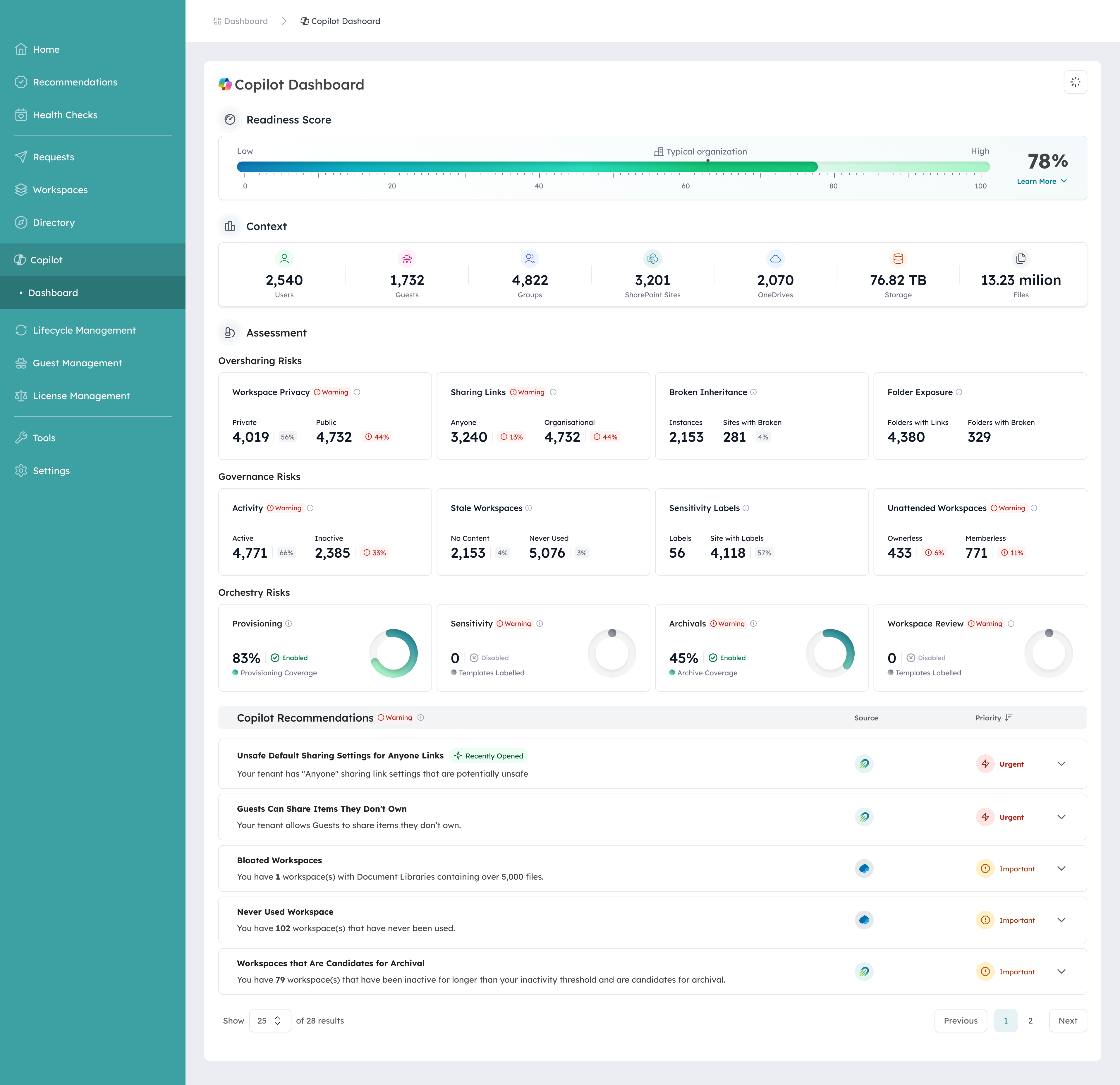
Orchestry Copilot Dashboard showing the tenant’s 13-signal score across oversharing, governance, and adoption markers.
How to get a Microsoft 365 Copilot license: buy, assign, and avoid shelfware
Getting a license live is the quick part:
- Confirm the base plan. Check that each target user is on an eligible Microsoft 365 or Office 365 subscription; if not, upgrade the base plan first.
- Buy the add-on. Purchase Microsoft 365 Copilot or Copilot Business seats in the Microsoft 365 admin center under Billing.
- Assign the seats. Assign the Copilot license to specific users under Users, or in bulk by group.
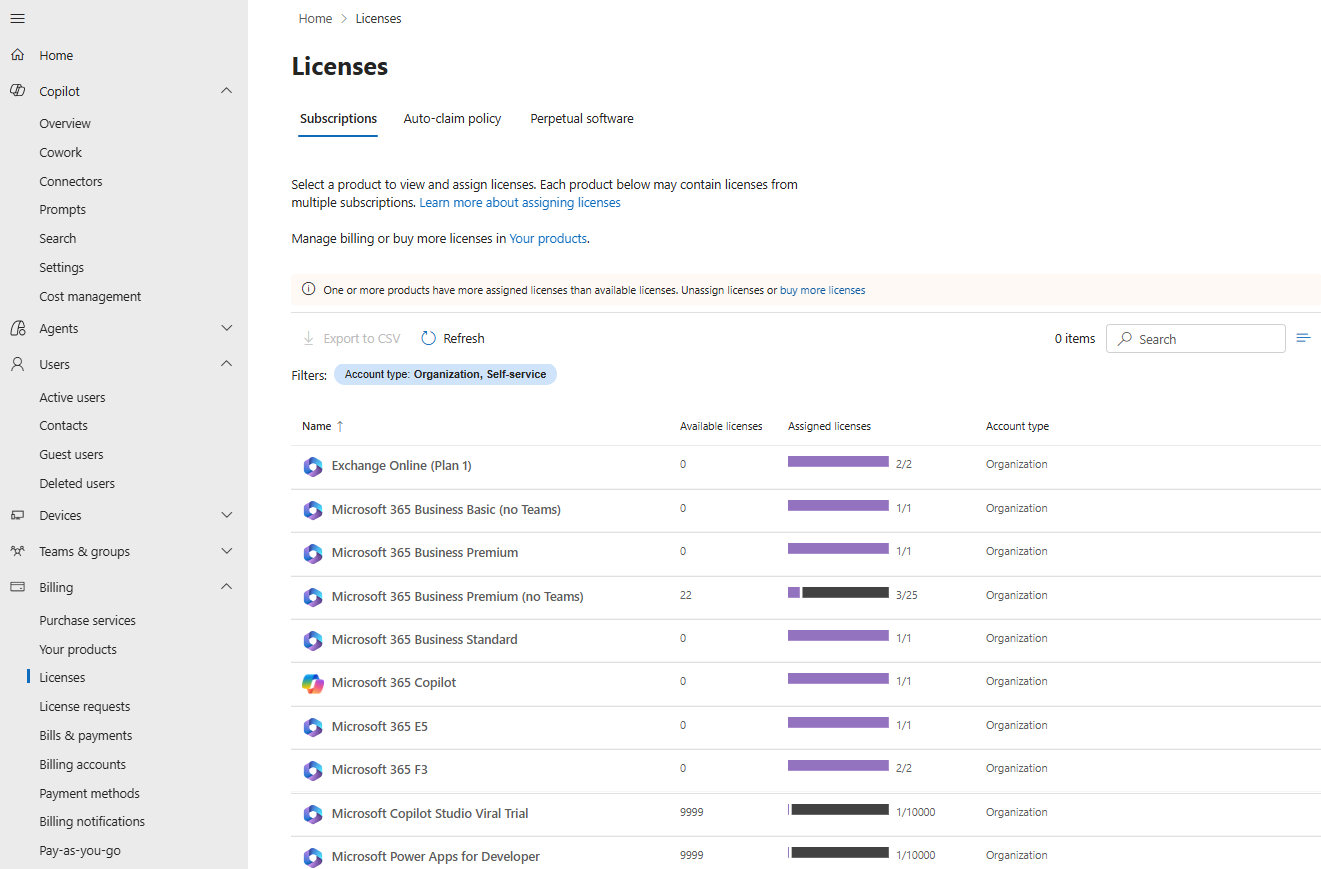
The Microsoft 365 Copilot add-on listed alongside your base plans, with assigned vs. available seats for each.
The part that protects the budget comes after assignment. Copilot seats don’t deprovision themselves when someone changes roles or leaves, so paid licenses drift onto people who never open them. That’s shelfware, and it compounds at every renewal.
Checking assigned seats against real activity on a recurring basis is what keeps the spend honest. Orchestry’s license optimization ties assigned seats to actual usage, so you reclaim idle Copilot and base licenses on a schedule instead of by accident. Based on Orchestry data, organizations running that kind of recurring lifecycle see $100,000 to $393,000 in first-year storage and licensing savings, and 67% of workspaces turn out to be inactive when they first connect the platform.
Microsoft 365 Copilot license: frequently asked questions
What is a Microsoft 365 Copilot license?
It’s a paid, per-user add-on to an eligible Microsoft 365 subscription that turns on Copilot inside the Office apps and work-based Copilot Chat grounded in your tenant’s data. It costs $30 per user per month on the enterprise plan and requires a qualifying base license underneath.
Which Microsoft 365 plans include Copilot?
None include the paid Copilot experience by default. Microsoft 365 E3, E5, F3, and Business Basic, Standard, or Premium qualify you to add it. Free web-based Copilot Chat is included with any eligible subscription.
Can I buy Microsoft 365 Copilot without a Microsoft 365 subscription?
No. Copilot is sold only as an add-on to an eligible base plan. If a user isn’t on a qualifying subscription, you upgrade the base plan first, then add Copilot.
How do I check if I have a Copilot license?
In the Microsoft 365 admin center, open Users, select the person, and look under Licenses and apps for Microsoft 365 Copilot. Admins can also run the Copilot license diagnostic that Microsoft provides.
Is Copilot Chat the same as a Copilot license?
No, and the difference is grounding. Free Copilot Chat answers from the web and doesn't automatically see your Microsoft 365 data: not your mailbox, not Teams, not SharePoint. The only way it touches your own content is if you upload files into a prompt, and limits apply (up to 20 files per conversation, 50 MB each). A paid Microsoft 365 Copilot license is what grounds Copilot in your work data automatically, so it can reason across your real emails, files, and chats, and it adds Copilot inside Word, Excel, PowerPoint, Outlook, and Teams.
Put the seat where it pays back
A Microsoft 365 Copilot license looks like a procurement question, but the seat you assign is only as valuable as the person using it and only as safe as the content it can reach. Get both right before you scale.
To see which seats are active, which are shelfware, and where your tenant is exposed before you assign Copilot, start with a license and readiness review.