/HubSpot%20-%20eBook%20-%20Proof%20Card%20Mockup%20001.jpg?length=1000&name=HubSpot%20-%20eBook%20-%20Proof%20Card%20Mockup%20001.jpg)
/HubSpot%20-%20eBook%20-%20Proof%20Card%20Mockup%20001.jpg?length=1000&name=HubSpot%20-%20eBook%20-%20Proof%20Card%20Mockup%20001.jpg)
/HubSpot%20-%20eBook%20-%20Proof%20Card%20Mockup%20001.jpg?length=1000&name=HubSpot%20-%20eBook%20-%20Proof%20Card%20Mockup%20001.jpg)
/HubSpot%20-%20eBook%20-%20Proof%20Card%20Mockup%20001.jpg?length=1000&name=HubSpot%20-%20eBook%20-%20Proof%20Card%20Mockup%20001.jpg)
/HubSpot%20-%20eBook%20-%20Proof%20Card%20Mockup%20001.jpg?length=1000&name=HubSpot%20-%20eBook%20-%20Proof%20Card%20Mockup%20001.jpg)
/HubSpot%20-%20eBook%20-%20Proof%20Card%20Mockup%20001.jpg?length=1000&name=HubSpot%20-%20eBook%20-%20Proof%20Card%20Mockup%20001.jpg)
/HubSpot%20-%20eBook%20-%20Proof%20Card%20Mockup%20001.jpg?length=1000&name=HubSpot%20-%20eBook%20-%20Proof%20Card%20Mockup%20001.jpg)

/HubSpot%20-%20eBook%20-%20Proof%20Card%20Mockup%20001-min.jpg?length=1000&name=HubSpot%20-%20eBook%20-%20Proof%20Card%20Mockup%20001-min.jpg)


With over a quarter billion daily users, Microsoft Teams and SharePoint sprawl is a pervasive issue within organizations. In our previous article, we’ve covered at length what sprawl is, the contributing factors, and how to avoid it.
Regardless of where you are in your M365 journey, you may be seeing the signs of Microsoft Teams sprawl.
In our article, we will show you how to reduce MS Teams sprawl. Follow along as we show you how to automate your Microsoft Teams cleanup, archive Teams, and complete SharePoint organization. We will also demonstrate how you can implement mechanisms that will prevent sprawl from ever occurring in the future.
Start with what you have
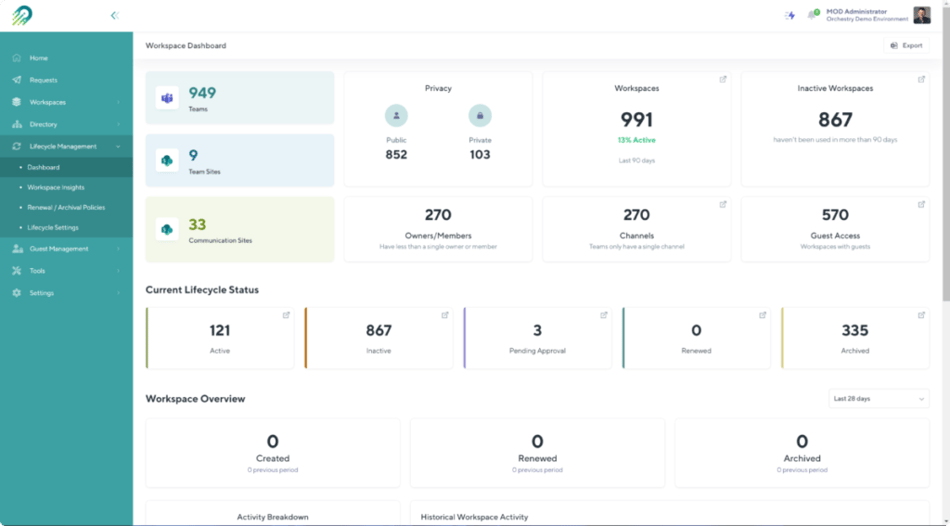
Within hours of installing the Orchestry app in your tenant, you will begin to receive compelling insights on your M365 tenant. These include usage and Team activity data of all Microsoft Teams, SharePoint Online teams, and Communication sites.
The insights include:
- How many workspaces (Teams, SharePoint team, Microsoft 365 Groups, and Communication sites) do you have within your tenant?
- How many of those workspaces are active or inactive? You can set the inactivity threshold to the number appropriate for your organization. Based on that number, workspaces will automatically be broken into active and inactive.
- How many workspaces are public/private?
- How many of the workspaces have no owners or no members?
- How many Teams only have the General channel?
- How many workspaces have Guest users in them?
All this data is essential for quickly identifying workspaces ripe for SharePoint cleanup and Teams organization.
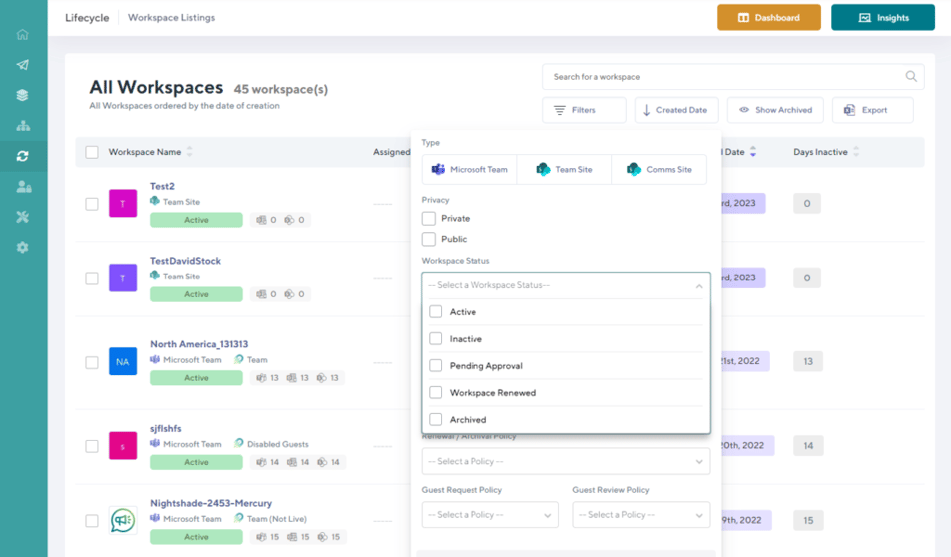
Taking it a step further, you can then look at the detailed view of all workspaces. Using filters, you can drill down into the workspaces that are most interesting.
- You can narrow in on all public/private workspaces.
- Identify the list of active/inactive Teams and SharePoint sites.
- Review the list of ownerless workspaces.
- Review the list of workspaces that have a specific owner. For example, a Team Owner is soon retiring and you are looking to ownership to someone else.
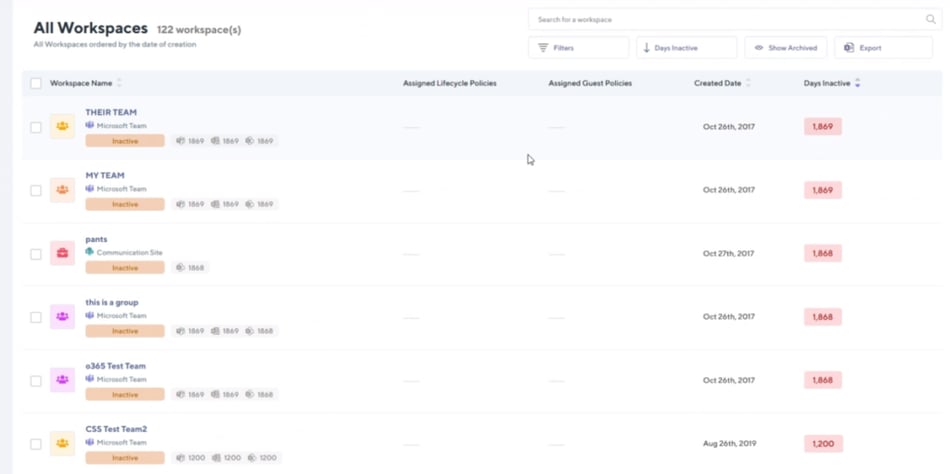
Depending on how you’ve had Teams enabled in your organization, you may see some surprising stats, like the ones below. You’ll notice that some of the workspaces in this tenant have been inactive for over 5 years! You may notice some patterns in the names of the teams. These could be names including “Test”, or having conspicuous names like “pants” or “this is a group”.
Being able to see what’s there as a Microsoft 365 admin is only half the battle.
Our experience shows that a factor that significantly contributes to sprawl is the lack of visibility for the end users. Not being able to see all Teams and SharePoint sites that exist, often leads to duplication of content.
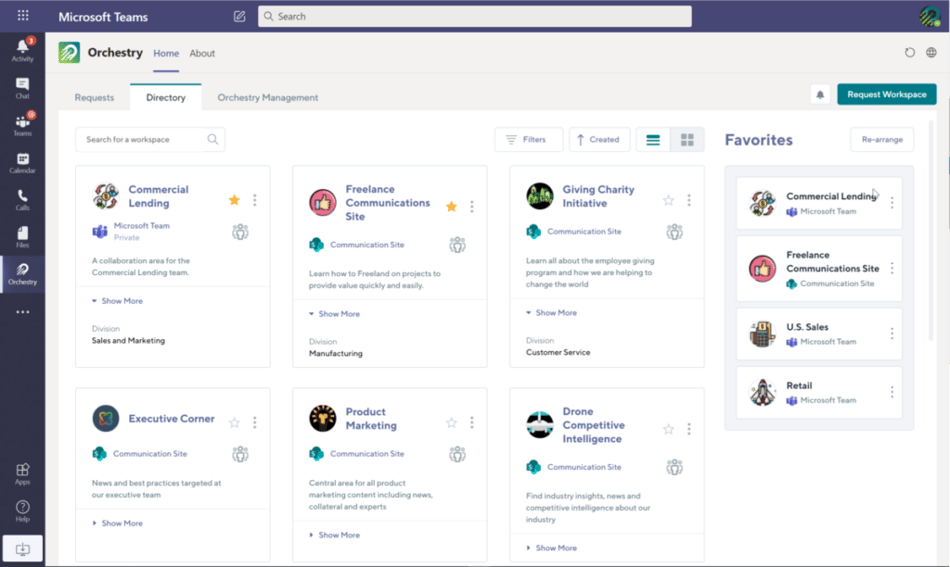
Orchestry offers a simple, yet incredibly elegant solution to that problem which is the Workspace Directory.
The Directory is made available through the Orchestry app to all end-users within your organization. It provides a very easy and user-friendly way to browse all Teams, SharePoint teams, and site collections. Every user can see their names and descriptions, and other valuable metadata, search by name, request access, and more.
This game-changer feature offers full transparency and prevents future Microsoft Teams and SharePoint sprawl from occurring.
Automate M365 archiving
Once you’ve identified workspaces that are ripe for deletion, you can begin the process of SharePoint and Teams cleanup. Orchestry makes the process painlessly easy and straightforward. This is the first step in introducing Microsoft Teams lifecycle management.
Begin by creating policies that will help you automatically archive Microsoft Teams and SharePoint sites. Embed policies with workflows that make sense for each type of outdated, ownerless, or redundant Team or SharePoint site.
Here are some examples of policies you can create:
- Microsoft Teams or SharePoint deletion policy. With this policy, you can delete workspaces in bulk after they meet a certain level of inactivity. As a failsafe, you can restore an archived Team from the Microsoft Administration Center.
- SharePoint archiving or Microsoft Teams archiving policy. This policy allows you to archive the site, Team, or Group without moving the location of the content. The policy will execute after a certain inactivity threshold is reached. The SharePoint site or Team will become read-only.
- Copy and delete Microsoft Teams or SharePoint site policy. You can choose to copy the content to a document library or a subsite. The policy will fire once a certain period of inactivity is reached.
- Microsoft Teams or SharePoint site renewal policy. With this policy, you are able to automatically contact content owners after a certain period of inactivity to get their approval. You can either offer the option to renew or delete/archive the SharePoint site, Team, or M365 Group.
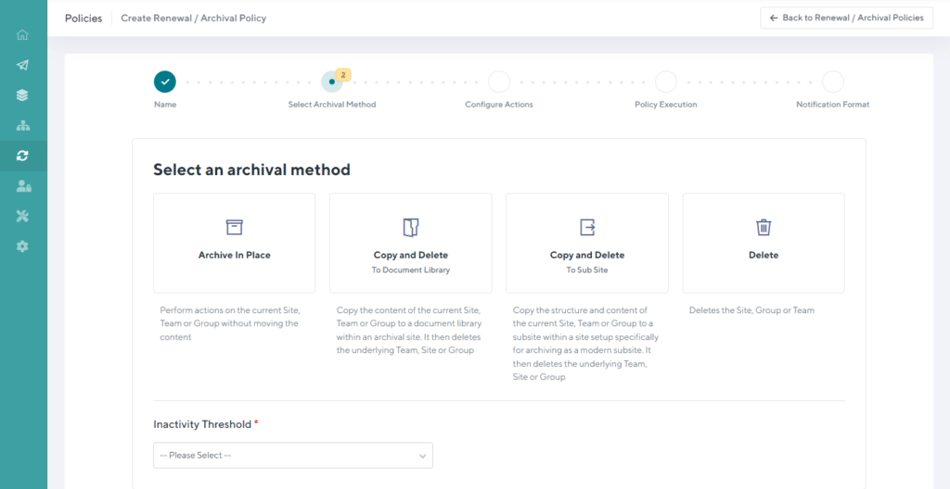
The policies are 100% configurable, and you can create as many policies as needed to meet your cleanup needs.
You can choose the exact parameters for the policy to fire. It can be based on inactivity or workspace expiry (this works great for project-based teams and workspaces).
You can control every aspect of what happens with a workspace and all its contents once archived, renewed, or deleted. This includes:
- Being able to change the name of it (for example, you can add an “Archived” string to the name)
- Changing/removing owners and members of the Site, Team, or Groups.
- Configuring content archival options.
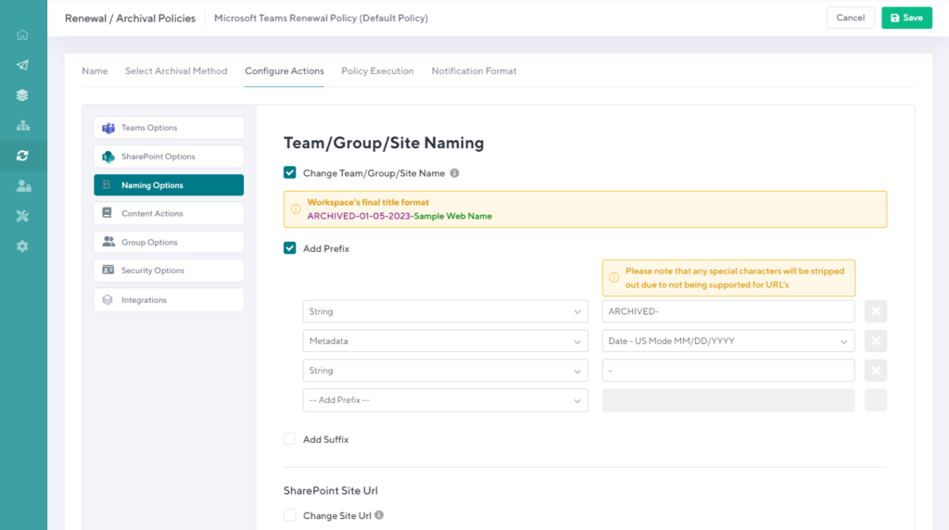
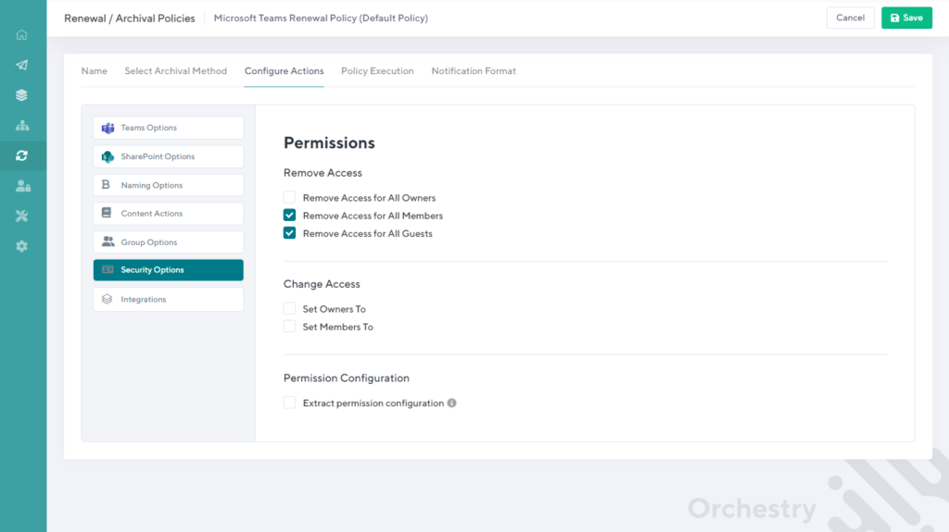
Once you’ve created the policies, you can either enforce them to take effect immediately or apply them in bulk. They will automatically fire off once the pre-set conditions are met.
Orchestry users clean up on average 75% of their unused Teams in the first 14 days of using the platform.
Put your Microsoft Teams governance on autopilot
A major contributor to Microsoft Teams’ sprawl is the lack of a Microsoft Teams governance plan or enforcement of governance policies.
With Orchestry, you can put every aspect of your Microsoft 365 governance on autopilot.
- Define your own Provisioning, Microsoft Teams Lifecycle Management, and naming Policies. Set default role & permission assignment for Microsoft Teams, SharePoint, Team Sites, and Communication Sites specific to your organizational needs.
- Set up governance guardrails for the end-users. Apply the right Policies and Microsoft Teams governance standards to existing content and newly created workspaces.
- Govern the creation of new Workspaces through a single interface.
- Sit back, relax, and watch Orchestry automatically engage content owners to clean up, organize and govern your tenant.
Orchestry users save on average $15,000 in costs per Teams/Group/Site template, governance, provisioning, and administration.
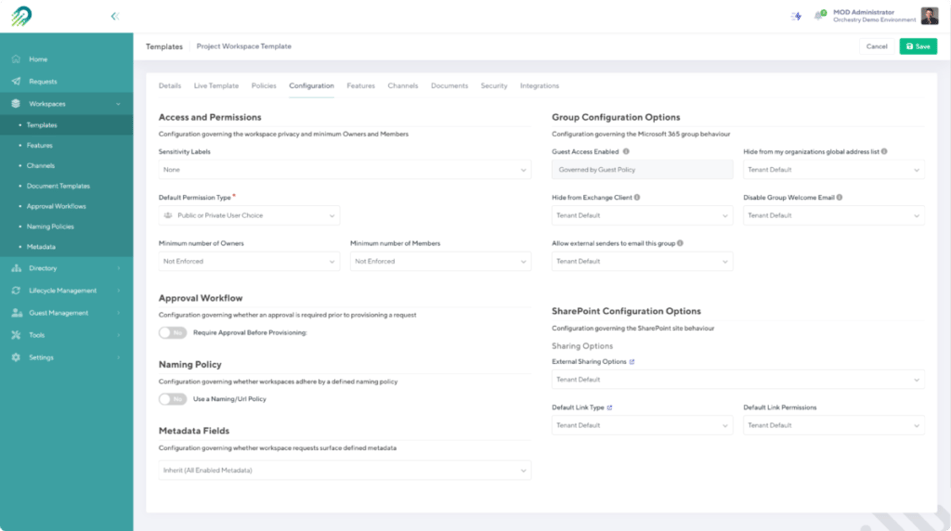
Leverage self-service workspace provisioning
Opening up the floodgates and allowing anyone to create new workspaces is great for getting everyone familiar with the tool. But it is also the main contributing factor to Microsoft Teams’ sprawl.
Equally, restricting the creation of new Teams and SharePoint sites to the IT department can be dangerous. It causes major bottlenecks and can introduce the Shadow IT concept to your organization.
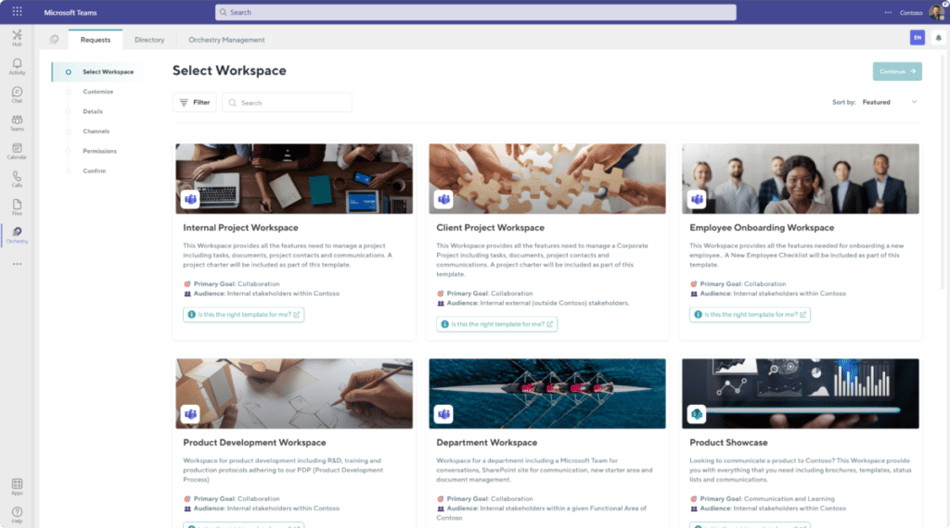
A happy win-win is leveraging a controlled self-service provisioning process and this is where Orchestry can help.
In a nutshell, Orchestry offers you the ability to create or modify an existing library of business-first workspace templates. You can then make them available to the end-users to request. Workspace templates can be accessed by the end user, customized to meet their unique content needs, and provisioned without any restrictions. Others may require justification and approval to be created and provisioned.
Read our blog about Template preparation and provisioning workflow creation for the IT admin.
This blog talks about what Workspace template customization and request experience look like for an end-user.
With these 4 powerful but simple steps, Orchestry helps you clean up your tenant in days. It also helps prevent Microsoft Teams sprawl from occurring in the future.
Want to see Orchestry in action?
Orchestry offers a free full-experience trial for 28 days.
- Trusted by thousands of IT admins, and leading Microsoft 365 partners worldwide
- Fully secure application attested by SOC2 Security certification
- Full features, zero commitment
- No credit card required
- Orchestry apps installation takes less than 15 minutes
- No obligation. If Orchestry is not your cup of tea, simply delete the apps at the end of the trial. All the content you created using Orchestry will remain
Chat with one of our Microsoft 365 experts about the opportunities you can unlock with Orchestry and see it in action.

Want more insights like this one?
For more Microsoft 365, SharePoint Online, and Teams insights, tips and tricks, best practices, and exclusive events delivered straight to your inbox, join our mailing list today and level up your Microsoft 365 game!