/HubSpot%20-%20eBook%20-%20Proof%20Card%20Mockup%20001.jpg?length=1000&name=HubSpot%20-%20eBook%20-%20Proof%20Card%20Mockup%20001.jpg)
/HubSpot%20-%20eBook%20-%20Proof%20Card%20Mockup%20001.jpg?length=1000&name=HubSpot%20-%20eBook%20-%20Proof%20Card%20Mockup%20001.jpg)
/HubSpot%20-%20eBook%20-%20Proof%20Card%20Mockup%20001.jpg?length=1000&name=HubSpot%20-%20eBook%20-%20Proof%20Card%20Mockup%20001.jpg)
/HubSpot%20-%20eBook%20-%20Proof%20Card%20Mockup%20001.jpg?length=1000&name=HubSpot%20-%20eBook%20-%20Proof%20Card%20Mockup%20001.jpg)
/HubSpot%20-%20eBook%20-%20Proof%20Card%20Mockup%20001.jpg?length=1000&name=HubSpot%20-%20eBook%20-%20Proof%20Card%20Mockup%20001.jpg)
/HubSpot%20-%20eBook%20-%20Proof%20Card%20Mockup%20001.jpg?length=1000&name=HubSpot%20-%20eBook%20-%20Proof%20Card%20Mockup%20001.jpg)
/HubSpot%20-%20eBook%20-%20Proof%20Card%20Mockup%20001.jpg?length=1000&name=HubSpot%20-%20eBook%20-%20Proof%20Card%20Mockup%20001.jpg)

/HubSpot%20-%20eBook%20-%20Proof%20Card%20Mockup%20001-min.jpg?length=1000&name=HubSpot%20-%20eBook%20-%20Proof%20Card%20Mockup%20001-min.jpg)


An agent that reads the wrong document gives you a wrong answer. One that writes to the wrong list, emails the wrong group, or updates the wrong record has already done it, on a schedule, with nobody reading the output first.
The permission model starts where Copilot's does: an agent reaches what the person running it can reach, until somebody configures it otherwise. The difference is that nothing sits between retrieval and effect, which is why agent readiness asks more of your tenant than Copilot readiness did.
What AI agent readiness means, and why it's a higher bar than Copilot readiness
Most readiness work so far has been about what AI can see. Agent readiness is the assessment of whether your tenant can absorb what AI does when nobody's checking the result first: whether you know which agents exist, what they're pointed at, who owns them, and what happens to them when that person leaves.
Most agents in a tenant only retrieve, which is why the distinction gets waved off. A readiness bar is set by the worst case in the estate though, not the average one, and the worst case is an agent with write access to something that matters.
The scale argument is no longer speculative. Microsoft's 2026 Work Trend Index reports that the number of active agents in the Microsoft 365 ecosystem grew 15x year over year, rising to 18x in large enterprises. Agents are being built by people who are not administrators, in tools that don't require an administrator's involvement.
None of this replaces the content work. If your storage is bloated and your sharing links are unreviewed, that's still the first problem, and the Copilot readiness checklist for storage and permissions covers that ground. Agent readiness sits on top of it, and if you want the ground floor first, start with what Microsoft Copilot agents are and how they're built.
Agent permissions: what an AI agent can reach in your tenant
Delegated access is the pattern most people have in mind. Entra's documentation on agent identities describes it directly: agents "can act on behalf of human users, using access rights given to the user".
SharePoint's guidance is more specific. An agent's responses depend on each user's permissions to the agent's data sources, so a user with access to the agent but not to the underlying site won't see that content in its answers.
That's the reassuring version, and it's the one most readiness advice stops at. It's also incomplete in ways that matter operationally.
The exception with the widest reach is maker-provided credentials. Microsoft's Copilot Studio documentation is direct about the consequence: when this is configured, "the agent uses the maker's credentials, not the end user's credentials," which means an end user might retrieve information or perform actions that only the maker's account is permitted to do.
In Copilot Studio, both end-user and maker-provided credentials are enabled by default. A maker picks either one unless an admin restricts the environment.
Narrower exceptions exist too: agents granted application permissions can run without a signed-in user, and an agent holding its own identity accumulates persistent access to whatever gets shared with it.
The delegated model is only as trustworthy as your understanding of what each identity can reach, and that understanding is thinner than most teams assume. In our webinar, only 13% of M365 admins could accurately describe how the SharePoint Copy Link sharing default inherits.
If the inheritance behavior underneath an agent isn't well understood, "it only sees what the user sees" stops being a control and becomes an assumption.
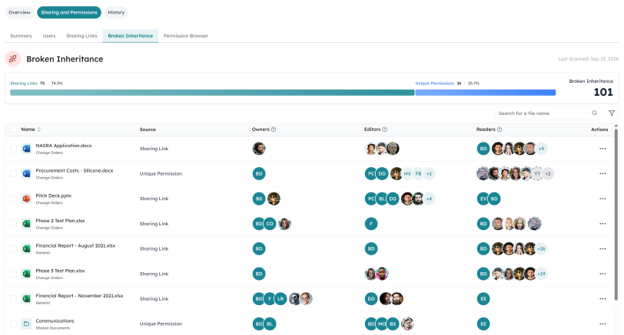
Orchestry detects broken permission inheritance on the items and folders inside a library, and distinguishes whether the break came from a sharing link or a unique permission. Its permission browser, on the Orchestry Enterprise plan, expands the full hierarchy, including expanded groups and sharing-link-backed access, with Everyone Except External Users surfaced as its own stat wherever it's granted.
That's the layer that tells you what an identity reaches in practice rather than on paper. Detection and reporting is where this sits today; the remediation decisions stay with you. For the mechanics, see how broken permissions expose access to Copilot.
Unmanaged agents: what Microsoft's registry counts and what it misses
The agent registry in the Microsoft 365 admin center gives administrators a consolidated view, and one of its summary tiles is worth reading closely. Microsoft defines unmanaged agents as agents created or managed outside of Agent 365, without its risk protection and observability. That number is a running count of what the control plane isn't covering.
A registry answers how many and who, which beats nothing. It's the same trajectory AI agent sprawl in Microsoft 365 followed: counting the objects came first, governing what sits underneath them came later.
The registry aggregates across platforms now, which is real progress.
| What you want to know | What the agent registry gives you |
|---|---|
| How many agents exist | A tenant-wide count, filterable by status, publisher, channel, platform and data source, and exportable |
| Who owns them | A count of agents without owners, a one-click filter, and a count that updates when you hard delete a user |
| Which ones sit outside the control plane | An unmanaged agents count: agents created or managed outside Agent 365 |
| Which ones are risky | Risk signals aggregated from Microsoft's security platforms, on an E7 or A365 license |
| What each agent can reach | Not answered here. Effective access is a permissions question |
| What to do when an owner leaves | Detection, then a manual decision. Nothing expires or transfers on its own |
Turning that into an inventory you can act on is the part that still takes work.
Counting isn't the readiness test, though. An accurate inventory tells you nothing about whether the content those agents reach is in a state you'd defend, and that question gets answered in the tenant.
Agent knowledge sources: what your agents are grounded on
Agents get pointed at content directly. A maker names SharePoint sites, files and folders, web URLs, or Graph connectors as knowledge sources, and from that point the agent's answers and actions are shaped by whatever lives there.
Administrator visibility into those choices exists, with caveats Microsoft states plainly. The Data & tools tab is read-only, and Microsoft notes the admin center "doesn't have data and tools information for all agents." Its own advice to verify an agent references only approved sources is sound, and partially unenforceable with native tooling alone.
Restricted Content Discovery is the mitigation, limiting how content from specific sites surfaces in organization-wide search and Copilot responses while removing AI entry points including agent creation. Microsoft calls it a temporary governance control, a Microsoft Copilot license grants it as part of SharePoint Advanced Management, and it leaves existing permissions untouched.
Its predecessor is already going: Restricted SharePoint Search is retiring, and new enablement has been blocked since July 31, 2026. If your readiness plan leans on it, that plan has an expiry date.
Ownerless agents: what happens when the builder leaves
Microsoft documents this one now, which is a change worth noticing. The agent registry reports that shared agents become ownerless when the user who created them is deleted, surfaces a count of them, and updates that count on hard deletion.
Microsoft's own guidance names the trigger plainly: when the original owner of an agent leaves the organization or changes roles, it can lead to orphaned agents that lack proper management.
What Microsoft gives you is detection and a conditional menu. Reassignment covers shared agents built in Agent Builder and Copilot Studio. Deletion from the admin center covers Agent Builder alone, and blocking is available more broadly, though for SharePoint and Foundry agents it only removes them from Copilot Chat rather than stopping them.
So nothing expires, transfers, or cleans itself up on a timer, and what you can do about it depends on a build decision somebody else made months ago.
Admins have seen this pattern before, at a scale that should set the expectation. Based on Orchestry data, 67% of workspaces show no activity in the trailing 90 days at first instrument, and on first run against an unmanaged tenant, thousands of inactive workspaces and hundreds-to-thousands of ownerless sites surfaced in a single dashboard view.
Ownership decay is an old failure mode in Microsoft 365, and agents are the newest object it applies to: the one where an absent owner means an unattended action rather than a neglected file.
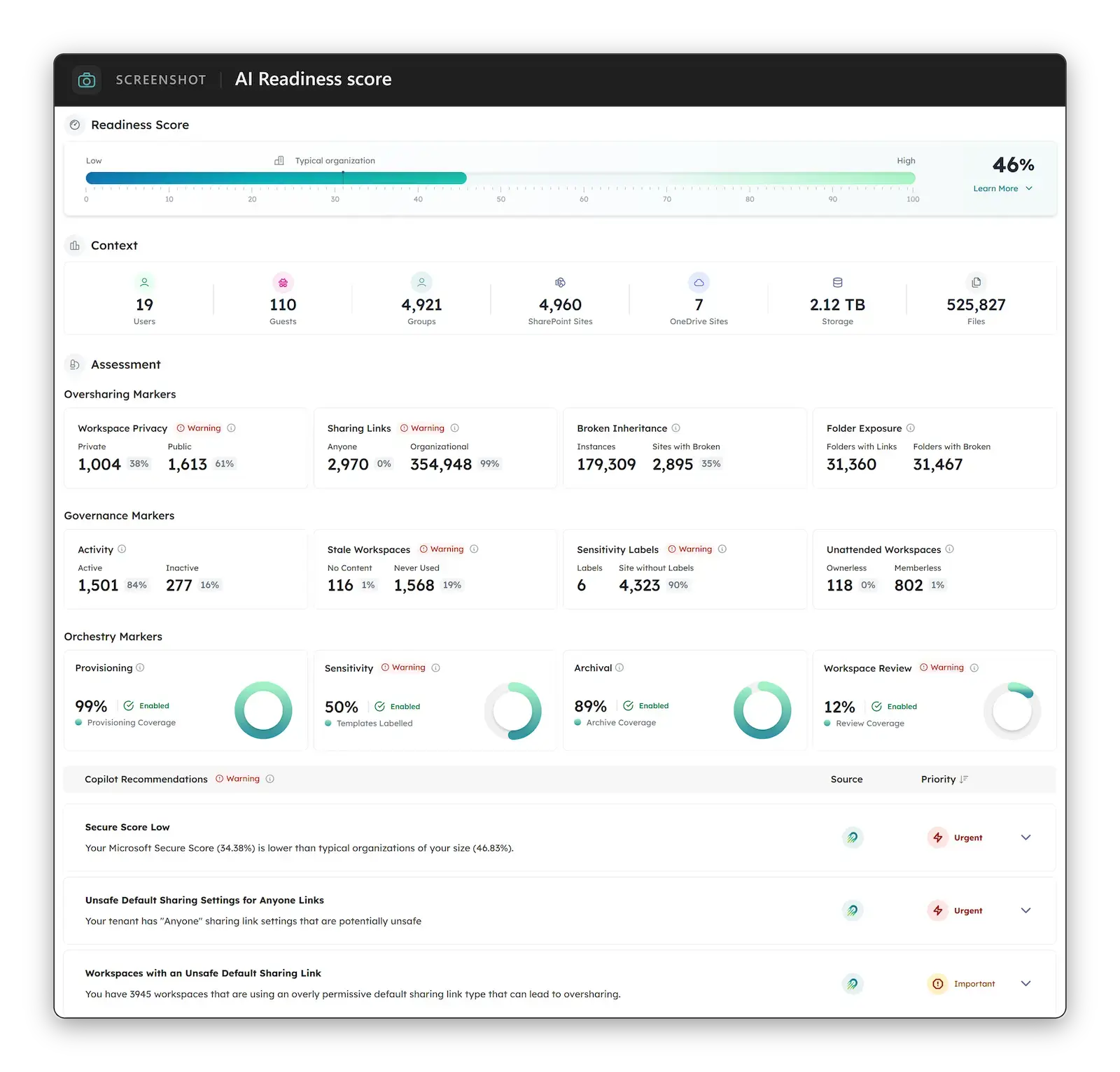
Orchestry's AI readiness dashboard, included on every Orchestry plan, scores 13 governance signals across three buckets as a single percentage, model-agnostic rather than tied to one AI product. Ownership visibility and ownerless detection sit alongside it, so the sites with nobody accountable show up next to the readiness score they're dragging down.
Agent lifecycle: creation gets governed, decommissioning doesn't
Provisioning governance in Microsoft 365 has matured a lot. Retirement hasn't, and agents inherit that asymmetry on day one. Native remediation depends on how the agent was built, and no single action retires them all, which makes cleanup a set of platform-specific decisions rather than one policy applied consistently.
It's the reason why the AI agent governance gap already existed before agents arrived: the same discipline was missing for workspaces, and nobody noticed as sharply because a stale site doesn't do anything. For what the native control plane covers, see what Agent 365 governs and what it costs.
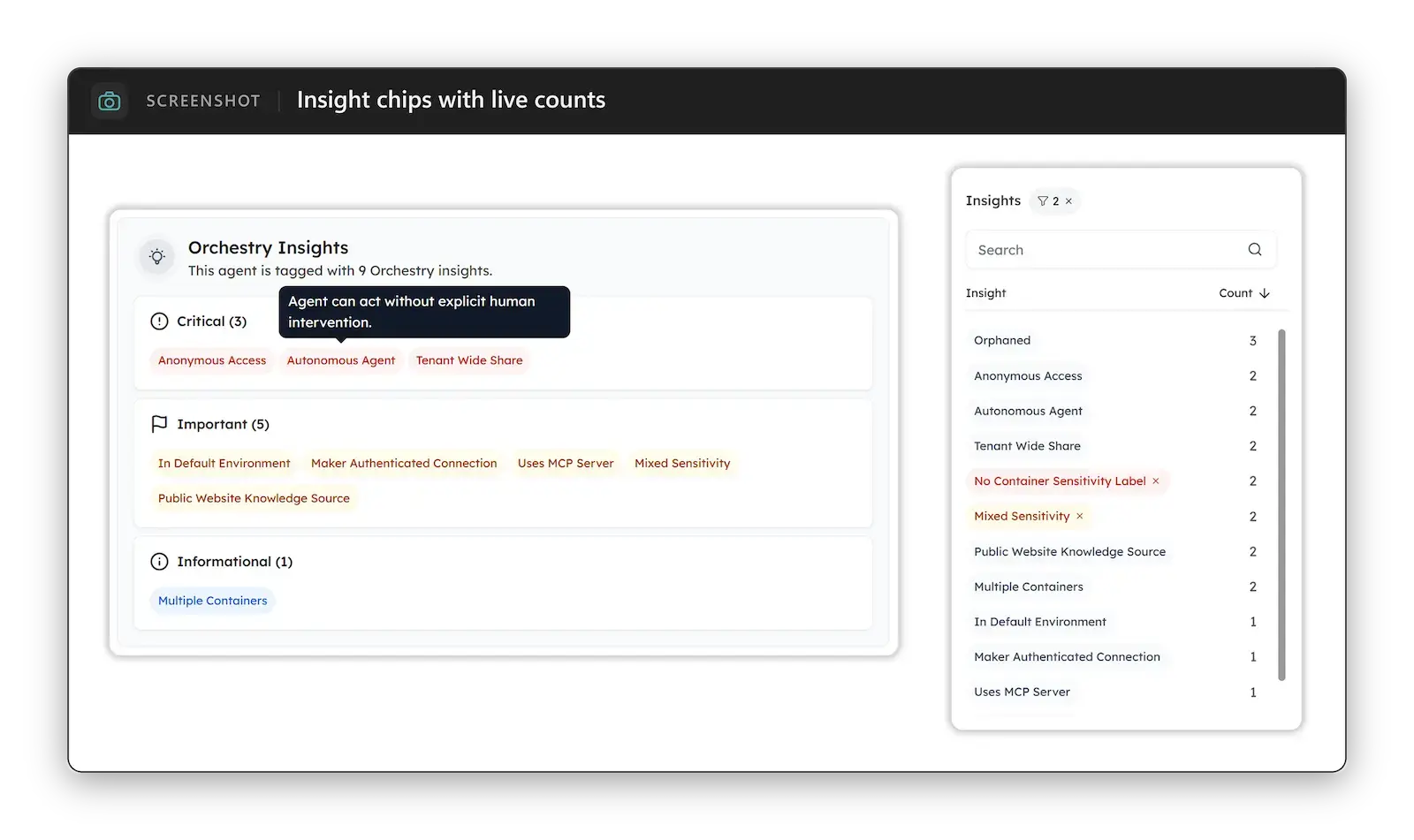
Orchestry's AI & Agents section went live on September 1 and closes that gap from one place: a cross-platform roster of your agents with the Power Platform context they run in, a composite risk score from 0 to 100 per agent with the named insights behind it visible, and delete across all sources.
The AI & Agents feature is available on the Orchestry Enterprise plan and runs on the Microsoft 365 licensing you already hold. Agents become answerable to the same lifecycle discipline as every other governed object.
Five dimensions that decide whether your tenant is agent-ready
Counting agents answers none of these.
Inventory and provenance. Which agents exist, who built each one, and whether that person still works here.
Effective access. What each agent's identity reaches once inheritance breaks, nested groups, and sharing-link-backed access are expanded. Maker-provided credentials deserve a specific look, since the default configuration permits them.
Grounding sources. Which sites, files, and connectors each agent points at, and whether those would survive a review if a stranger read everything in them.
Blast radius. What the agent can change, send, or trigger, and whether a human sees the result before it takes effect. An agent that answers questions is a different risk from one that writes.
Retirement path. How the agent gets decommissioned, who decides, and what the record shows afterward.
Working these against a real tenant takes a structured pass, and the tenant hygiene underneath them is its own body of work. Our M365 agent readiness checklist walks that data foundation domain by domain with a scored result, so you finish with a position rather than a list of concerns.
Agent readiness questions Microsoft 365 admins ask
Can an AI agent see more than the person using it?
Usually no, but there are documented exceptions. Delegated access is the common pattern, so the agent reaches what the person running it can reach. The exception with the widest practical reach is maker-provided credentials in Copilot Studio, where Microsoft states the agent authenticates with the maker's credentials rather than the end user's, and both credential modes are enabled by default there. Agents with application permissions or their own identity are the other cases to check.
Do I need Agent 365 to govern agents in Microsoft 365?
No, though what you can do natively without it is narrower. The agent registry counts agents created or managed outside Agent 365 as unmanaged, meaning they sit outside its risk protection and observability. Third-party governance tooling generally runs on the Microsoft licensing you already hold, which is the practical alternative to adding a per-user license on top.
What happens to an agent when the person who built it leaves?
It becomes ownerless, and it keeps working. Microsoft surfaces a count of ownerless agents in the agent registry and updates it when a user is hard deleted, but there's no automatic expiry or ownership transfer. What an administrator can do next depends on how the agent was built: reassignment covers shared Agent Builder and Copilot Studio agents, deletion from the admin center covers Agent Builder, and blocking a SharePoint or Foundry agent only removes it from Copilot Chat rather than stopping it.
Is Copilot readiness the same as agent readiness?
No. Copilot readiness assesses whether the content AI can see is in a defensible state. Agent readiness adds the question of what AI can do with that content unattended: which agents exist, what they're grounded on, what they're able to change, and who's accountable when the person who built one has left.
Keeping your tenant agent-ready as agents keep appearing
Readiness framed as a gate assumes a moment when you're finished. Agents get created continuously by people who don't file tickets, so the useful question isn't whether your tenant was ready the last time somebody checked. It's whether you'd know today if it stopped being ready.
That's a measurement problem, and measurement is the part you can start on now. To see where your tenant stands across the governance signals that shape what your agents can reach, connect with our team to run an AI readiness check and work from the score.
If you'd rather begin with the data foundation underneath, score your tenant against the five conditions first.