/HubSpot%20-%20eBook%20-%20Proof%20Card%20Mockup%20001.jpg?length=1000&name=HubSpot%20-%20eBook%20-%20Proof%20Card%20Mockup%20001.jpg)
/HubSpot%20-%20eBook%20-%20Proof%20Card%20Mockup%20001.jpg?length=1000&name=HubSpot%20-%20eBook%20-%20Proof%20Card%20Mockup%20001.jpg)
/HubSpot%20-%20eBook%20-%20Proof%20Card%20Mockup%20001.jpg?length=1000&name=HubSpot%20-%20eBook%20-%20Proof%20Card%20Mockup%20001.jpg)
/HubSpot%20-%20eBook%20-%20Proof%20Card%20Mockup%20001.jpg?length=1000&name=HubSpot%20-%20eBook%20-%20Proof%20Card%20Mockup%20001.jpg)
/HubSpot%20-%20eBook%20-%20Proof%20Card%20Mockup%20001.jpg?length=1000&name=HubSpot%20-%20eBook%20-%20Proof%20Card%20Mockup%20001.jpg)
/HubSpot%20-%20eBook%20-%20Proof%20Card%20Mockup%20001.jpg?length=1000&name=HubSpot%20-%20eBook%20-%20Proof%20Card%20Mockup%20001.jpg)
/HubSpot%20-%20eBook%20-%20Proof%20Card%20Mockup%20001.jpg?length=1000&name=HubSpot%20-%20eBook%20-%20Proof%20Card%20Mockup%20001.jpg)

/HubSpot%20-%20eBook%20-%20Proof%20Card%20Mockup%20001-min.jpg?length=1000&name=HubSpot%20-%20eBook%20-%20Proof%20Card%20Mockup%20001-min.jpg)


Microsoft just made guest accounts the default. Every external share now creates a guest account in your directory, so the pile grows whether or not anyone planned for it. The reflex is to buy more cleanup tooling, but the accounts you never wanted are a front-door problem, not a janitorial one.
That's why Microsoft 365 guest access governance is suddenly a live question for teams who never had to think about it. And it raises the one most of them hit first: do you need Microsoft Entra ID P2 or Entra ID Governance to put a real approval process in front of guest access?
If you do it natively, mostly yes. Microsoft's structured onboarding, the request-and-approve access packages in entitlement management, plus recurring guest access reviews, needs at least Entra ID P2. The dedicated guest-governance capabilities are billed separately through Entra ID Governance.
Why guest accounts keep multiplying in Microsoft 365
Guest counts climb because the model changed underneath you. With the move to Entra B2B guest accounts, sharing a file or folder with an external email now creates a guest account automatically, and that account stays in your directory until someone removes it.
Nobody decided to grow the guest list. It grows as a byproduct of normal collaboration, which means the volume is tied to how often your people share. Most of them share a lot.
The accounts also arrive with no context. There's no record of who sponsored the guest, why they were added, or when access should end, which is exactly the information you need when an auditor or a security review comes calling.
Guest access management is more than cleanup
Most of what gets sold as guest management is really back-end work: find the stale accounts, review them, remove the ones nobody recognizes. That work matters, but it's downstream of the actual problem.
If the front door is ungoverned, cleanup never catches up. You're reconciling a list that grows faster than you can review it, and every pass starts from a worse position than the last.
It doesn't help that sharing is poorly understood to begin with. Based on Orchestry data, only 13% of Microsoft 365 admins could accurately describe how the SharePoint “Copy Link” sharing default inherits permissions. Govern the inflow and the cleanup queue stops growing on its own.
A guest request and approval workflow that scales
The fix is to make every guest come in through a request, with an approver and the right data attached, before the account exists. That's the part native cleanup tools skip.
This is where Orchestry's guest management anchors the process. Guest Request Policies let a workspace owner request a new or existing guest from inside Orchestry, and they replace the native add-guest method, so the account is created with the right data recorded to Entra ID: who sponsored it, a justification, and the workspace it's for.
A trusted-domain auto-approval safe list keeps it from becoming a bottleneck. Requests from vetted partner domains are approved automatically, while anything from an unknown domain still routes for review.
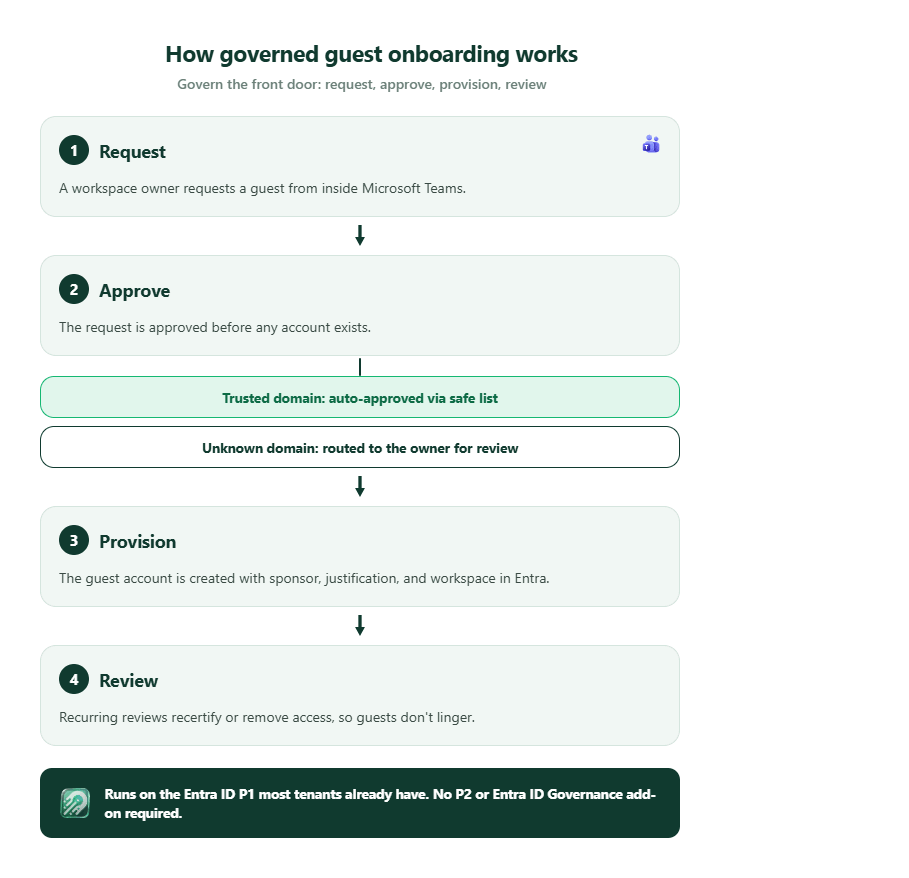
A guest onboarding workflow that scales
The reason this holds up under volume is delegation. The request goes to the workspace owner who actually sponsors the guest, not to a central IT queue that turns into a backlog.
Owners approve or reject in context, because they know whether the external person belongs in their workspace.
You can also push this further upstream by attaching the policies to provisioning templates, so new workspaces are born with a guest onboarding process already in place rather than bolted on later.
Native guest access governance vs delegated onboarding
Microsoft does offer a governed path, and a free starting point. A group member can invite a guest with the group owner's approval at no extra cost. That's useful, but it's a single toggle, not a program with required data, routing rules, and reviews behind it.
The full native program lives in entitlement management and access reviews, and that's where licensing comes in. Entra ID P2 is the floor, and P2 isn't in Microsoft 365 E3 or Business Premium; those include only Entra ID P1. P2 ships with E5. Governing guests at scale moves you to Entra ID Governance, which is billed per active guest with no free tier.
| Capability | Microsoft native | Orchestry |
|---|---|---|
| Request and approval onboarding | Access packages (entitlement management) | Guest Request Policies, owner-approved |
| Trusted-domain auto-approval | Policy-based in entitlement management | Auto-approval safe list |
| Recurring guest reviews | Access reviews | Guest Review policies |
| Licensing floor | Entra ID P2 minimum; full guest governance via Entra ID Governance, billed per guest | Entra ID P1 |
| Where owners work | Entra admin center and My Access portal | Inside Microsoft Teams |
Other vendors tend to cover just one piece of this: some do provisioning, others do cleanup. Orchestry runs the complete guest lifecycle, from onboarding and reviews to reporting, with automated guest deletion releasing shortly.
Guest account lifecycle: onboarding is only half the job
A governed front door cuts the inflow of unaccountable guests, but guests still need to leave when the work ends.
Orchestry's Guest Review policies prompt the workspace owner to recertify or remove guests on a schedule, and the Guest Dashboard gives you a tenant-wide view of who the guests are and where they have access, so you can see your guest population without reconstructing it site by site.
For the accounts that already slipped through, Orchestry identifies unredeemed and inactive external users against thresholds you set, with automated offboarding from Entra releasing shortly, all without stepping up to P2.
Orchestry is also building toward the scenario that started this: governed onboarding for guests that aren't necessarily tied to a workspace, so an end user gets a sanctioned way to bring in a collaborator instead of a workaround.
Frequently asked questions about Microsoft 365 guest access governance
Do you need Entra ID P2 or Entra ID Governance to govern guest access?
For Microsoft's native governed onboarding, yes. Request-and-approve access packages and recurring access reviews require at least Entra ID P2, and governing guests at scale uses Entra ID Governance, which is billed per active guest. A basic “member invites, owner approves” toggle for Microsoft 365 Groups is free, and third-party tools like Orchestry run a governed request, approval, and review workflow on Entra ID P1.
What's the difference between guest access and external sharing?
External sharing is sending a link to a file, folder, or site to someone outside your organization. Guest access is that external person having an account in your directory with defined permissions. Since the Entra B2B change, external sharing now produces guest accounts by default, which is why the two are increasingly the same conversation.
Who should approve guest requests, IT or the workspace owner?
The workspace owner is usually the better approver, because they know whether the external person belongs in their workspace, while IT rarely has that context. Routing approvals to owners also prevents a central IT queue from becoming a bottleneck, as long as IT still sets the policy and keeps trusted-domain rules in place.
How do you stop guest accounts from piling up after the Entra B2B change?
Govern the inflow rather than only cleaning up after it. Require every guest to come in through a request with an approver and recorded context, auto-approve trusted domains to avoid friction, and run recurring reviews so accounts leave when the work ends.
Govern the front door
Microsoft 365 guest access governance comes down to one shift: the Entra B2B change moved the decision point. Guests now arrive by default, so the place to govern is the front door: who can bring an external person in, with what justification, approved by whom, and reviewed on what schedule. Cleanup still matters, but it's the teams that govern onboarding who stop fighting the same backlog every quarter.
If you want to see what governed guest onboarding looks like on the licensing you already have, walk through Orchestry's guest governance in your own tenant.