/HubSpot%20-%20eBook%20-%20Proof%20Card%20Mockup%20001.jpg?length=1000&name=HubSpot%20-%20eBook%20-%20Proof%20Card%20Mockup%20001.jpg)
/HubSpot%20-%20eBook%20-%20Proof%20Card%20Mockup%20001.jpg?length=1000&name=HubSpot%20-%20eBook%20-%20Proof%20Card%20Mockup%20001.jpg)
/HubSpot%20-%20eBook%20-%20Proof%20Card%20Mockup%20001.jpg?length=1000&name=HubSpot%20-%20eBook%20-%20Proof%20Card%20Mockup%20001.jpg)
/HubSpot%20-%20eBook%20-%20Proof%20Card%20Mockup%20001.jpg?length=1000&name=HubSpot%20-%20eBook%20-%20Proof%20Card%20Mockup%20001.jpg)
/HubSpot%20-%20eBook%20-%20Proof%20Card%20Mockup%20001.jpg?length=1000&name=HubSpot%20-%20eBook%20-%20Proof%20Card%20Mockup%20001.jpg)
/HubSpot%20-%20eBook%20-%20Proof%20Card%20Mockup%20001.jpg?length=1000&name=HubSpot%20-%20eBook%20-%20Proof%20Card%20Mockup%20001.jpg)
/HubSpot%20-%20eBook%20-%20Proof%20Card%20Mockup%20001.jpg?length=1000&name=HubSpot%20-%20eBook%20-%20Proof%20Card%20Mockup%20001.jpg)

/HubSpot%20-%20eBook%20-%20Proof%20Card%20Mockup%20001-min.jpg?length=1000&name=HubSpot%20-%20eBook%20-%20Proof%20Card%20Mockup%20001-min.jpg)


If your users have been sharing from their OneDrive to get files to outside partners without anyone creating a guest account, that workaround is closing. Starting in May 2026, every external person they share with gets a real Microsoft Entra B2B guest account in your directory, and the setting that used to control this behavior is going away. By the end of August, the old one-time passcode links stop working altogether.
This is the SharePoint external sharing change that arrived quietly in a Microsoft message center notice and is about to get loud.
In plain terms: SharePoint and OneDrive are retiring their own one-time passcode sharing and routing all external access through Microsoft Entra B2B. Share a file, folder, or site with someone outside your organization and they now get a guest account in your directory, and you can't turn the behavior off.
That last part is what makes this one of the more consequential external sharing changes in years. It's not only an authentication swap. It changes who ends up in your directory, and who has to clean it up.
What the SharePoint one-time passcode retirement actually changes
First, the thing that trips people up: one-time passcodes aren't going away. What's retiring is SharePoint's own passcode method, known as SPO OTP. Entra B2B still uses an email one-time passcode as its fallback when a guest doesn't have a work or Microsoft account, so the verification-code experience your external users see won't disappear. Microsoft's email OTP documentation confirms it stays as the default for guests.
What changes is where authentication happens. New external sharing invitations route through the Microsoft Entra B2B Invitation Manager instead of SharePoint's legacy flow, as Microsoft's integration documentation describes.
The bigger change is that you no longer get a say. The EnableAzureADB2BIntegration setting that used to control this stops affecting sharing behavior in May 2026, and the option to disable the integration is removed. Every tenant moves over on Microsoft's schedule, not yours.
If you need a refresher on where those sharing controls live, our guide to enabling and disabling external sharing covers the admin-center basics.
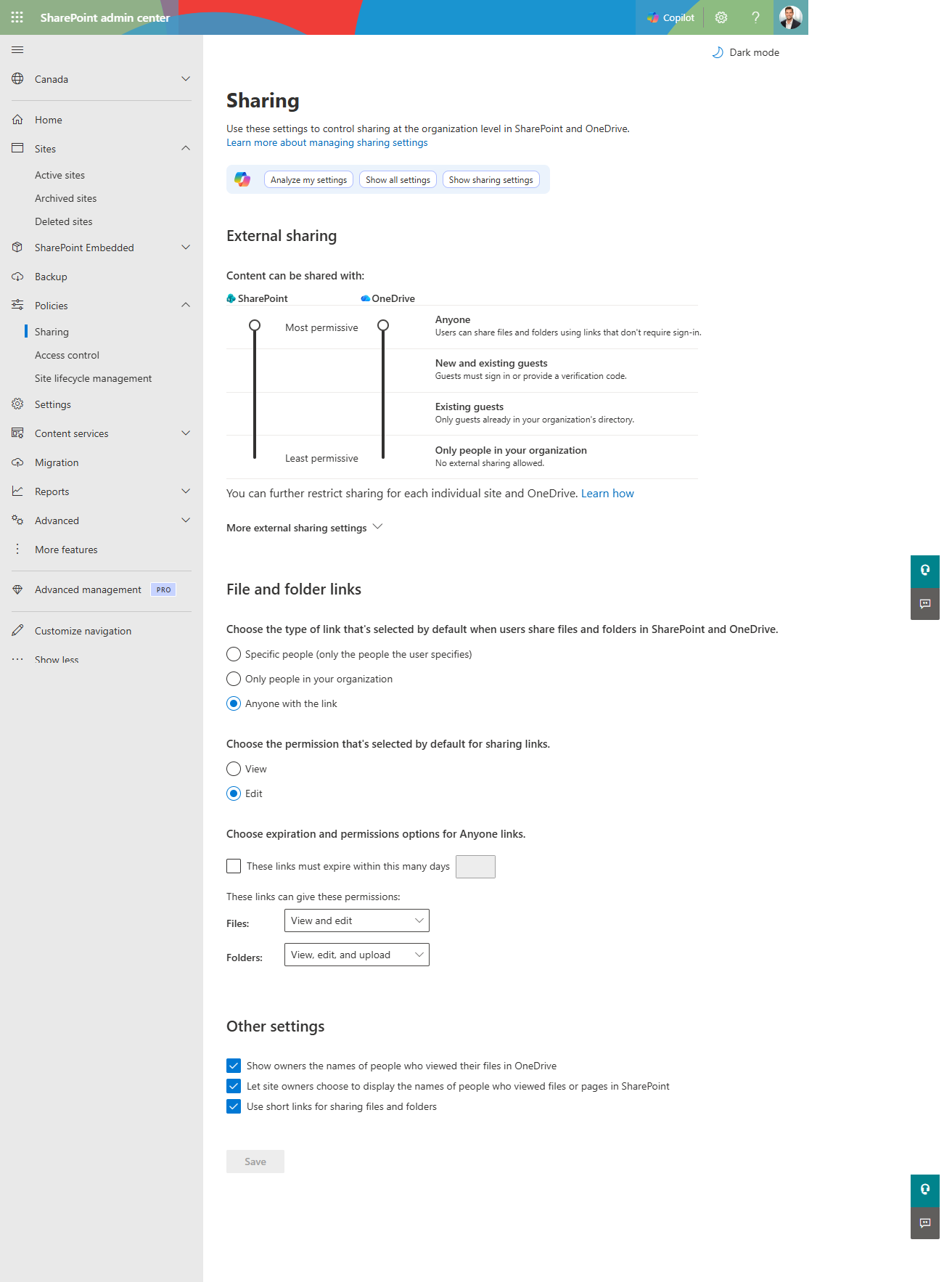
The SharePoint admin center still shows the same external sharing levels. What's changed underneath is how external users authenticate: every new share now routes through Entra B2B.
SharePoint OTP retirement timeline: May to August 2026
Microsoft's retirement notice lays out three phases:
- May and June 2026: New external sharing invitations and authentication move to Entra B2B. Anyone who previously authenticated through SPO OTP keeps access to their existing links for now.
- July 2026: SPO OTP retirement begins. External users without a guest account get access denied on previously shared “specific people” links.
- August 31, 2026: Retirement is expected to complete.
Why every external share now creates an Entra B2B guest account
Guest counts climb because the new model turns a casual share into a directory object. When a user shares with an external email that doesn't already have a guest account, the Entra B2B Invitation Manager creates one automatically, and that account stays in your directory until someone removes it.
Microsoft is buying something real with this. Guests authenticated through Entra B2B fall under Conditional Access, Identity Protection, and consistent guest governance, and their activity lands in Entra audit logs instead of a separate SharePoint trail. Microsoft's B2B collaboration overview covers that identity and governance model.
The trade is that the number of guest accounts is now tied to how often your people share, and most people share a lot.
What this means for OneDrive external sharing
For a long time, OneDrive was the quiet path. A user who didn't want to go through IT or didn't want to create a guest in the tenant could share a file straight from their own OneDrive and the recipient could verify with a passcode. No directory object, no ticket, no oversight.
This change closes that path. Sharing from OneDrive now follows the same B2B route as everything else, so the same external recipient becomes a guest in your directory.
Letting users share sensitive content from a personal OneDrive with no directory record was a real security gap, and closing it is defensible. But it also removes a workaround that plenty of organizations quietly depended on to keep collaboration moving.
Guest account sprawl: the cleanup bill nobody budgeted for
The practical consequence is guest sprawl. As routine shares create accounts, your guest population grows faster than anyone is tracking, and a share of those guests go orphaned the moment a project ends or the internal owner leaves.
This is harder than it sounds, because sharing is already poorly understood. Based on Orchestry data, only 13% of Microsoft 365 admins could accurately describe how the SharePoint “Copy Link” sharing default inherits permissions. Now multiply that uncertainty across every external share that creates a standing guest account.
The first problem to solve is seeing the guest population, and that's where Orchestry's guest visibility and guest dashboard help: a consolidated view of external users across the tenant, rather than reconstructing it site by site. Pair that with a clear picture of your wider tenant inventory and you can size the problem sooner rather than after.
Seeing them is step one. Keeping the list from growing is step two: Orchestry's Guest Delete policy automatically removes guests that go inactive or never redeem their invitation.
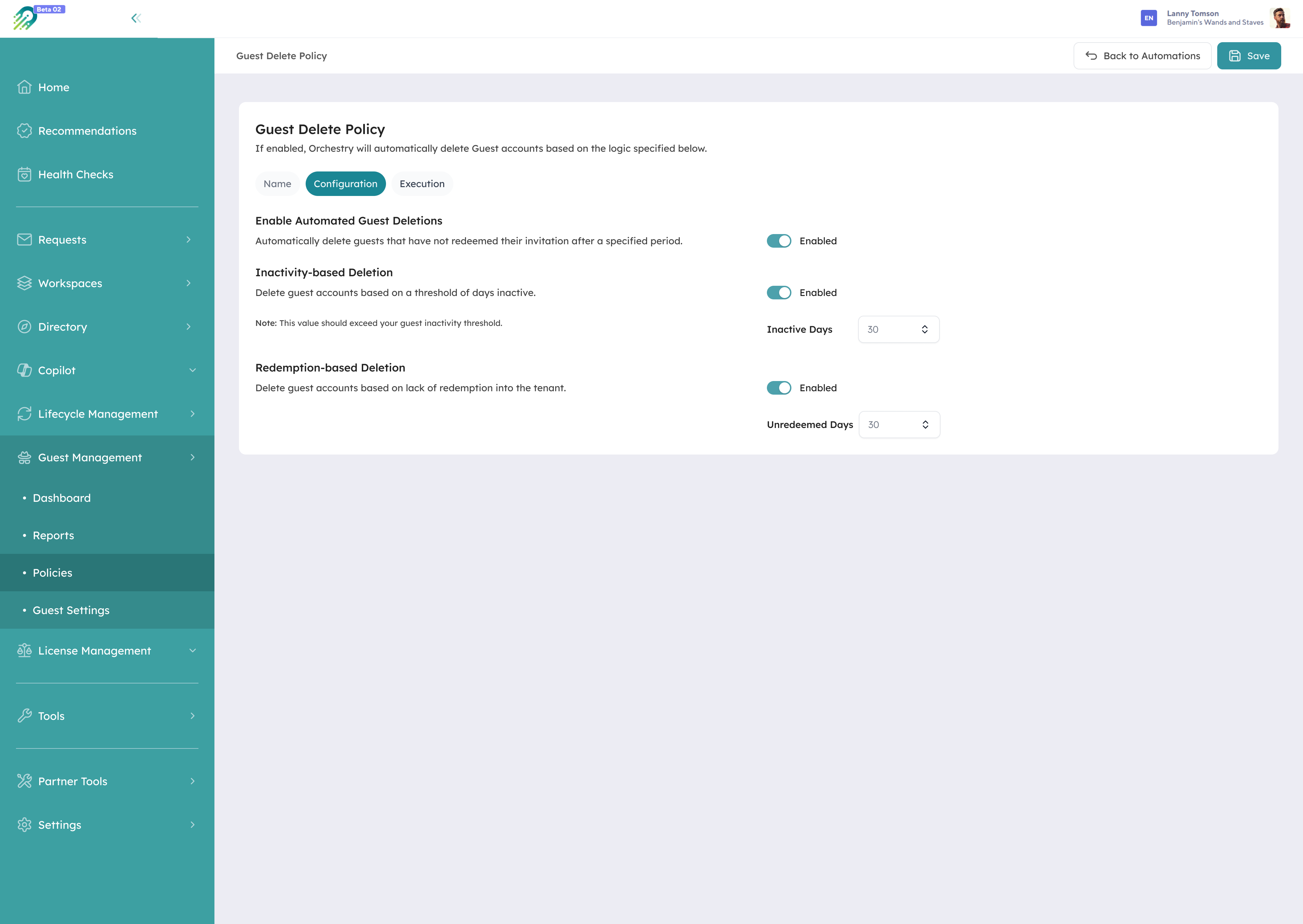
Orchestry's Guest Delete policy automatically removes guests that go inactive or never redeem their invitation, so the accounts this change creates don't pile up unmanaged.
What breaks in July 2026, and who gets access denied
The breakage is specific. “Specific people” links shared before the change rolled out to your tenant keep working on SPO OTP until July 2026. After that, any external user who never got a guest account sees access denied on those links.
The fix is straightforward but manual: an admin creates a guest account for the user, or any internal user with permission shares or re-shares at least one file, folder, or site, which creates the guest account automatically.
Microsoft's guidance on adding B2B guests covers both paths. You don't need to re-share everything; one re-share per user restores all their previously shared content once the guest account exists.
How to prepare for the SharePoint external sharing changes
You can't stop the rollout, so the win is controlling what flows through it. A short checklist before July:
- Tell your users that some external collaborators may hit access denied on older links starting in July, so they aren't blindsided.
- Confirm email OTP isn't disabled in your Entra External ID settings, or guests without a Microsoft account lose their fallback sign-in.
- Review your external sharing and Conditional Access policies so the guests this change creates land under the rules you actually want.
- Find the guests without accounts now. Run the external sharing report to list external users invited via SPO OTP who don't yet have a B2B guest account, and create accounts proactively to preserve access.
- Decide your guest onboarding process before the volume arrives, rather than approving accounts reactively.
That last step is where most teams will feel the strain, because native tools don't give end users a governed way to bring a guest in.
Orchestry's guest request policies let workspace owners request a new or existing guest from inside Orchestry and replace the native add-guest method, so every guest comes in through an approval step with the right data attached. A trusted-domain safe list auto-approves vetted partners while unknown domains still route for review, and guest review policies prompt owners to recertify or remove guests on a schedule so the population doesn't quietly grow.
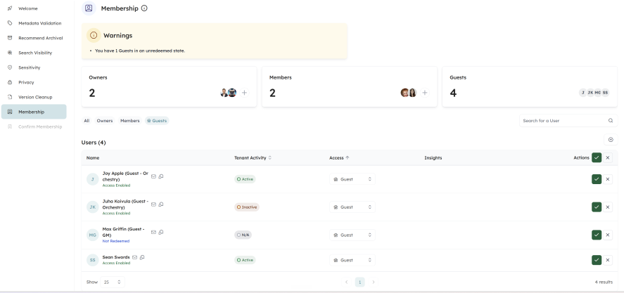
In Orchestry's Workspace Review, owners recertify who still needs access, including guests, and keep or remove each one in a guided step.
This is the exact gap Orchestry is built to close. We're bringing governed guest onboarding to the OneDrive and SharePoint sharing path: when someone needs to work with an outside party, they get a sanctioned, self-service way to request that guest, with an approval step, a named sponsor, and the right details captured up front. Admins keep control, and cleanup runs automatically. No workarounds, no guest sprawl, and no blocked collaboration.
SharePoint external sharing and Entra B2B: frequently asked questions
Is one-time passcode authentication going away?
No. SharePoint's own one-time passcode method (SPO OTP) is retiring, but Entra B2B still uses email one-time passcodes as the default fallback for guests without a work or Microsoft account. The verification-code experience your external users see continues.
Can I opt out of the SharePoint Entra B2B sharing change?
No. The move to Entra B2B applies to all Microsoft 365 tenants, and the option to disable Entra B2B integration is being removed. The EnableAzureADB2BIntegration setting stops controlling sharing behavior in May 2026.
Do I need to re-share everything with external users?
No. If an external user already has an Entra B2B guest account in your directory, their existing links keep working. For users without one, a single re-share of one file, folder, or site restores access to everything previously shared with them.
That works because the re-share creates the guest's B2B identity, and every link previously shared to that email was already scoped to it, so all of it resolves against the new account at once.
Will moving external sharing to Entra B2B increase my guest account count?
Yes, in practice. Every external share to someone without an existing guest account now creates one automatically, so guest counts tend to rise with normal sharing activity unless you put an onboarding and review process in place.
Why the July deadline works in your favor
The July deadline isn't a setback. It's the nudge that turns external sharing into something you actually govern.
These external sharing changes end the era of treating external collaboration as something that happens off to the side, and they pull guest accounts into the same governed identity model as everyone else in your tenant. The organizations that come out ahead are the ones that decide, before the deadline, how a guest gets in and who's accountable for them after.
If you want to see what governed guest onboarding looks like across your own tenant, take a walkthrough of Orchestry's guest governance.