/HubSpot%20-%20eBook%20-%20Proof%20Card%20Mockup%20001.jpg?length=1000&name=HubSpot%20-%20eBook%20-%20Proof%20Card%20Mockup%20001.jpg)
/HubSpot%20-%20eBook%20-%20Proof%20Card%20Mockup%20001.jpg?length=1000&name=HubSpot%20-%20eBook%20-%20Proof%20Card%20Mockup%20001.jpg)
/HubSpot%20-%20eBook%20-%20Proof%20Card%20Mockup%20001.jpg?length=1000&name=HubSpot%20-%20eBook%20-%20Proof%20Card%20Mockup%20001.jpg)
/HubSpot%20-%20eBook%20-%20Proof%20Card%20Mockup%20001.jpg?length=1000&name=HubSpot%20-%20eBook%20-%20Proof%20Card%20Mockup%20001.jpg)
/HubSpot%20-%20eBook%20-%20Proof%20Card%20Mockup%20001.jpg?length=1000&name=HubSpot%20-%20eBook%20-%20Proof%20Card%20Mockup%20001.jpg)
/HubSpot%20-%20eBook%20-%20Proof%20Card%20Mockup%20001.jpg?length=1000&name=HubSpot%20-%20eBook%20-%20Proof%20Card%20Mockup%20001.jpg)
/HubSpot%20-%20eBook%20-%20Proof%20Card%20Mockup%20001.jpg?length=1000&name=HubSpot%20-%20eBook%20-%20Proof%20Card%20Mockup%20001.jpg)
/HubSpot%20-%20eBook%20-%20Proof%20Card%20Mockup%20001-min.jpg?length=1000&name=HubSpot%20-%20eBook%20-%20Proof%20Card%20Mockup%20001-min.jpg)


You’ve got a SharePoint storage bill climbing past your included quota, a shortlist of governance tools in a browser tab, and one problem: they all promise to cut it.
There’s no single best tool for every tenant, but the best Microsoft 365 governance tools for storage cost reduction share one trait. They don’t just report the problem in more detail than the SharePoint admin center, they act on it: trimming version history at scale, archiving dormant workspaces, and routing those decisions to the owners who know what’s still in use. The tools that only visualize the problem leave the actual reduction to you.
Here’s how Microsoft’s native tooling, Orchestry, Syskit Point, Rencore, and ShareGate compare on the criteria that decide your bill: visibility into what’s driving growth, version trimming, archival, delegation, and coverage across SharePoint, OneDrive, and Teams.
How Microsoft 365 storage costs actually work
Microsoft 365 commercial subscriptions include a pooled SharePoint allocation of 1 TB base plus 10 GB per licensed user. For a 500-person tenant, that’s roughly 6 TB. Cross it and you’re billed standard overage at $0.20 per GB per month, while Microsoft 365 Archive meters archived content at $0.05 per GB per month, a 75% per-GB reduction.
Storage rarely balloons overnight. It accumulates: autosaved versions, projects that ended but were never archived, sites that look active because one file changed last week. By the time the tenant hits 85% of quota, the drivers have been running for years.
Four things drive most of a SharePoint storage cost problem: version history bloat, dormant workspaces, mixed-activity sites, and hidden consumers like recycle bins and retention holds. We cover how Microsoft 365 storage costs add up in depth separately. What matters for tool selection is that none of these show up clearly in native reports, which is exactly where the tools in this comparison differ.
SharePoint storage pricing and overage explained
Once you cross the pooled limit, SharePoint storage pricing is simple and unforgiving: $0.20 per GB per month for standard overage, billed until you bring usage back under quota. Push far enough past your SharePoint storage limits and sites can drop into read-only mode, blocking new content until you free space or buy more.
You can buy storage in 1 GB increments or add capacity through licenses, as covered in Microsoft’s storage planning guidance. Paying down overage instead of fixing the drivers, though, is the most expensive way to stay compliant. A tool earns its cost by removing the storage, not by helping you rent more of it.
What to look for in a tool to reduce SharePoint storage
Every tool in this comparison can show you storage data. The separation is what they can do about it. Five capabilities decide whether a tool actually lowers the bill:
- Tenant-wide visibility that surfaces drivers, not just totals. You need to see which sites, which libraries, and how much of a site is version history versus live content, not a single number.
- Version trimming at scale. Because Microsoft counts every major version as a full copy, trimming existing version history across many libraries at once is what makes used storage actually drop. Orchestry and Syskit Point can run this in bulk; native trimming is per-library or PowerShell.
- Inactive-workspace archival. Moving dormant sites into Microsoft 365 Archive’s cheaper tier, ideally without hunting site by site. The difference between site-level and file-level archiving affects what a tool can move.
- Delegation. Routing archive and cleanup decisions to workspace owners instead of asking central IT to guess what’s safe to remove.
- Cross-workload coverage. SharePoint, OneDrive, and Teams all feed the same pooled bill, so a tool that sees only one workload leaves savings on the table.
How the tools compare: archiving, trimming, and Microsoft 365 Archive support
The table maps each tool against those five criteria, based on each vendor’s published positioning for storage and cost as of July 2026. It reflects primary emphasis, not a full feature audit, and every product’s capabilities shift release to release.
| Capability | Microsoft native | Orchestry | Syskit Point | Rencore | ShareGate |
|---|---|---|---|---|---|
| Tenant-wide storage visibility (with drivers) | Partial | ✓ | ✓ | ✓ | ✓ |
| Bulk version trimming at scale | Manual | ✓ | ✓ | Partial | Limited |
| Inactive-workspace archival (M365 Archive) | ✓ (manual) | ✓ | ✓ | ✓ | ✓ |
| Owner-delegated decisions | ✗ | ✓ | Limited | Partial | Limited |
| SharePoint + OneDrive + Teams coverage | Partial | ✓ | ✓ | ✓ | ✓ |
| File-level archiving | ✓ (GA) | Early access | – | – | – |
Microsoft native tools: the baseline
Microsoft’s own tooling covers the essentials. The SharePoint admin center reports total and per-site storage, org-level version limits cap future growth, and Microsoft 365 Archive provides a genuinely cheaper $0.05 per GB tier for inactive sites. For a smaller tenant, that’s frequently all you need.
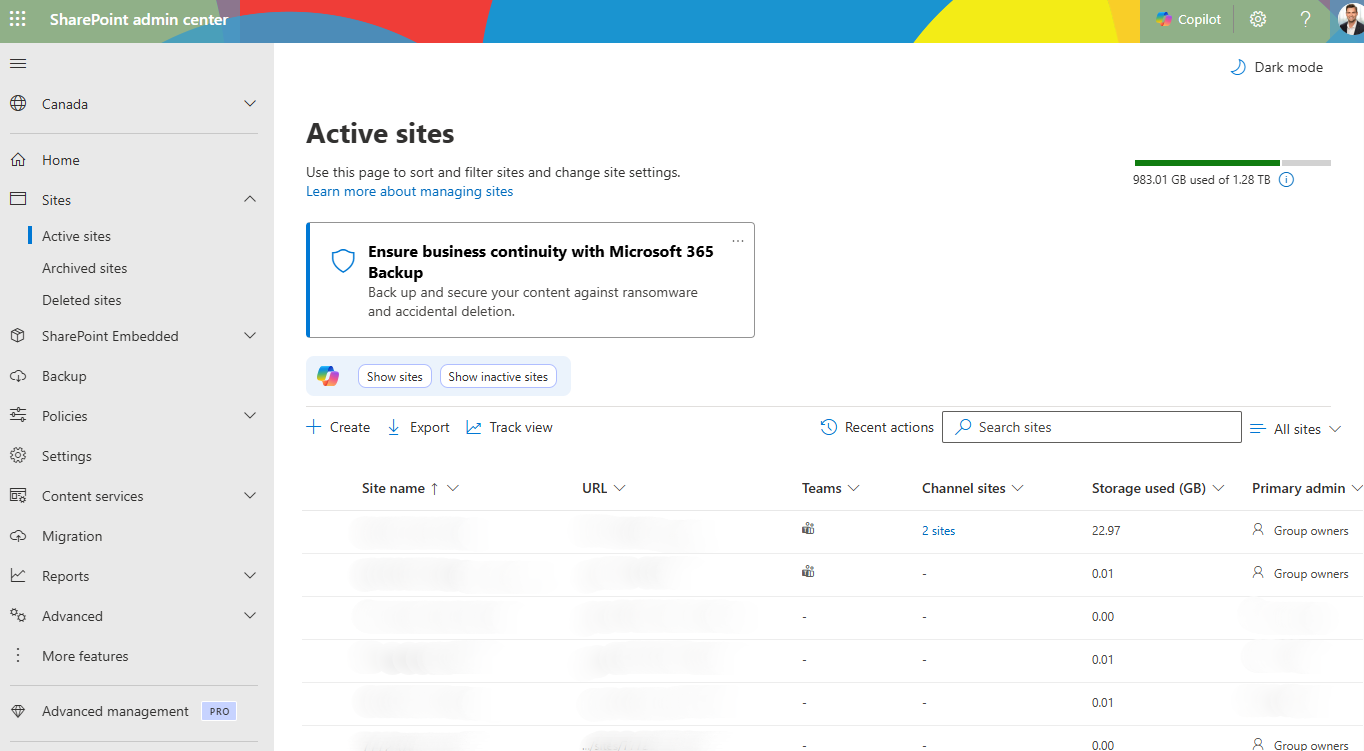
SharePoint admin center > Active sites, showing the tenant storage bar (total and available storage).
The gap opens up at scale. Native reports hand you totals rather than causes, so a site can look large without revealing that most of its footprint is version history. Trimming those existing versions falls to PowerShell or per-library work, and nothing lets you push archival decisions out to owners.
Microsoft’s file-level archiving reached general availability in July 2026, rolling out worldwide and on by default where Microsoft 365 Archive is enabled, and it helps with mixed-activity sites. What it still leaves untouched is the reporting and delegation gap.
Orchestry
Orchestry combines the two levers most tools keep apart. Its storage reporting breaks usage down by workspace across OneDrive, SharePoint, and Teams, surfacing the growth trends and drivers that native reports bury, while its version cleanup runs bulk purging jobs across hundreds or thousands of SharePoint sites in a single pass.
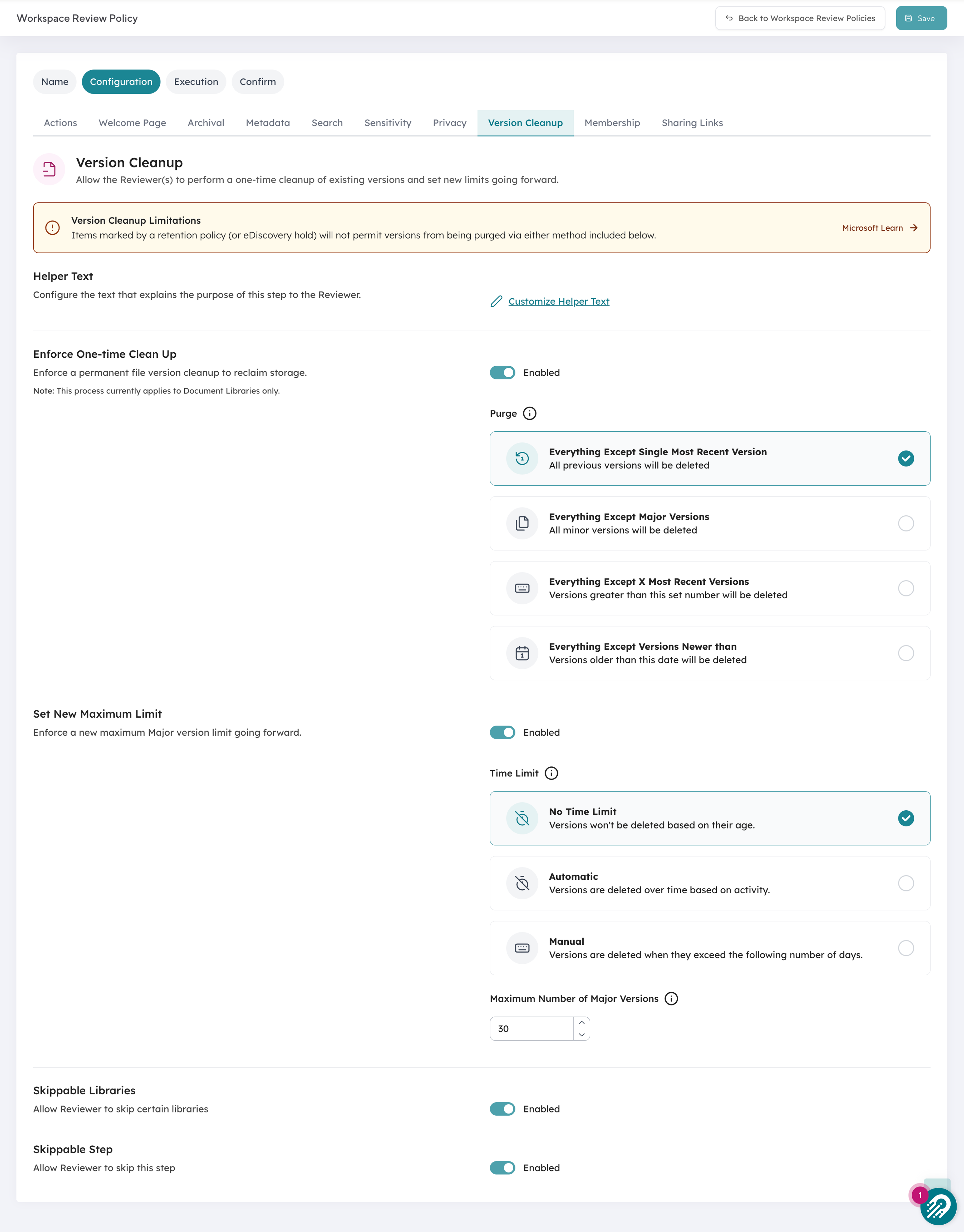
Orchestry’s version cleanup: one-time purge options plus a new maximum version limit, applied across libraries inside a workspace review.
The part that’s genuinely hard to replicate is who makes the call. Rather than leaving central IT to guess which dormant sites are safe to archive, Orchestry routes each decision to the workspace owner who knows whether a site is finished or just quiet through its workspace review.
That distinction carries weight: based on Orchestry data, roughly 67% of workspaces are inactive when organizations first connect to the platform, and owner-delegated review is what converts that backlog into reclaimed storage rather than a risky mass deletion. Customers running recurring lifecycle this way report first-year storage and licensing savings in the $100,000 to $393,000 range.
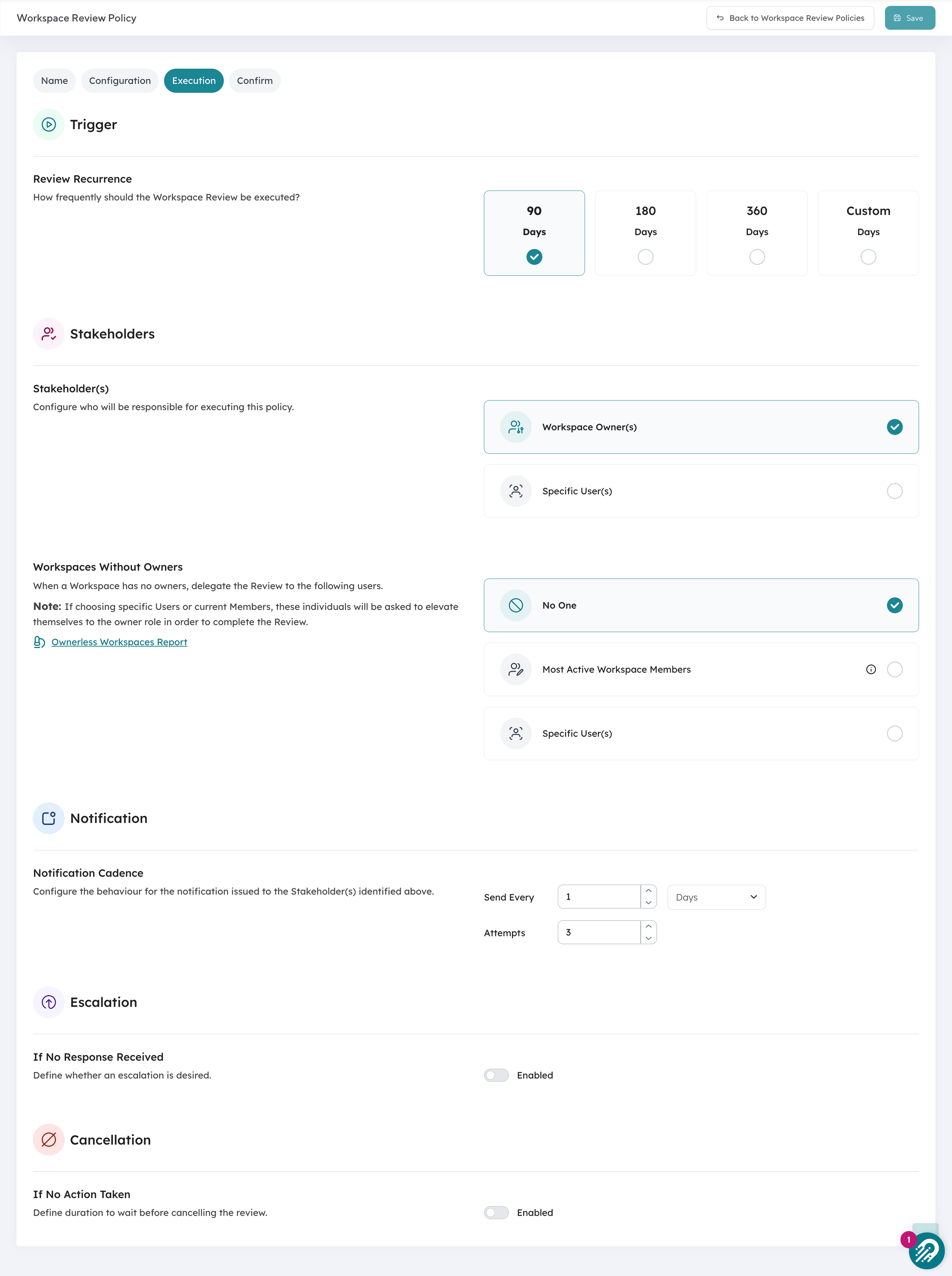
The workspace review routes archival and cleanup to workspace owners on a recurring cycle (here, every 90 days), not to central IT.
Orchestry is extending this past whole sites. File-level archiving, now in early access with full release coming soon, lets owners choose what to archive down to the individual file, the flexibility most organizations actually need, with the same owner-driven review and user notifications as the rest of the platform.
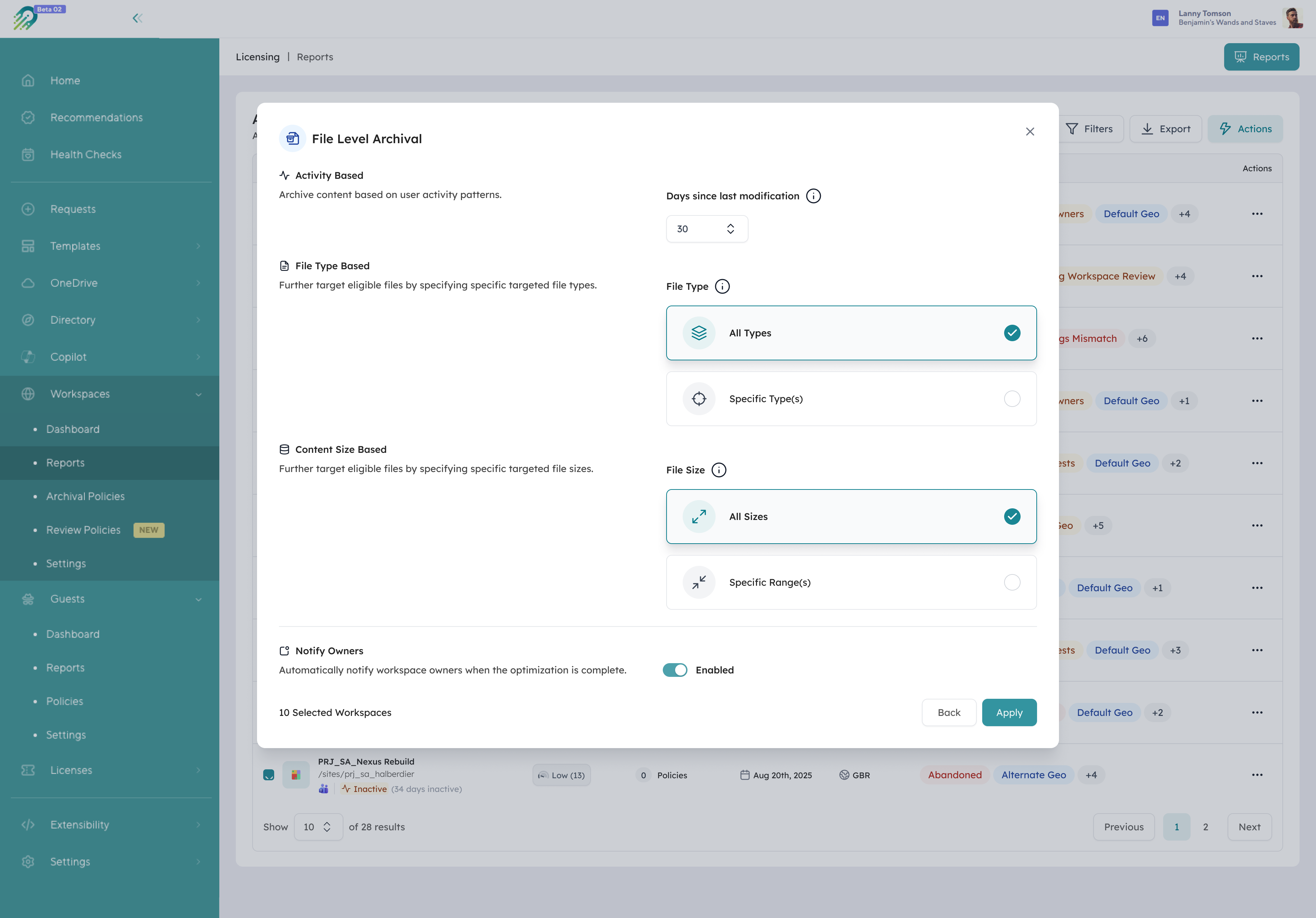
Orchestry's file-level archiving configuration: choose how content is archived down to the individual file (early access).
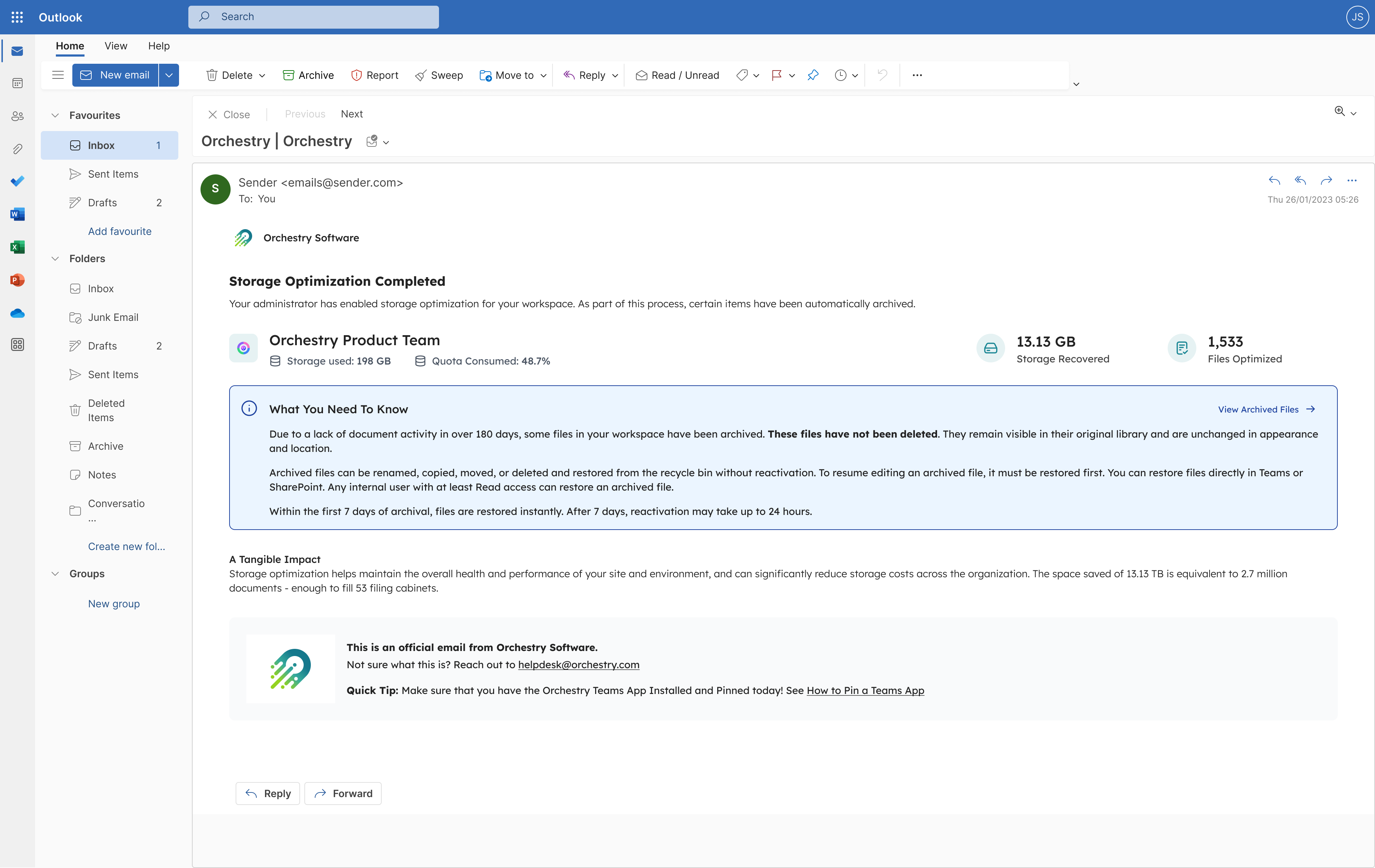
The notification a user receives after their content is archived to the cold-storage tier.
Pros
- Tenant-wide storage reporting across OneDrive, SharePoint, and Teams that surfaces drivers, not just totals
- Bulk version cleanup and dormant-site archival at scale, run from one place
- Archival decisions delegated to the workspace owners who know the content
Cons
- A full governance platform, so it’s more than a team that only needs a cheaper archive tier for a handful of old sites would take on
“We continue to gain value from the Orchestry solution as it’s allowing us to keep on top of the never-ending creation of new M365 workspaces which, without Orchestry, would be left hanging around the tenant, occupying space and increasing costs.” - Consultant, utilities (verified Capterra review)
Syskit Point
Syskit Point is a strong native-console alternative for storage. It gives you file-level visibility across the tenant and can both trim versions and archive inactive content from one admin surface. Its cost material is refreshingly concrete, working through the $0.05 versus $0.20 per GB archive math and pointing to results like a reported $24,000 in storage reclaimed in under an hour.
Its center of gravity is IT-run cleanup. Syskit expects a central admin to drive the work, so pushing dormant-workspace decisions out to the owners who know the content isn’t where the product leans.
Pros
- File-level storage visibility across the tenant
- Version trimming and inactive-content archival from a central console
- Specific, credible cost math and named customer results
Cons
- Built around IT-run cleanup, with less emphasis on owner-delegated decisions
Rencore
Rencore approaches the bill from the finance side. A cost-savings calculator turns waste into a dollar figure the business will understand, and policy-based monitoring flags sites nearing their 90% capacity threshold before auto-scaling raises your spend without warning.
Execution is the quieter half of its story. Rencore is at its best quantifying and enforcing cost; bulk version trimming as an active step sits behind its reporting and policy engine rather than leading it.
Pros
- Cost-savings calculator that quantifies waste in dollars
- Policy-based monitoring that catches the 90% capacity threshold early
- Strong governance and reporting depth
Cons
- Bulk version trimming sits behind the reporting and policy engine rather than leading
ShareGate
ShareGate builds on its migration heritage. ShareGate Protect flags inactive and orphaned sites, teams, groups, and OneDrives, then archives or cleans them up through Microsoft 365 Archive; SimCorp, for one, deleted or archived around 15% of its sites and content this way.
One major driver stays outside its lens. ShareGate’s storage story is built around inactive-workspace cleanup, so version-history trimming, the biggest hidden contributor in many tenants, doesn’t get the same attention.
Pros
- Finds inactive and orphaned sites, teams, groups, and OneDrives
- Archives and cleans up through Microsoft 365 Archive
- Builds on deep migration heritage
Cons
- Version-history trimming, a top hidden driver, isn’t a focus
How to choose a tool to manage SharePoint storage
The right way to manage SharePoint storage depends less on a feature checklist and more on how your team works:
- If your tenant is small and mostly needs a cheaper tier for old sites, Microsoft 365 Archive on its own may be enough.
- If version bloat is your biggest driver and you want owners, not just IT, making the cleanup and archival calls at scale across SharePoint, OneDrive, and Teams, Orchestry fits.
- If you want deep, file-level storage reporting and a central console for IT to run cleanup, Syskit Point is strong.
- If your priority is quantifying cost and enforcing policy, Rencore’s calculator and monitoring fit well.
- If you’re already invested in ShareGate for migration and want inactive-workspace cleanup in the same place, Protect is a natural extension.
Whichever you pick, the order of operations matters more than the logo. Set version limits, purge existing versions, then archive what’s dormant. Archive before you trim and you lock bloated version history into the archive tier rather than eliminating it, so you keep paying to store the very thing you meant to remove.
Best Microsoft 365 governance tools for storage cost: frequently asked questions
What’s the best tool to reduce Microsoft 365 storage costs?
The best tool is the one that acts on your biggest cost driver, not the one with the most detailed report. For most tenants that driver is version history, so a tool that trims versions in bulk and archives dormant sites, such as Orchestry or Syskit Point, reduces the bill faster than reporting-only tools. Match the tool to your dominant driver and to whether you want IT or workspace owners making the calls.
Can you reduce Microsoft 365 storage costs without a third-party tool?
Yes, up to a point. Microsoft’s native tools set version limits and archive inactive sites to the cheaper Microsoft 365 Archive tier, which is enough for smaller tenants. What native tooling doesn’t do is surface what’s actually driving growth, trim existing version history in bulk without scripting, or route archival decisions to workspace owners, and that’s where a third-party tool earns its cost in larger environments.
How much does SharePoint storage cost?
SharePoint storage beyond your included pooled quota costs $0.20 per GB per month as standard overage, while Microsoft 365 Archive meters archived content at $0.05 per GB per month. Your included quota is 1 TB plus 10 GB per licensed user, so the bill starts only once active usage crosses that line.
Do these tools use Microsoft 365 Archive or their own storage?
Mostly they orchestrate Microsoft 365 Archive rather than provide separate cold storage. Orchestry, Syskit Point, and ShareGate all move inactive content into Microsoft 365 Archive’s $0.05 per GB tier and differ mainly in how they find candidates and who approves the move. Version trimming is the exception: it shrinks your active footprint directly instead of shifting it to a cheaper tier.
Does the SharePoint recycle bin count against storage?
Yes. Deleted content sits in the recycle bin and keeps counting against your quota for 93 days before it’s permanently removed, and retention holds can extend that window. That’s why deleting files often doesn’t drop your storage number right away.
Where to start with storage cost reduction
If storage cost reduction is on your shortlist, the test worth running is simple: can the tool trim version history and archive dormant workspaces at scale, and can it route those calls to the people who own the content?
To see how Orchestry handles both across SharePoint, OneDrive, and Teams in your own tenant, book a 30-minute demo.