/HubSpot%20-%20eBook%20-%20Proof%20Card%20Mockup%20001.jpg?length=1000&name=HubSpot%20-%20eBook%20-%20Proof%20Card%20Mockup%20001.jpg)
/HubSpot%20-%20eBook%20-%20Proof%20Card%20Mockup%20001.jpg?length=1000&name=HubSpot%20-%20eBook%20-%20Proof%20Card%20Mockup%20001.jpg)
/HubSpot%20-%20eBook%20-%20Proof%20Card%20Mockup%20001.jpg?length=1000&name=HubSpot%20-%20eBook%20-%20Proof%20Card%20Mockup%20001.jpg)
/HubSpot%20-%20eBook%20-%20Proof%20Card%20Mockup%20001.jpg?length=1000&name=HubSpot%20-%20eBook%20-%20Proof%20Card%20Mockup%20001.jpg)
/HubSpot%20-%20eBook%20-%20Proof%20Card%20Mockup%20001.jpg?length=1000&name=HubSpot%20-%20eBook%20-%20Proof%20Card%20Mockup%20001.jpg)
/HubSpot%20-%20eBook%20-%20Proof%20Card%20Mockup%20001.jpg?length=1000&name=HubSpot%20-%20eBook%20-%20Proof%20Card%20Mockup%20001.jpg)
/HubSpot%20-%20eBook%20-%20Proof%20Card%20Mockup%20001.jpg?length=1000&name=HubSpot%20-%20eBook%20-%20Proof%20Card%20Mockup%20001.jpg)

/HubSpot%20-%20eBook%20-%20Proof%20Card%20Mockup%20001-min.jpg?length=1000&name=HubSpot%20-%20eBook%20-%20Proof%20Card%20Mockup%20001-min.jpg)


Most guest access tools on a Microsoft 365 shortlist will review guests and remove the inactive ones. Where they split is the front door: whether a guest is approved before the invitation goes out, or only reviewed once the account already sits in Entra.
And if you'd planned to lean on Microsoft's own inactive-guest reviews, each guest included in one is now billed through the Entra ID Governance for guests add-on.
The Microsoft 365 guest access management tools worth comparing are Orchestry, ShareGate Protect, CoreView, AvePoint Cloud Governance, Syskit Point, Solutions2Share External User Manager and Rencore, measured against Microsoft's native controls.
Orchestry is the pick if you want guest requests and owner reviews built into your workspace templates, plus a tenant-wide policy that deletes unredeemed and inactive guests, all on Entra ID P1 without the per-guest Entra ID Governance add-on.
The table below shows where each tool fits, judged on six criteria.
Teams guest access best practices to test each tool against
Guest access in Teams is a tenant setting, but the work happens one workspace at a time. These six criteria separate a tool that runs the guest lifecycle from one that reports on it:
- Visibility across Teams, SharePoint and OneDrive. One view of every guest, where they have access and when they last signed in.
- Approval before the invitation. Whether a request is approved before Microsoft sends the invite, or the guest is only reviewed after the account exists.
- Owner or sponsor reviews. Who confirms that a guest still needs access, and how often they're asked.
- Cleanup of unredeemed and inactive guests on your own thresholds. Invitations nobody accepted and accounts nobody uses can warrant different timers.
- The Microsoft licensing each approach depends on. Some tools run on Entra ID P1; Microsoft's native inactive-guest reviews need the Entra ID Governance for guests add-on.
- Where owners do the work. Whether new requests for Guests, and subsequent reviews and approvals reach owners in Teams and Email, or wait in a separate portal.
Microsoft 365 guest access management tools compared
The table reflects each vendor's product pages and documentation as last checked in October 2026. Capabilities change release to release, so confirm anything that decides your shortlist in a demo.
| Tool | Best for | What it covers | Keep in mind |
|---|---|---|---|
| Orchestry | Teams and SharePoint tenants that want guest requests, reviews and deletion run from one platform and delegated to workspace owners | Tenant-wide guest inventory with status, last sign-in and workspace memberships; guest requests with optional approval before the Microsoft invitation, and guest additions to the Microsoft 365 group switched off on governed workspaces; guest onboarding without a workspace; owner reviews in Teams or email with escalation and a default action; tenant-wide delete policy with separate thresholds for unredeemed and inactive guests | Request and review policies apply to Microsoft 365 group-connected workspaces; needs a single Entra ID P1 license in the tenant to crawl Last Login dates |
| ShareGate Protect | Tenants already on ShareGate that want owners reviewing guests and external sharing links in the same pass | Owner reviews by email or Teams chatbot; keep or remove each guest and external link; 14 days to decide | Reviews start once the guest exists; no pre-invite approval found in its docs |
| CoreView | Admin teams already running CoreView automation that want scheduled guest reviews | Access Reviews with a guest user access template; reviewers without a CoreView account; CSV export of review decisions; scheduled workflows that remove inactive guests | Access Reviews is an add-on |
| AvePoint Cloud Governance | Organizations that route Microsoft 365 requests through one service catalog | Guest onboarding with conditional approvals; warning notifications before inactive guests are removed, in AvePoint Policies | Guest controls span more than one AvePoint product |
| Syskit Point | Inventory-led teams that want an inactive-guest policy with tight scoping | Guest visibility across Teams, SharePoint and OneDrive; configurable inactivity days and ignored domains; validation by manager, sponsor, admins or named people; disable, delete or no action on no response | Reviews start once the guest exists; no pre-invite approval found in its docs |
| Solutions2Share External User Manager | Teams-centric organizations that want a guest-only app with onboarding paperwork | Replaces the native Teams invite with request and approval; onboarding portal with signed documents such as NDAs; lifecycles by time or inactivity that trigger a review | Guest management only; provisioning and workspace lifecycle are separate Solutions2Share products |
| Rencore Governance | Teams that want guest checks inside a wider policy engine | External Access dashboard; flags invitations unaccepted after three months and groups with external owners; prebuilt inactive external users policy that can disable or warn | Request approval not found in its pages |
| Microsoft native | Tenants already licensed for Entra ID Governance | Group owner approval for member invites from Outlook on the web; access reviews; inactive guest report; disable, then delete | Inactive-guest reviews, guest lifecycle workflows and sponsor approvers need the guests add-on, billed per guest |
Orchestry
Guest management starts from a tenant-wide view. The guests dashboard shows every guest by status, from pending approval and never redeemed to inactive and recently deleted, and the guest report adds last sign-in, days inactive, domain and each guest's workspace memberships. Orchestry runs guest controls through the same policies that govern its workspaces. With guest requests, a workspace owner asks for a guest and the request waits for approval before Microsoft sends its invitation, if configured for approval. On a governed workspace, Orchestry turns off guest additions to the Microsoft 365 group, so owners can't add guests directly in Teams or Outlook and use the request instead. Microsoft Purview labels governing external sharing are always respected.
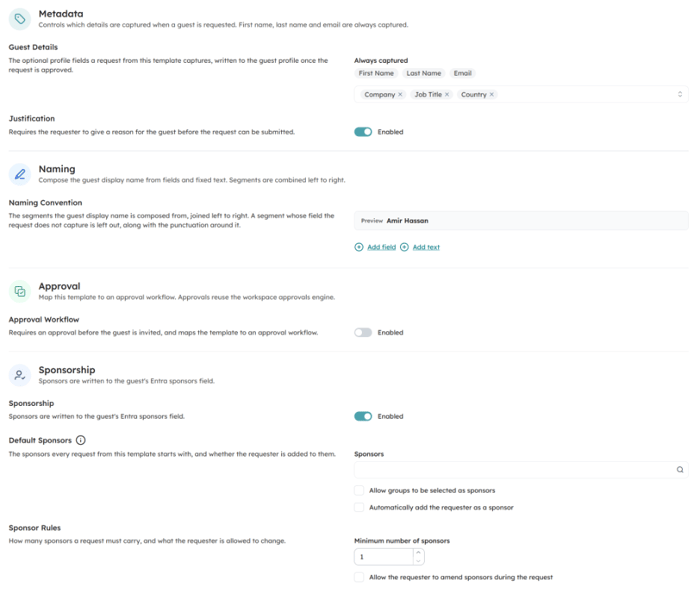 Orchestry guest onboarding policy settings with metadata capture, required justification, approval, naming convention and sponsor designation
Each request policy can limit guests to specific domains and require a justification. Tenant-wide domain rules go further: requests for guests from approved domains skip approval, and requests from blocked domains are rejected automatically. Because request and review policies attach to workspace templates, every workspace provisioned from a template starts with its guest rules in place.
Guest onboarding and the guest delete policy extend the same control past the workspace. Guest onboarding handles guests who don't need a workspace at all: the account is created disabled, and approval enables it, sends the invitation and writes up to five sponsors to the guest's Entra profile.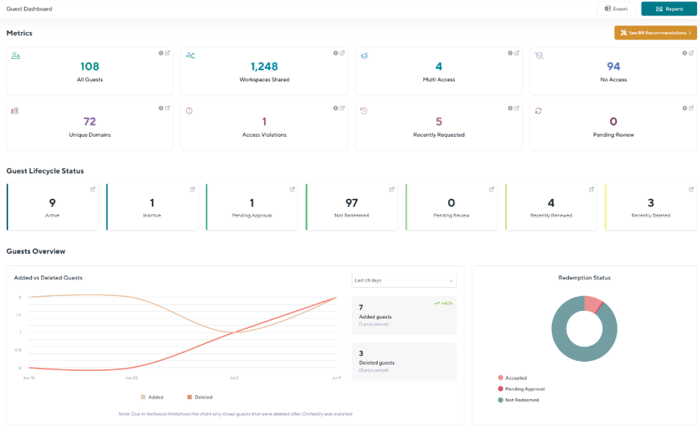
Orchestry guests dashboard summarizing the tenant's guest population by status
Guest reviews go to workspace owners or named approvers in Teams or email, with reminders, escalation and a default action if nobody answers.
Orchestry's guest reviews need no additional Microsoft licenses, and Orchestry's guest management requires at least one Entra ID P1 in the tenant. At a ~400-user government organization, Orchestry was used to directly remove ~1,250 stale guest accounts, part of a broader cleanup of roughly 2,400 guest accounts.
Two scope limits apply. Request and review policies work on Microsoft 365 group-connected workspaces, not yet on classic or groupless sites, and guest policies don't apply to Viva Engage communities.
ShareGate Protect
ShareGate Protect hands guest decisions to the people who own the team. Owners get an email or a ShareGate Teams chatbot notification asking them to review the guests and external sharing links in their team or group, then keep or remove each one. They have 14 days from the first notification to decide.
Reviewing links and guests together is the useful part for teams whose exposure comes from both. Owners who shouldn't be contacted can go on a do-not-disturb list. Control starts after the guest is in, though: we didn't find a step that approves a guest before the invitation.
CoreView
CoreView comes at guests from the admin side of tenant management. Its Access Reviews add-on ships templates for recurring reviews, including guest user access, alongside Teams memberships, mailbox permissions and OneDrive ownership.
Reviewers don't need a CoreView account; CoreView provisions restricted access for review tasks only. Every decision is logged and exports as CSV for audit, and CoreView frames reviews around internal policies or regulatory requirements such as NIST, ISO and SOC2. For cleanup, CoreView's workflows can remove inactive guest accounts on a schedule. We didn't find a step that approves a guest before the invitation.
AvePoint Cloud Governance
AvePoint folds guests into a broader request model. Cloud Governance presents a catalog of governed Microsoft 365 services, and its guest onboarding supports conditional approvals and policies based on roles and the request.
AvePoint Policies added warning notifications for inactive guest users, alerting them before removal based on inactivity thresholds. If you're comparing on cost, check which AvePoint products your guest workflow needs.
Syskit Point
Syskit Point starts from inventory, giving you external users across Teams, SharePoint and OneDrive in one view. Its Inactive Guest Users policy runs tenant-wide, with a configurable inactivity period and a list of domains to ignore.
When the policy finds an inactive guest, it can send a validation task to the guest's manager, sponsor, Syskit admins or named people, with a reminder before the due date. If nobody responds, Syskit can disable the guest, delete it or leave it alone.
Like Orchestry, it needs at least one Entra ID P1 for accurate sign-in times. Owners can also remove inactive guests during Syskit's workspace reviews, but we didn't find a step that approves a guest before the invitation.
Solutions2Share External User Manager
External User Manager is a specialist: guests are all it does. Organizations can turn off the out-of-the-box Teams invite and route every invitation through a request that team owners or chosen approvers approve or reject.
Approved guests land in an onboarding and compliance portal first, where they can be asked to sign documents such as NDAs before they join the team. Lifecycles based on time or inactivity trigger a review or remove inactive guests. Like Orchestry's request and review policies, it governs guests in Teams and Microsoft 365 groups.
Rencore Governance
Rencore treats guests as one more policy domain. Its External Access dashboard shows teams with guests, flags external users invited more than three months ago who never accepted, and flags groups and sites owned by an external user.
For cleanup, a prebuilt inactive external users policy can disable those accounts automatically or email them a warning first. We didn't find a request-and-approval step in Rencore's pages. Its Access Review does have owners confirm or remove access inside Teams, with External Teams and External Users review types.
Guest access reviews and guest access expiration: what happens when nobody responds
Every review process meets the same problem: an owner who never answers. What a tool does next decides whether stale guests leave or stay.
- Orchestry escalates unanswered guest reviews to named people or groups, then applies the default you chose: remove all non-reviewed guests from the group, or leave them in place. A separate guest delete policy then removes guests from Entra nightly once they pass its inactivity or unredeemed thresholds.
- Microsoft's access reviews offer a remove access setting for reviewers who don't respond, and denied guests can be blocked from signing in for 30 days before they're removed.
- Syskit Point disables the guest, deletes it, or takes no action.
- Solutions2Share lifecycles remove inactive guests or trigger a review.
- AvePoint Policies warns inactive guests before removal.
- Rencore disables the account directly or sends a warning email first.
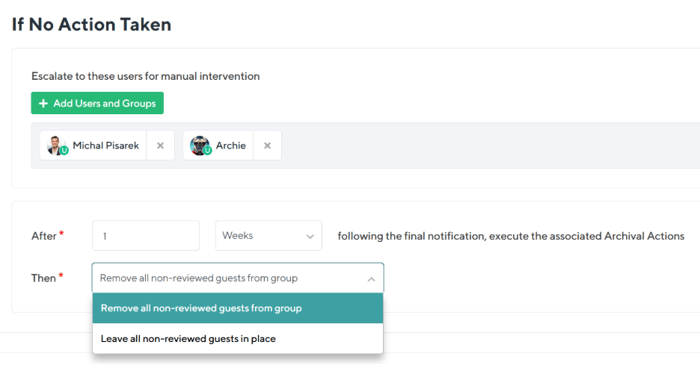 Orchestry guest review policy with automated fallback action when no response is received
Reviews only cover guests someone is asked about, so a backstop matters. Orchestry's guest delete policy is a tenant-wide automation with its own threshold in days for invitations never redeemed and for accounts gone inactive. It runs nightly, emails a deletion report to named stakeholders, and deleted accounts stay recoverable in the Entra recycle bin for 30 days.
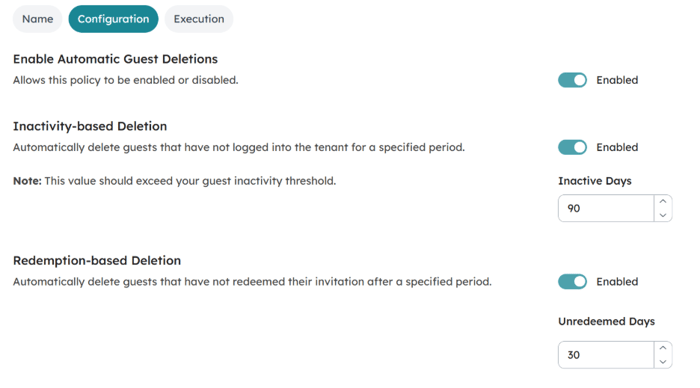
Orchestry guest delete policy with configurable thresholds
One customer's result: 2,914 stale guest accounts eliminated from Entra in a single day, using Orchestry. If you're starting from a backlog, here's how to find stale guest accounts natively before you automate.
Native Microsoft Teams guest access controls and where they stop
Team owners add guests in the Teams client, the Guest Inviter role delegates who can invite, and sensitivity labels control guest access per team. When a guest leaves a team, the guest account stays in your directory until an admin removes it.
For Microsoft 365 groups, members can invite guests through Outlook on the web, and the group owner approves. Owners themselves add guests in Teams without that approval step.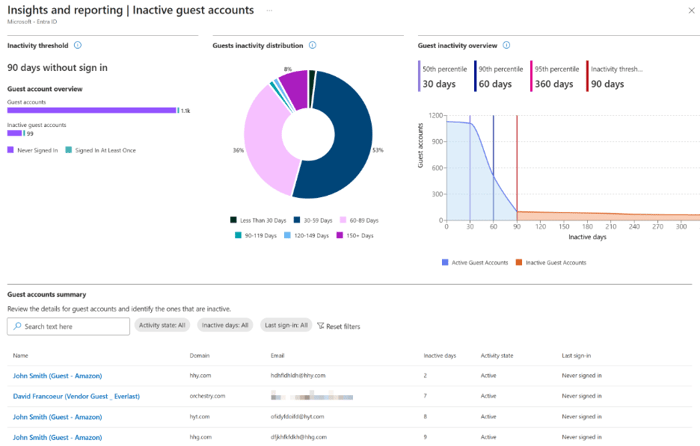
Comparison of Microsoft 365 guest access management tools for guest requests, reviews and cleanup.
The Entra inactive guest report uses a 90-day threshold by default that you can change, and an inactive-guest access review can disable guests for 30 days, then delete them. Microsoft's guest billing page also lists disabling and deleting guests through a Guest Lifecycle Policy as billable actions. Both sit behind Entra ID Governance licensing, which is where the cost question starts.
A full walkthrough of the native setup is coming in "Microsoft Entra guest user management: complete 2026 guide."
Entra ID Governance licensing: what native guest reviews cost now
Microsoft bills the Entra ID Governance for guests add-on per guest, per month, for each guest with at least one governance action that month. An inactive-user access review counts, and so does a guest lifecycle workflow run. There's no free tier, including within the first 50,000 monthly active users.
Not everything is billed. Basic access reviews and entitlement management included with Entra ID P2 stay off the meter. Since January 2026, though, you can't create new guest-scoped inactive-user reviews without the add-on connected, and you still need at least one Entra ID Governance or Entra Suite license for an admin.
That per-guest meter belongs in your tool comparison next to the feature list. Orchestry's guest reviews run without additional Microsoft licenses on a tenant with at least one Entra ID P1. For the full licensing breakdown, see our guide to governing guest access without Entra ID Governance licensing.
Microsoft 365 guest access management tools: frequently asked questions
Do I need Entra ID Governance to review guest access?
Not for every review. Basic access reviews included with Entra ID P2 aren't billed to the guest add-on, but inactive-user reviews scoped to guests need the Entra ID Governance for guests add-on, billed per guest each month. Third-party tools such as Orchestry run owner-led guest reviews on Entra ID P1 without additional Microsoft licenses.
How long before an inactive guest is removed in Microsoft 365?
It depends on the threshold you set. Microsoft's inactive guest report uses a 90-day threshold by default, and an inactive-guest access review can block guests for 30 days before deleting them. Third-party tools let you set your own thresholds, and Orchestry uses separate ones for unredeemed invitations and inactive accounts.
Is guest access in Microsoft Teams a security risk?
Guest access is governed, but guests outlast the work they were invited for. Guests get Entra accounts, and you can enforce conditional access and MFA policies on them, yet a guest who leaves a team keeps their directory account until an admin removes it. The risk is accumulation, which recurring reviews and threshold-based deletion address.
How do I manage guest access in Microsoft Teams without a third-party tool?
Set guest access at the tenant level, then narrow it. Restrict guest invitations in Entra's external collaboration settings and assign the Guest Inviter role to the people who should invite, use sensitivity labels to control guest access per team, let group owners approve guest invites made from Outlook on the web, and run Entra access reviews for guests. Inactive-guest reviews and the inactive guest report need Entra ID Governance licensing.
Can I stop owners adding guests directly in Teams?
Natively, you can restrict guest invitations to admins and people with the Guest Inviter role and block guests on specific teams with sensitivity labels. To make every guest go through approval, you need more than the native invite. Orchestry turns off guest additions to the Microsoft 365 group on governed workspaces, so owners add guests through a request instead, and Solutions2Share External User Manager replaces the Teams invite with a request. Microsoft offers the ability to route guests through approval-gated entitlement management access packages, but it is gated behind a P2 or Governance license.
If you're comparing Microsoft 365 guest access management tools, see how Orchestry puts guest requests, owner reviews and automated deletion in one place. Book a 30-minute walkthrough in your own tenant.