



Microsoft spent Ignite 2026 showing what agents can do. The IT teams who stopped by our booth kept asking something else: what agents will cost, how to keep track of the ones built outside Microsoft, how to stop new ones appearing before anyone's approved them, and whether their SharePoint content is ready to feed any of them.
Those questions are a better filter on Microsoft Ignite 2026 than the keynote. These are the five takeaways that matter most for Microsoft 365 IT teams:
- AI cost is now an admin problem from Agent 365 pricing to Copilot credit limits.
- Agent sprawl is small but growing quickly.
- Agent governance has to reach agents Microsoft didn't build.
- Control has to start at creation, as well as at cleanup.
- Copilot readiness still has no agreed measure.
Check the status of anything below before you plan around it. Office Watch counts only 76 of 215 announced features (35%) as generally available today. A year ago, Ignite was when AI agents first became a governance problem; this year, the questions got more specific.
Microsoft Ignite 2026 announcements vs what IT teams asked
The announcements and the booth questions map onto each other closely. The gap between them is status and operations: much of what answers the floor is in preview, and all of it needs someone to run it.
| Theme | What Microsoft announced | What IT teams asked our team at the booth |
|---|---|---|
| Cost | Agent 365 spending limits and alerts for agent usage (preview) | How do we justify the price, and how do we monitor token spend? |
| Sprawl | More than 50 million agents registered in Agent 365 since May | We have a handful and more on the way. How do we stay ahead as that grows? |
| Scope | Entra Agent ID for agents from other vendors (preview) | How do we keep tabs on agents built outside Microsoft including in Microsoft Foundry? |
| Control | Entra lifecycle management for agent identities and a tenant-wide ceiling on agent actions | Can we approve agents before they're created, or lock down who builds them? |
| Readiness | SharePoint Admin Agent (GA) and Copilot DLP for unlabeled files (preview, January 2027) | How do we know whether SharePoint is ready to be an agent's knowledge source? |
Microsoft 365 Copilot licensing: read every announcement twice
Office Watch notes that Microsoft rarely says which license a new Copilot feature needs, and that leaves IT to work it out feature by feature.
The rules are changing. From December 1, commercial customers can buy Microsoft 365 Copilot at $30 per user per month without a qualifying Microsoft 365 subscription. Microsoft's own Ignite post describes a per-user subscription alongside a usage-based consumption model for the hardest tasks.
That means reading every announcement twice: once for what it does and once for which bill it lands on.
Microsoft Agent 365 pricing and Copilot credits put AI cost on the admin's desk
Our team at the booth heard the same Agent 365 question more than once: how to build the business case for it. Agent 365 lists at $15 per user per month as a standalone add-on, or comes bundled in Microsoft 365 E7 at $99. It isn't included in E3 or E5 and it's licensed per user.
The second question was about consumption. Visitors wanted to monitor agent token spend and nobody had a clear precedent for budgeting agent usage inside IT. Microsoft's answer is tooling: Agent 365 now tracks consumption across users, services, agents, and models, and adds spending limits and alerts in preview at the user, group, organization, or resource level. Microsoft also cites BCG research putting more than 80% of AI spend outside the enterprise IT budget.
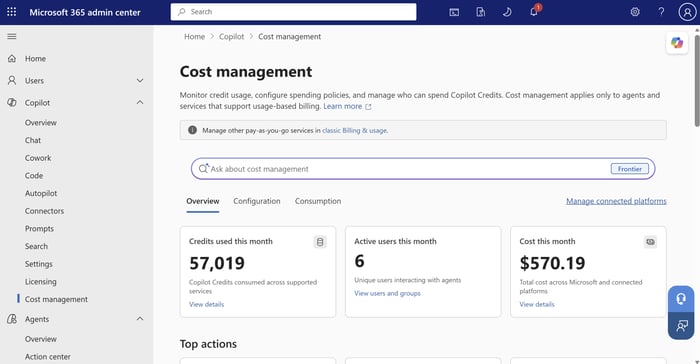
Agent 365 cost management view in the Microsoft 365 admin center showing AI spend by user and agent
Credits are getting a default ceiling. Microsoft plans to turn on usage-based billing by default for new Microsoft 365 Copilot Business purchases through CSP starting January to March 2027 with a default limit of 4,000 Copilot Credits per user per month that admins can adjust.
Governance now has a budget line and the admin console is where it gets enforced.
A spending limit nobody owns is the same problem as a site nobody owns. Orchestry's agent governance runs on the Microsoft 365 E3 or E5 licensing you already have and sits alongside Microsoft's native tooling.
Agent sprawl is small but growing and most expect it to accelerate
Most of the people our team spoke with knew they had agents in their tenant, but many weren’t sure of exact volume or growth trajectory. Almost all of them were planning to grow that number soon.
Microsoft's numbers point the same way. Organizations have registered more than 50 million agents in Agent 365 since its May 2026 launch. New kinds keep arriving: Autopilot, a personal agent, is starting to roll out to Frontier customers, and Microsoft Defender now discovers local agents such as Claude Code and GitHub Copilot CLI (GA).
A handful of agents is the easiest point to set the rules. Once agents multiply, the work shifts from setting rules to cleaning up after their absence.
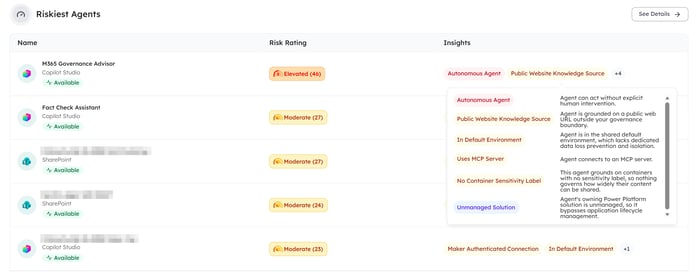
Orchestry Agents Dashboard showing every agent in a Microsoft 365 tenant with a 0 to 100 risk score
Orchestry's AI & Agents inventory gives you a list of every agent in your tenant in one view, so you can see sprawl, creation patterns and where risk concentrates. Each agent carries a 0 to 100 composite risk score, banded into five tiers, built from named insights across access, sharing, sensitivity labeling and ownership.
AI agent governance now has to reach agents Microsoft didn't build
One question came up across conversations at the booth: agents are being built outside Microsoft, on competing platforms, so how do you keep tabs on all of them? Several teams also asked how to govern agents running in Foundry alongside the ones in Microsoft 365.
Microsoft's answer is identity. Connected agents now automatically receive a Microsoft Entra Agent ID, with support rolling out across Salesforce Agentforce, Google Vertex AI, OpenAI, ServiceNow and other platforms. It's in preview, capabilities vary by platform, and the rollout is due to complete in December.
A common identity layer helps, but it doesn't decide which inventory is your system of record or who reviews what each agent can reach. For more on that, see what the AI agent registry doesn't show you.
Entra Agent ID gives every agent a sponsor but not a gate at creation
Entra's automated lifecycle management for agent identities helps manage the growing agent volume. It checks whether each agent has a human sponsor, is still needed, and has been active recently. An out-of-the-box policy notifies sponsors and owners after 60 days of inactivity, disables the agent identity after 90 days of inactivity, and deletes it after 455 days. You can also configure your own lifecycle policies on top, but it requires Microsoft 365 E7, or Agent 365 plus Entra ID P1. Admins must also enable it to take effect.
Agent 365 adds an action center that surfaces inactive and ownerless agents for review in private preview from December. A tenant-wide upper limit on agent actions was announced where each agent's own policy can narrow but never exceed, with an admin approving the policy an agent's maker proposes.
Most of that governs agents once they exist. What our team heard at the booth was a strong desire for something earlier: agent provisioning and approvals and a way to lock down who can create agents at all.
That request has a precedent in workspaces. Orchestry's Self-Service Provisioning governs Teams, SharePoint and Viva Engage workspaces before a single file is uploaded with single or multi-step approvals before anything is created. That's the model buyers described for agents. Today it applies to workspaces, which is where the content your agents read lives. For the cleanup side, here's the case for agent lifecycle management.
Copilot readiness still has no agreed measure
There's no shortage of agent capability on show, but our team heard that there's still no clear way to measure readiness or to prepare SharePoint to be mined as an agent's main knowledge source. Copilot readiness and workspace lifecycle resonated most with the teams who already knew where their gaps were.
Microsoft shipped native tooling for this. The SharePoint Admin Agent is generally available, with skills for oversharing and for identifying inactive, outdated and ownerless sites in plain language. The Governance Hub for Site Owners, in public preview, brings site owners into inactivity, ownership, attestation and access reviews.
Purview's changes center on sensitive content. It will stop Copilot processing files that contain sensitive data even when they aren't labeled, in public preview from January 2027, and auto-labeling now covers up to 500,000 SharePoint and OneDrive files per tenant per day up from 100,000.
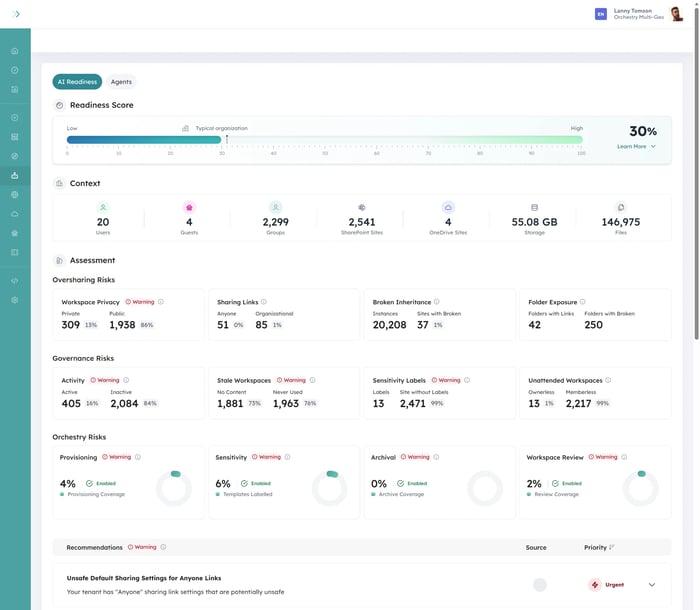
Orchestry AI Readiness Dashboard showing a tenant-wide AI readiness score built from 13 governance signals
What the booth was asking for was a measure: one number you can track while you fix things. Orchestry's AI Readiness Dashboard gives you a single tenant-wide score from 0 to 100, built from 13 governance signals across oversharing, governance and Orchestry safeguards. Each signal passes or fails against a threshold, and the score is included on every plan. If you're starting from scratch, work through our Copilot readiness checklist for IT teams.
Teams and SharePoint are still the foundation agents run on
Some of the sharpest feedback our team heard wasn't about agents. Conversations about age-old problems like permissions, storage and workspace management were still very prevalent, showing the platforms that still carry day-to-day collaboration (Teams and SharePoint) haven’t been checked off the to-do list. A clear, intuitive user experience was still a factor in deciding which tools they bought.
Agents now work directly on that foundation. Work IQ gives any agent more than 60 native SharePoint operations (public preview), and Microsoft 365 already holds 19.5 exabytes of data, with more than 2 billion files uploaded to SharePoint every day. Once an agent can change content, a permission mistake can produce a wrong action as well as a wrong answer.
Microsoft Ignite 2026 handed you a long list of native agent controls, many of them still in preview. The questions from the floor are a reminder of what every one of those controls depends on: owners, permissions and labels in the Teams and SharePoint workspaces underneath, kept right every day rather than fixed once.
Microsoft Agent 365 and Ignite 2026: FAQs
What is Microsoft Agent 365?
Microsoft Agent 365 is Microsoft's product for registering, governing and securing AI agents, licensed per user. At Ignite 2026, Microsoft extended it so connected agents from other vendors automatically receive a Microsoft Entra Agent ID, in preview. More than 50 million agents have been registered in Agent 365 since it launched in May 2026.
How much does Microsoft Agent 365 cost?
Microsoft Agent 365 lists at $15 per user per month as a standalone add-on, or comes included in Microsoft 365 E7 at $99 per user per month. It isn't included in Microsoft 365 E3 or E5.
Does Microsoft Entra disable inactive agents automatically?
Yes, once an admin turns it on. Entra's free out-of-the-box policy notifies sponsors and owners after 60 days of inactivity, disables the agent identity after 90 days and deletes it after 455. Those timeframes can't be changed. Custom policies require Microsoft 365 E7, or Agent 365 plus Entra ID P1 or Microsoft 365 E3. Microsoft announced the capability as generally available at Ignite, but Microsoft Learn still lists the default policy as preview.
How many Microsoft Ignite 2026 announcements are generally available?
About a third. Office Watch counted 215 separate features across 59 announcements, and only 76 of them (35%) are generally available today. Adding 8 features that are live but cost extra brings the usable total to 84 (39%).
To see how Orchestry inventories your agents and scores AI readiness, explore Orchestry's AI & Agents.