/HubSpot%20-%20eBook%20-%20Proof%20Card%20Mockup%20001.jpg?length=1000&name=HubSpot%20-%20eBook%20-%20Proof%20Card%20Mockup%20001.jpg)
/HubSpot%20-%20eBook%20-%20Proof%20Card%20Mockup%20001.jpg?length=1000&name=HubSpot%20-%20eBook%20-%20Proof%20Card%20Mockup%20001.jpg)
/HubSpot%20-%20eBook%20-%20Proof%20Card%20Mockup%20001.jpg?length=1000&name=HubSpot%20-%20eBook%20-%20Proof%20Card%20Mockup%20001.jpg)
/HubSpot%20-%20eBook%20-%20Proof%20Card%20Mockup%20001.jpg?length=1000&name=HubSpot%20-%20eBook%20-%20Proof%20Card%20Mockup%20001.jpg)
/HubSpot%20-%20eBook%20-%20Proof%20Card%20Mockup%20001.jpg?length=1000&name=HubSpot%20-%20eBook%20-%20Proof%20Card%20Mockup%20001.jpg)
/HubSpot%20-%20eBook%20-%20Proof%20Card%20Mockup%20001.jpg?length=1000&name=HubSpot%20-%20eBook%20-%20Proof%20Card%20Mockup%20001.jpg)
/HubSpot%20-%20eBook%20-%20Proof%20Card%20Mockup%20001.jpg?length=1000&name=HubSpot%20-%20eBook%20-%20Proof%20Card%20Mockup%20001.jpg)

/HubSpot%20-%20eBook%20-%20Proof%20Card%20Mockup%20001-min.jpg?length=1000&name=HubSpot%20-%20eBook%20-%20Proof%20Card%20Mockup%20001-min.jpg)


In one of our previous articles, we covered in detail what out-of-the-box SharePoint & Microsoft Teams provisioning options exist.
Simply put, IT admins have two options. Allow users to create workspaces freely or restrict creation, which requires a lot of work for processing and provisioning requests.
There are more complex ways to set up workspaces, like using Power Automate for approval workflows. They require technical expertise and the PnP provisioning schema will take a lot of time and effort to configure. The interface for users and IT admins is difficult to use and not enjoyable.
We would like to introduce you to one of the core functionalities of Orchestry - SharePoint & MS Teams Provisioning in our article. Additionally, we will provide you with a brief overview of other essential features. They include Microsoft 365 governance, content lifecycle management, and cross-organizational adoption of Microsoft 365 tools.

Orchestry's SharePoint & Microsoft Teams Templates
Slow adoption of new technology tools, especially Microsoft 365, can be attributed to end-users' lack of training and technical knowledge. This causes uncertainty about which tool to use and which set of solutions will meet their unique business and project needs.
Regarding Microsoft Teams, Groups, SharePoint, or Communications sites, users often create test workspaces which later get abandoned. Alternatively, they become indecisive and ask IT teams for guidance on which tools to use. Sometimes people turn to outside solutions that don't meet security and privacy standards set by their organization. This is known as Shadow IT.
A good solution to this issue is to create a collection of templates for Microsoft that cater to common business requirements. It becomes very easy for users to find and request the ones they need and start using them right away.
Orchestry offers a wide range of business scenarios MS Teams and SharePoint templates created by experts and validated by many users. With user-friendly SharePoint & Teams template creation features, IT admins can easily meet the unique needs of every team and department without needing to code anything.
By utilizing pre-built templates or custom ones, you can standardize common business processes. The template types include employee onboarding and offboarding, inter-departmental communication and collaboration, project management, and others.
Orchestry provides custom web parts that can fill common gaps in Microsoft 365. They will save you the time and effort that would be spent on coding and configurations. The web parts include advanced tasks and the People web part among others.
Orchestry's custom templates can save you more than 2 hours on customizations per MS Team or SharePoint site.
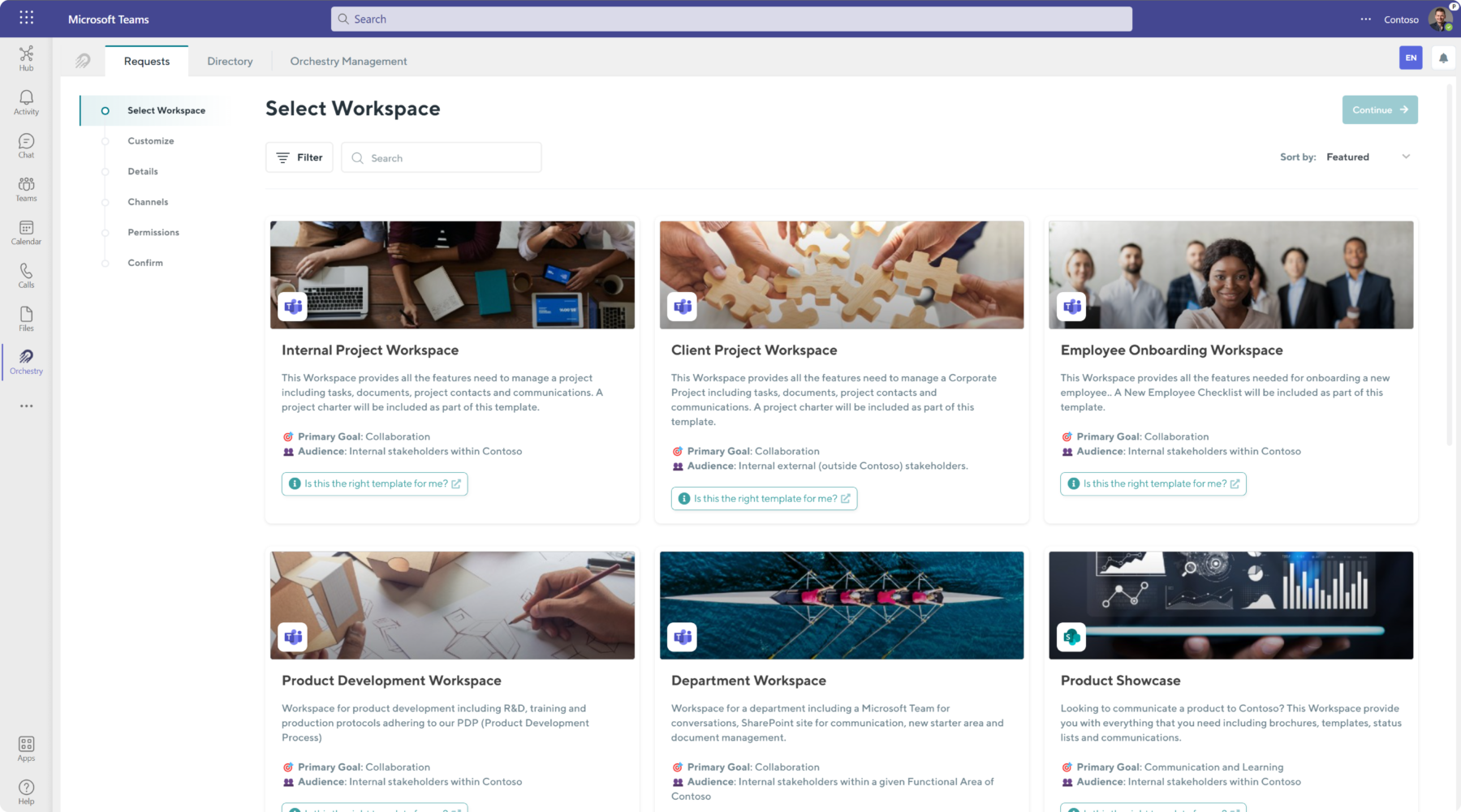
Once you have prepared your first template, you can immediately make it available using Orchestry's MS Teams and SharePoint provisioning service.
Orchestry's Teams and SharePoint Online Provisioning Service
Different SharePoint and MS Teams templates require different approaches. Some workspaces can be provisioned to the end user without any delay (especially if your templates are configured very well). Others, depending on their type and sensitivity level may need to go through approval before provisioning the template.
The added approval steps also help reduce Microsoft 365 sprawl. If a workspace has been approved before being provisioned, the likelihood of it being abandoned later on is much reduced.
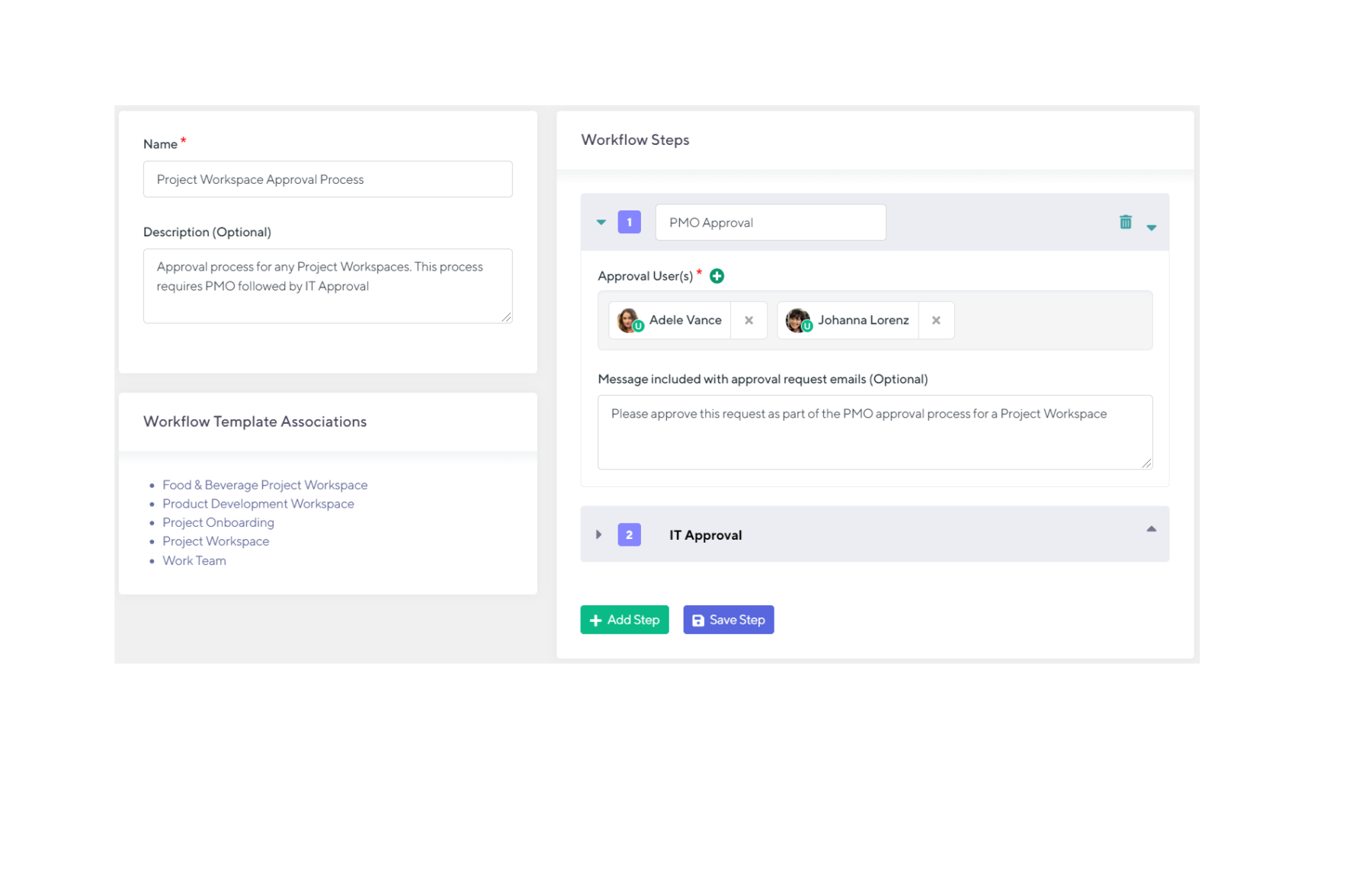
In Orchestry’s exquisite MS Teams and SharePoint Provisioning interface, IT admins can create an endless number of Teams & SharePoint site provisioning workflows of any complexity. Simpler workflows, that engage specific individuals to review workspace requests can be built with a couple of clicks of a button.
A workspace in the marketing department can be reviewed initially by the marketing team manager. Then the IT team can review it for final approval.
You can customize the approval process for workspace requests by adding as many steps as you need. You can also create personalized messages for each approver. Additionally, you can associate existing SharePoint and Teams templates with these approval workflows.
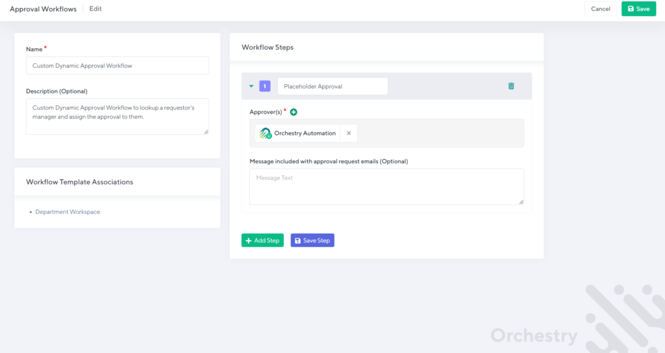
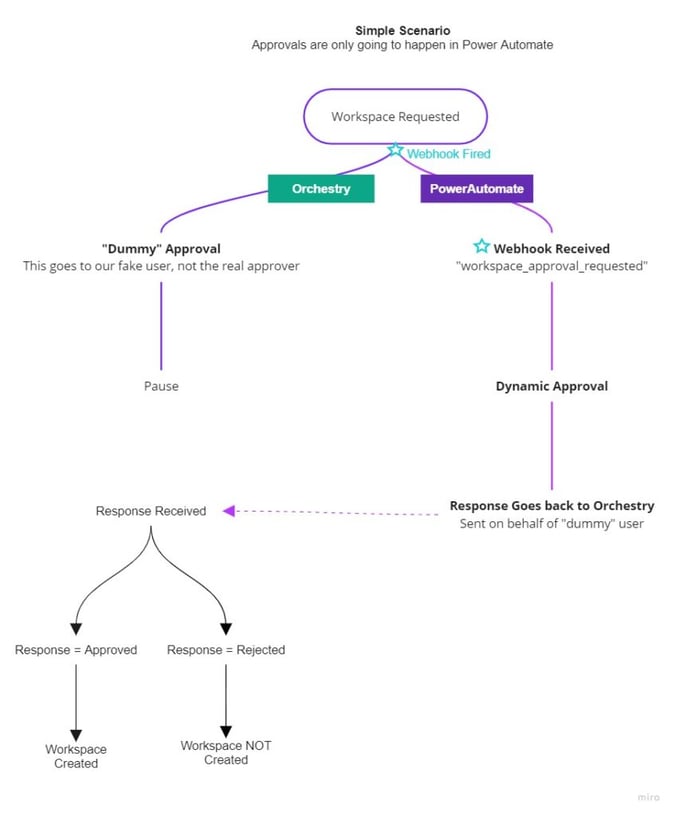
You can also create more complex Teams and SharePoint provisioning template workflows, that require automation using Power Automate. You would simply create a new approval workflow, and generate a “dummy account” as an approver in that workflow.
First, you need to set up your Power Automate approval workflow. Then, you need to set up a unique trigger for the automation to begin. This trigger will be a message sent by Orchestry when an end user requests a new workspace with the approval workflow.
After the approval is completed in Power Automate, a message will be sent back to Orchestry. From there Orchestry platform will provision Microsoft Teams or SharePoint Online site.
Power Automate allows you to set up workflows of any complexity, like the example we have below.
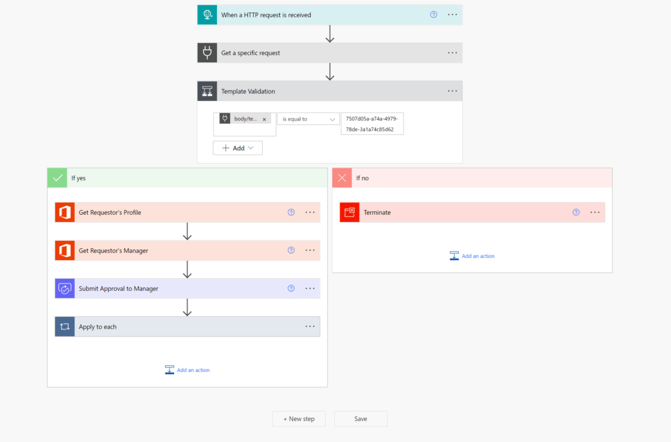
Orchestry coupled with Power Automate gives you the ability to:
- Manage approval workflows
- Associate workflows with templates, existing and new workspaces
- Check and respond to workspace requests easily using a well-designed interface that surpasses Microsoft 365 and user experience standards.
Orchestry's Workspace Request Wizard
You can allow end-users to request any SharePoint or Microsoft Teams template from Orchestry's library or the ones you created. We made the workspace request process easy for end users by designing Orchestry with IT Administrators and end users in mind.
End users can access the Orchestry app within their Teams app. Users can request a new workspace easily using the step-by-step process in the requests section, without any technical knowledge.
There are only 5 simple steps involved in the entire process. They include:
- Choosing the appropriate template for their requirements
- Personalizing it with features and documents
- Providing details about their workspace
- Setting up channels and permissions
- Submitting it for review or direct provision if no approval is needed.
The Workspace Provisioning Wizard automatically checks for duplicate content. When a user tries to request a workspace that already exists, they'll be alerted. They will also be given links to view or request access to similar content. This feature greatly reduces potential Microsoft Teams sprawl.
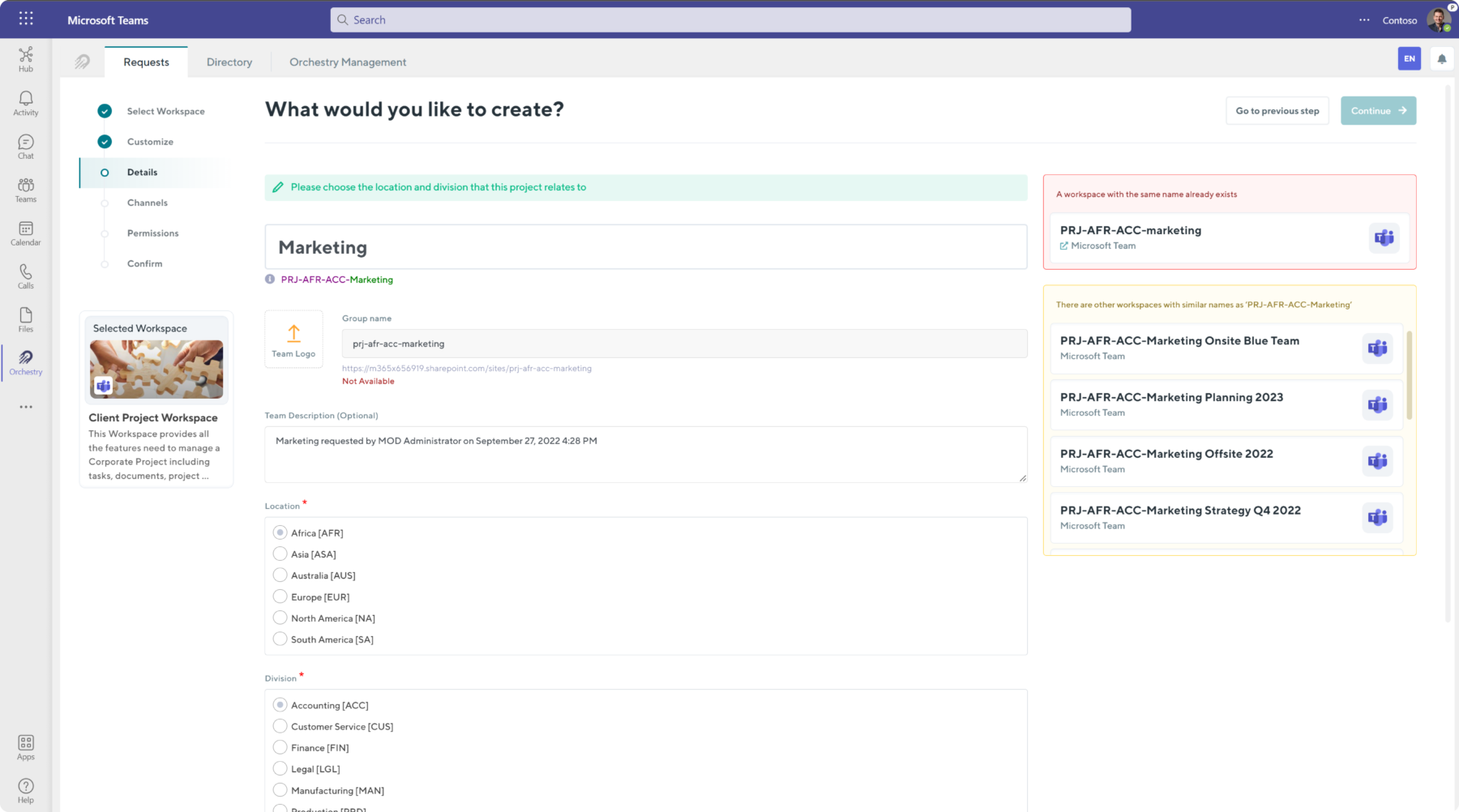
Orchestry's Microsoft 365 Governance
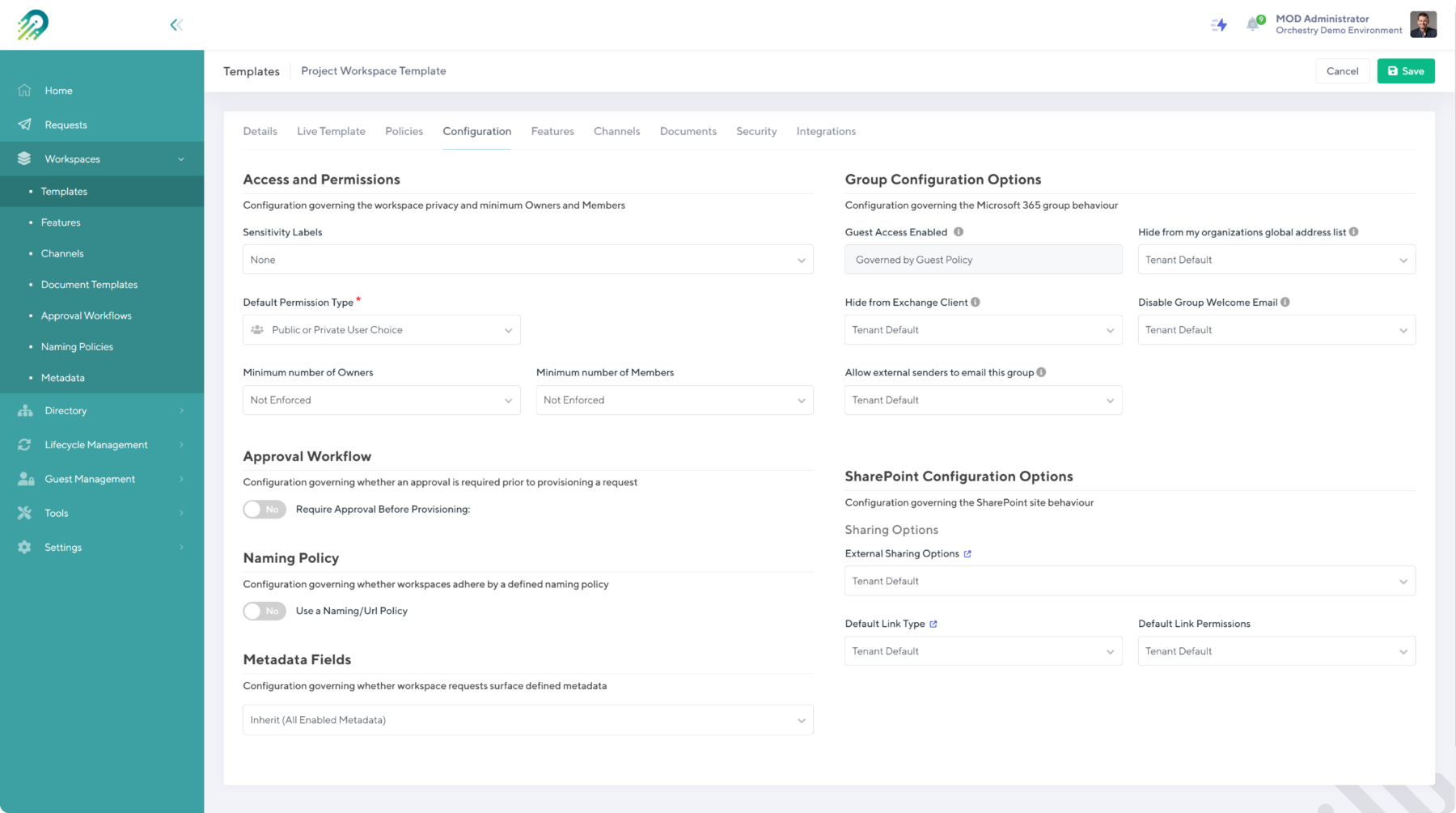
Orchestry is a complete solution that manages every aspect of Microsoft 365 environment administration within a single interface. Microsoft 365 governance is no exception. In Orchestry, IT admins can set up default Microsoft Teams governance configurations for the tenant including:
- Configure default Teams access and permissions
- Apply sensitivity labels
- Associate approval workflows
- Generate and apply Microsoft Teams naming policies
- Create and enable new metadata fields, for example, department, location, division
- Configure Microsoft 365 behavior including Guest access, allow or disable external emailing to the Microsoft 365 groups, and more
- Configure SharePoint site behavior including external sharing options, default link types and permissions, and more
For workspaces and templates, you can either use the default Microsoft 365 governance settings or customize them for each workspace individually.
Orchestry's Workspace Lifecycle Management
Every workspace in Microsoft 365 has a shelf life. It's best to think about the result when creating workspaces, so you don't end up with lots of unused workspaces.
Orchestry allows you to create SharePoint and Teams archiving policies and associate them with specific Teams and SharePoint templates. These templates can then be requested by end-users and will be subject to the defined policies. As soon as the workspace is provisioned, the archival policy will come into effect and the countdown will begin.
These policies can be based on specific timeframes, such as the duration of a project. When the policy's timeframe is up, the workspace owners will receive automatic notifications to either archive or renew the workspace.
Other policies may be based on inactivity. After a certain number of days of inactivity, the workspace owners will receive a notification to review and decide whether to renew or archive.
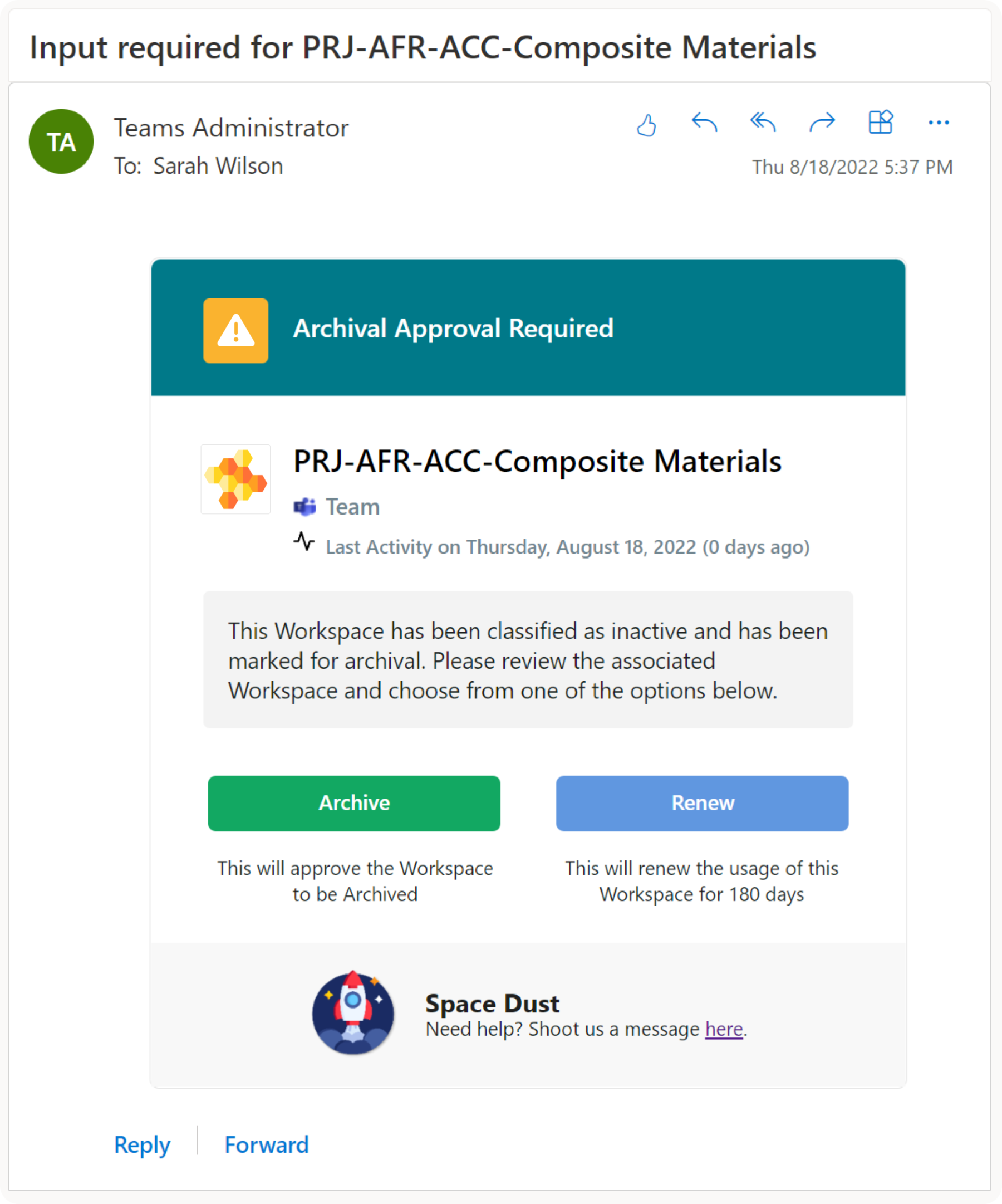
Orchestry is a comprehensive self-service MS Teams and SharePoint Online site provisioning solution for Microsoft 365 that will please both end-users and Microsoft 365 admins. It lets you:
- Go beyond out-of-the-box MS Teams templates with support for pre-configured Channels, Tabs, Apps, and more.
- Build or modify Orchestry’s pre-built Teams & SharePoint templates and embed them with Microsoft 365 governance policies, and adoption resources.
- Orchestry's Workspace Request Wizard allows users to create and customize workspaces easily and without delays. This helps to increase adoption while providing control.
- Provide feedback, approve, and govern Workspace requests in a single interface.
Orchestry users save on average 30 minutes provisioning a single Team, Group, SharePoint, or Communication site
Want to see Orchestry in action?
Orchestry offers a free full-experience trial for 28 days.
- Trusted by thousands of IT admins, and leading Microsoft 365 partners worldwide
- Fully secure application attested by SOC2 Security certification
- Full features, zero commitment
- No credit card required
- Orchestry apps installation takes less than 15 minutes
- No obligation – if Orchestry is not your cup of tea, simply delete the apps at the end of the trial and all the content you created using Orchestry will remain
Book your demo to see it in action.